
Cannot Change Background of the Google Chart
47 views
Skip to first unread message

Baris Sarac
Feb 4, 2016, 11:26:57 AM2/4/16
to Google Visualization API

Here is the code:
        var options = {'title': 'abc',
               'width': 300,
               'height': 250,
               'is3D':true,
               'fontSize':18,
               ' backgroundColor': '#FCF3E5',
               'chartArea': {'width': '80%', 'height': '80%',' backgroundColor': '#FCF3E5'},
               'legend': {'position': 'none'},
        };
I tried only bacgroundColor it didn't work, then I tried backgroundColor inside chartArea that didn't work either. I even tried both, in the aboe example, that didn't work too. I cannot change their background color.

Sergey Grabkovsky
Feb 4, 2016, 11:31:01 AM2/4/16
to Google Visualization API
Hi Baris,
Your property has a space before it, as in you're writing '_backgroundColor' (with a space instead of an underscore), where you should be writing 'backgroundColor'. Here is an example of your options working perfectly: http://jsfiddle.net/nLf64qga/
--
You received this message because you are subscribed to the Google Groups "Google Visualization API" group.
To unsubscribe from this group and stop receiving emails from it, send an email to google-visualizati...@googlegroups.com.
To post to this group, send email to google-visua...@googlegroups.com.
Visit this group at https://groups.google.com/group/google-visualization-api.
To view this discussion on the web visit https://groups.google.com/d/msgid/google-visualization-api/5cadf2fe-565b-4cb5-8609-83ec00543c8a%40googlegroups.com.
For more options, visit https://groups.google.com/d/optout.
--
• | Sergey Grabkovsky | |
• | Software Engineer | |
• | Google, Inc | |
• |

Baris Sarac
Feb 4, 2016, 12:20:23 PM2/4/16
to Google Visualization API
See there is no extra space. It showed like that in the code I pasted for some reason..
On Thursday, February 4, 2016 at 10:31:01 AM UTC-6, Sergey wrote:
Hi Baris,Your property has a space before it, as in you're writing '_backgroundColor' (with a space instead of an underscore), where you should be writing 'backgroundColor'. Here is an example of your options working perfectly: http://jsfiddle.net/nLf64qga/
On Thu, Feb 4, 2016 at 11:27 AM Baris Sarac <baris...@gmail.com> wrote:
--
Here is the code:
'width': 300,
'height': 250,
'is3D':true,
'fontSize':18,
' backgroundColor': '#FCF3E5',
'chartArea': {'width': '80%', 'height': '80%',' backgroundColor': '#FCF3E5'},
'legend': {'position': 'none'},
};
I tried only bacgroundColor it didn't work, then I tried backgroundColor inside chartArea that didn't work either. I even tried both, in the aboe example, that didn't work too. I cannot change their background color.
You received this message because you are subscribed to the Google Groups "Google Visualization API" group.
To unsubscribe from this group and stop receiving emails from it, send an email to google-visualization-api+unsub...@googlegroups.com.
To post to this group, send email to google-visua...@googlegroups.com.
Visit this group at https://groups.google.com/group/google-visualization-api.
To view this discussion on the web visit https://groups.google.com/d/msgid/google-visualization-api/5cadf2fe-565b-4cb5-8609-83ec00543c8a%40googlegroups.com.
For more options, visit https://groups.google.com/d/optout.
Sergey Grabkovsky
Feb 4, 2016, 1:04:16 PM2/4/16
to google-visua...@googlegroups.com
Ok, I'd say that if you copy/pasted that code into your email, then that space appeared for a reason.

The option "chartArea.backgroundColor" doesn't work for Pie Chart, but top-level backgroundColor does.
jsfiddle and screenshot:
If you're still experiencing this issue, please modify the jsfiddle to reproduce it, since the code you're pasting works for me.
On Thu, Feb 4, 2016 at 12:20 PM Baris Sarac <baris...@gmail.com> wrote:
\
See there is no extra space. It showed like that in the code I pasted for some reason..
On Thursday, February 4, 2016 at 10:31:01 AM UTC-6, Sergey wrote:Hi Baris,Your property has a space before it, as in you're writing '_backgroundColor' (with a space instead of an underscore), where you should be writing 'backgroundColor'. Here is an example of your options working perfectly: http://jsfiddle.net/nLf64qga/On Thu, Feb 4, 2016 at 11:27 AM Baris Sarac <baris...@gmail.com> wrote:
--
Here is the code:
'width': 300,
'height': 250,
'is3D':true,
'fontSize':18,
' backgroundColor': '#FCF3E5',
'chartArea': {'width': '80%', 'height': '80%',' backgroundColor': '#FCF3E5'},
'legend': {'position': 'none'},
};
I tried only bacgroundColor it didn't work, then I tried backgroundColor inside chartArea that didn't work either. I even tried both, in the aboe example, that didn't work too. I cannot change their background color.
You received this message because you are subscribed to the Google Groups "Google Visualization API" group.
To unsubscribe from this group and stop receiving emails from it, send an email to google-visualizati...@googlegroups.com.
To post to this group, send email to google-visua...@googlegroups.com.
Visit this group at https://groups.google.com/group/google-visualization-api.
To view this discussion on the web visit https://groups.google.com/d/msgid/google-visualization-api/5cadf2fe-565b-4cb5-8609-83ec00543c8a%40googlegroups.com.
For more options, visit https://groups.google.com/d/optout.
--
•
Sergey Grabkovsky
•
Software Engineer
•
Google, Inc
•
--
You received this message because you are subscribed to the Google Groups "Google Visualization API" group.
To unsubscribe from this group and stop receiving emails from it, send an email to google-visualizati...@googlegroups.com.
To post to this group, send email to google-visua...@googlegroups.com.
Visit this group at https://groups.google.com/group/google-visualization-api.
To view this discussion on the web visit https://groups.google.com/d/msgid/google-visualization-api/fb191dc6-ceb9-4f71-b490-bfef8339b498%40googlegroups.com.
For more options, visit https://groups.google.com/d/optout.
Baris Sarac
Feb 16, 2016, 10:47:18 AM2/16/16
to Google Visualization API
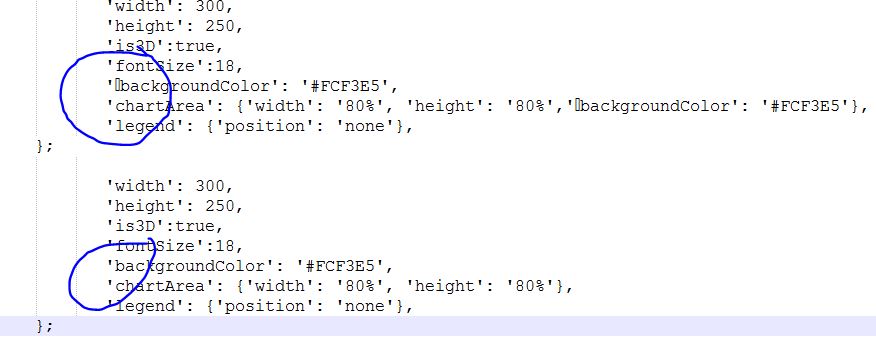
You were right. I copied and pasted your code on top of mine and found out that even though in the coding application is not showing, there was a character. Thank you!
To unsubscribe from this group and stop receiving emails from it, send an email to google-visualization-api+unsub...@googlegroups.com.
To post to this group, send email to google-visua...@googlegroups.com.
Visit this group at https://groups.google.com/group/google-visualization-api.
To view this discussion on the web visit https://groups.google.com/d/msgid/google-visualization-api/5cadf2fe-565b-4cb5-8609-83ec00543c8a%40googlegroups.com.
For more options, visit https://groups.google.com/d/optout.
----
•
Sergey Grabkovsky
•
Software Engineer
•
Google, Inc
•
You received this message because you are subscribed to the Google Groups "Google Visualization API" group.
To unsubscribe from this group and stop receiving emails from it, send an email to google-visualization-api+unsub...@googlegroups.com.
To post to this group, send email to google-visua...@googlegroups.com.
Visit this group at https://groups.google.com/group/google-visualization-api.
To view this discussion on the web visit https://groups.google.com/d/msgid/google-visualization-api/fb191dc6-ceb9-4f71-b490-bfef8339b498%40googlegroups.com.
For more options, visit https://groups.google.com/d/optout.
Sergey Grabkovsky
Feb 16, 2016, 10:50:07 AM2/16/16
to Google Visualization API
Glad to hear that you figured it out!
To unsubscribe from this group and stop receiving emails from it, send an email to google-visualizati...@googlegroups.com.
To post to this group, send email to google-visua...@googlegroups.com.
Visit this group at https://groups.google.com/group/google-visualization-api.
To view this discussion on the web visit https://groups.google.com/d/msgid/google-visualization-api/5cadf2fe-565b-4cb5-8609-83ec00543c8a%40googlegroups.com.
For more options, visit https://groups.google.com/d/optout.
----
•
Sergey Grabkovsky
•
Software Engineer
•
Google, Inc
•
You received this message because you are subscribed to the Google Groups "Google Visualization API" group.
To unsubscribe from this group and stop receiving emails from it, send an email to google-visualizati...@googlegroups.com.
To post to this group, send email to google-visua...@googlegroups.com.
Visit this group at https://groups.google.com/group/google-visualization-api.
To view this discussion on the web visit https://groups.google.com/d/msgid/google-visualization-api/fb191dc6-ceb9-4f71-b490-bfef8339b498%40googlegroups.com.
For more options, visit https://groups.google.com/d/optout.
--
•
Sergey Grabkovsky
•
Software Engineer
•
Google, Inc
•
--
You received this message because you are subscribed to the Google Groups "Google Visualization API" group.
To unsubscribe from this group and stop receiving emails from it, send an email to google-visualizati...@googlegroups.com.
To post to this group, send email to google-visua...@googlegroups.com.
Visit this group at https://groups.google.com/group/google-visualization-api.
To view this discussion on the web visit https://groups.google.com/d/msgid/google-visualization-api/eb468199-6dbe-4a78-8d89-74efc06cd62c%40googlegroups.com.
For more options, visit https://groups.google.com/d/optout.
Reply all
Reply to author
Forward
0 new messages