
Smooth Line Chart
4,452 views
Skip to first unread message

RodgerWilko!
Feb 3, 2009, 7:38:57 PM2/3/09
to Google Visualization API
Hi,
Is it possible to draw a Smooth Line Chart.
To give an example, the following chart http://code.google.com/apis/ajax/playground/#line_chart
is very rigid around the points.
As apposed to something like this
http://www.domain.com.au/public/ChartHousePrice.aspx?Type=House&Suburb=Sydney&PostCode=2000
I realise we could add lots of points around the main point to try and
make it not soo 'sharp' but I think it would be better to have the
functionality in the charts.
If it's not available, is there a place to request functionality like
this?
Thanks,
RodgerWilko!
Is it possible to draw a Smooth Line Chart.
To give an example, the following chart http://code.google.com/apis/ajax/playground/#line_chart
is very rigid around the points.
As apposed to something like this
http://www.domain.com.au/public/ChartHousePrice.aspx?Type=House&Suburb=Sydney&PostCode=2000
I realise we could add lots of points around the main point to try and
make it not soo 'sharp' but I think it would be better to have the
functionality in the charts.
If it's not available, is there a place to request functionality like
this?
Thanks,
RodgerWilko!

VizGuy
Feb 4, 2009, 3:25:50 AM2/4/09
to google-visua...@googlegroups.com
Just add a configuration option to smooth the lines, by changing the last line in the playground sample to:
draw(data, {'smoothLine': true});
See this option, and other configuration options at http://code.google.com/apis/visualization/documentation/gallery/linechart.html#Configuration_Options
Regards,
VizGuy
draw(data, {'smoothLine': true});
See this option, and other configuration options at http://code.google.com/apis/visualization/documentation/gallery/linechart.html#Configuration_Options
Regards,
VizGuy

duncan
Feb 4, 2009, 5:32:15 AM2/4/09
to Google Visualization API
hi vizguy,
i'm new to visualizations API and i'm having some hardtime looking for
google's complete list of country and city codes for geomap. i've read
some posts on this community and found pretty much answers from you,
and i really hope you can help me.
thanks,
duncan
i'm new to visualizations API and i'm having some hardtime looking for
google's complete list of country and city codes for geomap. i've read
some posts on this community and found pretty much answers from you,
and i really hope you can help me.
thanks,
duncan

asgallant
Nov 27, 2012, 11:58:18 AM11/27/12
to google-visua...@googlegroups.com
What browser are you seeing this in? I can't replicate it with any of my charts.
On Tuesday, November 27, 2012 8:33:00 AM UTC-5, Patrick McCarthy wrote:
On Tuesday, November 27, 2012 8:33:00 AM UTC-5, Patrick McCarthy wrote:
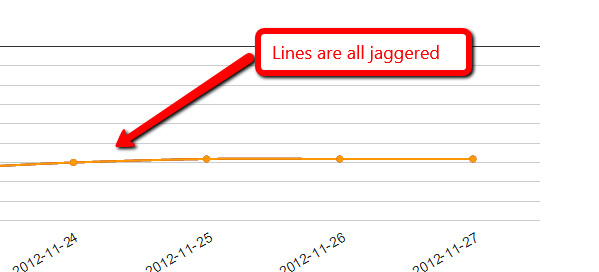
The line on my charts have suddenly gone all jaggered. Any ideas?

Patrick McCarthy
Nov 27, 2012, 12:05:07 PM11/27/12
to google-visua...@googlegroups.com
It happens in all my browsers. Chrome, IE and Firefox...
Patrick McCarthy
Nov 27, 2012, 12:12:35 PM11/27/12
to google-visua...@googlegroups.com
Just rebooted the machine in case. Still happening and here is the source code:
| <script type="text/javascript"> | |
| google.load("visualization", "1", {packages:["corechart"]}); | |
| google.setOnLoadCallback(drawChart); | |
| function drawChart() { | |
| var data = google.visualization.arrayToDataTable([ | |
| ['Date', 'http://www.vi.net/dedicated-servers/','http://www.vi.net/dedicated-servers/','http://www.vi.net/dedicated-servers/'], | |
| ['2012-11-22', 68, 68, 68, ],['2012-11-23', 70, 70, 70, ],['2012-11-24', 67, 67, 67, ],['2012-11-25', 65, 65, 65, ],['2012-11-26', 65, 65, 65, ],['2012-11-27', 65, 65, 65, ], ]); | |
| var options = { | |
| title: 'Keyword Ranking Data', | |
| backgroundColor: {strokeWidth:2,stroke:'#DDD'}, | |
| chartArea: {top:60,padding:100,width:'80%', height:'50%'}, | |
| pointSize: 5, | |
| hAxis: {baseline:1,showTextEvery:1,direction:1,slantedText:true}, | |
| vAxis: {gridlines: {count:10}, format:'#',direction:-1,minValue:1,maxValue:100,viewWindowMode:'pretty',textPosition:'out'}, | |
| legend: {position:'bottom'}, | |
| curveType: 'function' | |
| }; | |
| var chart = new google.visualization.LineChart(document.getElementById('chart_div')); | |
| chart.draw(data, options); | |
| } | |
| </script> |
asgallant
Nov 27, 2012, 12:50:19 PM11/27/12
to google-visua...@googlegroups.com
Ok, I put it up in a jsfiddle and played around a bit. It looks like this is an artifact of less than perfect anti-aliasing in the browser, exacerbated by the fact that your 3 lines all exactly overlay one another. If you separate out the lines, you can still see the effect if you look for it, but it's nowhere near as pronounced. See here: http://jsfiddle.net/asgallant/rDWu5/
Also, you have an errant comma problem in your code that will cause IE to bomb if you try to run that (notes in the fiddle).
Patrick McCarthy
Nov 27, 2012, 3:08:33 PM11/27/12
to google-visua...@googlegroups.com
Really appreciate the work you re doing here. Thanks. Bizarrely the output of the fiddle is also not sharp. This has nothing to do with flash or anything like that./ I wouldn't help for me to reinstall some component or something?
asgallant
Nov 27, 2012, 4:18:58 PM11/27/12
to google-visua...@googlegroups.com
It's just as bad for you, even when the lines are separated? Can you screenshot it?
Patrick McCarthy
Nov 28, 2012, 4:32:17 AM11/28/12
to google-visua...@googlegroups.com
It seems you were right a couple of posts ago in that there were two lines following an identical path which distorted the line smoothness. I really appreciate you taking the time to help out and getting to the bottom of it. Sometimes when you ahve been staring at code for days you can't see the wood for the trees.
Thanks ...
asgallant
Nov 28, 2012, 10:50:14 AM11/28/12
to google-visua...@googlegroups.com
I know how that feels >;o)
Reply all
Reply to author
Forward
0 new messages