Google Line Chart with data from MYSQL

7,867 views
Skip to first unread message

Vojtěch Piska

unread,
Mar 4, 2013, 3:38:13 PM3/4/13
to google-visua...@googlegroups.com
graf.php

asgallant

unread,
Mar 4, 2013, 3:56:44 PM3/4/13
to google-visua...@googlegroups.com
You have to format the data in the manner expected by the DataTable constructor.  See this post for sample code you can use to get started.

Vojtěch Piska

unread,
Mar 4, 2013, 4:01:39 PM3/4/13
to google-visua...@googlegroups.com
Thank you a lot, but i dont know what do you think could you guide me what to do in my code please:/ ?

Dne pondělí, 4. března 2013 21:56:44 UTC+1 asgallant napsal(a):

asgallant

unread,
Mar 4, 2013, 7:05:22 PM3/4/13
to google-visua...@googlegroups.com
I attached a chart file and a data source file that should work for you (though you may need to tweak them a bit, depending on your data).
get_json.php
graf.php

Vojtěch Piska

unread,
Mar 5, 2013, 3:44:56 AM3/5/13
to google-visua...@googlegroups.com
Thank you a lot, i modified some think but on screen appears this: " Object 2013-03-04 18:53:52 has no method 'getTimezoneOffset'×

$table = array();
$table['cols'] = array(
/* define your DataTable columns here
* each column gets its own array
* syntax of the arrays is:
* label => column label
* type => data type of column (string, number, date, datetime, boolean)
*/
// I assumed your first column is a "string" type
// and your second column is a "number" type
// but you can change them if they are not
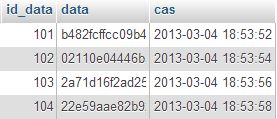
    array('cas' => 'cas', 'type' => 'datetime'),      // cas from mysql are in format 2013-03-1 14:45:23
array('data' => 'data', 'type' => 'number')   // data from mysql are HEX numbers

and I want to do a Line chart, so i modified: 

function drawChart() {
var json = $.ajax({
url: 'get_json.php', // make this url point to the data file
dataType: 'json',
async: false
}).responseText;
// Create our data table out of JSON data loaded from server.
var data = new google.visualization.DataTable(json);
var options = {
title: 'My Weekly Plan',
is3D: 'true',
width: 800,
height: 600
};
// Instantiate and draw our chart, passing in some options.
//do not forget to check ur div ID
var chart = new google.visualization.LineChart(document.getElementById('chart_div'));
chart.draw(data, options);


I still dont know where is the problem, but you shift me:)


Dne pondělí, 4. března 2013 21:38:13 UTC+1 Vojtěch Piska napsal(a):

Vojtěch Piska

unread,
Mar 5, 2013, 4:59:41 AM3/5/13
to google-visua...@googlegroups.com

I want to display in to the similar chart: 


Dne pondělí, 4. března 2013 21:38:13 UTC+1 Vojtěch Piska napsal(a):
Hi friends,

asgallant

unread,
Mar 5, 2013, 12:12:53 PM3/5/13
to google-visua...@googlegroups.com
Ok, with dates and hex numbers, you have to do a bit of fiddling with the data when you input it into the JSON.  The "while" loop should look something like this:

while($r = mysql_fetch_assoc($query)) {
    $temp = array();
// each column needs to have data inserted via the $temp array
// break apart the date and time data so we can import it in the proper format
// I assume your dates are in the form "year-month-day hour:minute:second"
$casArr = explode(' ', $r['cas']); // split into date and time segments
$dateArr = explode('-', $casArr[0]); // split date into year, month, day
$timeArr = explode(':', $casArr[1]); // split time into hour, minute, second
$year = (int) $dateArr[0];
$month = ((int) $dateArr[1]) - 1; // javascript uses a 0-based index for months, so we have to subtract 1
$day = (int) $dateArr[2];
$hour = (int) $timeArr[0];
$minute = (int) $timeArr[1];
$second = (int) $timeArr[2];
$date = "Date($year, $month, $day, $hour, $minute, $second)";
$temp[] = array('v' => $date);
$temp[] = array('v' => hexdec($r['data'])); // convert hexadecimal output to decimal, as JSON doesn't support hex numbers
// insert the temp array into $rows
    $rows[] = array('c' => $temp);

Vojtěch Piska

unread,
Mar 5, 2013, 12:34:22 PM3/5/13
to google-visua...@googlegroups.com
Thank you a lot man! It finally works!:) You saved me, thank you, thank you


Dne pondělí, 4. března 2013 21:38:13 UTC+1 Vojtěch Piska napsal(a):
Hi friends,

Liviu

unread,
Jan 15, 2017, 8:30:03 AM1/15/17
to Google Visualization API
Hi,

Where should I change the code to my vertical lines appear?
I want to use function explorer: { actions: ['dragToZoom', 'rightClickToReset'],
axis: 'horizontal',
keepInBounds: true,
maxZoomIn: 4.0}  
and does not work.
I'm a beginner.

get_json.php
grafcopy.php
Reply all
Reply to author
Forward
0 new messages