
Conflict with prototype.js when using element.js to translating whole web
599 views
Skip to first unread message

haze...@gmail.com
Jan 6, 2022, 12:58:34 PM1/6/22
to Google Cloud Translation API
Google translate tool bar will not work if I
embed "prototype.js
" the page.
<script type="text/javascript" src="
https://ajax.googleapis.com/ajax/libs/prototype/1.7.3.0/prototype.js"></script>
The url
will returns 403 error.
What should I do?Bellow works right only with out
prototype.js.
<div id="google_translate_element" style='padding-top:10px;'></div>
<script type="text/javascript" src="//translate.google.com/translate_a/element.js?cb=googleTranslateElementInit"></script>
<script type="text/javascript">
function googleTranslateElementInit() {
new google.translate.TranslateElement({pageLanguage: 'en'}, 'google_translate_element');
}
</script>
<script type="text/javascript" src="//translate.google.com/translate_a/element.js?cb=googleTranslateElementInit"></script>
<script type="text/javascript">
function googleTranslateElementInit() {
new google.translate.TranslateElement({pageLanguage: 'en'}, 'google_translate_element');
}
</script>
Efim (Cloud Platform Support)
Jan 6, 2022, 7:17:14 PM1/6/22
to Google Cloud Translation API
Please provide full API call request and responses to have a better understanding of the issue.
haze...@gmail.com
Jan 8, 2022, 1:01:40 PM1/8/22
to Google Cloud Translation API
<script type="text/javascript" src="
https://ajax.googleapis.com/ajax/libs/prototype/1.7.3.0/prototype.js"></script>
Google translate will not work ,it wont show tool bar if I
embed prototype.js (
as the above line code
) in the page .Coluld you try that ?
haze...@gmail.com
Jan 8, 2022, 1:01:41 PM1/8/22
to Google Cloud Translation API
Google translate tool bar will not show if prototype.js is embedded in the page.
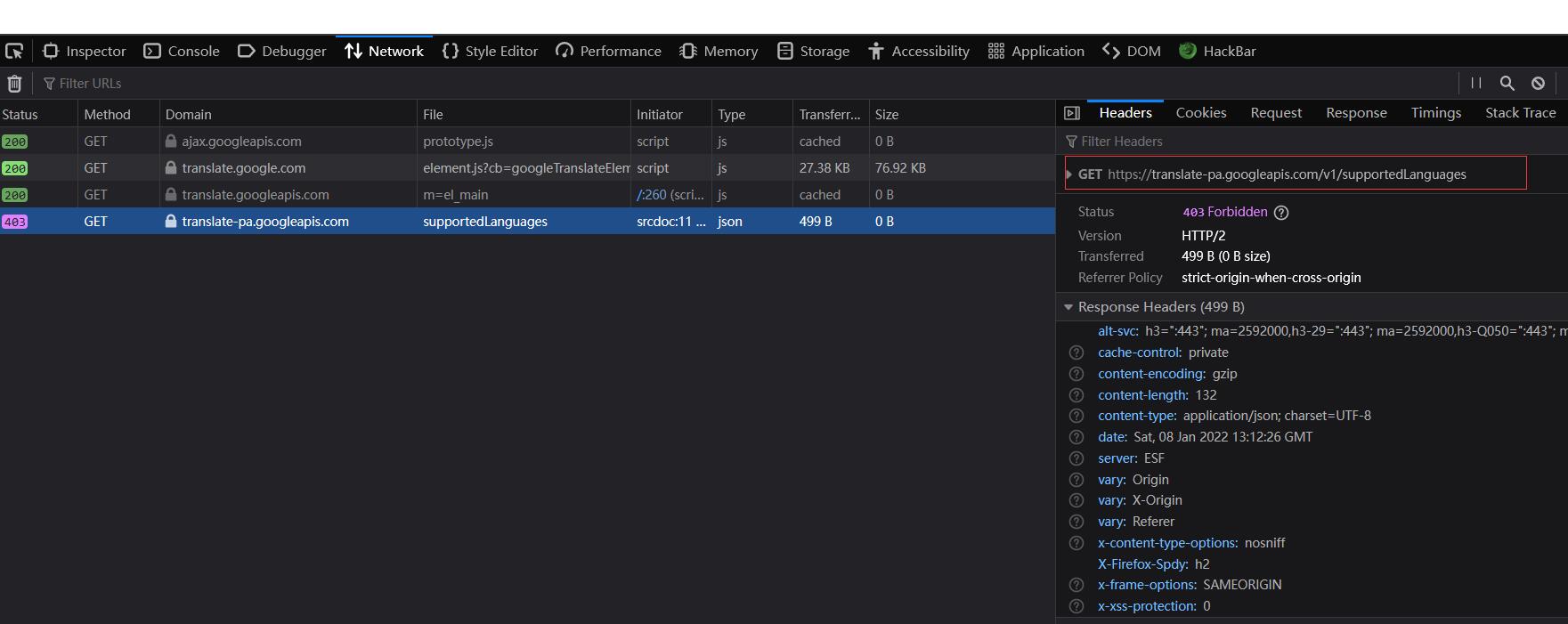
As the bellow picture 1, line 6 can't be added.Or the request url
"https://translate-pa.googleapis.com/v1/supportedLanguages"
will get a 403 error as picture 2. This requested url
"
supportedLanguages" should contains some parameters(
"client=te&display_language=en-US&key=xxxxxx&callback=callback"
) as picture 3( which I deleted line 6 then it works right),but it didn't.


On Friday, January 7, 2022 at 8:17:14 AM UTC+8 Efim (Cloud Platform Support) wrote:
Efim (Cloud Platform Support)
Jan 9, 2022, 12:30:09 PM1/9/22
to Google Cloud Translation API
Please try line 6 without the space in the src URL, like so.
<script type="text/javascript" src="https://ajax.googleapis.com/ajax/libs/prototype/1.7.3.0/prototype.js"></script>
haze...@gmail.com
Jan 10, 2022, 3:10:14 AM1/10/22
to Google Cloud Translation API
I have tried ,nothing to do with the space in the src url.
element.js is just conflict with prototype.js
Adrian Kiełbasa
Jan 25, 2022, 5:04:48 PM1/25/22
to Google Cloud Translation API
Hi,
I have the same problem. Maybe you already have a solution to this problem?
Adrian Kiełbasa
Jan 25, 2022, 5:04:55 PM1/25/22
to Google Cloud Translation API
Hi,
I have the same problem. Maybe you already have a solution to this problem?
poniedziałek, 10 stycznia 2022 o 09:10:14 UTC+1 haze...@gmail.com napisał(a):
Adrian Kiełbasa
Jan 31, 2022, 12:02:45 PM1/31/22
to Google Cloud Translation API
Can anyone answer?

haze...@gmail.com
Feb 1, 2022, 6:02:14 AM2/1/22
to Google Cloud Translation API
No solution yet
Adrian Kiełbasa
Feb 1, 2022, 6:24:47 AM2/1/22
to Google Cloud Translation API
Anyone from the support working on fixing for this problem?
Mohammad Alam
Feb 11, 2022, 4:01:36 AM2/11/22
to Google Cloud Translation API
Hello OP,
You are likely seeing the 403 error message due to the CORS policy. For security reasons, modern browsers (e.g chrome, Mozilla, etc) do not allow “cross-domains” requests, notably Ajax request due to this policy. CORS defines a way in which a browser and server can interact to determine whether it is safe to allow the cross-origin request.
Based on the information you have provided, I performed a bit of research for you, and found this StackOverflow answer to the CORS issue. From the post, you can set the HTTP header: "Access-Control-Allow-Origin" with value of "*" or "your client domain". You can either send this header from the Extensible Serviceable Proxy (ESP) which is part of the Google Cloud Endpoint, or you can send the HTTP header from your server side API script.
Hope this helps.
haze...@gmail.com
Feb 11, 2022, 9:06:07 AM2/11/22
to Google Cloud Translation API
I don't think so.The url returns a 403 error is because the requested url missing some parameters.
Ben Fojas
Feb 11, 2022, 10:42:28 AM2/11/22
to Google Cloud Translation API
I've found that the incompatibility stems from prototype.js' override of the Array.from() method which is used by Google translate on initialization. Google Translate passes from() an iterator map which the overridden method does not properly handle. As a result, it is unable to send authentication parameters to the API and consequently, the 403.
One workaround is to modify the $A.from() method in prototype.js so that if it sees an iterator map, it will use Javascript's native from() method to return a result.
haze...@gmail.com
Mar 1, 2022, 10:59:24 PM3/1/22
to Google Cloud Translation API
Awesome
,you got it.
When I comment the line " Array.from = $A;" from prototype.js, google translation works just fine.
Reply all
Reply to author
Forward
0 new messages