
onEdit e.range doesn't work even if function is assigned to trigger in google app script
227 views
Skip to first unread message

Clyde
Aug 21, 2021, 10:24:13 AM8/21/21
to Google Apps Script Community
I have a function that should work when trigger onEdit is triggered. I also have set up the triggers too. But, an error appears when running the function...
TypeError: Cannot read property 'range' of undefined
onBillingEdit
If I edit any thing on the spreadsheet, the function gets triggered.
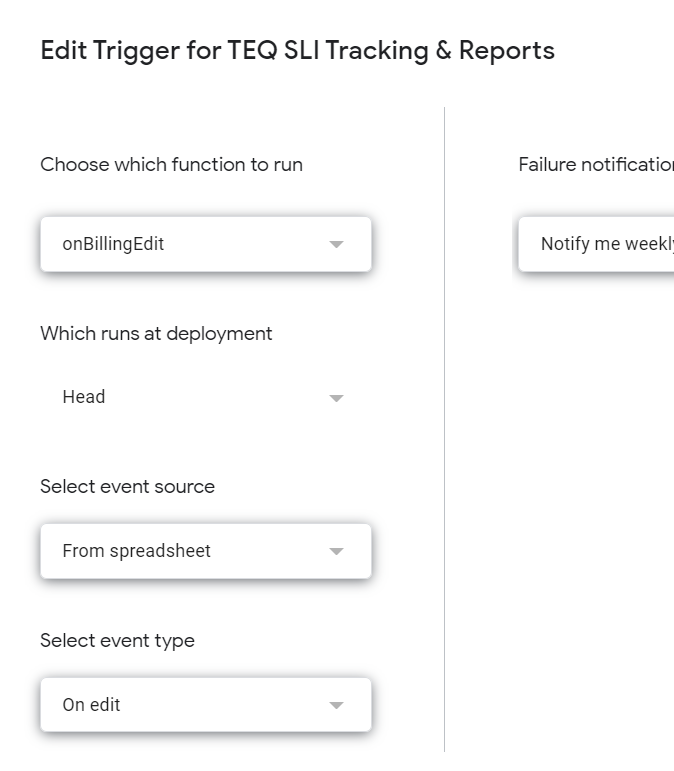
This is the trigger I set up:
This is my code:
function onBillingEdit(e){
const changedRange = e.range;
const sheetName = sheet.getSheetName();
if(sheetName == BillingSummarySheetName){
const a1PeriodStart = sheet.getRange("BillingPeriodStart").getA1Notation();
const a1PeriodEnd = sheet.getRange("BillingPeriodEnd").getA1Notation();
const changedCell = changedRange.getCell.getA1Notation();
if(changedCell == a1PeriodStart || changedCell == a1PeriodEnd) {
formatDataTable();
}
}
}

Clay Smith
Aug 21, 2021, 10:59:11 AM8/21/21
to google-apps-sc...@googlegroups.com
This line:
const sheetName = sheet.getSheetName();
Where is sheet defined?
If you think it's e.range you can console.log(e) to look for the range property.
--
You received this message because you are subscribed to the Google Groups "Google Apps Script Community" group.
To unsubscribe from this group and stop receiving emails from it, send an email to google-apps-script-c...@googlegroups.com.
To view this discussion on the web visit https://groups.google.com/d/msgid/google-apps-script-community/b6baf8b8-99f6-477b-849f-7a693446f576n%40googlegroups.com.







Reply all
Reply to author
Forward
0 new messages