Have some problems with youtube resumable uploader

Pubg Mobile
I want to transfer my videos from google drive to youtube using following script in google apps script:
function myFunction() {
// Please set the file ID of video file and the metadata for uploading it to YouTube.
const fileId = "###";
const metadata = {
snippet: { description: "Upload sample.", title: "Sample uploaded video." },
status: { privacyStatus: "private" },
};
// 1. Retrieve location.
const headers = { authorization: "Bearer " + ScriptApp.getOAuthToken() };
const url1 = encodeURI(
"https://www.googleapis.com/upload/youtube/v3/videos?uploadType=resumable&part=snippet,status"
);
const res1 = UrlFetchApp.fetch(url1, {
headers,
payload: JSON.stringify(metadata),
contentType: "application/json",
muteHttpExceptions: true,
});
if (res1.getResponseCode() != 200) {
console.log(res1.getContentText());
return;
}
const location = res1.getAllHeaders()["Location"];
console.log("Got Location.");
// 2. Calculate chunks.
const chunkSize = 20971520; // 20 MB
const { fileSize } = Drive.Files.get(fileId, {
supportsAllDrives: true,
fields: "fileSize",
});
const chunks = [...Array(Math.ceil(fileSize / chunkSize))].map((_, i, a) => [
i * chunkSize,
i == a.length - 1 ? fileSize - 1 : (i + 1) * chunkSize - 1,
]);
console.log("Calculated chunk data.");
// 3. Retrieve chunks from Google Drive with the partial download and uploading chunks to YouTube with the resumable upload.
const url2 = `https://www.googleapis.com/drive/v3/files/${fileId}?alt=media&supportsAllDrives=true`;
let res2;
const len = chunks.length;
chunks.forEach((e, i) => {
console.log(`Now... ${i + 1}/${len}`);
const params2 = {
headers: {
authorization: headers.authorization,
range: `bytes=${e[0]}-${e[1]}`,
},
};
res2 = UrlFetchApp.fetch(url2, params2).getContent();
const params3 = {
headers: { "Content-Range": `bytes ${e[0]}-${e[1]}/${fileSize}` },
payload: res2,
muteHttpExceptions: true,
};
console.log("Downloaded a chunk, and upload a chunk.");
const res3 = UrlFetchApp.fetch(location, params3);
const statusCode = res3.getResponseCode();
if (statusCode == 200) {
console.log("Done.");
console.log(res3.getContentText());
} else if (statusCode == 308) {
console.log("Upload the next chunk.");
res2.splice(0, res2.length);
} else {
throw new Error(res3.getContentText());
}
});
// Please don't remove the following comment line. This comment line is important for running this script.
// YouTube.Videos.insert(); // This is used for automatically detecting the scope of "https://www.googleapis.com/auth/youtube" with the script editor.
this script work with google drive api and youtube api v3.
but this script have some problems and limitions.
- I can't select the source Google Drive account and the destination
YouTube channel for upload the video separately. for example in
following sample i must select @gmail account as Google Drive
account video file source and script must upload video file from
google drive account to youtube channel (youtube account) but when i
select @gmail account, script upload video file to @gmail youtube
channel and not upload to my youtube account. if i select youtube
account then script can't read file from google drive! How to fix this problem?

- In the current stage, the maximum execution time of Google Apps
Script is 6 minutes and i can't upload large video files. i get
exceeded maximum execution time error. also i don't know how to executing the script with the time-driven trigger and how to fix this? if i use time-driven trigger for executing this script then i must apply some changes in this script, what is changes that i must apply?


-
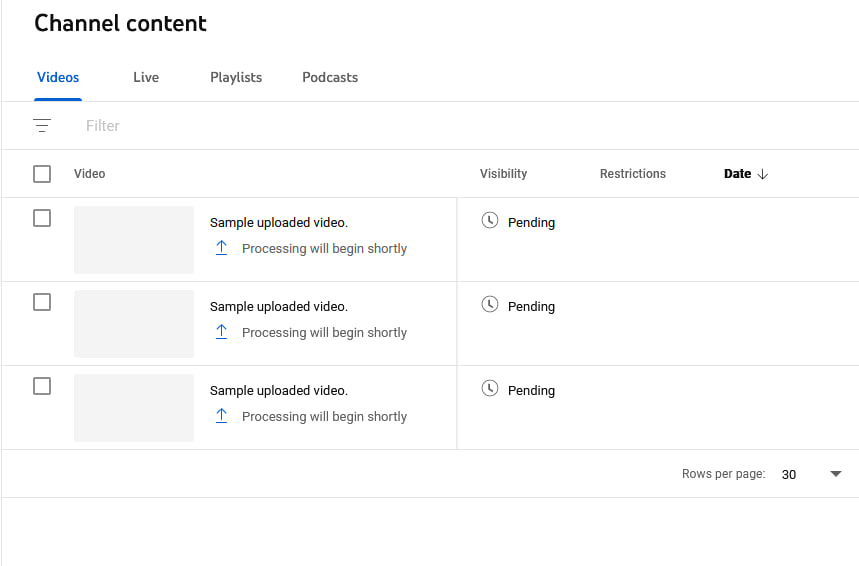
after executing script when i check my youtube channel, i encounter
the following scene. multiple upload processing! How to fix it??