
Collapsible Card
860 views
Skip to first unread message

Umer Iqbal
Apr 19, 2022, 3:31:56 AM4/19/22
to Google Apps Script Community
Hi All,
How we can create the custom Collapsible card in gmail add-on using apps script. Please check attach design image.
Thanks,
Muhammad Umer Iqbal,

dimud...@gmail.com
Apr 19, 2022, 10:43:28 AM4/19/22
to Google Apps Script Community
Looking at the documentation Google Workspace Add-Ons (GWAO) do not currently support collapsible cards.
GWAOs are limited to a small collection of widgets and we cannot extend or customize them (as we can with Editor Add-ons via HTML/CSS/Javascript).
GWAOs are limited to a small collection of widgets and we cannot extend or customize them (as we can with Editor Add-ons via HTML/CSS/Javascript).

Clark Lind
Apr 20, 2022, 10:18:16 AM4/20/22
to Google Apps Script Community
Have you tried the unofficial card creation tool?
I think the functionality is there, but you will have to play with it to make it work. I would add each collapsible section as a new section.
Using the above tool and just playing around, I created 2 sections, adding a paragraph to the first and an image to the second, and set them both to collapsible
I think the functionality is there, but you will have to play with it to make it work. I would add each collapsible section as a new section.
Using the above tool and just playing around, I created 2 sections, adding a paragraph to the first and an image to the second, and set them both to collapsible
and 'number of uncollapsible widgets' to zero:
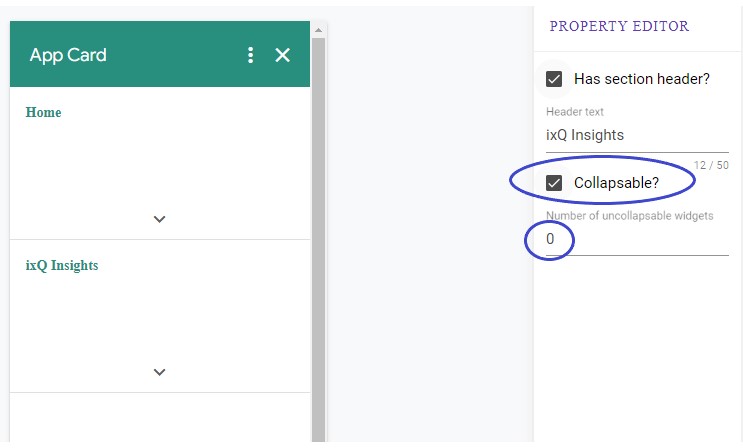
Once you build your card, you can copy the output on the bottom right side. (Note: I don't think the upper right JSON output is supported yet).
Here is the output from the above example:
function buildHomeCard(opts) {
var builder = CardService.newCardBuilder();
builder.addSection(CardService.newCardSection()
.setHeader('Home')
.setCollapsible(true)
.setNumUncollapsibleWidgets(0)
.addWidget(CardService.newTextParagraph()
.setText(
'This is a <b>paragraph</b>. It can <a href="https://google.com">link</a>, force new</br>lines, use <i>italics</i>, etc...</i>'
)));
builder.addSection(CardService.newCardSection()
.setHeader('ixQ Insights')
.setCollapsible(true)
.setNumUncollapsibleWidgets(0)
.addWidget(CardService.newImage()
.setImageUrl(
'https://source.unsplash.com/collection/190727/1600x900')
.setAltText('Placeholder image')));
return builder.build();
}
Again, mine isn't perfectly what you want, so you will have to play around with it.
Here is the output from the above example:
function buildHomeCard(opts) {
var builder = CardService.newCardBuilder();
builder.addSection(CardService.newCardSection()
.setHeader('Home')
.setCollapsible(true)
.setNumUncollapsibleWidgets(0)
.addWidget(CardService.newTextParagraph()
.setText(
'This is a <b>paragraph</b>. It can <a href="https://google.com">link</a>, force new</br>lines, use <i>italics</i>, etc...</i>'
)));
builder.addSection(CardService.newCardSection()
.setHeader('ixQ Insights')
.setCollapsible(true)
.setNumUncollapsibleWidgets(0)
.addWidget(CardService.newImage()
.setImageUrl(
'https://source.unsplash.com/collection/190727/1600x900')
.setAltText('Placeholder image')));
return builder.build();
}
Again, mine isn't perfectly what you want, so you will have to play around with it.
On Tuesday, April 19, 2022 at 3:31:56 AM UTC-4 Umer Iqbal wrote:
Clark Lind
Apr 20, 2022, 10:38:53 AM4/20/22
to Google Apps Script Community
The above works.. I pasted it into one of my Gmail addons to test it. Again, not perfect, but functional. (The first 5-6 seconds are blank.. sorry):

dimud...@gmail.com
Apr 23, 2022, 1:44:24 PM4/23/22
to Google Apps Script Community
I stand corrected. When was that feature added?
Clark Lind
Apr 24, 2022, 5:23:03 PM4/24/22
to Google Apps Script Community
I don't know if it was added recently, or was always hiding there as a method only on the "CardSection".
Reply all
Reply to author
Forward
0 new messages