
get Drive Folder URL not working on custom function
212 views
Skip to first unread message

Benjamin Jackson
Mar 31, 2023, 10:16:42 AM3/31/23
to Google Apps Script Community
Hi there! I have a spreadsheet and I want to programmatically create a Drive Folder URL for every row with a valid value on the "Name" column but I'm getting this error:

"Exception: You do not have permission to call DriveApp.getFolders. Required permissions: (https://www.googleapis.com/auth/drive.readonly || https://www.googleapis.com/auth/drive) (line 69)."
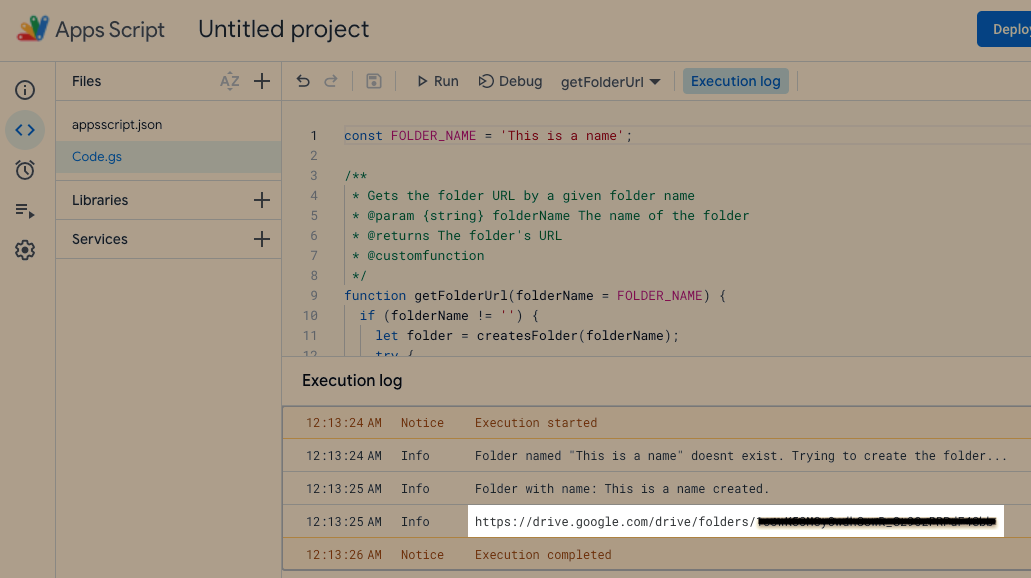
But on the editor, the code is working:

Tanaike
Mar 31, 2023, 9:05:55 PM3/31/23
to Google Apps Script Community
Unfortunately, I cannot know your whole script. But, from your error message, I'm worried that the methods which cannot be used with the custom function might be included in your script. So, how about confirming your script again?
Benjamin Jackson
Apr 1, 2023, 2:30:25 AM4/1/23
to Google Apps Script Community
This is the Code.gs script:
const FOLDER_NAME = 'This is a name';
/**
* Gets the folder URL by a given folder name
* @param {string} folderName The name of the folder
* @returns The folder's URL
* @customfunction
*/
function getFolderUrl(folderName = FOLDER_NAME) {
if (folderName != '') {
let folder = createsFolder(folderName);
try {
let folderUrl = folder.getUrl();
console.log(folderUrl);
return folderUrl;
}
catch(error) {
console.log(error);
}
}
else {
return '';
}
}
/**
* Creates a folder if it doesn't exist by a given folder name
* @param {string} folderName The name of the folder to be created
* @returns The folder
* @customfunction
*/
function createsFolder(folderName) {
let folderExist = checkIfFolderExist(folderName);
if (folderExist != true) {
console.log('Folder named "' + folderName + '" doesnt exist. Trying to create the folder...');
try {
let folder = DriveApp.createFolder(folderName);
console.log('Folder with name: ' + folderName + ' created.');
return folder;
}
catch(error) {
console.log('Couldnt create the folder with name "' + folderName + '". Error details: ' + error);
}
}
else {
console.log('Folder named "' + folderName + '" already exist. Trying to retrieve the folder...');
try {
let folders = DriveApp.getFoldersByName(folderName);
let folder = folders.next();
console.log('Folder with name: ' + folderName + ' retrieved.');
return folder;
}
catch(error) {
console.log('Couldnt retrieve the folder with name "' + folderName + '". Error details: ' + error);
}
}
}
/**
* Check if a folder already exist by a given folder name
* @param {string} folderName The name of the folder to be checked
* @returns {boolean} true if a folder with the given name already exists, false if it doesn't.
* @customfunction
*/
function checkIfFolderExist(folderName) {
let foldersName = [];
let folders = DriveApp.getFolders();
while (folders.hasNext()) {
try {
let folder = folders.next();
foldersName.push(folder.getName())
}
catch(error) {
ui.alert(error);
}
}
if (foldersName.indexOf(folderName) != -1) {
return true;
}
else {
return false;
}
}
And this is the appsscript.json:
{
"timeZone": "Australia/Brisbane",
"dependencies": {
"enabledAdvancedServices": []
},
"exceptionLogging": "STACKDRIVER",
"runtimeVersion": "V8"
}
Tanaike
Apr 2, 2023, 8:54:54 PM4/2/23
to Google Apps Script Community
Thank you for replying. From your provided script, it was found that the reason for your current issue is due to that the methods which cannot be used with the custom function are used in your showing script. Unfortunately, the Drive service cannot be used with the custom function. I apologize for this situation.
Reply all
Reply to author
Forward
0 new messages