
Where can I set Maximum Daily Budget in the new Google Cloud Console?
82 views
Skip to first unread message

。おにぎり
May 11, 2015, 3:49:37 AM5/11/15
to google-a...@googlegroups.com
In the old console, I can set the Maximum Daily Budget like the below.
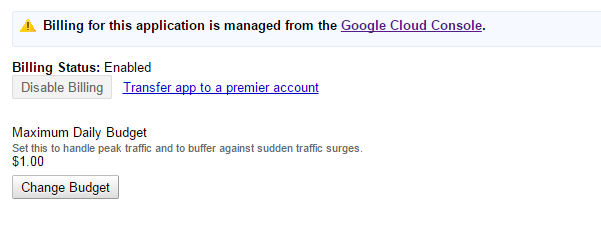
But in the new console, I cannot find it...
Maybe "Current blanace" is the one?


Mihail Russu
May 11, 2015, 6:52:23 AM5/11/15
to google-a...@googlegroups.com
Have you tried https://console.developers.google.com/project/<APP_ID>/appengine/settings (Dashboard -> Compute -> App Engine -> Settings) where <APP_ID> is the ID of your app?
。おにぎり
May 11, 2015, 9:49:50 AM5/11/15
to google-a...@googlegroups.com
uh!! I finally found it!! Thank you Mihail!!

Michael Thomsen
May 11, 2015, 1:06:05 PM5/11/15
to google-a...@googlegroups.com
Just a quick little tip: To share a Developer's Console URL without including a specific app/project ID, simply replace that part of the URL with an underscore.
On Mon, May 11, 2015 at 9:49 AM, 。おにぎり <onig...@gmail.com> wrote:
uh!! I finally found it!! Thank you Mihail!!
--
You received this message because you are subscribed to the Google Groups "Google App Engine" group.
To unsubscribe from this group and stop receiving emails from it, send an email to google-appengi...@googlegroups.com.
To post to this group, send email to google-a...@googlegroups.com.
Visit this group at http://groups.google.com/group/google-appengine.
To view this discussion on the web visit https://groups.google.com/d/msgid/google-appengine/23ce92e3-26f9-4dbd-a803-98a7337ceeb1%40googlegroups.com.
Reply all
Reply to author
Forward
0 new messages