
Filtering data
1,067 views
Skip to first unread message

Emma
Nov 12, 2015, 9:08:47 AM11/12/15
to google-analytics-spreadsheet-add-on
Hi
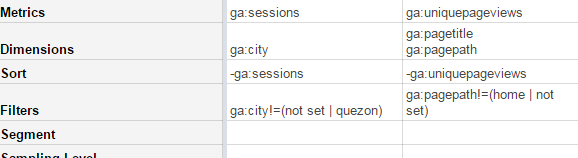
I'm looking to exclude data from my report by using the filters below, but seem to be running into an issue when I'm wanting to exclude more than one page path or city. I've tried to add each exclusion as an individual filter and combining both into one (below!) but with no luck.
Is there a simpler way to do this?
Thanks

Philip Walton
Nov 12, 2015, 1:12:25 PM11/12/15
to Emma, google-analytics-spreadsheet-add-on
Take a look at the filters reference:
What you're doing is using a not equal (!=) comparison, but then passing it a regular expression. What GA is seeing is you asking for something that is not equal to the literal string "(home | not set)". Computers aren't that smart :)
Try using the regular expression comparison (=~) instead and make sure your expression is valid.
--
You received this message because you are subscribed to the Google Groups "google-analytics-spreadsheet-add-on" group.
To unsubscribe from this group and stop receiving emails from it, send an email to google-analytics-spread...@googlegroups.com.
To view this discussion on the web visit https://groups.google.com/d/msgid/google-analytics-spreadsheet-add-on/21904087-8110-4ee9-9bad-0e049377b98d%40googlegroups.com.
For more options, visit https://groups.google.com/d/optout.
Emma
Nov 13, 2015, 10:27:17 AM11/13/15
to google-analytics-spreadsheet-add-on, digita...@gmail.com
Great, thanks.
Doing that though doesn't exclude the data that I want to exclude, instead it gives me just the data for the home page and those with 'not set'... how do I exclude things like this? I've attempted using !~ but that didn't seem to remove the items either.
Also, is it possible to apply 2 (or more) filters to one report?
On Thursday, 12 November 2015 18:12:25 UTC, Philip Walton wrote:
Take a look at the filters reference:What you're doing is using a not equal (!=) comparison, but then passing it a regular expression. What GA is seeing is you asking for something that is not equal to the literal string "(home | not set)". Computers aren't that smart :)Try using the regular expression comparison (=~) instead and make sure your expression is valid.
On Thu, Nov 12, 2015 at 6:08 AM, Emma <digita...@gmail.com> wrote:
HiI'm looking to exclude data from my report by using the filters below, but seem to be running into an issue when I'm wanting to exclude more than one page path or city. I've tried to add each exclusion as an individual filter and combining both into one (below!) but with no luck.Is there a simpler way to do this?Thanks
--
You received this message because you are subscribed to the Google Groups "google-analytics-spreadsheet-add-on" group.
To unsubscribe from this group and stop receiving emails from it, send an email to google-analytics-spreadsheet-add-on+unsubscribe@googlegroups.com.
Philip Walton
Nov 13, 2015, 1:28:32 PM11/13/15
to Emma, google-analytics-spreadsheet-add-on
Yes it's possible to have two filters in the same query, but I'd recommend asking this question on Stack Overflow with the [google-analytics] tag, since at this point your question isn't really about the add-on anymore.
On Fri, Nov 13, 2015 at 7:27 AM, Emma <digita...@gmail.com> wrote:
Great, thanks.Doing that though doesn't exclude the data that I want to exclude, instead it gives me just the data for the home page and those with 'not set'... how do I exclude things like this? I've attempted using !~ but that didn't seem to remove the items either.
Also, is it possible to apply 2 (or more) filters to one report?
On Thursday, 12 November 2015 18:12:25 UTC, Philip Walton wrote:
Take a look at the filters reference:What you're doing is using a not equal (!=) comparison, but then passing it a regular expression. What GA is seeing is you asking for something that is not equal to the literal string "(home | not set)". Computers aren't that smart :)Try using the regular expression comparison (=~) instead and make sure your expression is valid.
On Thu, Nov 12, 2015 at 6:08 AM, Emma <digita...@gmail.com> wrote:
HiI'm looking to exclude data from my report by using the filters below, but seem to be running into an issue when I'm wanting to exclude more than one page path or city. I've tried to add each exclusion as an individual filter and combining both into one (below!) but with no luck.Is there a simpler way to do this?Thanks
--
You received this message because you are subscribed to the Google Groups "google-analytics-spreadsheet-add-on" group.
To unsubscribe from this group and stop receiving emails from it, send an email to google-analytics-spread...@googlegroups.com.
To view this discussion on the web visit https://groups.google.com/d/msgid/google-analytics-spreadsheet-add-on/21904087-8110-4ee9-9bad-0e049377b98d%40googlegroups.com.
For more options, visit https://groups.google.com/d/optout.
--
You received this message because you are subscribed to the Google Groups "google-analytics-spreadsheet-add-on" group.
To unsubscribe from this group and stop receiving emails from it, send an email to google-analytics-spread...@googlegroups.com.
To view this discussion on the web visit https://groups.google.com/d/msgid/google-analytics-spreadsheet-add-on/9205ff6b-fa85-4ac4-9b2d-307a02f5d653%40googlegroups.com.
Emma
Nov 16, 2015, 7:11:04 AM11/16/15
to google-analytics-spreadsheet-add-on, digita...@gmail.com
Great, thanks Philip, I'll ask my filter question there.
On Friday, 13 November 2015 18:28:32 UTC, Philip Walton wrote:
Yes it's possible to have two filters in the same query, but I'd recommend asking this question on Stack Overflow with the [google-analytics] tag, since at this point your question isn't really about the add-on anymore.
On Fri, Nov 13, 2015 at 7:27 AM, Emma <digita...@gmail.com> wrote:
Great, thanks.Doing that though doesn't exclude the data that I want to exclude, instead it gives me just the data for the home page and those with 'not set'... how do I exclude things like this? I've attempted using !~ but that didn't seem to remove the items either.
Also, is it possible to apply 2 (or more) filters to one report?
On Thursday, 12 November 2015 18:12:25 UTC, Philip Walton wrote:
Take a look at the filters reference:What you're doing is using a not equal (!=) comparison, but then passing it a regular expression. What GA is seeing is you asking for something that is not equal to the literal string "(home | not set)". Computers aren't that smart :)Try using the regular expression comparison (=~) instead and make sure your expression is valid.
On Thu, Nov 12, 2015 at 6:08 AM, Emma <digita...@gmail.com> wrote:
HiI'm looking to exclude data from my report by using the filters below, but seem to be running into an issue when I'm wanting to exclude more than one page path or city. I've tried to add each exclusion as an individual filter and combining both into one (below!) but with no luck.Is there a simpler way to do this?Thanks
--
You received this message because you are subscribed to the Google Groups "google-analytics-spreadsheet-add-on" group.
To unsubscribe from this group and stop receiving emails from it, send an email to google-analytics-spreadsheet-add-on+unsubscribe@googlegroups.com.
To view this discussion on the web visit https://groups.google.com/d/msgid/google-analytics-spreadsheet-add-on/21904087-8110-4ee9-9bad-0e049377b98d%40googlegroups.com.
For more options, visit https://groups.google.com/d/optout.
--
You received this message because you are subscribed to the Google Groups "google-analytics-spreadsheet-add-on" group.
To unsubscribe from this group and stop receiving emails from it, send an email to google-analytics-spreadsheet-add-on+unsubscribe@googlegroups.com.
Reply all
Reply to author
Forward
0 new messages