
Skip to first unread message

Enne Soft
Jan 20, 2016, 8:31:07 AM1/20/16
to Google Mobile Ads SDK Developers
A little question about Admob Banner.
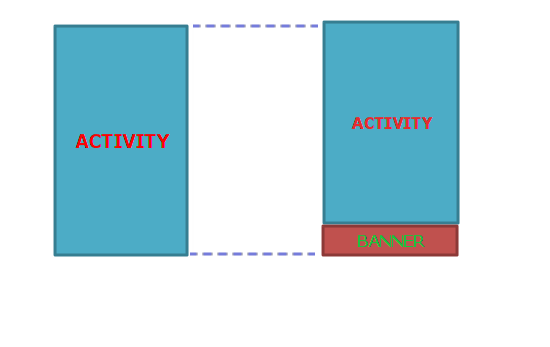
We would like to know how to correctly insert a BANNER Admob that it can be used only in the space required by us.
Let me explain: the space is very valuable to the screen of this app and can not afford to use an empty fragment occupying the surface when the banner is not already loaded. We would like the surface of the Banner shows only when loaded or required.
We want to have the full layout of the activity as long the BANNER isn't SHOW.
Do you have any indication or solutions?
Mny thx!
E & N

Veer Arjun Busani
Jan 20, 2016, 3:03:29 PM1/20/16
to Google Mobile Ads SDK Developers
Hi there,
I understand that you want to have a certain Layout aligned to the bottom of the screen when the Banner View is hidden and then above the Banner when it's shown. There are several ways you can achieve this and one would be without using XML. In this example, I have a RelativeLayout as the parent with a Banner AdView aligned to the bottom of the parent and another RelativeLayout aligned at the top of the Banner View.
- First you can always programmatically insert AdView. Add your AdView into the parent RelativeLayout like this -
mAdRelativeLayout = (RelativeLayout) findViewById(R.id.adRelativeLayout);

adView = new AdView(this);
adView.setId(View.generateViewId());
adView.setAdSize(AdSize.SMART_BANNER);

RelativeLayout.LayoutParams params = new RelativeLayout.LayoutParams(RelativeLayout.LayoutParams.WRAP_CONTENT, RelativeLayout.LayoutParams.WRAP_CONTENT);
params.addRule(RelativeLayout.CENTER_HORIZONTAL, RelativeLayout.TRUE);
params.addRule(RelativeLayout.ALIGN_PARENT_BOTTOM, RelativeLayout.TRUE);
adView.setLayoutParams(params);

mAdRelativeLayout.addView(adView);- Note that mAdRelativeLayout is your parent Layout. Next let's add two more items - another RelativeLayout, which would hold a TextView. This TextView would at the bottom of the parent and the child RelativeLayout would be aligned at the bottom of the Banner AdView.
relativeLayout = new RelativeLayout(this);
relativeParams = new RelativeLayout.LayoutParams(RelativeLayout.LayoutParams.WRAP_CONTENT, RelativeLayout.LayoutParams.WRAP_CONTENT);
relativeParams.addRule(RelativeLayout.ALIGN_PARENT_TOP, RelativeLayout.TRUE);
relativeParams.addRule(RelativeLayout.ABOVE, adView.getId());
relativeLayout.setLayoutParams(relativeParams);

mAdRelativeLayout.addView(relativeLayout);

tView = new TextView(this);
tView.setText("Bottom Text");
params1 = new RelativeLayout.LayoutParams(RelativeLayout.LayoutParams.WRAP_CONTENT, RelativeLayout.LayoutParams.WRAP_CONTENT);
params1.addRule(RelativeLayout.CENTER_HORIZONTAL, RelativeLayout.TRUE);
params1.addRule(RelativeLayout.ALIGN_PARENT_BOTTOM, RelativeLayout.TRUE);
tView.setLayoutParams(params1);

relativeLayout.addView(tView);- Then in this example, I'm gonna have a Button, which would toggle between hiding and showing the Banner AdView. Just add a Button and onClick() -
            @Override
            public void onClick(View arg0) {
                if(!isDestroyed) {
                    adView.destroy();
                    isDestroyed = true;
                    Log.i("shown", "isShown");
                    mAdRelativeLayout.removeView(adView);
                    relativeParams.removeRule(RelativeLayout.ABOVE);
                    relativeParams.addRule(RelativeLayout.ALIGN_PARENT_BOTTOM, RelativeLayout.TRUE);

                } else  {
                    mAdRelativeLayout.addView(adView);
                    AdRequest adRequest = new AdRequest.Builder().build();
                    adView.loadAd(adRequest);
                    Log.i("shown", "notShown");
                    isDestroyed = false;
                    relativeParams.removeRule(RelativeLayout.ALIGN_PARENT_BOTTOM);
                    relativeParams.addRule(RelativeLayout.ABOVE, adView.getId());
                }
                relativeLayout.setLayoutParams(relativeParams);
}- This is just one way to adjust your layout when showing/hiding the AdView. You can destroy() the AdView upon hiding it and even remove it from the view hierarchy and then load the AdRequest again once you want to show it. You can also wait for the Ad to be loaded before you adjust the child RelativeLayout for consistency.
Do let us know if you need anything more.
Thanks,
Veer Arjun Busani
Mobile Ads SDK Team
Code License: https://developers.google.com/open-source/devplat
Enne Soft
Jan 21, 2016, 2:52:25 AM1/21/16
to Google Mobile Ads SDK Developers
Hi Veer Arjun, mny thx!
This solution is made without using XML.
BUT, in my case, the principal activity layout is wrote in XML, like this:
How can develop this solution in this case?
Warm regards,
Nick
This solution is made without using XML.
BUT, in my case, the principal activity layout is wrote in XML, like this:
<RelativeLayout xmlns:android="http://schemas.android.com/apk/res/android"
    xmlns:tools="http://schemas.android.com/tools" android:layout_width="match_parent"
    android:layout_height="match_parent" android:paddingLeft="@dimen/activity_horizontal_margin"
    android:paddingRight="@dimen/activity_horizontal_margin"
    android:paddingTop="@dimen/activity_vertical_margin"
    android:paddingBottom="@dimen/activity_vertical_margin"
    android:id="@+id/principalLayout">

...

</RelativeLayout>
How can develop this solution in this case?
Warm regards,
Nick

Albert Gazetdinov
Jan 21, 2016, 3:24:10 AM1/21/16
to Google Mobile Ads SDK Developers
add invisible AdView in XML:
<com.google.android.gms.ads.AdView
xmlns:ads="http://schemas.android.com/apk/res-auto"
android:id="@+id/adView"
android:visibility="gone"...
After a successful load of banner display adView:
AdView adView = (AdView) findViewById(R.id.adView);
adView.setAdListener(new AdListener() {
public void onAdLoaded() {
adView.setVisibility(View.VISIBLE);
...
adView.loadAd(new AdRequest.Builder().build());
четверг, 21 января 2016 г., 10:52:25 UTC+3 пользователь Enne Soft написал:
четверг, 21 января 2016 г., 10:52:25 UTC+3 пользователь Enne Soft написал:
Veer Arjun Busani
Jan 21, 2016, 11:46:26 AM1/21/16
to Google Mobile Ads SDK Developers
Hi guys,
@Albert
Thank you so much for that. Adding the visibility tag would certainly work in hiding the View.
@Enne
As Albert here has pointed out, you could use visibility attribute for this as well. This would even automatically cancel out the Ad refresh. Once that is done you can still add rules to change your RelativeLayout as you want.
Enne Soft
Jan 23, 2016, 2:59:14 AM1/23/16
to Google Mobile Ads SDK Developers
Dear all,
mny thx! Sounds very good all your solutions!
Very happy.
:-)
mny thx! Sounds very good all your solutions!
Very happy.
:-)
Reply all
Reply to author
Forward
0 new messages