
The following classes could not be found: - com.google.ads.AdView (Change to android.view.View, Fix
1,678 views
Skip to first unread message

Quique Martinez
Sep 11, 2014, 6:11:47 AM9/11/14
to google-adm...@googlegroups.com
Hi, I get the error The following classes could not be found:
- Com.google.ads.AdView (Change to android.view.View, Fix Build Path, XML Edit, Create Class) em the Graphical Layout screen. Favor.Cuando aid amount in the mobile app unexpectedly quits. That I can do

Amy Quispe (AdMob SDK Team)
Sep 11, 2014, 6:26:12 PM9/11/14
to google-adm...@googlegroups.com
Hi Quique,
com.google.ads.AdView is the class from the (deprecated) standalone SDK. The class in Google Play Services is com.google.android.gms.ads.AdView
Amy Quispe

Edu App
Sep 16, 2014, 11:21:15 AM9/16/14
to google-adm...@googlegroups.com
@Amy
Exception raised during rendering: com/google/android/gms/ads/AdView : Unsupported major.minor version 51.0
Exception details are logged in Window > Show View > Error Log
Because of this error I cannot see my graphical layout. Can you tell me whats wrong?
This is my adview tag:
<com.google.android.gms.ads.AdView
android:id="@+id/pre_gate_adView"
android:layout_below="@+id/listView1"
android:layout_width="match_parent"
android:layout_height="50dp"
android:layout_alignParentBottom="true"
ads:adSize="SMART_BANNER"
ads:adUnitId="@string/ad_unit_id" >
</com.google.android.gms.ads.AdView>
Amy Quispe (AdMob SDK Team)
Sep 16, 2014, 6:57:27 PM9/16/14
to google-adm...@googlegroups.com
Hi there,
This is a known issue - are you using Android Studio or IntelliJ? The app should still run find regardless.
Amy Quispe
Android Beginer
Nov 8, 2014, 12:20:27 AM11/8/14
to google-adm...@googlegroups.com
Hi Amy,
I am using Eclipse IDE to develop app. This is very annoying problem with adView. Please help ASAP.
I am using below for showing banner ad in xml
<com.google.android.gms.ads.AdView
android:id="@+id/about_adView"
android:layout_width="match_parent"
android:layout_height="50dp"
android:layout_alignParentBottom="true"
android:layout_alignParentLeft="true"
ads:adSize="SMART_BANNER"
ads:adUnitId="@string/ad_unit_id" >
</com.google.android.gms.ads.AdView>
And it says "Exception raised during rendering: com/google/android/gms/ads/AdView : Unsupported major.minor version 51.0 Exception details are logged in Window > Show View > Error Log"
Please feel free to ask other details if you need any.
Thanks!

Eric Leichtenschlag
Nov 11, 2014, 8:22:38 PM11/11/14
to google-adm...@googlegroups.com
Hello,
It looks like you'll need to download Java 1.7 and have Android point to 1.7 to resolve the error.
Thanks,
Eric
Eric
Android Beginer
Dec 6, 2014, 12:09:11 AM12/6/14
to google-adm...@googlegroups.com, eleich...@google.com
Hi Eric,
Thanks for reply. But the error is still there.
- I installed jdk-7u67-linux-x64.tar.gz. Then followed installation instructions.
- Extracted this .tar file to my Desktop
- So it created jdk1.7.0_67 folder
- I opened eclipse set windows--preferences--java--execution environment--JavaSE1.7--checked jdk1.7 jre
- set java--compiler compliance level 1.7
Please note that, I have not removed older version which is java-6-openjdk-amd64 under path /usr/lib/jvm/java-6-openjdk-amd64
Am I missing something?
Please help me to resolve this issue.
Eric Leichtenschlag (Mobile Ads SDK Team)
Dec 6, 2014, 12:40:33 AM12/6/14
to google-adm...@googlegroups.com
I actually got some very similar message when I was working on something for Unity, and I downloaded jdk 1.7 and followed these instructions to point to jdk 1.7.
Granted, these instructions are for mac, so it'll likely be slightly different on Linux. But I strongly strongly believe the issue is related to 1.6 vs. 1.7 based on my personal experience now, and that despite your setting changes, Android is still trying to use jdk 1.6 to compile. Those changes sound pretty complete though, so I'm not sure which setting you actually need to change. I'm not sure if linux has the same CURRENT_JDK pointer that is used on mac.
Thanks,
Eric

Steven Ferrarese
Jan 2, 2015, 8:31:14 PM1/2/15
to google-adm...@googlegroups.com
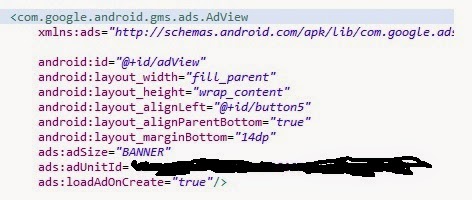
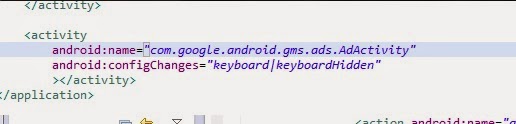
as soon as it gets to the main activity it crashes and didn't crash before i added admob
Eric Leichtenschlag (Mobile Ads SDK Team)
Jan 5, 2015, 5:28:28 PM1/5/15
to google-adm...@googlegroups.com
Hi Steven,
Do you have the Google Play services library included/referenced in your app? That error indicates it can't find com.google.android.gms.ads.AdView, which is part of Google Play services.
Also, are you using Java 1.7?
Thanks,
Eric
Reply all
Reply to author
Forward
0 new messages