
Setting up HTTPS (SSL/TLS)
256 views
Skip to first unread message

Fredrik Wendt
Sep 10, 2015, 2:01:05 PM9/10/15
to go-cd
Hi,
I've setup httpS a couple of times before with Apache and Nginx, but never with Jetty and gocd. I've read these pages and the sections related to key handling, in order:
Yet, I end up with GoCD serving a certificate I didn't expect. This is the Dockerfile I'm using:
FROM gocd/gocd-server
COPY certs /tmp/certs
WORKDIR /tmp/certs
RUN openssl rsa -des3 -in gocd.wendt.io.key -out gocd.wendt.io.key-with-pass -passout pass:serverKeystorepa55w0rd
RUN openssl pkcs12 -inkey gocd.wendt.io.key-with-pass -in gocd.wendt.io.crt -export -out gocd.wendt.io.pkcs12 -passin pass:serverKeystorepa55w0rd -passout pass:asdf
RUN keytool -importkeystore -srckeystore gocd.wendt.io.pkcs12 -srcstoretype PKCS12 -srcstorepass asdf -destkeystore keystore -srcalias 1 -destalias cruise -storepass serverKeystorepa55w0rd
run keytool -keystore keystore -storepass serverKeystorepa55w0rd -list -v -alias cruise
RUN mv keystore /etc/go/keystore
All commands complete without any errors and the keytool -list command shows this:
Step 6 : RUN keytool -keystore keystore -storepass serverKeystorepa55w0rd -list -v -alias cruise
---> Running in 7a242422c693
Alias name: cruise
Creation date: Sep 10, 2015
Entry type: PrivateKeyEntry
Certificate chain length: 1
Certificate[1]:
Owner: CN=gocd.wendt.io, OU=Domain Control Validated - RapidSSL(R), OU=See www.rapidssl.com/resources/cps (c)15, OU=GT34817974
Issuer: CN=RapidSSL SHA256 CA - G4, O=GeoTrust Inc., C=US
...
...
All looks good, right?
I can run the Docker image produced without any warnings being printed in the logs and the gui shows up nicely on port 8153. However, when using https and port 8154, I'm served this certificate:
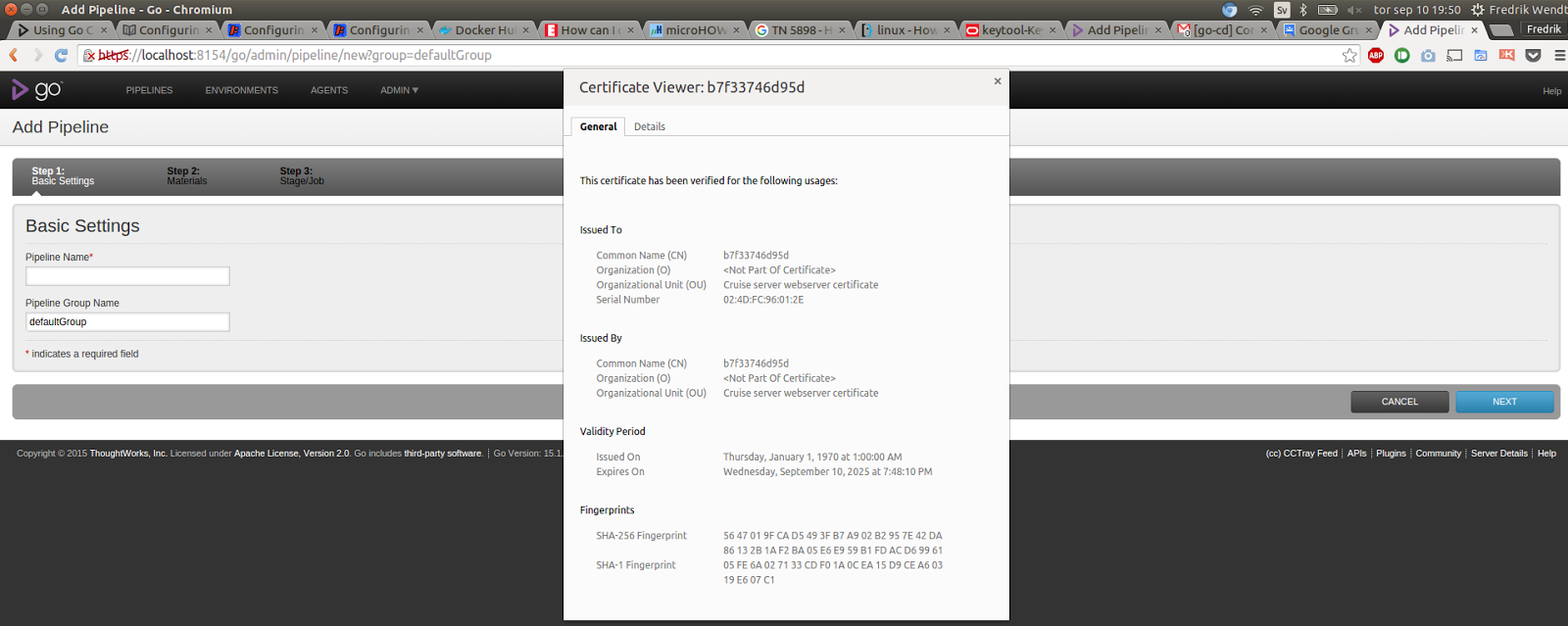
Now I'm not sure how to proceed.
Is /etc/go/keystore the right path for the keystore? (The docs doesn't say)
Am I right in assuming that I should put the certificate "in" -alias cruice in the keystore? (The docs doesn't really say?)
Is there some other way to run gocd with https, such as setting up nginx as a reverse proxy in front of gocd (which is supported, or at least documented and perhaps tested)?
Thanks in advance!
/ Fredrik

Ketan Padegaonkar
Sep 10, 2015, 2:10:33 PM9/10/15
to go...@googlegroups.com
Chrome is notorious for "caching ssl certificates", I'd suggest using the CLI to verify certs using `echo | openssl s_client -connect HOST:PORT`
--
You received this message because you are subscribed to the Google Groups "go-cd" group.
To unsubscribe from this group and stop receiving emails from it, send an email to go-cd+un...@googlegroups.com.
For more options, visit https://groups.google.com/d/optout.
Reply all
Reply to author
Forward
0 new messages