
Fwd: [Official Gmail Blog] Using Gmail, Calendar and Docs without an Internet conn...
44 views
Skip to first unread message

Jeff Grossman
Aug 31, 2011, 1:41:39 PM8/31/11
to Gmail Users
I just received the following e-mail about offline Gmail, Calendar, and Docs today from the Google Gmail Blog.
Jeff
---------- Forwarded message ----------
From: The Gmail Team <gmai...@google.com>
Date: Wed, Aug 31, 2011 at 9:00 AM
Subject: [Official Gmail Blog] Using Gmail, Calendar and Docs without an Internet conn...
To: gmail-bl...@googlegroups.com
Posted by Benoît de Boursetty, Product Manager
(Cross-posted on the Google Enterprise Blog)
The great thing about web apps is that you can access all of your information on the go, and we’ve introduced ways to use Google Apps on a variety of devices like mobile phones and tablets. But it’s inevitable that you’ll occasionally find yourself in situations when you don’t have an Internet connection, like planes, trains and carpools. When we announced Chromebooks at Google I/O 2011, we talked about bringing offline access to our web apps, and now we’re taking our first steps in that direction. Gmail offline will be available today, and offline for Google Calendar and Google Docs will be rolling out over the next week, starting today.
Gmail Offline is a Chrome Web Store app that’s intended for situations when you need to read, respond to, organize and archive email without an internet connection. This HTML5-powered app is based on the Gmail web app for tablets, which was built to function with or without web access. After you install the Gmail Offline app from the Chrome Web Store, you can continue using Gmail when you lose your connection by clicking the Gmail Offline icon on Chrome’s “new tab” page.
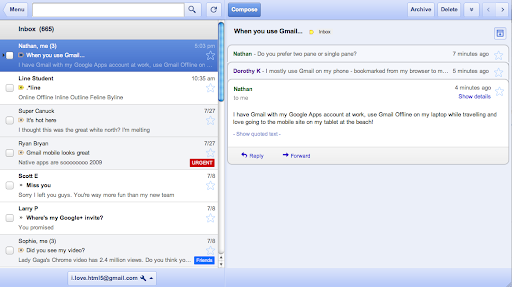
Google Calendar and Google Docs let you seamlessly transition between on- and offline modes. When you’re offline in Google Calendar, you can view events from your calendars and RSVP to appointments. With Google Docs you can view documents and spreadsheets when you don’t have a connection. Offline editing isn’t ready yet, but we know it’s important to many of you, and we’re working hard to make it a reality. To get started using Google Calendar or Google Docs offline, just click the gear icon at the top right corner of the web app and select the option for offline access.
IT administrators can deploy Chrome Web Store apps to users en masse by setting up organizational policies for Chrome.
Today’s world doesn’t slow down when you’re offline and it’s a great feeling to be productive from anywhere, on any device, at any time. We’re pushing the boundaries of modern browsers to make this possible, and while we hope that many users will already find today’s offline functionality useful, this is only the beginning. Support for offline document editing and customizing the amount of email to be synchronized will be coming in the future. We also look forward to making offline access more widely available when other browsers support advanced functionality (like background pages).
--
Posted By The Gmail Team to Official Gmail Blog at 8/31/2011 09:00:00 AM --
You received this message because you subscribed to the Gmail Blog via email.
To unsubscribe, email gmail-blog-pos...@googlegroups.com. More info at http://groups.google.com/group/gmail-blog-posts?hl=en
From: The Gmail Team <gmai...@google.com>
Date: Wed, Aug 31, 2011 at 9:00 AM
Subject: [Official Gmail Blog] Using Gmail, Calendar and Docs without an Internet conn...
To: gmail-bl...@googlegroups.com
Posted by Benoît de Boursetty, Product Manager
(Cross-posted on the Google Enterprise Blog)
The great thing about web apps is that you can access all of your information on the go, and we’ve introduced ways to use Google Apps on a variety of devices like mobile phones and tablets. But it’s inevitable that you’ll occasionally find yourself in situations when you don’t have an Internet connection, like planes, trains and carpools. When we announced Chromebooks at Google I/O 2011, we talked about bringing offline access to our web apps, and now we’re taking our first steps in that direction. Gmail offline will be available today, and offline for Google Calendar and Google Docs will be rolling out over the next week, starting today.
Gmail Offline is a Chrome Web Store app that’s intended for situations when you need to read, respond to, organize and archive email without an internet connection. This HTML5-powered app is based on the Gmail web app for tablets, which was built to function with or without web access. After you install the Gmail Offline app from the Chrome Web Store, you can continue using Gmail when you lose your connection by clicking the Gmail Offline icon on Chrome’s “new tab” page.
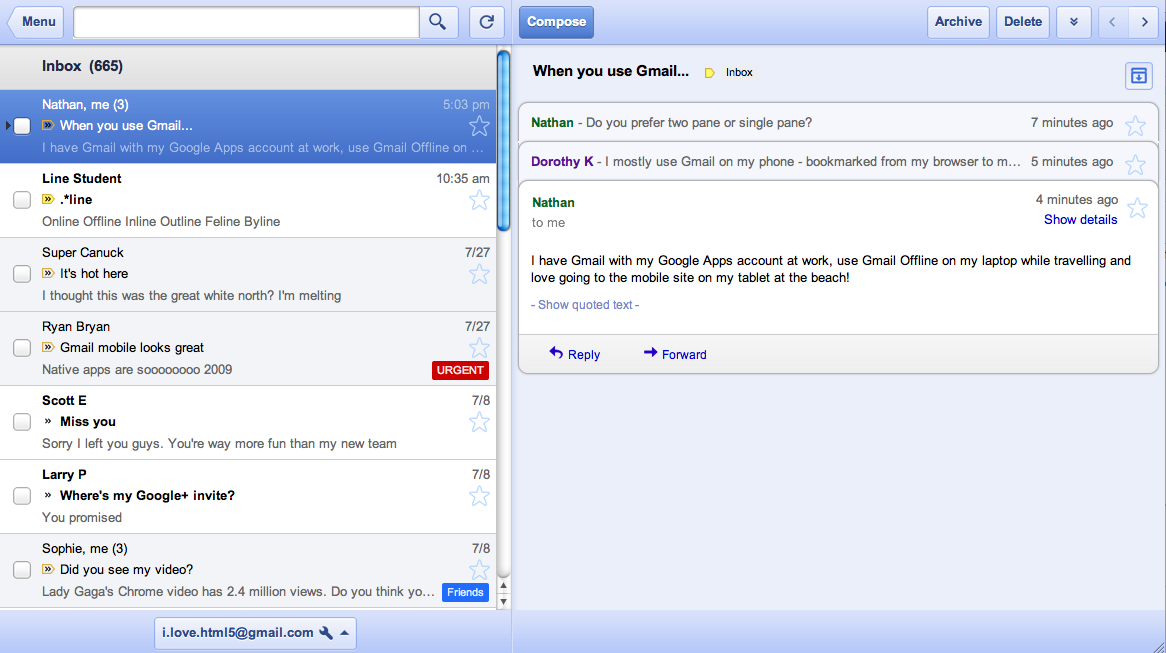
Google Calendar and Google Docs let you seamlessly transition between on- and offline modes. When you’re offline in Google Calendar, you can view events from your calendars and RSVP to appointments. With Google Docs you can view documents and spreadsheets when you don’t have a connection. Offline editing isn’t ready yet, but we know it’s important to many of you, and we’re working hard to make it a reality. To get started using Google Calendar or Google Docs offline, just click the gear icon at the top right corner of the web app and select the option for offline access.
IT administrators can deploy Chrome Web Store apps to users en masse by setting up organizational policies for Chrome.
Today’s world doesn’t slow down when you’re offline and it’s a great feeling to be productive from anywhere, on any device, at any time. We’re pushing the boundaries of modern browsers to make this possible, and while we hope that many users will already find today’s offline functionality useful, this is only the beginning. Support for offline document editing and customizing the amount of email to be synchronized will be coming in the future. We also look forward to making offline access more widely available when other browsers support advanced functionality (like background pages).
--
Posted By The Gmail Team to Official Gmail Blog at 8/31/2011 09:00:00 AM --
You received this message because you subscribed to the Gmail Blog via email.
To unsubscribe, email gmail-blog-pos...@googlegroups.com. More info at http://groups.google.com/group/gmail-blog-posts?hl=en

Dodo
Aug 31, 2011, 8:24:54 PM8/31/11
to Gmail-Users
Jeff--
See my post from earlier today under the topic heading Anything New on
Offline Gmail. Essentially, we said the same thing. The wait is
over! ~Dodo
On Aug 31, 10:41 am, Jeff Grossman <j...@stikman.com> wrote:
> I just received the following e-mail about offline Gmail, Calendar, and Docs
> today from the Google Gmail Blog.
>
> Jeff
>
> ---------- Forwarded message ----------
> From: The Gmail Team <gmailt...@google.com>
> Date: Wed, Aug 31, 2011 at 9:00 AM
> Subject: [Official Gmail Blog] Using Gmail, Calendar and Docs without an
>
> Internet conn...
> To: gmail-bl...@googlegroups.com
>
> Posted by Benoît de Boursetty, Product Manager
>
> *(Cross-posted on the Google Enterprise
> Blog<http://googleenterprise.blogspot.com/>
> )*
> .
See my post from earlier today under the topic heading Anything New on
Offline Gmail. Essentially, we said the same thing. The wait is
over! ~Dodo
On Aug 31, 10:41 am, Jeff Grossman <j...@stikman.com> wrote:
> I just received the following e-mail about offline Gmail, Calendar, and Docs
> today from the Google Gmail Blog.
>
> Jeff
>
> ---------- Forwarded message ----------
> From: The Gmail Team <gmailt...@google.com>
> Date: Wed, Aug 31, 2011 at 9:00 AM
> Subject: [Official Gmail Blog] Using Gmail, Calendar and Docs without an
>
> Internet conn...
> To: gmail-bl...@googlegroups.com
>
> Posted by Benoît de Boursetty, Product Manager
>
> Blog<http://googleenterprise.blogspot.com/>
> )*
>
> The great thing about web apps is that you can access all of your
> information on the go, and we’ve introduced ways to use Google Apps on a
> variety of devices like mobile phones and tablets. But it’s inevitable that
> you’ll occasionally find yourself in situations when you don’t have an
> Internet connection, like planes, trains and carpools. When we announced
> Chromebooks at Google I/O 2011, we talked about bringing offline access to
> our web apps, and now we’re taking our first steps in that direction. Gmail
> offline will be available today, and offline for Google Calendar and Google
> Docs will be rolling out over the next week, starting today.
>
> Gmail Offline is a Chrome Web Store app that’s intended for situations when
> you need to read, respond to, organize and archive email without an internet
> connection. This HTML5-powered app is based on the Gmail web app for
> tablets<http://gmailblog.blogspot.com/2010/04/gmail-on-ipad.html>,
> The great thing about web apps is that you can access all of your
> information on the go, and we’ve introduced ways to use Google Apps on a
> variety of devices like mobile phones and tablets. But it’s inevitable that
> you’ll occasionally find yourself in situations when you don’t have an
> Internet connection, like planes, trains and carpools. When we announced
> Chromebooks at Google I/O 2011, we talked about bringing offline access to
> our web apps, and now we’re taking our first steps in that direction. Gmail
> offline will be available today, and offline for Google Calendar and Google
> Docs will be rolling out over the next week, starting today.
>
> Gmail Offline is a Chrome Web Store app that’s intended for situations when
> you need to read, respond to, organize and archive email without an internet
> connection. This HTML5-powered app is based on the Gmail web app for
> which was built to function with or without web access. After you install
> the Gmail Offline
> app<https://chrome.google.com/webstore/detail/ejidjjhkpiempkbhmpbfngldlkg...>from
> the Gmail Offline
> the Chrome Web Store, you can continue using Gmail when you lose your
> connection by clicking the Gmail Offline icon on Chrome’s “new tab” page.
>
> <http://3.bp.blogspot.com/-FGQCEzdAzTY/Tl2If2IYVhI/AAAAAAAAAMk/gCLlea4...>
> connection by clicking the Gmail Offline icon on Chrome’s “new tab” page.
>
> Google Calendar and Google Docs let you seamlessly transition between on-
> and offline modes. When you’re offline in Google Calendar, you can view
> events from your calendars and RSVP to appointments. With Google Docs you
> can view documents and spreadsheets when you don’t have a connection.
> Offline editing isn’t ready yet, but we know it’s important to many of you,
> and we’re working hard to make it a reality. To get started using Google
> Calendar or Google Docs offline, just click the gear icon at the top right
> corner of the web app and select the option for offline access.
>
> IT administrators can deploy Chrome Web Store apps to users en masse by
> setting up organizational policies for
> Chrome<http://www.chromium.org/administrators/policy-list-3#ExtensionInstall...>
> and offline modes. When you’re offline in Google Calendar, you can view
> events from your calendars and RSVP to appointments. With Google Docs you
> can view documents and spreadsheets when you don’t have a connection.
> Offline editing isn’t ready yet, but we know it’s important to many of you,
> and we’re working hard to make it a reality. To get started using Google
> Calendar or Google Docs offline, just click the gear icon at the top right
> corner of the web app and select the option for offline access.
>
> IT administrators can deploy Chrome Web Store apps to users en masse by
> setting up organizational policies for
> .
>
> Today’s world doesn’t slow down when you’re offline and it’s a great feeling
> to be productive from anywhere, on any device, at any time. We’re pushing
> the boundaries of modern browsers to make this possible, and while we hope
> that many users will already find today’s offline functionality useful, this
> is only the beginning. Support for offline document editing and customizing
> the amount of email to be synchronized will be coming in the future. We also
> look forward to making offline access more widely available when other
> browsers support advanced functionality (like background
> pages<http://blog.chromium.org/2011/02/amping-up-chromes-background-feature...>).
> Today’s world doesn’t slow down when you’re offline and it’s a great feeling
> to be productive from anywhere, on any device, at any time. We’re pushing
> the boundaries of modern browsers to make this possible, and while we hope
> that many users will already find today’s offline functionality useful, this
> is only the beginning. Support for offline document editing and customizing
> the amount of email to be synchronized will be coming in the future. We also
> look forward to making offline access more widely available when other
> browsers support advanced functionality (like background
>
> --
> Posted By The Gmail Team to Official Gmail
> Blog<http://gmailblog.blogspot.com/2011/08/using-gmail-calendar-and-docs-w...>at
> --
> Posted By The Gmail Team to Official Gmail
Dodo
Sep 1, 2011, 12:40:07 AM9/1/11
to Gmail-Users
I now have had a chance to look things over about the new offline
Gmail. My worst fear is confirmed: I'm confused. I already had the
latest version of Chrome; I believe I installed the new offline Gmail;
there is an Offline Google link (with blue envelope; one instruction I
read said I would see a "Gmail Offline" icon; I assume this is the
same as the "Offline Google" blue envelope I just described ) when I
open Chrome; when I click on that, I get my Inbox with a different
appearance, and I don't know what to do next. There is no
synchronization that I am aware of as with the previous (Gears) method
of offline Gmail.
In my reading prior to installing offline Gmail, I read something
about what would be synchronized (had to do with age of messages and
labels), which I also didn't fully grasp. Additionally, I went to
Help, but what I found there was information on the old offline
Gmail. In short, help! I need confirmation that what I've done so
far is correct and specific steps on how to synchronize or what to do
next.
Sorry this is so wordy. I'm trying to be clear so that any assistance
is on track with where I am. I know this will be simple to others in
this group who are more technically savvy, so patience also will be
appreciated. Thanks for any help! ~Dodo
Gmail. My worst fear is confirmed: I'm confused. I already had the
latest version of Chrome; I believe I installed the new offline Gmail;
there is an Offline Google link (with blue envelope; one instruction I
read said I would see a "Gmail Offline" icon; I assume this is the
same as the "Offline Google" blue envelope I just described ) when I
open Chrome; when I click on that, I get my Inbox with a different
appearance, and I don't know what to do next. There is no
synchronization that I am aware of as with the previous (Gears) method
of offline Gmail.
In my reading prior to installing offline Gmail, I read something
about what would be synchronized (had to do with age of messages and
labels), which I also didn't fully grasp. Additionally, I went to
Help, but what I found there was information on the old offline
Gmail. In short, help! I need confirmation that what I've done so
far is correct and specific steps on how to synchronize or what to do
next.
Sorry this is so wordy. I'm trying to be clear so that any assistance
is on track with where I am. I know this will be simple to others in
this group who are more technically savvy, so patience also will be
appreciated. Thanks for any help! ~Dodo

Sarah
Sep 1, 2011, 4:47:24 PM9/1/11
to gmail...@googlegroups.com
The timing of this release makes JohnW's circumstances all the more poignant
On 31 Aug 2011 22:50, "Jeff Grossman" <je...@stikman.com> wrote:
> I just received the following e-mail about offline Gmail, Calendar, and Docs
> today from the Google Gmail Blog.
>
> Jeff
>
> ---------- Forwarded message ----------
> From: The Gmail Team <gmai...@google.com>
> Date: Wed, Aug 31, 2011 at 9:00 AM
> Subject: [Official Gmail Blog] Using Gmail, Calendar and Docs without an
> Internet conn...
> To: gmail-bl...@googlegroups.com
>
>
> Posted by Benoît de Boursetty, Product Manager
>
> I just received the following e-mail about offline Gmail, Calendar, and Docs
> today from the Google Gmail Blog.
>
> Jeff
>
> ---------- Forwarded message ----------
> From: The Gmail Team <gmai...@google.com>
> Date: Wed, Aug 31, 2011 at 9:00 AM
> Subject: [Official Gmail Blog] Using Gmail, Calendar and Docs without an
> Internet conn...
> To: gmail-bl...@googlegroups.com
>
>
> Posted by Benoît de Boursetty, Product Manager
>
> The great thing about web apps is that you can access all of your
> information on the go, and we’ve introduced ways to use Google Apps on a
> variety of devices like mobile phones and tablets. But it’s inevitable that
> you’ll occasionally find yourself in situations when you don’t have an
> Internet connection, like planes, trains and carpools. When we announced
> Chromebooks at Google I/O 2011, we talked about bringing offline access to
> our web apps, and now we’re taking our first steps in that direction. Gmail
> offline will be available today, and offline for Google Calendar and Google
> Docs will be rolling out over the next week, starting today.
>
> Gmail Offline is a Chrome Web Store app that’s intended for situations when
> you need to read, respond to, organize and archive email without an internet
> connection. This HTML5-powered app is based on the Gmail web app for
> information on the go, and we’ve introduced ways to use Google Apps on a
> variety of devices like mobile phones and tablets. But it’s inevitable that
> you’ll occasionally find yourself in situations when you don’t have an
> Internet connection, like planes, trains and carpools. When we announced
> Chromebooks at Google I/O 2011, we talked about bringing offline access to
> our web apps, and now we’re taking our first steps in that direction. Gmail
> offline will be available today, and offline for Google Calendar and Google
> Docs will be rolling out over the next week, starting today.
>
> Gmail Offline is a Chrome Web Store app that’s intended for situations when
> you need to read, respond to, organize and archive email without an internet
> connection. This HTML5-powered app is based on the Gmail web app for
> which was built to function with or without web access. After you install
> the Gmail Offline
> the Chrome Web Store, you can continue using Gmail when you lose your
> connection by clicking the Gmail Offline icon on Chrome’s “new tab” page.
>
> <http://3.bp.blogspot.com/-FGQCEzdAzTY/Tl2If2IYVhI/AAAAAAAAAMk/gCLlea43NhY/s1600/gmailoffline.png>
> Google Calendar and Google Docs let you seamlessly transition between on-
> and offline modes. When you’re offline in Google Calendar, you can view
> events from your calendars and RSVP to appointments. With Google Docs you
> can view documents and spreadsheets when you don’t have a connection.
> Offline editing isn’t ready yet, but we know it’s important to many of you,
> and we’re working hard to make it a reality. To get started using Google
> Calendar or Google Docs offline, just click the gear icon at the top right
> corner of the web app and select the option for offline access.
>
> IT administrators can deploy Chrome Web Store apps to users en masse by
> setting up organizational policies for
> .
>
> Today’s world doesn’t slow down when you’re offline and it’s a great feeling
> to be productive from anywhere, on any device, at any time. We’re pushing
> the boundaries of modern browsers to make this possible, and while we hope
> that many users will already find today’s offline functionality useful, this
> is only the beginning. Support for offline document editing and customizing
> the amount of email to be synchronized will be coming in the future. We also
> look forward to making offline access more widely available when other
> browsers support advanced functionality (like background
>
>
> --
> Posted By The Gmail Team to Official Gmail
> 8/31/2011 09:00:00 AM
>
> --
> You received this message because you subscribed to the Gmail Blog via
> email.
> To unsubscribe, email gmail-blog-pos...@googlegroups.com. More
> info at http://groups.google.com/group/gmail-blog-posts?hl=en
>
> --
> You received this message because you are subscribed to the Google Groups "Gmail-Users" group.
> To post to this group, send email to gmail...@googlegroups.com.
> To unsubscribe from this group, send email to gmail-users...@googlegroups.com.
> For more options, visit this group at http://groups.google.com/group/gmail-users?hl=en.
>
> To post to this group, send email to gmail...@googlegroups.com.
> To unsubscribe from this group, send email to gmail-users...@googlegroups.com.
> For more options, visit this group at http://groups.google.com/group/gmail-users?hl=en.
>

Venable
Sep 3, 2011, 4:40:39 PM9/3/11
to Gmail-Users
Extremely disappointing. The tablet interface is not the greatest, but
the real weakness is the limited storage & functionality.
Back to FF3.6 with Gears, I guess...
the real weakness is the limited storage & functionality.
Back to FF3.6 with Gears, I guess...
Venable
Sep 3, 2011, 4:44:30 PM9/3/11
to Gmail-Users
On Sep 1, 12:40 am, Dodo <depfah...@gmail.com> wrote:
> I now have had a chance to look things over about the new offline
> Gmail. My worst fear is confirmed: I'm confused. I already had the
> latest version of Chrome; I believe I installed the new offline Gmail;
> there is an Offline Google link (with blue envelope; one instruction I
> read said I would see a "Gmail Offline" icon; I assume this is the
> same as the "Offline Google" blue envelope I just described ) when I
> open Chrome; when I click on that, I get my Inbox with a different
> appearance, and I don't know what to do next.
click on a message to read or click on compose to write.
DEP/Dodo
Sep 4, 2011, 12:34:53 AM9/4/11
to gmail...@googlegroups.com
I've tried it a little now and am so glad to have the capability of offline Gmail back with Chrome. Turns out I had correctly installed it. The big shocker was synchronization. The previous way, with Gears, took a long time; messages were downloaded first followed by attachments. I had to decide the span of time to synchronize messages. I have no idea how/when synchronization occurred now. It happened w/o anything written to tell me it was in progress and was done in an instant! So I thought I hadn't installed offmail Gmail properly. I've studied how Gmail synchronizes and am hazy on two of the three info bullets. (See "How much data is synchronized?" in the Help feature within offline Gmail.) Finally, I was able to open attachments, at least the one I tested (a YouTube video). With the old offline Gmail, most of the time I couldn't view attachments.
Finally, this really confuses me: I was working offline earlier today. As expected, my sent messages went to Drafts. When I returned home, the messages got sent and copies remained in Drafts! Further, unlike the previous Gears offline Gmail, they were sent before I opened offline Gmail, when I was in my regular online Gmail. I'm really puzzled by these two occurrences. ~Dodo
DEP/Dodo
Sep 4, 2011, 3:43:58 AM9/4/11
to gmail...@googlegroups.com
Update: I just went to the one computer on which I have offline Gmail installed, accessed it, and there in the lower left corner, it stated synchronization was occurring and what percent was complete! It fully synchronized quickly. This was after I had spent time on another computer doing Gmail while online. When I installed Gmail offline, perhaps a similar notification about synchronization was there but I just didn't see it? If someone happens to install it subsequent to reading this, please post if you see a notation about synchronization. ~Dodo

bill hansen
Sep 4, 2011, 7:31:26 AM9/4/11
to gmail...@googlegroups.com
In my case, "synching" occurrs if I have both offline and online Gmail open. It doesn't occurr the instant I open offline Gmail, but after several seconds. AND - most importantly - it does not synch all the emails! For example, just now I had 19 new emails in Gmail, but only 12 of them synched. Most of those which didn't synch were from the Gmail users group, but even that's not consistent. A couple of emails from the Gmail users group did synch.
Bill
--
DEP/Dodo
Sep 4, 2011, 10:48:23 PM9/4/11
to gmail...@googlegroups.com
Perhaps you will find this helpful, Bill:
As I wrote in another post, I found the second two bullets somewhat difficult to understand. For example, I don't know what an "alpha" label is. ~Dodo

Marko Vukovic
Sep 5, 2011, 4:43:18 AM9/5/11
to gmail...@googlegroups.com
Hi D
On Sunday, September 4, 2011, DEP/Dodo wrote:
--
Marko
YouTube videos are not attachments, they are simply links.
I have also noticed that it sometimes takes more than a few seconds for the Drafts folder to sync after a message is actually sent. I'm guessing there will be issues as this offline app is still in beta.
On Sunday, September 4, 2011, DEP/Dodo wrote:
I've tried it a little now and am so glad to have the capability of offline Gmail back with Chrome. Turns out I had correctly installed it. The big shocker was synchronization. The previous way, with Gears, took a long time; messages were downloaded first followed by attachments. I had to decide the span of time to synchronize messages. I have no idea how/when synchronization occurred now. It happened w/o anything written to tell me it was in progress and was done in an instant! So I thought I hadn't installed offmail Gmail properly. I've studied how Gmail synchronizes and am hazy on two of the three info bullets. (See "How much data is synchronized?" in the Help feature within offline Gmail.) Finally, I was able to open attachments, at least the one I tested (a YouTube video). With the old offline Gmail, most of the time I couldn't view attachments.
Finally, this really confuses me: I was working offline earlier today. As expected, my sent messages went to Drafts. When I returned home, the messages got sent and copies remained in Drafts! Further, unlike the previous Gears offline Gmail, they were sent before I opened offline Gmail, when I was in my regular online Gmail. I'm really puzzled by these two occurrences. ~Dodo
--
Marko
--
Marko
DEP/Dodo
Sep 5, 2011, 9:47:38 AM9/5/11
to gmail...@googlegroups.com
More good info--thank you, Marko. ~Dodo
DEP/Dodo
Sep 5, 2011, 9:57:44 AM9/5/11
to gmail...@googlegroups.com
I didn't know that as they are always presented as attachments; that is, there is an attachment icon in the list. ~Dodo
On Mon, Sep 5, 2011 at 1:43 AM, Marko Vukovic <marko....@gmail.com> wrote:
DEP/Dodo
Sep 5, 2011, 10:11:19 AM9/5/11
to gmail...@googlegroups.com
I keep forgetting this and then start fretting when things don't go as they should--or as I think they should. Thanks for the reminder. ~Dodo
Thanks for the reminder. ~DodoOn Mon, Sep 5, 2011 at 1:43 AM, Marko Vukovic <marko....@gmail.com> wrote:

JohnW
Sep 5, 2011, 11:47:20 AM9/5/11
to gmail...@googlegroups.com
> For example, I don't know what an "alpha" label is. ~Dodo
It's not an 'alpha label' - merely a label which is (in that instance) called "alpha"!! [They could have used any word which is usable as a label in your mailbox.]
DEP/Dodo
Sep 5, 2011, 4:05:03 PM9/5/11
to gmail...@googlegroups.com
I considered that the word "alpha" was used as a substitute for "any" label, which I would have understood. But the Help info used that terminology: "A typical Trashed message will not be downloaded, but a Trashed message that contains the label 'alpha' will."
It's good to still get feedback from you here despite the TC fiasco. ~Dodo
DEP/Dodo
Sep 5, 2011, 4:05:53 PM9/5/11
to gmail...@googlegroups.com
I discovered this early on as well. ~Dodo
Reply all
Reply to author
Forward
0 new messages