
User don't have permissions in Git
494 views
Skip to first unread message

Madhu Marella
May 17, 2022, 8:55:13 AM5/17/22
to git-for-windows
Hi Team,
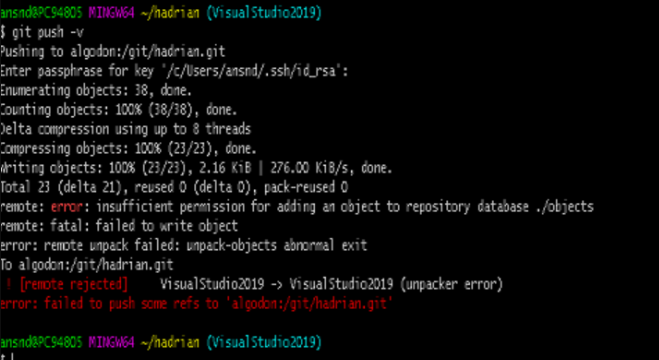
Please assist as one of my users is getting the below error.

Konstantin Khomoutov
May 17, 2022, 9:42:49 AM5/17/22
to Madhu Marella, git-for-windows
On Mon, May 16, 2022 at 10:25:59PM -0700, Madhu Marella wrote:
> Please assist as one of my users is getting the below error.
> [image: Capture.PNG]
The error message of interest is
> Please assist as one of my users is getting the below error.
> [image: Capture.PNG]
| remote: insufficient permission for adding an object to repository database
The key part here is that "remote:" prefix - it means the error is reported by
the Git process which is handling the push operation on the receiving side,
and it means the problem is there.
From the text surrounding the error message I can conjure you push via the SSH
protocol. To understand the problem better, the push operation - in the case
supposedly captured by the image - happens like this:
1. A local Git process which is handling the `git push` command uses a client
program implementing the SSH protocol to "dial" and then log into the
remote computer.
2. The remote shell started during that SSH session starts a Git process
on that remote computer. That Git process is told to handle the push
operation - that is, to receive the updates from the local Git process.
3. The two Git processes exchange data. The data is shoveled back and forth
by the established SSH session.
Ostensibly, the remote Git process fails to handle the updates sent to it
due to insufficient permissions to the target remote repository which the
account used to run that remote Git process possess.
What to do about it, highly depends on what actually happens.
The SSH protocol has the concept of the user name: to log into the
remote system via SSH you have to tell it what your user (account) name is.
The text on the image misses that information, and this could mean two things:
- The user name to use is configured in the client-side SSH configuration,
and is not seen.
- The SSH protocol is using the name of the currently logged in local user,
which is "ansnd" or something like this - it's pretty indecypherable on
such a low-resolution image.
No matter what that user is, it has insufficient permissions to access the
files in the remote Git repository. This can happen due to various reasons,
and highly depends on how the remote repository and the access to it has been
set up.
One possible case is that the repository is set up to be accessed by different
user accounts - for instance, each user has its own account on the remote
system, - but whoever set it up did not arrange for the repository to set
proper permissions on the new files created by Git.
When multiple users access the same Git repository, their accounts usually
have to be joined into the same group and the repository has to be made shared
for that group - see the description of the "--shared" command-line option in
the git-init manual page.
Another possible case may be someone meddled with the repository while running
with elevated privileges - say, by means of `su` or `sudo` or whatever.
This is quite typical for inexperience users.
Still, it may be something else completely. Since you have communicated almost
zero information about the problem, I'm going to stop there as I'm not sure I
can do more with my psychic debugging skills in this case.
Please next time copy (and paste to the message) the error text itself,
do not post images of text.
Reply all
Reply to author
Forward
0 new messages