
Re: data and manual colours doesn't fit - how to solve it ?
49 views
Skip to first unread message

John Kane
Jul 1, 2012, 12:04:16 PM7/1/12
to ggp...@googlegroups.com
You are using COULEUR for the fill andbCD_COULEUR for the legend colours.
To supply data for an example please use dput(). It produces an easily used data set. The data as you supplied is is very difficult to use.
On Sunday, July 1, 2012 9:30:08 AM UTC-4, Anthony wrote:
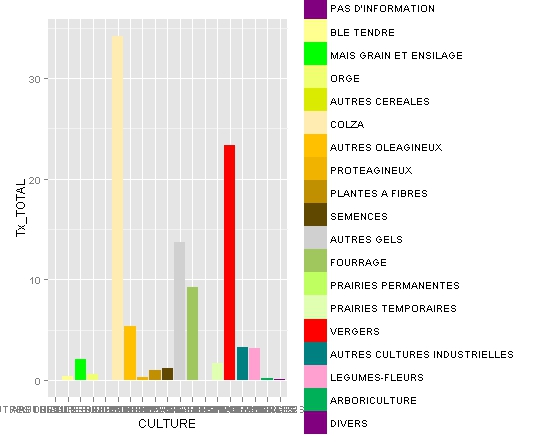
Hello,I'm a new ggplot user and I got problems using scale_fill_manual function.Here is the head of the data.frame Resultat which I want to ggplot :CODE_CULTURE CULTURE CD_COULEUR SURF_DPT60 1 0 PAS D'INFORMATION #800080 NA 2 1 BLE TENDRE #FFFF90 1490.6 3 2 MAIS GRAIN ET ENSILAGE #00FF00 676.8 4 3 ORGE #F0FF70 289.5 5 4 AUTRES CEREALES #DAEB00 1.9 6 5 COLZA #FFECB0 195.4 Tx_DPT60 SURF_DPT76 Tx_DPT76 SURF_DPT80 Tx_DPT80 SURF_TOTALE 1 NA NA NA 0.0 0.0 0.0 2 33.4 6901.0 29.7 9581.6 38.5 17973.2 3 15.2 3160.6 13.6 3371.7 13.5 7209.1 4 6.5 2157.6 9.3 2373.1 9.5 4820.2 5 0.0 87.1 0.4 123.1 0.5 212.1 6 4.4 1124.4 4.8 1500.2 6.0 2820.0 Tx_TOTAL 1 0.0 2 34.2 3 13.7 4 9.2 5 0.4 6 5.4The column CD_COULEUR contains the fill value I want for each culture.When I do :ggplot(Resultat, aes(x = CULTURE, y = Tx_TOTAL, fill=CULTURE)) + geom_bar(width = 0.9) + scale_fill_manual(name="LEGENDE",values = Resultat$CD_COULEUR, labels=Resultat$CULTURE)I obtain the following image :
My problem is that the legend as got the right colour for the right name but the colour use to fille the diagram are not the right one (eg. data at 34 is "BLE TENDRE" and not "COLZA").Can anybody explain me what is wrong and how can I have the right colour for the right data ?Regards,Anthony

Anthony
Jul 1, 2012, 3:34:33 PM7/1/12
to ggp...@googlegroups.com
Thanks a lot for your answer. I still I the problem and I really can't see what to do to solve it.
I tried to simplify my data to explain my problem better.
# data
# COULEUR VALUES ARE HEXA CODE FOR = yellow, green, red, brown
COULEUR<-c("#FFFF90", "#00FF00", "#FF0000", "#604800")
CULTURE<-c("BLE TENDRE", "MAIS GRAIN", "VERGERS", "SEMENCES")
TAUX<-c(0.3, 0.1, 0.4, 0.2)
df<-data.frame(CULTURE,TAUX,COULEUR)
# ggplot code
ggplot(df, aes(x = CULTURE, y = TAUX, fill=COULEUR)) +
geom_bar(width = 0.9) +
scale_fill_manual(name="LEGENDE",values = df$COULEUR, labels=df$CULTURE)

With this code :
- label doesn't fit with the data (for exemple BLE TENDRE is red in the data and blue in the label)
- colours are not conform with their hexacode.
Thanks a lot for your help !
Anthony
Message has been deleted
Message has been deleted

Justine Röhmel
Jul 1, 2012, 4:03:15 PM7/1/12
to Anthony, ggp...@googlegroups.com
ggplot(df,aes(x=CULTURE,y=TAUX,fill=CULTURE))+geom_bar(width=0.9)+
scale_fill_manual(name="LEGENDE",values=c("BLE TENDRE"="#FFFF90","MAIS GRAIN"="#00FF00","SEMENCES"="#FF0000","VERGERS"="#604800"))
should work. By using colours AND labels you enforced this order in your example.
Best,
Justine
scale_fill_manual(name="LEGENDE",values=c("BLE TENDRE"="#FFFF90","MAIS GRAIN"="#00FF00","SEMENCES"="#FF0000","VERGERS"="#604800"))
should work. By using colours AND labels you enforced this order in your example.
Best,
Justine
2012/7/1 Anthony <anthon...@gmail.com>
Thanks a lot for your answer. I still I the problem and I really can't see what to do to solve it.I tried to simplify my data to explain my problem better.# data
# COULEUR VALUES ARE HEXA CODE FOR = yellow, green, red, brownCOULEUR<-c("#FFFF90", "#00FF00", "#FF0000", "#604800")CULTURE<-c("BLE TENDRE", "MAIS GRAIN", "VERGERS", "SEMENCES")TAUX<-c(0.3, 0.1, 0.4, 0.2)df<-data.frame(CULTURE,TAUX,COULEUR)# ggplot code
ggplot(df, aes(x = CULTURE, y = TAUX, fill=COULEUR)) +geom_bar(width = 0.9) +
scale_fill_manual(name="LEGENDE",values = df$COULEUR, labels=df$CULTURE)
With this code :- label doesn't fit with the data (for exemple BLE TENDRE is red in the data and blue in the label)- colours are not conform with their hexacode.
Thanks a lot for your help !
Anthony--
You received this message because you are subscribed to the ggplot2 mailing list.
Please provide a reproducible example: https://github.com/hadley/devtools/wiki/Reproducibility
To post: email ggp...@googlegroups.com
To unsubscribe: email ggplot2+u...@googlegroups.com
More options: http://groups.google.com/group/ggplot2
Anthony
Jul 1, 2012, 4:36:01 PM7/1/12
to ggp...@googlegroups.com, Anthony
Thanks a lot Justine. It works.The problem is that this method for scale fill manual is really... manual ;-)It seems that my problem comes from the fact that ggplot sort my data frame from A to Z whereas scale_fill_manual take the data in the same order as written in the data frame.Is their an option which could forbid ggplot to sort the data ?Regards,Anthony

Dennis Murphy
Jul 1, 2012, 6:31:44 PM7/1/12
to Anthony, ggp...@googlegroups.com
Hi:
Look at
> str(df)
'data.frame': 4 obs. of 3 variables:
$ CULTURE: Factor w/ 4 levels "BLE TENDRE","MAIS GRAIN",..: 1 2 4 3
$ TAUX : num 0.3 0.1 0.4 0.2
$ COULEUR: Factor w/ 4 levels "#00FF00","#604800",..: 4 1 3 2
Notice that both CULTURE and COULEUR are factors, and observe that
their default levels are lexicographically ordered. You need to order
the levels of one of the two factors to be compatible with the
ordering of the other; one way is to match them using the values =
argument of scale_fill_manual(), but another way is to reorder the
levels of one or both of the factors in the data frame prior to
invoking ggplot().
HTH,
Dennis
Look at
> str(df)
'data.frame': 4 obs. of 3 variables:
$ CULTURE: Factor w/ 4 levels "BLE TENDRE","MAIS GRAIN",..: 1 2 4 3
$ TAUX : num 0.3 0.1 0.4 0.2
$ COULEUR: Factor w/ 4 levels "#00FF00","#604800",..: 4 1 3 2
Notice that both CULTURE and COULEUR are factors, and observe that
their default levels are lexicographically ordered. You need to order
the levels of one of the two factors to be compatible with the
ordering of the other; one way is to match them using the values =
argument of scale_fill_manual(), but another way is to reorder the
levels of one or both of the factors in the data frame prior to
invoking ggplot().
HTH,
Dennis
Anthony
Jul 3, 2012, 4:42:23 PM7/3/12
to ggp...@googlegroups.com, Anthony
Thank you very much Justine and Dennis.
I'm a newbie in R and moreover in ggplot. Your messages helped me a lot to understand how worked factor.
Regards,
Anthony

Charlotte Wickham
Jul 3, 2012, 5:33:47 PM7/3/12
to Anthony, ggp...@googlegroups.com
Perhaps scale_identity is really what you want (especially if you
really have more than 4 colour-culture pairs):
ggplot(df, aes(x = CULTURE, y = TAUX, fill=COULEUR)) +
geom_bar(width = 0.9) +
scale_fill_identity(name="LEGENDE")
No legend, but it is redundant in this example anyway.
Charlotte
really have more than 4 colour-culture pairs):
ggplot(df, aes(x = CULTURE, y = TAUX, fill=COULEUR)) +
geom_bar(width = 0.9) +
No legend, but it is redundant in this example anyway.
Charlotte
Reply all
Reply to author
Forward
0 new messages