
Graphical displays not showing on WSL through VcXsrv
1,234 views
Skip to first unread message

Arthur S
May 10, 2022, 3:41:00 PM5/10/22
to GAMA
Hi everyone,
I use GAMA on WSL (dcc3bf6a zip release (1.8.2), on Ubuntu 20.04.4 on Windows 11) and visualise it by exporting the display through VcXsrv, since Gama doesn't work with WSLg*. Everything works properly and simulations run, but the display parts are not "forwarded" properly :
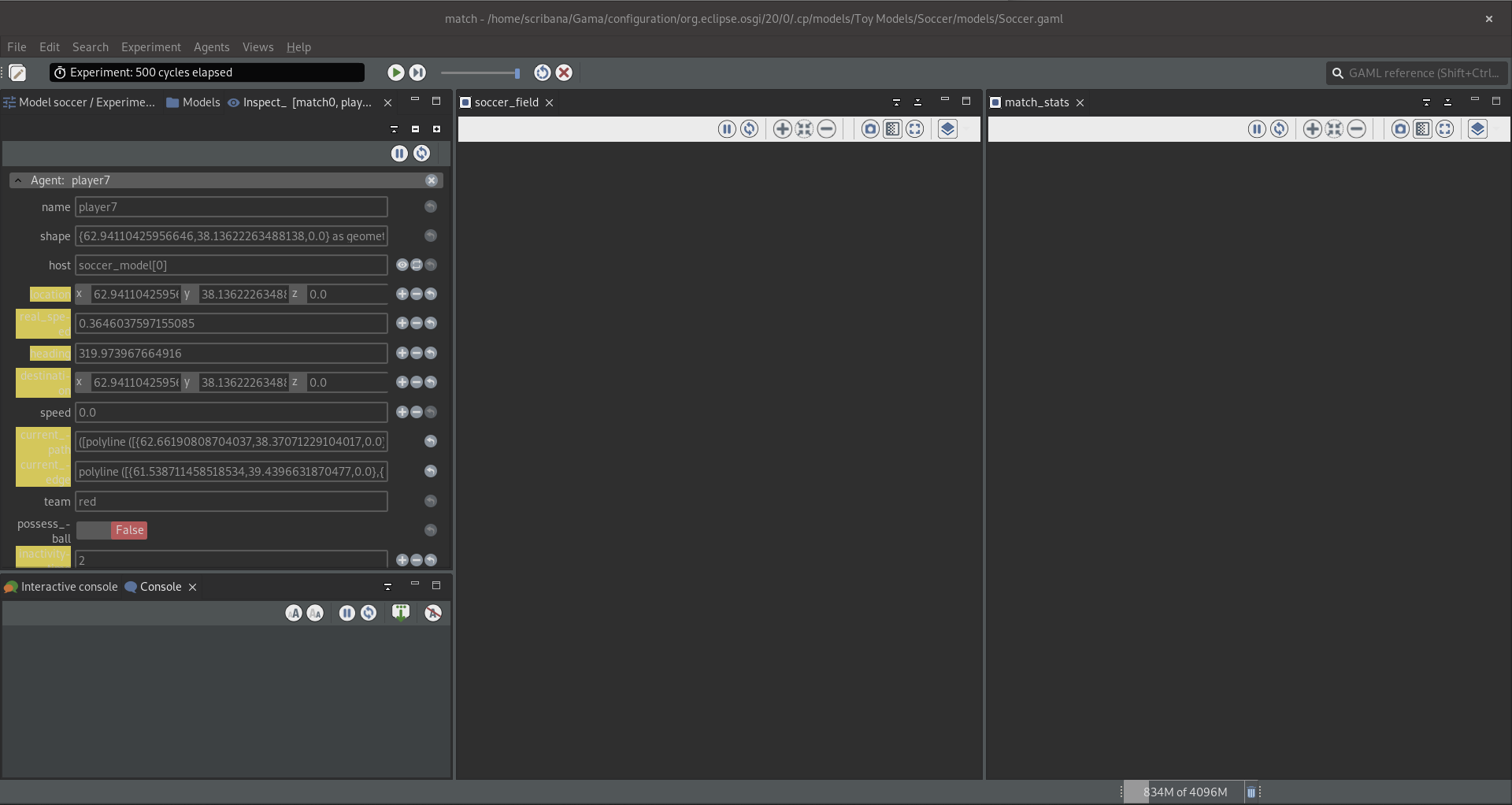
Note that it works properly on the VM with a DE, so no issue with the build, but that the latency makes it unusable like that.
Has anyone faced and resolved the same issue?
Cheers,
Arthur
*Here's what Gama gives with WSLg, it seems to fail to load the ui parts :


Lucas Grosjean
May 11, 2022, 12:21:13 AM5/11/22
to GAMA
Hello Arthur
I tested GAMA on WSL (c76d955d
Linux deb with JDK release (1.8.2), on Ubuntu 20.04.3 on Windows 10), I'm exporting the display on Xming (https://sourceforge.net/projects/xming/).
The display are fine and you can start simulation.
Step to reproduce:
0) Install whatever version of gama for linux you want (Zip or deb)
1) Open Xming on Windows
2) On Linux CMD : export DISPLAY=:0
3) On Linux CMD: ./Gama
4) The display are now on Xming


The only issue with gama on WSL is that model using OpenGL won't display anything.
I hope it help you!
Lucas
Arthur S
May 11, 2022, 12:15:02 PM5/11/22
to GAMA
Hi Lucas,
Thanks for your answer!
It turns out that Gama somehow still uses WSLg, even when launched on a specific display relayed with VcXsrv/Xming. I have no clue of why it does, even when I
durably
export the display to specifically the one VcXsrv/Xming shows, with .bashrc. I thus shut down WSLg completely as a test, by editing the .wslconfig file, and it does work that way. So the problem indeed comes form WSLg (I've heard Wayland is known to cause issues).
The problem is that I use WSLg for a number of other programs, some of which don't seem to work with an X server, and thus cannot durably have it off like that... Any way to durably have Gama display on a specific display? Otherwise a solution could be to write a windows shell script that turns WSL off, edits the .wslconfig file, starts
VcXsrv, turns wsl on again and then launches Gama, but what a hassle...
Arthur
Arthur S
May 12, 2022, 8:43:37 AM5/12/22
to GAMA
Hi again,
Let me add a clearer answer for who would need it. Note that the "load ui parts" as a note of my first email is no more, I think it was due to a conflict between WSLg and the export DISPLAY command in the Linux VM.
System info :
- Windows 11 with Ubuntu 20.04.4 on WSL2 (note that WSLg is embedded natively),
- Gama 1.8.2 dcc3bf6a zip release, with JDK or OpenJDK 17 (tested both with all scenarios, no differences),
- VcXsrv in scenario 2 (I did not test everything with XMing, but every time I did, I had the same behaviour than with VcXsrv),
- Windows' Remote Desktop with xrdp in scenario 3 (setup like this, or something similar),
- Command to export display in Ubuntu (in .bashrc on scenario 2 and 3) : export DISPLAY=$(cat /etc/resolv.conf | grep nameserver | awk '{print $2}'):0 && export LIBGL_ALWAYS_INDIRECT=true,
- A .wslconfig file lives in Windows user directory ( C:\Users\Me\), with the following : [wsl2] guiApplications=true/false.
Case 1 : "Vanilla" WSLg
Description :
guiApplications=true, VcXsrv not running and no DISPLAY forwarded by the VM. Gama launched from linux bash :
./Gama.
Results :
- Gama launches, although not in a normal WSLg window...
- Java2D -> runs, but displays nothing (first screenshot)
- OpenGL -> crash

(A normal WSLg window for reference :
 )
)Case 2 : WSLg disabled, display forwarded to X server
Description :
guiApplications=false, VcXsrv runs (options : multiple windows, display 0 and -ac) and DISPLAY forwarded through the command mentioned above.
Gama launched from linux bash :
./Gama.
Results :
- Gama launches in an X window, but somehow the "Dark theme" option is greyed out...
- Java2D -> works properly
- OpenGL -> works properly (! @Lucas)

(The issue here being that I need to use WSLg for several other things, so this is not a durable solution)
Case 3 : Desktop environment
Description :
xfce4 seen through xrdp and Remote Desktop. Gama launched by double clicking the binary file or
with ./Gama.
Results :
- Gama launches properly.
- Java2D -> Runs
- OpenGL -> Runs very slowly (note that this is a fresh Gama install, I did not mess with the settings and the INI)

I hope it is clearer. Now my hope would be to have WSLg working properly, since it is the handier. What could be the issue with these displays not showing?
Good day all,
Arthur
Arthur S
May 13, 2022, 9:15:53 AM5/13/22
to GAMA
Hi again,
Here's the log for when it crashes with OpenGL (same as in case 1 in the previous mail, only with a fresh Debian install instead of Ubuntu and Gama with JDK, 1.8.2 RC 16152ad). Again, Java2D runs but shows nothing and OpenGL crashes.
Last breathe in terminal :
Creating the SceneHelper
Loading redefined SWTAccessor
#
# A fatal error has been detected by the Java Runtime Environment:
#
# SIGSEGV (0xb) at pc=0x00007fe57cff9132, pid=30480, tid=30481
#
# JRE version: OpenJDK Runtime Environment Temurin-17.0.3+7 (17.0.3+7) (build 17.0.3+7)
# Java VM: OpenJDK 64-Bit Server VM Temurin-17.0.3+7 (17.0.3+7, mixed mode, sharing, tiered, compressed oops, compressed class ptrs, g1 gc, linux-amd64)
# Problematic frame:
# C [libX11.so.6+0x39132] XQueryExtension+0x52
#
# No core dump will be written. Core dumps have been disabled. To enable core dumping, try "ulimit -c unlimited" before starting Java again
#
# An error report file with more information is saved as:
# /home/debi/hs_err_pid30480.log
#
# If you would like to submit a bug report, please visit:
# https://github.com/adoptium/adoptium-support/issues
# The crash happened outside the Java Virtual Machine in native code.
# See problematic frame for where to report the bug.
Loading redefined SWTAccessor
#
# A fatal error has been detected by the Java Runtime Environment:
#
# SIGSEGV (0xb) at pc=0x00007fe57cff9132, pid=30480, tid=30481
#
# JRE version: OpenJDK Runtime Environment Temurin-17.0.3+7 (17.0.3+7) (build 17.0.3+7)
# Java VM: OpenJDK 64-Bit Server VM Temurin-17.0.3+7 (17.0.3+7, mixed mode, sharing, tiered, compressed oops, compressed class ptrs, g1 gc, linux-amd64)
# Problematic frame:
# C [libX11.so.6+0x39132] XQueryExtension+0x52
#
# No core dump will be written. Core dumps have been disabled. To enable core dumping, try "ulimit -c unlimited" before starting Java again
#
# An error report file with more information is saved as:
# /home/debi/hs_err_pid30480.log
#
# If you would like to submit a bug report, please visit:
# https://github.com/adoptium/adoptium-support/issues
# The crash happened outside the Java Virtual Machine in native code.
# See problematic frame for where to report the bug.
Cheers,
Arthur

Alexis Drogoul (IRD)
May 13, 2022, 2:17:28 PM5/13/22
to gama-p...@googlegroups.com
Hi,
Have you tried with the previous VM (Temurin 17.0.2) ? Same thing happens ?
Alexis

--
You received this message because you are subscribed to the Google Groups "GAMA" group.
To unsubscribe from this group and stop receiving emails from it, send an email to gama-platfor...@googlegroups.com.
To view this discussion on the web visit https://groups.google.com/d/msgid/gama-platform/2b214e44-5174-46ec-9cb8-eb077e59712en%40googlegroups.com.
<hs_err_pid28781.log>
Reply all
Reply to author
Forward
0 new messages