
how to kill an ESP8266
366 views
Skip to first unread message

GRB352
Jun 5, 2016, 6:01:14 PM6/5/16
to Gainesville Hackerspace
If you've talked to me in the past few months I've probably gone on and on about the ESP8266 as a wifi/serial transceiver or as a possible replacement for a nano/micro. I don't really have time for a full write up at the moment i will just quickly point out that you don't have to use the nodeMCU firmware (http://nodemcu.com/) (http://nodemcu-build.com/) which is pretty cool all by itself but you can use the Arduino IDE.(https://github.com/esp8266/Arduino)
anyways, I've managed to kill 3 of them so far and since I know a couple other members have recently started playing with the ESP12E (one of the newer ESP8266 family) I am posting direction on how to kill an ESP12E for your entertainment and maybe for help in finding methods that don't involve dead chips.
The cheapest place to get the ESP-12E is probably aliexpress, but I've been buying from this ebay seller http://r.ebay.com/1G6418 because is in the US and has a great combined shipping deal.
1. I killed the first chip by accidentally powering it with 5v instead of 3.2v...it lasted about 10 seconds....don't do that, even unintentionally.
2. The 2nd chip I killed while playing with a 3d printer firmware. something about the way it stored something in the flash....possibly this one is recoverable (http://internetofhomethings.com/homethings/?p=396
3. lastly I've been trying to connect a 12e to an uno over the serial pins. since one device uses 3.2v logic and the other uses 5v you need either a level shifter or a voltage divider.. I got the level shifter to work, but not reliably. I read some stuff in the 3d printer hardware groups about timing issues from the level shifters so I tried to build a voltage divider:
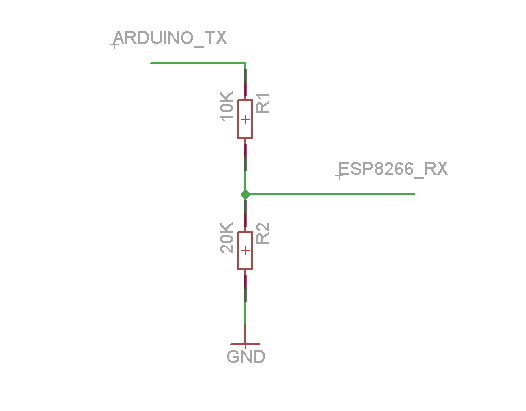
The above image worked just fine, and they said that for the espTX to ArduinoRX you probably don't need to worry because 3.2v is enough for the arduinoRX to get what it needs and if not then you need to build a level shifter.
Well I can tell you that you do need to worry. This worked fine for about 30min, then started to reset itself after a short while, then it just locked with the LED always on and dumping errors out the serial.
So in short, use proper voltage and a level shifter.
GRB352
Jul 10, 2016, 5:26:17 PM7/10/16
to Gainesville Hackerspace
I actually seem to be getting somewhere on this esp8266 project...I mean, I haven't burned out a 12e in weeks ;-)
The esp8266 robot control project has made some great progress too, I'll post a video update on that as soon as I update the code with all the "lessons learned" from deltabuddy.
GRB352
Jul 30, 2016, 7:15:45 AM7/30/16
to Gainesville Hackerspace
More progress on this project. My printer is sprouting an extra arm.
That roboremo app is pretty darn sweet. I don't think I'll be using the accelerometer control for anything, but it is neat to watch.
I figured I would start with servo's and pull them back off if it turns out I can't update them quickly enough for fast travels. The springs alone actually do a pretty good job of keeping the extruder centered, but still easy to be pulled in whatever direction. Once the servo arms are hooked up though, the springs don't do much. The whole arm is a little wobbly, but I can stiffen it up some.
I also still need to work on my serial gcode handling, it occasionally picks up some junk for the Z value and then attempts to move there. I have most of it cleaned up, but not quite enough to hook everything up yet.
GRB352
Jul 31, 2016, 8:48:04 PM7/31/16
to Gainesville Hackerspace
I found a new way to kill an ESP-12E, or at least kill the wifi...this was a read head scratcher, as I didn't notice the dead wifi, until after making tons of updates to my firmware.then I had to peel them, back one by one until the wifi came back.
If you do something that takes too long, in my case a 'analogRead', and do it too often (like in the main loop), it will kill the wifi background process. In some instances using "yeild()" after a long operation will essentially do a delay(0) and give it time. a delay will do it also, but delay slows everything, not just the analogRead. I had make a counter check to make it read the value less often,
if (bCount == 1000) {
int button1State = analogRead(button1Pin);
  bCount = 0;
} else {
  bCount ++;
}
Reply all
Reply to author
Forward
0 new messages