
New FoxBin2Prg Tools

Mike Potjer

The tools all appear highlighted in yellow indicating that they are custom tools. If they become part of the official Thor repository, you will want to delete them from the "My Tools" folder so that you get the latest version through Thor updates.
The first tool, Create/Edit FoxBin2Prg "SendTo" shortcuts, displays a dialog that makes it easy to setup or remove Windows "Send to" shortcuts for the VB scripts included with FoxBin2Prg. If you already manually created shortcuts in the standard user "Send to" folder, this tool should find them and allow you to edit them.

- A default name for the shortcut is displayed in a textbox, allowing you to edit the name directly in this form. TAB out of the textbox when you finish editing the name, then either
- Click the Create button to add the shortcut, if it doesn't already exist, or
- Click the Save button to update the name if the shortcut already exists.
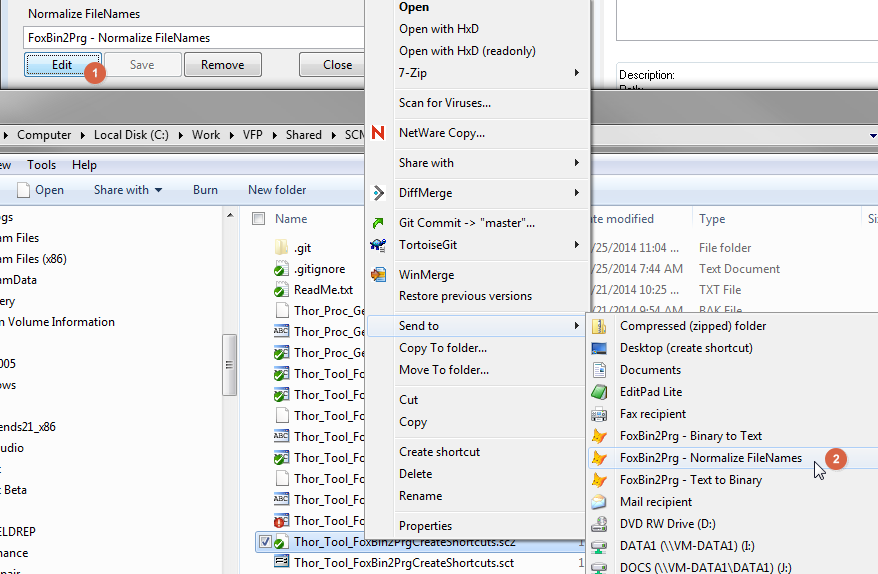
After clicking the Create button,
- The caption will change to Edit, allowing you to edit any other settings of the shortcut, and
- The shortcut will now appear under the "Send to" context menu in Windows Explorer.
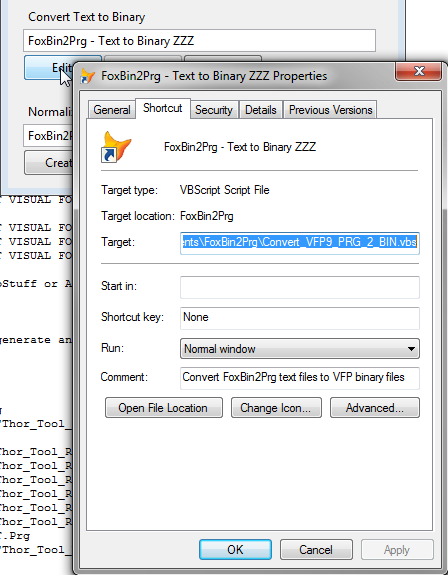
The other 2 tools are pretty straightforward and act on a VFP project. Both will act on the ActiveProject in the IDE, if there is a project open in the Project Manager. Otherwise, they will prompt you for a file.
Convert Project files to FoxBin2Prg text will convert a VFP .PJX file, and all the binary files in the project, to their FoxBin2Prg text format. This conversion is done through the FoxBin2Prg.EXE, so all your FoxBin2Prg configuration settings will be respected.
Generate Project files from FoxBin2Prg text works in the other direction. If there is an ActiveProject in the IDE, it assumes you want to regenerate the .PJX and other binary files for that project. This tool currently assumes you are using the PJ2 extension for your project text file, but this easy enough to change via a constant in the tool code. Perhaps in the future the tool can be enhanced to get the extension from an option setting or by reading FoxBin2Prg configuration settings. All other extensions are handled according to the FoxBin2Prg configuration settings. There are a couple limitations with this tool due to the way VFP leaves .VCX files in memory, which means that this tool is most effective when called from a menu or via hotkey. The tool will run from the Tool Launcher or the Thor toolbar, but you will get a warning, and under certain conditions FoxBin2Prg might give you an error message and not regenerate your .VCX files.
Finally, there is the Get FoxBin2Prg Folder plug-in shared by all the tools. This first looks for FoxBin2Prg under the Components folder where Thor installs it, then checks a couple other places, then finally prompts you for the folder if it is unsuccessful. If you have installed FoxBin2Prg in a custom folder, you can edit the plug-in as needed. The easiest way to customize it is to enter the folder path in the constant at the top of the .PRG.

If you have any questions or suggestions, I'll try to address them.
Enjoy!

Jim Nelson
--
You received this message because you are subscribed to the Google Groups "Thor, the Tool Manager for FoxPro" group.
To unsubscribe from this group and stop receiving emails from it, send an email to FoxProThor+...@googlegroups.com.
For more options, visit https://groups.google.com/d/optout.

Fernando D. Bozzo
Mike Potjer

Fernando D. Bozzo
Just in case you are interested, starting from FoxBin2Prg v1.19.38 (latest version by now) the vbs scripts are no more necessary.
In example:
In previous versions you needed to make shortcuts of VBS scripts "Convert_VFP9_PRG_2_BIN.vbs" and "Convert_VFP9_BIN_2_PRG.vbs" for batch conversions
From v1.19.38:
You can make 3 shortcuts of foxbin2prg.exe, move them to "SendTo" folder on your Windows profile and rename and edit those shortcuts as this:
Name------------------------  Right-click/Properties/destination-----------
FoxBin2Prg - Binary2Text.lnk  <path>\foxbin2prg.exe "BIN2PRG-INTERACTIVE"
FoxBin2Prg - Text2Binary.lnk  <path>\foxbin2prg.exe "PRG2BIN-INTERACTIVE"
FoxBin2Prg.lnk <path>\foxbin2prg.exe "INTERACTIVE"- With "BIN2PRG" or "PRG2BIN" options, you can process directories or individual files
- With just FoxBin2Prg.exe you can process individual files
- With the "INTERACTIVE" option, a confirmation dialog will be shown when done, and errors are automatically shown too
Pros of using the EXE directly without vbs scripts:
- You run only one process
- The processing inside the EXE and the progressbar functionallity is more homegeneous
- There are no problems if VBS scripting is disabled by IT dept, because does not depend on it
Cons of using the EXE directly:
- You can't process a selection of files, just one file or one directory (Whith VBS scripts you can select various files at a time with Ctrl-Click or Shift-Click)
About don't processing a selection of files and directories, this is really not a cons, because when you select a directory for conversion, this directory is configured as the base compile directory and all the processed files are compiled based on this directory, just as the PJX does.
Just want you to know this new functionallity. VBS Scripts can be used anyway.
Best regards! :)
Mike Potjer
Mike Potjer
Mike Potjer
Hi Fernando,
When I run the "INTERACTIVE" option for an individual file, it appears to perform the action appropriate for the selected -- if the file is binary, the text file is created; if the file is text, the binary is created. That's good. But what is it supposed to do if I run it on a folder? My folder has both text and binary files, which I think will be common for most people, but when I run it on a folder, it doesn't appear to do anything, and the result is like the attached image.

Fernando D. Bozzo
Hijo Mike:
With just FoxBin2Prg you can only process files, nota directories.
That's why in a previous email I said this:
With "BIN2PRG" or "PRG2BIN" options, you can process directories or individual files
With just FoxBin2Prg.exe you can process individual files
With the "INTERACTIVE" option, a confirmation dialog will be shown when done, and errors are automatically shown too
When I get at home I look at the last error you describe. Weird thing is I tested it :-(
--
You received this message because you are subscribed to a topic in the Google Groups "Thor, the Tool Manager for FoxPro" group.
To unsubscribe from this topic, visit https://groups.google.com/d/topic/FoxProThor/q9dNsdh8Vt4/unsubscribe.
To unsubscribe from this group and all its topics, send an email to FoxProThor+...@googlegroups.com.
Mike Potjer
Thanks for clarifying that. I can take that into account with the Thor tool revisions.
Fernando D. Bozzo
Fernando D. Bozzo
> Using BIN2PRG or PRG2BIN keywords it's thought to be used with directories only (batch processing)
> Using FoxBin2Prg alone is for single files, for binaries or texts, depending on the source
Mike Potjer

Fernando D. Bozzo
Fernando D. Bozzo
Here is the link to the v1.19.39 Preview with the fixes:
https://vfpx.codeplex.com/downloads/get/1159381
Mike Potjer

Thanks,
Fernando D. Bozzo
Hijo Mike:
You must provide a directory name as second parameter so INTERACTIVE give you the choice for the conversion.
Mike Potjer
Fernando D. Bozzo
Fernando D. Bozzo
Mike Potjer
Fernando D. Bozzo
What this means in practice:
DO foxbin2prg.exe WITH "SHOWMSG-INTERACTIVE", "<directory>" && Selection message appears and status message too
(This script now use the "INTERACTIVE" keyword so FoxBin2Prg shows the new dialog but the message is displayed by this script)
Warm regards!
Fernando D. Bozzo
Mike Potjer
Fernando D. Bozzo
Fernando D. Bozzo
Mike Potjer
Thanks,
Fernando D. Bozzo
I've finally released version v1.19.39 with your suggestions and other fixes and enhancements:
https://vfpx.codeplex.com/wikipage?title=FoxBin2Prg
The final options for configuration is this, when not using the vbs scripts:
FoxBin2Prg - Binary2Text.lnk <path>\foxbin2prg.exe "BIN2PRG-SHOWMSG"
FoxBin2Prg - Text2Binary.lnk <path>\foxbin2prg.exe "PRG2BIN-SHOWMSG"
FoxBin2Prg.lnk <path>\foxbin2prg.exe "INTERACTIVE-SHOWMSG"
But with the 3rd.option alone you don't need the other 2, because you can do everything: convert one file to the other (bin2prg or prg2bin) and convert a directory to whatever you choose next.
Mike, very thanks for your suggestions and ideas, I think that the new options make FoxBin2Prg more easy for the end user and now only one option is needed to do everything.
Cheers! :D
Mike Potjer
- The default behavior is to create a shortcut that calls the FoxBin2Prg.EXE directly, rather than calling the VBS script as before.
- The tool can locate FoxBin2Prg shortcuts whether the shortcut uses the VBS script or the EXE. If the user prefers the VBS script, they will be able to view and manually edit it via the Edit button. Otherwise, they will be able to easily replace an existing VBS shortcut with one that calls the EXE instead (just Remove then Create).
- For shortcuts using the EXE, there is a checkbox to indicate whether the current shortcut is setup to show a FoxBin2Prg results message, and the current setting of the shortcut can be changed via the checkbox and the Save button.
- In addition to the controls for creating "Binary to Text" and "Text to Binary" shortcuts, there is a new set of controls for creating a "2-Way Conversion" shortcut. This corresponds to the new "INTERACTIVE" behavior of FoxBin2Prg.
- There is a button to open the Windows "Send to" folder in Windows Explorer, so you can manually add, edit, or remove shortcuts.
Fernando D. Bozzo
Jim Nelson
--
You received this message because you are subscribed to the Google Groups "Thor, the Tool Manager for FoxPro" group.
To unsubscribe from this group and stop receiving emails from it, send an email to FoxProThor+...@googlegroups.com.
For more options, visit https://groups.google.com/d/optout.
Fernando D. Bozzo
Thanks Jim, that's great!
You received this message because you are subscribed to a topic in the Google Groups "Thor, the Tool Manager for FoxPro" group.
To unsubscribe from this topic, visit https://groups.google.com/d/topic/FoxProThor/q9dNsdh8Vt4/unsubscribe.
To unsubscribe from this group and all its topics, send an email to FoxProThor+...@googlegroups.com.