
Firefox 7 released. Installation instructions for Ubuntu 10.10 and 10.04 users
1 view
Skip to first unread message

Danish Faizan
Oct 3, 2011, 5:28:55 PM10/3/11
to fossc-...@googlegroups.com
If you’re using Ubuntu 11.04 or 11.10 you don’t need to do anything special to get the upgrade: Firefox will update automatically via the Update Manager.
Users of Ubuntu 10.10 and 10.04 can install the latest version by doing the following:-
 Another small window will open. Its here you copy and paste the follwing line :-
ppa:mozillateam/firefox-stable
Now just run update manager and upgrade firefox.
--
Users of Ubuntu 10.10 and 10.04 can install the latest version by doing the following:-
Open The Ubuntu Software Centre and ‘mouse’ over the top panel to reveal the Application Menu. In the ‘Edit’ menu select ‘Software Sources’.

A small pop-up will appear asking you to enter your password to ensure changes being made have your approval. Once entered click ‘Ok’.
Another window, pictured below, will open. Along the top of the window are a row of tabs. Click on the second tab, named ‘Other Software’, followed by the ‘Add’ button located towards the bottom
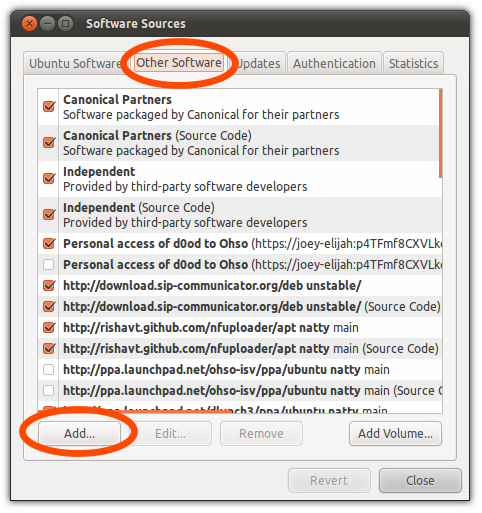 Another small window will open. Its here you copy and paste the follwing line :-
ppa:mozillateam/firefox-stable
Now just run update manager and upgrade firefox.
--
Danish Faizan
Reply all
Reply to author
Forward
0 new messages