
VS Code extensions v3.7 - Debugger and editor improvements

Danny Tuppeny
Hey all,
v3.7 of the VS Code extensions have been published. Release notes below (and online).
Debugger Improvements
Preview: Web Debugging
Note: Flutter’s web support is still in preview and only be available on some channels. See the Flutter site for more info.
#1773: Basic debugging support is available for Flutter web apps when launching on the Chrome device.

Breakpoints, stepping through code and the variables list should work. Features that depend on expression evaluation are not currently available (this includes the watch pane, evaluation in the debug console, hovering over variables, conditional breakpoints). There may be a delay of a few seconds when hitting breakpoints - this is a known issue.
Debug Mode Toggle
#1291/#2121: While debugging, a new status bar will allow quick cycling through the settings to control whether the debugger steps into only your own code, your own code and Pub packages, or all code including the SDKs. Changing the option here will automatically update the dart.debugExternalLibraries and dart.debugSdkLibraries settings as well as immediately apply them to all running debug sessions.

Run Dart CLI apps in Terminal
#99/#2102: It’s now possible to run Dart CLI apps in the Terminal pane instead of the Debug Console. This allows you to provide input to the processes stdin stream. You can enable this mode by adding "console": "terminal" to your launch configuration.

When you run your app, the Terminal pane should become focused and the output will appear there. You can type directly into the terminal.
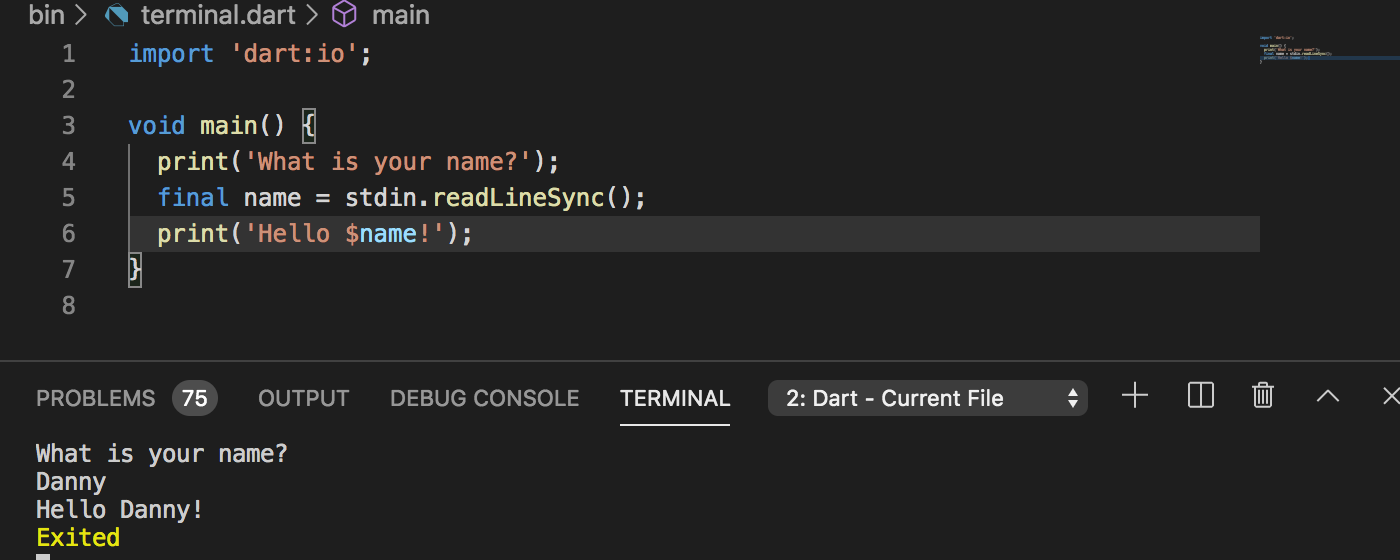
Note: This mode has less functionality than using the debug console (for example stack frames in errors cannot be linked to source code) so it is only recommended if you require this stdin functionality. This feature uses a VS Code Pseudoterminal to connect the Terminal pane to the debugger and is not actually spawning the process in a shell as would be the case if you ran it from the terminal directly.
Preview: Step Back
#2052/#2117: A new setting dart.previewDebuggerStepBack enables a new Step Back button on the debug toolbar. This function works similar to Step Out but moves the execution pointer to before the invoked function instead of after. This allows re-executing code without restarting your application.

Note: Enabling this setting also adds another button (Reverse Continue) to the debug toolbar. This is not functional but VS Code does not currently provide a way to add the Step Back button without also showing Reverse Continue (microsoft/vscode#85215).
Editor Improvements
Preview: Placeholders for @required Arguments
#2123/#2132: A new setting dart.previewNewCompletionPlaceholders enables improved argument placeholder functionality for named arguments annotated with @required.

IconButton has two @required arguments, which are now populated with placeholders that can be <tab>‘d between.

Additionally, enabling this setting will resolve some inconsistencies with tabstops for named/non-named arguments (#1940).
Note: The dart.previewNewCompletionPlaceholders setting is likely to become the default in a future update so please try it out and provide feedback. Insertion of placeholders can be disabled entirely using the existing dart.insertArgumentPlaceholders setting.
Other Editor Improvements
- #2041: Flutter gutter icons and colors are now enabled by default.
- #1709/#2116: Icons used in the gutter and Flutter documentation hovers are now shipped inside the extension so that they appear more quickly and work offline.
Flutter Improvements
- #2134: Turning off
dart.flutterTrackWidgetCreationwill now explicitly send--no-track-widget-creationto Flutter in order to preserve behaviour when Flutter changes its own default for this flag. - #1589: Two new folder locations have been added to locations searched for the Flutter SDK,
./.flutterand./vendor/flutter. - #2074/#2103: A new setting
dart.previewHotReloadOnSaveWatcherwill change hot-reload-on-save to watch for filesystem events instead of VS Code save events. This allows hot reload to be triggered automatically if external tools are making changes to Dart files. - #2120:
dart.flutterHotRestartOnSaveis now enabled by default. This means if a running Flutter app does not support hot reload, it will instead by hot restarted when the on-save handler fires.
Web Improvements
- #68/#2113: When the
programfield of a launch configuration begins withweb/, the webdev daemon debugger will be used when running the application. This makes it possible to run non-Flutter web projects (for example Angular web apps).
Testing Improvements
- #2109: Adding
testFailuretodart.openTestViewnow correctly selects the first test to fail in the tree rather than the containing suite node.
VS Code Remoting Improvements
- #1866/#2047: When running in a container, the VM Service URI is now mapped through
vscode.env.asExternalUrito allow DevTools to connect to it from the host/client.
Other Improvements
- #1442: A lot of synchronous file system access has been updated to async. This should reduce blocking in the extension host and reduce the chance of triggering the “Extension causes high CPU” warning from VS Code.
- #2087: The dependencies tree no longer writes errors to the console for projects that have a pubspec but no
.packagesfile at load time. - #2096: Log files are no longer be overwritten with new empty logs during shutdown when there are pending actions that try to log after the logfile is closed.
- #2138: In log filenames, the string
${name}will now be replaced with the debug session name to avoid concurrent debug sessions from writing over each others logs. - #2139: When using the Dart: Capture Logs command, any log lines that originate in a debug session will be prefixed with the debug sessions name to avoid confusion when there are multiple debug sessions.