
Setup flutter development environment

fost...@gmail.com
Just wondering if someone could offer some assistance on getting flutter setup. I have done some C# development in the past but very new to flutter, dart, android, IDEA - so possibly I am swallowing a bit too much. Not being familiar with this environment I’m not even certain where things are going wrong at this point (i.e. being in alpha I'm not certain what errors are normal and what aren't)
I’ve attempted to follow the setup-windows guide and started on the creating first flutter app but when I get to the point where I attempt to run, I get this message:

So I assume this means I need to select a target. However when I attempt to select the one I configured in setup the following happens:
Firstly I select the emulator I configured
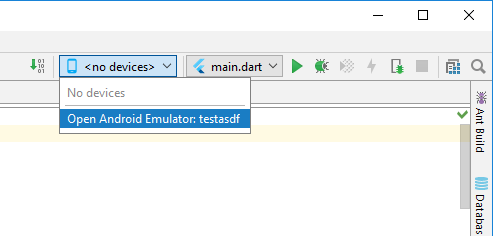
The ‘android emulator window’ flickers and then the android emulator comes up:

I’m not sure if something is supposed to happen here. If I press the power button nothing I can see changes.
The device is also not ‘selected’ in IDEA (see below) At this point I’m unsure if this is supposed to be like this – it is somewhat counterintuitive combobox behaviour to me but for all I know this is normal.

At this point I’m unable to ‘run’ anything. I don’t get any notifications of errors in the event log.
If I try the flutter create myapp and then flutter run, I get told the device is offline and there are no connected devices.
So I was hoping I could get some sanity checks of what I did to setup in the environment?
1. Firstly, when setting up the android emulator (following https://flutter.io/setup-windows/ )I was not able to find the ‘Android Studio -> Tools -> Android -> AVD Manager’. My tools window in Android Studio looks like this (note I just created a new project to get to here):

Instead I accessed it from the Android SDK Manager shown here:

My device looks like this. Lacking any direction for setting up a device I selected the first potion available for most of these settings:

Regarding the instructions from the link in the graphics page (https://developer.android.com/studio/run/emulator-acceleration.html ) step 5 says 'Under Emulated Performance, select Hardware - GLES 2.0 to enable hardware acceleration' but I don’t see this in the page above. I’m not entirely certain if I’m in the right area here?
2. In the SDK manager I have the following installed:


Note that I installed 7.7.1 because of some error I was getting in IDEA discussed below.
3. In my IDEA project (and this happens for any freshly created flutter project in IDEA) I have the following ‘error’ in project settings:

Hovering over the error gives me this:

I thought perhaps IDEA was hardcoded to use 25 which is why I installed it above. However the flutter doctor seems to be okay with 27.
Any suggestions would be appreciated - I appreciate it’s currently alpha so my expectations are not that it would just work. But as many others appear to have had success I just wanted to check if I was missing anything obvious.
Command from flutter doctor/devices/run (this is after doing a flutter create myapp and then cd'ing to the directory)


Devon Carew
--
You received this message because you are subscribed to the Google Groups "Flutter Dev" group.
To unsubscribe from this group and stop receiving emails from it, send an email to flutter-dev+unsubscribe@googlegroups.com.
For more options, visit https://groups.google.com/d/optout.
mr...@google.com
