
How to remove spacing at the start and end of a horizontal list
542 views
Skip to first unread message

Chris
Sep 20, 2018, 9:00:59 AM9/20/18
to Flutter Dev
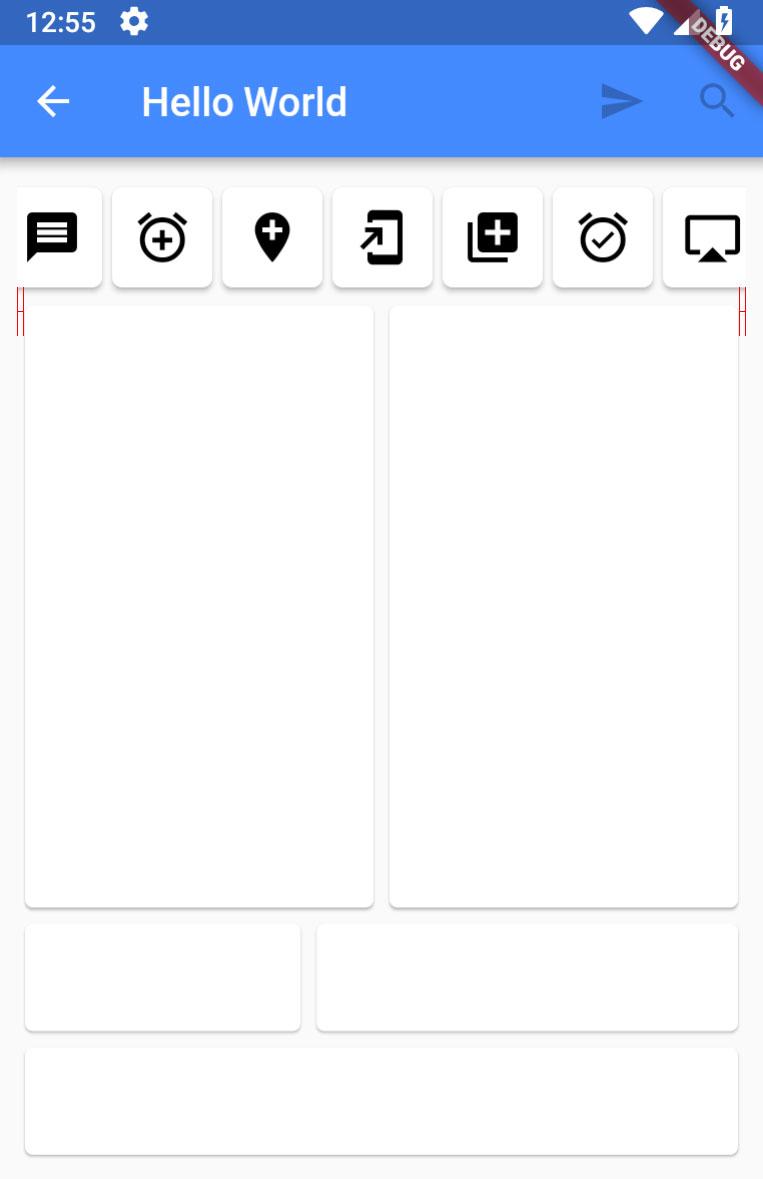
I have a horizontal list in a StatelessWidget and a a padding defined for the body. The padding is everywhere correct but not for the LIST - when I scroll the list, the result is like in the screenshot. How can this be fixed?
class MyWidget extends StatelessWidget{
  @override
  Widget build(BuildContext context) {
    // TODO: implement build
    return new Scaffold(
      appBar: new AppBar(
          backgroundColor: Colors.blueAccent,
          title: new Text(CoreLocalisation.of(context).title),
          actions: <Widget>[
            new IconButton(icon: new Icon(Icons.send), onPressed: null),
            new IconButton(icon: new Icon(Icons.search), onPressed: null)
          ]
      ),
      body: Padding(
          padding: new EdgeInsets.all(SCREEN_PADDING),
          child:
          new Column(
            crossAxisAlignment: CrossAxisAlignment.stretch,
            mainAxisAlignment: MainAxisAlignment.start,
            children: <Widget>[
              SizedBox(
                height: 60.0,
                child: new CustomRadio(),
              ),Expanded(
                flex: 5,
                child: Column(
                  children: <Widget>[
                    Expanded(
                      flex: 5,
                      child: new Row
                        (
                        children: <Widget>[
                          new Expanded(
                            flex: 3,
                            child:new Card(
                              child: Center(
                                child: new TestWidget(
                                ),
                              ),
                            ),
                          ),
                          new Expanded(
                            flex: 3,
                            child:new Card(
                              child: new Container(),
                            ),
                          ),
                        ],
                      ),
                    ),
Chris
Oct 4, 2018, 5:43:18 AM10/4/18
to Flutter Dev
Does anyone have a solution for this problem?

Hans Muller
Oct 4, 2018, 11:49:33 AM10/4/18
to christia...@ml-labs.com, Flutter Dev
Card widgets have a default margin of 4 pixels on all sides. You can override that with the margin constructor parameter. That might account for the difference you're seeing.
--
You received this message because you are subscribed to the Google Groups "Flutter Dev" group.
To unsubscribe from this group and stop receiving emails from it, send an email to flutter-dev...@googlegroups.com.
For more options, visit https://groups.google.com/d/optout.
Chris
Oct 4, 2018, 12:20:28 PM10/4/18
to Flutter Dev
Yes.. thanks... that was the problem... adding a margin to the CustomRadio and everything is in a line...
Reply all
Reply to author
Forward
0 new messages