
primarySwatch vs. primaryColor
1,378 views
Skip to first unread message

Ralph Bergmann
Jun 10, 2021, 5:56:24 AM6/10/21
to Flutter Development (flutter-dev)
Hello,
I’m a little bit confused about primarySwatch and primaryColor, and their usage.
I played a bit with the Interactive example (https://flutter.dev/docs/cookbook/design/themes#interactive-example) and wondered why the FAB uses the primaryColor, but an ElevatedButton uses the primarySwatch. Is this the expected behavior or just a bug?
Here the code I used and the result:
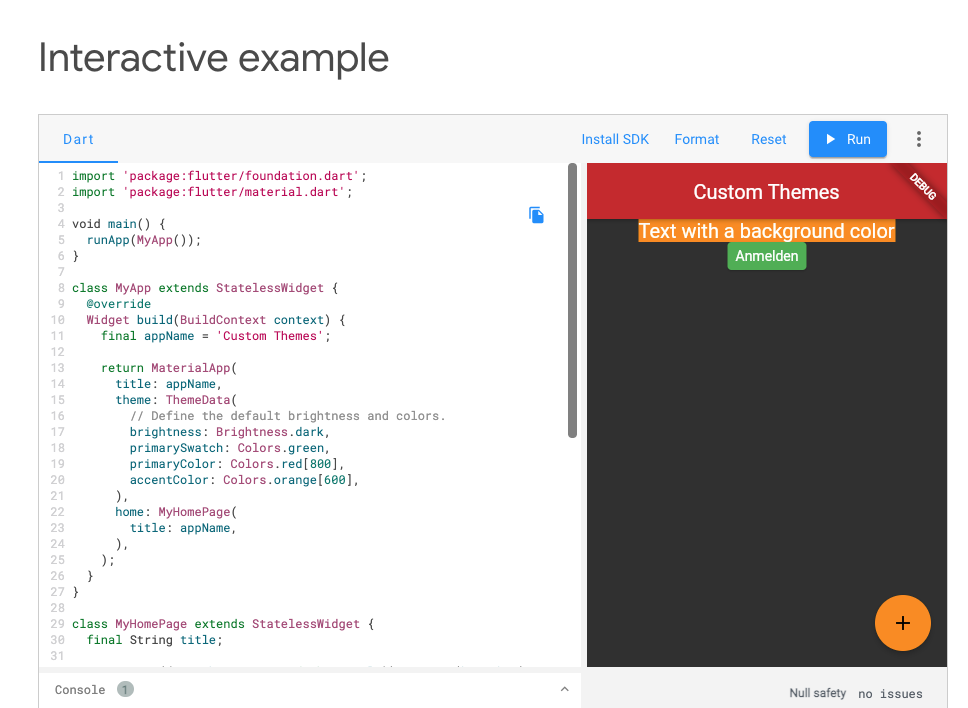
import 'package:flutter/foundation.dart';
import 'package:flutter/material.dart';
void main() {
runApp(MyApp());
}
class MyApp extends StatelessWidget {
@override
Widget build(BuildContext context) {
final appName = 'Custom Themes';
return MaterialApp(
title: appName,
theme: ThemeData(
// Define the default brightness and colors.
brightness: Brightness.dark,
primarySwatch: Colors.green,
primaryColor: Colors.red[800],
accentColor: Colors.orange[600],
),
home: MyHomePage(
title: appName,
),
);
}
}
class MyHomePage extends StatelessWidget {
final String title;
MyHomePage({Key? key, required this.title}) : super(key: key);
@override
Widget build(BuildContext context) {
return Scaffold(
appBar: AppBar(
title: Text(title),
),
body: Center(
child: Column(children: [
Container(
color: Theme.of(context).accentColor,
child: Text('Text with a background color'),
),
ElevatedButton(
onPressed: () {},
child: Text('Anmelden'),
),
]),
),
floatingActionButton: FloatingActionButton(
onPressed: () {},
child: Icon(Icons.add),
),
);
}
}
Ralph Bergmann
Jun 10, 2021, 10:50:03 AM6/10/21
to Flutter Development (flutter-dev)
I’m wondering why some UI elements are using the primarySwatch and sone others are using the primaryColor.

When the theme’s brightness is light. the app bar, the elevated button and the FAB are usein the primarySwatch as background color.

But when the brightness is dark, only the button uses the primarySwatch. The app bar and the FAB are using a predefinet color. It looks okay for the app bar, because I selected a dark brightness, but why is the FAB now completely different?
Ralph Bergmann
Jun 10, 2021, 10:54:50 AM6/10/21
to Flutter Development (flutter-dev)
this is the line of code which does it:
> accentColor ??= isDark ? Colors.tealAccent[200]! : primarySwatch[500]!;
So why is the predefined accentColor Colors.tealAccent[200]! when I want a dark theme?
Is it somewhere defined in the Material Design syleguid?
Reply all
Reply to author
Forward
0 new messages