How to connect a Keyman keyboard to a FLEx WS?

45 views
Skip to first unread message

Kevin Warfel

unread,
Mar 9, 2015, 1:37:19 AM3/9/15
to flex...@googlegroups.com
For the past three days, we've been trying unsuccessfully to connect a Keyman keyboard that is installed on the various computers that we want to use for data entry in our Rapid Word Collection workshop that will begin later today. Maybe someone on this list can help us find the piece that we're missing in order to be successful.

In the FLEx Helps, we read that "You must add an Input Language in Microsoft Windows before you select it on the Keyboard tab of the Writing System Properties dialog box." It goes on to say that "Operating systems change, and adding an input language to your operating system is beyond the scope of these user Helps. Therefore, if the steps in this topic do not work for you, refer to your Windows Help and Support system for help."

The steps given for Windows 7, which all but one of the computers we're using are running, are:
1. In Microsoft Windows, open the Control Panel window, and then open the Text Services and Input Languages dialog box.
2. ...

When I open the Control Panel window, I don't see anything labeled Text Services and Input Languages, nor do I know how to "refer to my Windows Help and Support system." I do see something called "Region and Language," and I thought that when I last did a RWC workshop a few months ago, it was on that screen that we added an Input Language, but I can't figure out how to get the list to appear so that I can choose one to add.

I feel like there is something very basic that we are missing here, so I'm hoping that someone can supply the missing detail in order to help us along. Meanwhile, we will simply activate the Keyman keyboard manually via the hotkey whenever we need to.

Thanks for any help you can provide, especially if your workday has already begun. (We are 5 hours ahead of the development team members in Dallas whom I would normally contact for this sort of question, and a solution sooner than the middle of our workday would be most welcome.)

Dennis Walters

unread,
Mar 9, 2015, 3:45:02 AM3/9/15
to flex...@googlegroups.com
Kevin

In Win7, you could try typing "Change keyboards" into the search bar on the Start menu.

Or Control Panel|Clock, Language and Region (Change keyboards or other input methods). This opens the Region and Language dialog. Choose the Keyboards and Languages tab, and click the Change keyboards button.

That opens Text Services and Input Languages dialog, General tab, click the Add button on the right.

HTH
Dennis
--
You are subscribed to the publicly accessible group "FLEx list".
Only members can post but anyone can view messages on the website.
---
You received this message because you are subscribed to the Google Groups "FLEx list" group.
To unsubscribe from this group and stop receiving emails from it, send an email to flex-list+...@googlegroups.com.
To post to this group, send email to flex...@googlegroups.com.
To view this discussion on the web visit https://groups.google.com/d/msgid/flex-list/CAHs8okVgGuhMUoOS0oUBe9X7R80O8Hdx3ix7Cd4Gc9CZQvOs7w%40mail.gmail.com.
For more options, visit https://groups.google.com/d/optout.

Kevin Warfel

unread,
Mar 9, 2015, 9:44:00 AM3/9/15
to flex...@googlegroups.com
Dennis,

Thank you. I think that has solved my problem. I was certain that I had clicked on the "Change keyboards" button at least 10 times, but after following your instructions, I saw the option to add a language for the first time. That was what I was searching and searching for and somehow could not find. I've now succeeded in configuring two of the computers, so I think I have all I need.

Thanks again!
Kevin

Kevin Warfel

unread,
Mar 9, 2015, 3:22:38 PM3/9/15
to flex...@googlegroups.com
I thought I had this problem figured out as a result of Dennis' post, but I'm still encountering some problems. Anyone out there have experience with doing this for a laptop computer running Windows 7 with a physical French keyboard? Do I have to link the Keyman keyboard (designed for an AZERTY physical keyboard) to some language in particular in order for it to work? I just grabbed the first language in the list--Afrikaans, but I can't get it to activate automatically in FLEx. By default, the vernacular language fields treat the keyboard as a QWERTY. And I have to activate Keyman manually every time I move to a new field, which is quite cumbersome.

So far I have succeeded in getting the Keyman keyboard to activate automatically on two of four computers: a desktop running Windows XP with a physical French keyboard, via Afrikaans; and a laptop running Windows 7 with an American keyboard, via Afrikaans. The two that are resisting are both laptops running Windows 7 with a physical French keyboard, via Afrikaans.

All help welcome! Thanks.
Kevin

On Mon, Mar 9, 2015 at 7:44 AM, Dennis Walters <dennis_...@sil.org> wrote:

Marc Durdin

unread,
Mar 9, 2015, 4:20:58 PM3/9/15
to flex...@googlegroups.com

Which version of Keyman are you running?

Kevin Warfel

unread,
Mar 10, 2015, 2:11:05 AM3/10/15
to flex...@googlegroups.com
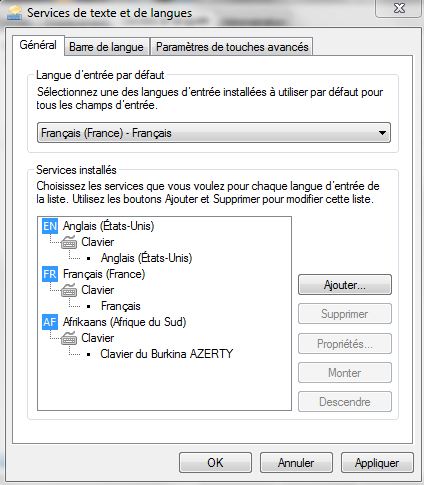
I have one of the computers with me here in the room where I'm staying. (It's 6am local time as I write this, so I don't have access to all of the computers at the moment.) It has Keyman 7.0.243 and is running the French version of Windows 7 Home Premium. Here is a screenshot of the link I've created between Afrikaans and the Clavier du Burkina AZERTY, in case that provides a clue as to what I may have done incorrectly.


In FLEx, I have configured the Bissa (vernacular) writing system (the only vernacular writing system in the project) to use the Afrikaans/Clavier du Burkina AZERTY combination, but when I place my cursor in a field where Bissa is the WS, the keyboard responds as though it were a QWERTY keyboard and no Keyman keyboard is active (though both AZERTY and QWERTY versions of the Clavier du Burkina are installed). I can manually activate the Clavier du Burkina AZERTY keyboard and then I am able to type in Bissa and the physical keyboard responds as an AZERTY keyboard, but I have to manually activate the Keyman keyboard each time I navigate to a Bissa field.

The FR language and keyboard configuration shown above is linked in FLEx to the French (analysis) writing system (the only active analysis WS, since English is there but unticked) and works just fine. Each time I navigate to a French field, the keyboard responds as an AZERTY keyboard, with no Keyman keyboard active.

I welcome input from anyone who can point me in a potentially helpful direction.

Thanks,
Kevin

Colin Suggett

unread,
Mar 10, 2015, 2:56:15 AM3/10/15
to Flexlist
Hi Kevin,

Sorry to hear about your troubles. In Keyman option, advanced, you will find a tick-box "switch windows language when a keyman keyboard is selected". You might want to try this selected, or unselected, to see if you get a different result. I find it works best if I have it selected. But each configuration of windows/flex/keyman seems to bring a new challenge.

For what it's worth,

Colin

Marc Durdin

unread,
Mar 10, 2015, 5:08:21 AM3/10/15
to flex...@googlegroups.com

Kevin,


Yes, each Windows upgrade changes the way keyboards work under the hood – sometimes for the better, sometimes not.  I’ve always had to do a lot of work to try and keep up with how Windows changes keyboard input methods and systems – going back to Windows 9x vs Windows NT, then big permissions changes with Windows XP and Vista, 64-bit support in Vista, “Modern UI” – touch – in Windows 8, “Text Services Framework” working its way through everything… and a million little details besides!


Colin’s advice is worth trying first; if that doesn’t resolve the problem, then read on.


Keyman version 7.0.243 is very old – released in 2007, years before Windows 7 became available – I would suggest at least 7.1.273.0 (http://www.tavultesoft.com/keyman/download71.php) which is a free upgrade from 7.0.  Version 7.1 does include fixes for compatibility with Windows 7.  http://help.keyman.com/products/desktop/versionhistory70.php shows a list of the bugs fixed between 7.0.243.0 and 7.1.273.0.


Version 8.0 (http://keyman.com/archive/downloads.php) and version 9.0 (http://keyman.com/desktop) are also available; version 9.0 has tighter integration with Windows but there is currently a known bug in Flex in interacting with Keyman which means I recommend staying with version 7.1 or 8.0 until it is resolved.  With Keyman 8 and later, you get the advantage of full 64-bit support. Most Windows installs today are 64-bit, so version 7.x of Keyman may run but won’t work in Windows app such as Notepad, Wordpad, or 64-bit versions of Office, Creative Cloud, etc.


If 7.1 or 8.0 don’t help, then the next thing I would look at is how you are linking keyboards with languages. I note you are also using “system shadow keyboards” with Keyman. With version 7.0 and later of Keyman, this method of linking keyboards to languages has been deprecated, as
recent (less than 10 year old) versions of Windows have made available more effective options.  http://help.keyman.com/products/desktop/8.0/docs/advanced_shadow_keyboards.php explains further.  In version 9.0, we were able to improve this further, for better compatibility with Modern UI, when we stopped supporting Windows XP with Keyman 9.


Very happy to assist further as you need.


Marc

Reply all
Reply to author
Forward
0 new messages