
How to connect a Keyman keyboard to a FLEx WS?

Kevin Warfel

Dennis Walters
In Win7, you could try typing "Change keyboards" into the search bar on the Start menu.
Or Control Panel|Clock, Language and Region (Change keyboards or other input methods). This opens the Region and Language dialog. Choose the Keyboards and Languages tab, and click the Change keyboards button.
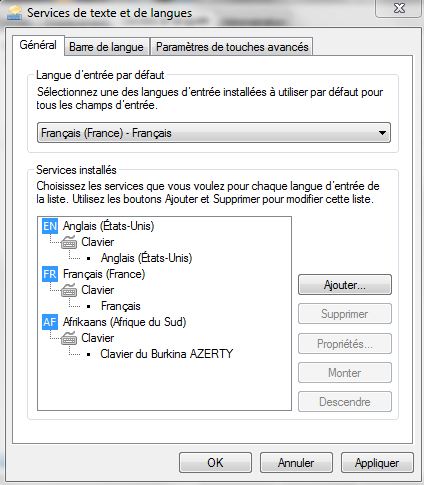
That opens Text Services and Input Languages dialog, General tab, click the Add button on the right.
HTH
Dennis
--
You are subscribed to the publicly accessible group "FLEx list".
Only members can post but anyone can view messages on the website.
---
You received this message because you are subscribed to the Google Groups "FLEx list" group.
To unsubscribe from this group and stop receiving emails from it, send an email to flex-list+...@googlegroups.com.
To post to this group, send email to flex...@googlegroups.com.
To view this discussion on the web visit https://groups.google.com/d/msgid/flex-list/CAHs8okVgGuhMUoOS0oUBe9X7R80O8Hdx3ix7Cd4Gc9CZQvOs7w%40mail.gmail.com.
For more options, visit https://groups.google.com/d/optout.
Kevin Warfel
To view this discussion on the web visit https://groups.google.com/d/msgid/flex-list/54FD4F78.7000704%40sil.org.
Kevin Warfel
To view this discussion on the web visit https://groups.google.com/d/msgid/flex-list/54FD4F78.7000704%40sil.org.

Marc Durdin
Which version of Keyman are you running?
To view this discussion on the web visit https://groups.google.com/d/msgid/flex-list/CAHs8okVGdn8MW3iJpW4TC%3D%2BV0cF2pvvbFNWik61xeXUXqr6o6g%40mail.gmail.com.
Kevin Warfel
To view this discussion on the web visit https://groups.google.com/d/msgid/flex-list/1CEDD746887FFF4B834688E7AF5FDA5A7395070D%40federation.tavultesoft.local.

Colin Suggett
To view this discussion on the web visit https://groups.google.com/d/msgid/flex-list/CAHs8okXkQFO8uh3XCms6ooqKRRgEM3hdUbyq2qZEMdCkWrO9ug%40mail.gmail.com.
Marc Durdin
Kevin,
Yes, each Windows upgrade changes the way keyboards work under the hood – sometimes for the better, sometimes not. I’ve always had to do a lot of work to try and keep up with how Windows changes keyboard input methods and systems – going back to Windows 9x vs Windows NT, then big permissions changes with Windows XP and Vista, 64-bit support in Vista, “Modern UI” – touch – in Windows 8, “Text Services Framework” working its way through everything… and a million little details besides!
Colin’s advice is worth trying first; if that doesn’t resolve the problem, then read on.
Keyman version 7.0.243 is very old – released in 2007, years before Windows 7 became available – I would suggest at least 7.1.273.0 (http://www.tavultesoft.com/keyman/download71.php) which is a free upgrade from 7.0. Version 7.1 does include fixes for compatibility with Windows 7. http://help.keyman.com/products/desktop/versionhistory70.php shows a list of the bugs fixed between 7.0.243.0 and 7.1.273.0.
Version 8.0 (http://keyman.com/archive/downloads.php) and version 9.0 (http://keyman.com/desktop) are also available; version 9.0 has tighter integration with Windows but there is currently a known bug in Flex in interacting with Keyman which means I recommend staying with version 7.1 or 8.0 until it is resolved. With Keyman 8 and later, you get the advantage of full 64-bit support. Most Windows installs today are 64-bit, so version 7.x of Keyman may run but won’t work in Windows app such as Notepad, Wordpad, or 64-bit versions of Office, Creative Cloud, etc.
If 7.1 or 8.0 don’t help, then the next thing I would look at is how you are linking keyboards with languages. I note you are also using “system shadow keyboards”
with Keyman. With version 7.0 and later of Keyman, this method of linking keyboards to languages has been deprecated, as
recent (less than 10 year old) versions of Windows have made available more effective options. http://help.keyman.com/products/desktop/8.0/docs/advanced_shadow_keyboards.php
explains further. In version 9.0, we were able to improve this further, for better compatibility with Modern UI, when we stopped supporting Windows XP with Keyman 9.
Very happy to assist further as you need.
Marc
To view this discussion on the web visit https://groups.google.com/d/msgid/flex-list/CADkgoY5PYusWDChCCiXYYtSve_yq5JqpVgr8jK6yEioyxKh1EQ%40mail.gmail.com.