
Problem with Firebug + Theme Font and Size Changer
106 views
Skip to first unread message

Jonas
Sep 3, 2013, 7:20:38 PM9/3/13
to fir...@googlegroups.com
Among the extensions I use in Mac Firefox are both Firebug and something called Theme Font & Size Changer. The latter extension is only slightly configurable. The problem is that it interferes with the proper display of the Firebug Console buttons (or maybe they're "tabs") -- I mean the ones that say Clear / Persist / Profile / All / Errors / Warnings / Info / Debug Info.
The buttons still show up and work, but I can no longer tell whether one is enabled or not -- the "off" and "on" states look identical. Normally when one is "on", it turns white -- not what I would have chosen, but good enough to show what state it's in.
Does anybody know of a CSS selector I could use in userChrome.css that would specifically target the "on" state of those Firebug buttons so that I could create an override for Theme Font & Size Changer? No guarantee it would work, but if I tag it "!important" it might. Thanks much.
The buttons still show up and work, but I can no longer tell whether one is enabled or not -- the "off" and "on" states look identical. Normally when one is "on", it turns white -- not what I would have chosen, but good enough to show what state it's in.
Does anybody know of a CSS selector I could use in userChrome.css that would specifically target the "on" state of those Firebug buttons so that I could create an override for Theme Font & Size Changer? No guarantee it would work, but if I tag it "!important" it might. Thanks much.

Sebastian Zartner
Sep 4, 2013, 6:02:23 AM9/4/13
to fir...@googlegroups.com
This problem doesn't seem to be related to Theme Font & Size Changer.
Please download Firebug 1.12.1, which should have fixed styling.
Does that work for you?
Sebastian
Please download Firebug 1.12.1, which should have fixed styling.
Does that work for you?
Sebastian
Jonas Smithson
Sep 4, 2013, 4:38:01 PM9/4/13
to fir...@googlegroups.com
In the setup I was using (Mac Firefox 22 with Theme Font & Size Changer, plus the previous version of Firebug), the problem absolutely did involve the interaction of those two extensions. I wasn't just guessing: I spent a lot of time testing, disabling different groups of extensions, and relaunched repeatedly to ensure I was right -- before I posted in this forum.
I've now updated Mac Firefox to version 23.0.1, which allowed me to update Firebug to the current version as well, and the problem seems to be basically resolved. However, the way Firebug shows me that one of those buttons is "pressed" is so subtle (a slight darkening/shadow), especially on my crummy auxiliary monitor where I normally keep the Firebug window, that it's hard to see whether it was pressed or not. There's also something strange: in the previous setup, if I disabled Theme Font & Size Changer, Firebug sometimes showed the pressed state with the darkening/shadow effect, or sometimes by turning the label white -- for the same buttons!Interestingly, the appearance of the pressed state in Windows 7 Firebug is completely different (a kind of outline box) and *much* clearer than in the Mac version. But then, Windows Firefox (and its extensions) has always worked better than the Mac version in numerous small ways.
To view this discussion on the web visit https://groups.google.com/d/msgid/firebug/70e7311e-40a3-46a6-b281-fb2000aff2cf%40googlegroups.com.--
You received this message because you are subscribed to the Google Groups "Firebug" group.
To unsubscribe from this group and stop receiving emails from it, send an email to firebug+u...@googlegroups.com.
To post to this group, send email to fir...@googlegroups.com.
Visit this group at http://groups.google.com/group/firebug.
Sebastian Zartner
Sep 5, 2013, 2:31:34 AM9/5/13
to fir...@googlegroups.com, thomasmr...@gmail.com
In the setup I was using (Mac Firefox 22 with Theme Font & Size Changer, plus the previous version of Firebug), the problem absolutely did involve the interaction of those two extensions. I wasn't just guessing: I spent a lot of time testing, disabling different groups of extensions, and relaunched repeatedly to ensure I was right -- before I posted in this forum.
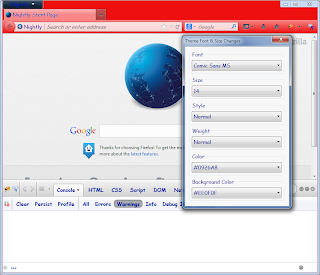
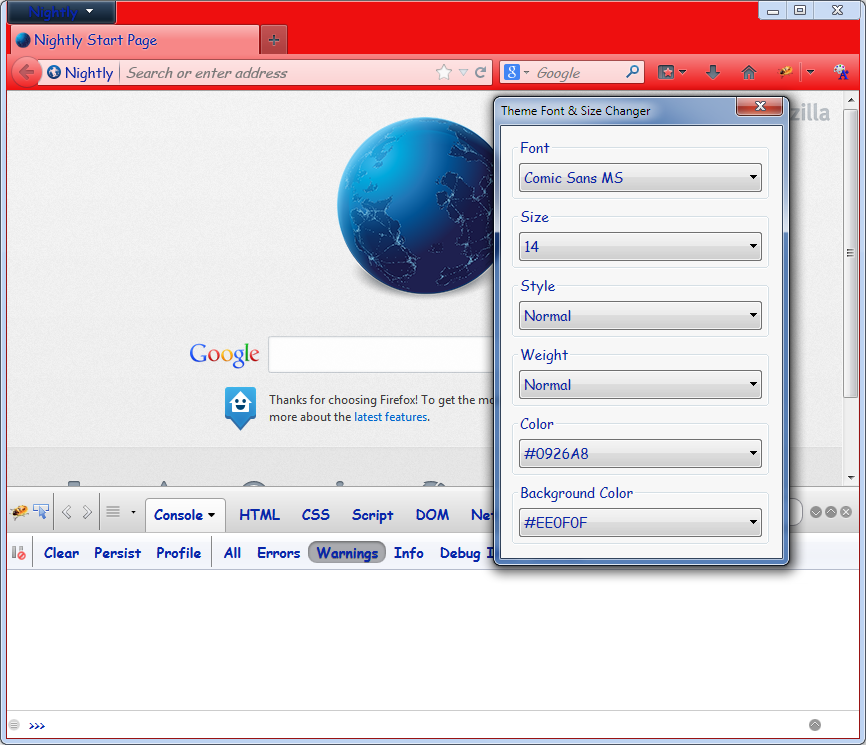
I see. I don't have a Mac, so I based my statement on the post in issue 6642 as well as on a quick test I made by replacing the default Firebug skin by the one used on Mac, which looks like this:
I've now updated Mac Firefox to version 23.0.1, which allowed me to update Firebug to the current version as well, and the problem seems to be basically resolved.
Good!
However, the way Firebug shows me that one of those buttons is "pressed" is so subtle (a slight darkening/shadow), especially on my crummy auxiliary monitor where I normally keep the Firebug window, that it's hard to see whether it was pressed or not.
For me it's clearly visible. See the screenshot above. Could you provide a screenshot of what you see?
There's also something strange: in the previous setup, if I disabled Theme Font & Size Changer, Firebug sometimes showed the pressed state with the darkening/shadow effect, or sometimes by turning the label white -- for the same buttons!
The previous setup obviously had an old version of Firebug, which didn't include the style fixes of the issue described above.
Sebastian
Sebastian
Sebastian Zartner
Sep 5, 2013, 5:16:52 PM9/5/13
to fir...@googlegroups.com, thomasmr...@gmail.com
...a quick test I made by replacing the default Firebug skin by the one used on Mac, which looks like this:That looks nothing at all like the default skin on my Mac. You think the default Firefox skin for Mac has a bright red titlebar?
No, I just played around with Theme Font and Size Changer as you can see in the screenshot to see how it influences the display.
Could you provide a screenshot of what you see?
I make screenshots all the time, but I have no idea how to include one here in Google Groups. Do you just drag a PNG into the message body itself?
No, there's an image button at the left of the "Link" button. Though positioning the inserted image is a bit tricky sometimes.
Anyway, I doubt it would prove much, because the screenshot isn't really a photo -- it basically shows a best-case scenario, not what my crappy second monitor displays.
Well, I can't fix your old monitor. :-)
I really do appreciate your help, but I still wish I could find out about Firebug CSS selectors.
No problem, the related selectors can be found here:
https://github.com/firebug/firebug/blob/master/extension/skin/classic/mac/firebug.css#L366 (normal style)
https://github.com/firebug/firebug/blob/master/extension/skin/classic/mac/firebug.css#L408 (pressed style)
Btw. you can inspect the whole browser UI to get to know about the structure and CSS behind it using DOM Inspector.
https://github.com/firebug/firebug/blob/master/extension/skin/classic/mac/firebug.css#L366 (normal style)
https://github.com/firebug/firebug/blob/master/extension/skin/classic/mac/firebug.css#L408 (pressed style)
Btw. you can inspect the whole browser UI to get to know about the structure and CSS behind it using DOM Inspector.
Sebastian
Reply all
Reply to author
Forward
0 new messages