
Display Console simultaneously with other panel?
105 views
Skip to first unread message

San
Aug 14, 2014, 3:09:13 PM8/14/14
to fir...@googlegroups.com
There's a two-page article in The Register comparing web development tools in different browsers. Misleading clickbait headline, and article doesn't go into much depth, but otherwise not bad. It focuses mostly on the built-in tools of Firefox vs. Chrome, but also mentions (and links to) Firebug.
One thing that intrigued me was this sentence, referring to the built-in Firefox and Chrome tools: "Both make the Console available within any other panel as well."
I've often wanted to be able to look at the debugger panel (or the Watch panel) while also watching the Console at the same time. Fooling around with the Firefox built-in tools (in FF 28), I finally found a way to split the pane, with the debugger on top and a console on bottom -- but the console didn't show any of the logs in the JS file as the page loaded (yes, I checked off "Logs" and all the other stuff in the dropdown menu). The console split-pane stayed blank; the only thing it seemed to do was respond to stuff I typed directly into it. Maybe I was doing something wrong?
Anyway, I mostly use Firebug. I wish there was some way to have the Firebug Console and the Debugger pane show (and be active) simultaneously, so I wouldn't have to keep tabbing back and forth while moving through breakpoints. Is this possible?
One thing that intrigued me was this sentence, referring to the built-in Firefox and Chrome tools: "Both make the Console available within any other panel as well."
I've often wanted to be able to look at the debugger panel (or the Watch panel) while also watching the Console at the same time. Fooling around with the Firefox built-in tools (in FF 28), I finally found a way to split the pane, with the debugger on top and a console on bottom -- but the console didn't show any of the logs in the JS file as the page loaded (yes, I checked off "Logs" and all the other stuff in the dropdown menu). The console split-pane stayed blank; the only thing it seemed to do was respond to stuff I typed directly into it. Maybe I was doing something wrong?
Anyway, I mostly use Firebug. I wish there was some way to have the Firebug Console and the Debugger pane show (and be active) simultaneously, so I wouldn't have to keep tabbing back and forth while moving through breakpoints. Is this possible?
Lawrence San
Aug 14, 2014, 3:37:38 PM8/14/14
to fir...@googlegroups.com
Oops, I should have experimented more before posting. I just discovered that the reason the Firefox split-console stayed blank on page load was because I also had a Firebug console window that I'd previously opened for another Firefox window. Apparently, the first console window (Firefox or Firebug) that's opened preempts any subsequent consoles from the other toolset, even if they're opened on different browser windows.
So it turns out that the built-in Firefox tools do allow me to view the Console and the Debugger simultaneously. Which seemed great -- until I discovered that the Debugger pane didn't actually work for some reason. It stayed frozen at the first breakpoint, with none of the buttons (Step Into, Step Over, or Step Out) working, nor their keyboard shortcuts, and no Continue button at all. Oh well.--
You received this message because you are subscribed to the Google Groups "Firebug" group.
To unsubscribe from this group and stop receiving emails from it, send an email to firebug+u...@googlegroups.com.
To post to this group, send email to fir...@googlegroups.com.
Visit this group at http://groups.google.com/group/firebug.
To view this discussion on the web visit https://groups.google.com/d/msgid/firebug/d7eebd4a-27ba-4e1f-9596-78f5876467fa%40googlegroups.com.
For more options, visit https://groups.google.com/d/optout.

YABU KEITA
Aug 17, 2014, 4:11:00 PM8/17/14
to fir...@googlegroups.com
How can I bug them out ?
--
Sent from Gmail Mobile
To view this discussion on the web visit https://groups.google.com/d/msgid/firebug/CAMoMLKi%2BZsqWNhdDUyFev-vbZDhniRXsJVZadw8owY7H40G3Nw%40mail.gmail.com.
For more options, visit https://groups.google.com/d/optout.
--
Sent from Gmail Mobile

Sebastian Zartner
Aug 18, 2014, 3:54:51 AM8/18/14
to fir...@googlegroups.com
Luckily Firebug already has a feature like this. We call it Command Line Popup and you can open it via the button with the arrow and the three
lines:
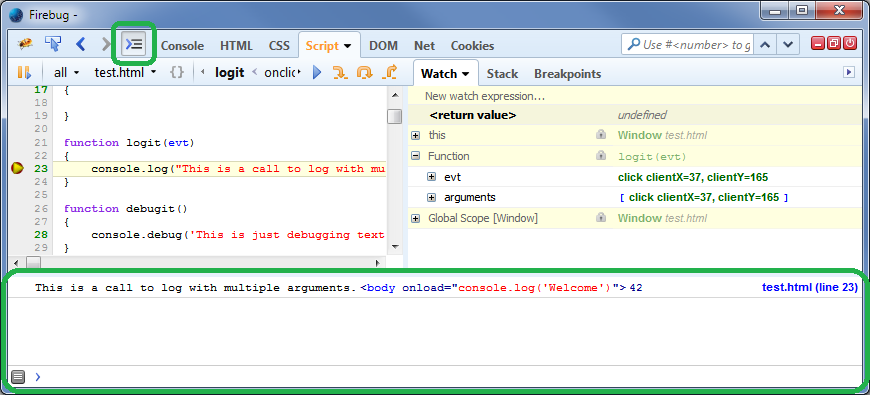
Sebastian
San
Aug 18, 2014, 9:08:53 AM8/18/14
to fir...@googlegroups.com
Sebastian Zartner wrote:
Luckily Firebug already has a feature like this. We call it Command Line Popup....
I didn't know about Command Line Popup. Works great -- especially since I have a second monitor with room (fullscreen) for the Script, Breakpoints, and Console panels simultaneously. Thank you!
In my older version of Mac Firefox, the button looks a little different, with a downward-pointing triangle to the right of the three lines. Clicking the triangle reveals a menu for choosing which panels you want; I thought that was all it was for, so I never thought to click the three lines directly.
When I get a chance, I'm going to try installing MultiFirefox, an old Mac-only Firefox extension that I used briefly years ago. Not clear if it's under active development or still works, however. If it's still compatible, I might be able to experiment with the current versions of Firefox and Firebug, while also keeping the older versions I'm running (at least for now). If anyone has any recent experience with MultiFirefox working (or not) with Firebug, I'd love to hear it. Or is there some more standard way to install and run multiple versions of Firefox/Firebug? Mozilla does have a page about the Profile Manager to enable multiple profiles, which I guess means you could have more than one version of Firebug -- but it's not clear that would let you have multiple versions of Firefox installed.
In my older version of Mac Firefox, the button looks a little different, with a downward-pointing triangle to the right of the three lines. Clicking the triangle reveals a menu for choosing which panels you want; I thought that was all it was for, so I never thought to click the three lines directly.
When I get a chance, I'm going to try installing MultiFirefox, an old Mac-only Firefox extension that I used briefly years ago. Not clear if it's under active development or still works, however. If it's still compatible, I might be able to experiment with the current versions of Firefox and Firebug, while also keeping the older versions I'm running (at least for now). If anyone has any recent experience with MultiFirefox working (or not) with Firebug, I'd love to hear it. Or is there some more standard way to install and run multiple versions of Firefox/Firebug? Mozilla does have a page about the Profile Manager to enable multiple profiles, which I guess means you could have more than one version of Firebug -- but it's not clear that would let you have multiple versions of Firefox installed.
Reply all
Reply to author
Forward
0 new messages