
Firebug HTML Panel Coloring on Windows (7)
20 views
Skip to first unread message

Ron Malteh
Mar 7, 2016, 11:44:58 AM3/7/16
to Firebug
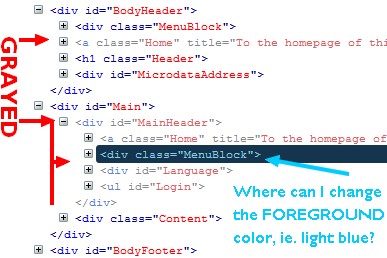
How can I change the foreground color (the text color) for a selected and 'grayed' element in the HTML panel?
In the HTML panel some nodes are 'grayed' (see picture). I'm curious why these are grayed so if someone knows, please tell me, but it's not the main reason for this post: that is about the text color those gray nodes get when you select them. I want to change that (light blue) color! I played with the Windows 7 color themes that provide standard colors for a lot of windows elements like Titlebar, Button Face, Textcolor etc. and they impact the coloring of the HTML panel but I cannot seem to find this light blue....so your help is appreciated!!!


Sebastian Zartner
Mar 7, 2016, 1:51:47 PM3/7/16
to Firebug
On Monday, March 7, 2016 at 5:44:58 PM UTC+1, Ron Malteh wrote:
I have a question about the colors HTML Panel in Firebug:
How can I change the foreground color (the text color) for a selected and 'grayed' element in the HTML panel?
In the HTML panel some nodes are 'grayed' (see picture). I'm curious why these are grayed so if someone knows, please tell me
These are invisible elements. A more detailed explanation can be found in the HTML panel description.
I want to change that (light blue) color! I played with the Windows 7 color themes that provide standard colors for a lot of windows elements like Titlebar, Button Face, Textcolor etc. and they impact the coloring of the HTML panel but I cannot seem to find this light blue....so your help is appreciated!!!
The colors within the HTML panel are hardcoded. So, unfortunately, they can't be changed.
The only chance to change it is by changing the Firebug source code here:
https://github.com/firebug/firebug/blob/master/extension/skin/classic/html.css#L179
Sebastian
Reply all
Reply to author
Forward
0 new messages