
FACEGEN ARTIST: DAZ Studio Exported Morph Problem
853 views
Skip to first unread message

Les
Mar 27, 2016, 5:27:20 PM3/27/16
to FaceGen
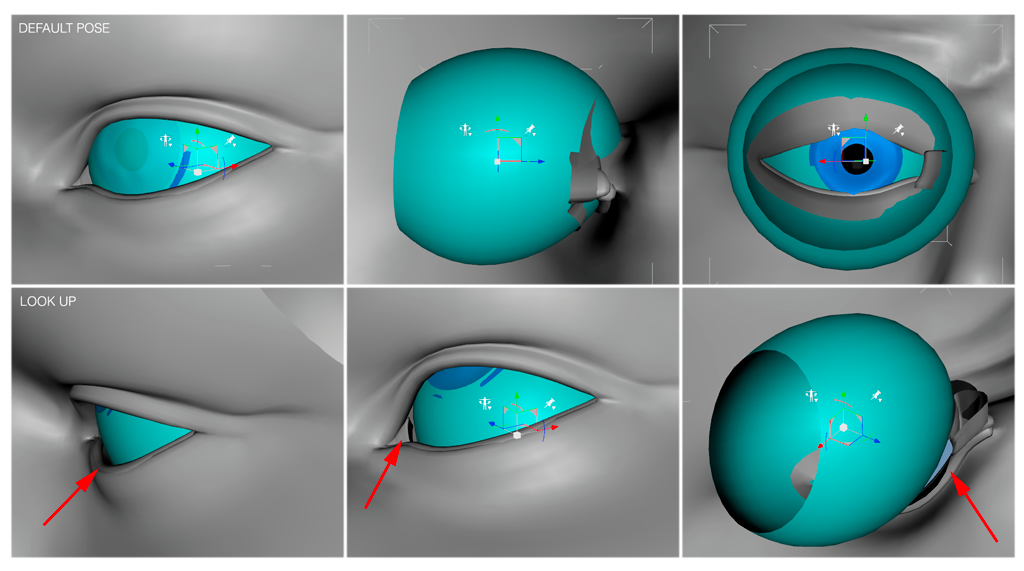
The plugin works great! However, I discovered the eyeballs become distorted causing the eyelids to track improperly when moved, essentially leaving gaps.

FaceGen Guru
Mar 28, 2016, 4:43:29 PM3/28/16
to FaceGen
Les, thank you for this detailed report.
Our spatial deformation approach does warp the eyes, so this is a limitation of FaceGen we hope to deal with in future.
Best wishes,
Les
Mar 28, 2016, 8:51:33 PM3/28/16
to FaceGen
Thank you for the reply. I'll write a DS script to revert the affected vertices.
Les
Mar 29, 2016, 3:37:04 AM3/29/16
to FaceGen
On Sunday, March 27, 2016 at 2:27:20 PM UTC-7, Les wrote:
The plugin works great! However, I discovered the eyeballs become distorted causing the eyelids to track improperly when moved, essentially leaving gaps.
In case it helps anyone, this is my lazy-man's fix to the eye deformation.Remove the following id blocks from the morph file to bypass any eye deformations.Example:[ 3337, 0.1301969, -0.0407410, -0.1015968 ],~[ 3711, 0.2125492, 0.1123810, -0.0949588 ],The ID is the first numberGenesis 1lEye: 3337 to 3711rEye: 12652 to 13026Genesis 2 Male / FemalelEye: 2179 to 9295rEye: 13011 to 19961
FaceGen Guru
Mar 29, 2016, 7:28:50 AM3/29/16
to FaceGen
Note though that if you keep the eye vertices fixed, the eyes may no longer align with the eyelids (which morph to match the face), even in the base pose.
Best wishes,
Les
Mar 29, 2016, 6:00:40 PM3/29/16
to FaceGen
Eye alignment is easier to fix than making the eyeball spherical again.

judy
Jul 2, 2016, 9:55:25 PM7/2/16
to FaceGen
Hello,
I've noticed not only are the morped eyes warped, but the gums and teeth seem to be warped too.
Surely, there must be a way to remove the shearing component from the final morphed vertices, while keeping translation, rotation, and uniform scaling intact. For both the eyes and gums/teeth.
I've noticed not only are the morped eyes warped, but the gums and teeth seem to be warped too.
Surely, there must be a way to remove the shearing component from the final morphed vertices, while keeping translation, rotation, and uniform scaling intact. For both the eyes and gums/teeth.
judy
Jul 2, 2016, 10:07:55 PM7/2/16
to FaceGen
Instead of deforming the actual eye vertices, could you not replace them with an orthogonal axis?
Deform the axis vectors with your spatial deformation, and then remove shearing component from the final matrix. Use the morphed matrix to transform the eye vertices without any shearing.
Deform the axis vectors with your spatial deformation, and then remove shearing component from the final matrix. Use the morphed matrix to transform the eye vertices without any shearing.
FaceGen Guru
Jul 4, 2016, 8:31:26 AM7/4/16
to FaceGen
Hello Judy,
Since different people have different shaped mouths, FaceGen will change the shape of the teeth and gums to accomodate differently shaped mouths.
Keeping the eyes spherical is desirable and we intend to work on that, although it won't make it into the next release.
The reason this turns out to be not so easy is that the spherical eyeball must somehow be made to fit seamlessly with the eyelid shape for all faces, and the eyelid shape is driven by our shape statistics which do not respect things like local spherical constraints.
Best wishes,
judy
Jul 8, 2016, 1:34:56 AM7/8/16
to FaceGen
Hello,
Are there any FaceGen program settings under "Modify -> Shape" that can help reduce or remove eyeball warping? Something that can be zeroed out or set to a neutral position? Something that only affects the eye shape and not the overall face shape?
I'm looking at settings like "Eyes - tilt inward / outward". Does zeroing that out help?
I'm not too concerned about getting a perfectly spherical eyeball, as the eye surface is over 50% hidden anyway. Just the visible part, like the cornea, is important. It should be as circular as possible.
Are there any FaceGen program settings under "Modify -> Shape" that can help reduce or remove eyeball warping? Something that can be zeroed out or set to a neutral position? Something that only affects the eye shape and not the overall face shape?
I'm looking at settings like "Eyes - tilt inward / outward". Does zeroing that out help?
I'm not too concerned about getting a perfectly spherical eyeball, as the eye surface is over 50% hidden anyway. Just the visible part, like the cornea, is important. It should be as circular as possible.
FaceGen Guru
Jul 8, 2016, 8:10:08 AM7/8/16
to FaceGen
Hello Judy,
Not currently, the shape sliders are fairly interconnected so that would be difficult.
Best wishes,
Reply all
Reply to author
Forward
0 new messages