
Excel Macros - Create a Date picker using Calender Control and form
1,130 views
Skip to first unread message

ashish
Aug 10, 2012, 9:39:17 AM8/10/12
to excelvb...@googlegroups.com
If you want to give option of selecting date to the user or add date picker on your worksheet . Snapshot below ------

Step 1
Press Alt+ F11
Step 2
Right click on "This workbook" -> Insert -> Userform

Step 3
When you will click on insert user form . you will see a new form inserted and "Tool box " next to it.
In case you are not able to see the tool box - goto "View" menu and click on"TOOLBOX"
Right click on Tool box and click on Additional control
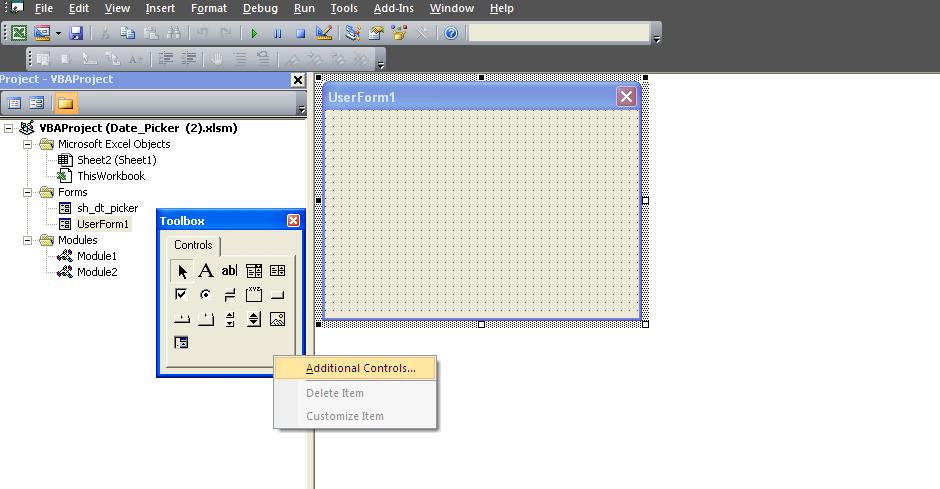
Step 4
Choose calender control and click on ok.

Step 5
You will see a new control "calender" . Select it and drag it over the form .

Step 6
Click on form and then in property change the back color or font color if you like to and rename the form , etc.

Add a below code to form calender event
Private Sub Calendar1_Click()
Range("e2").Value = Me.Calendar1.Value
Unload Me
End Sub
Add below code to module1 or any new module
Sub show_date_picker()
sh_dt_picker.Show
End Sub
Download Working File https://www.box.com/s/2c1b383bf0d489a027aa
Reply all
Reply to author
Forward
0 new messages