
Creating a new F# project with Excel-DNA and Visual Studio 2019
251 views
Skip to first unread message

jant...@gmail.com
May 7, 2021, 9:24:06 AM5/7/21
to Excel-DNA
Hi,
I have been using Excel DNA and F# for a while, but I have just "upgraded" to Visual 2019 (from VS2017), and ran into difficulties while creating a new project. I can't get Excel DNA into the project.
I am aware of several articles / resources discussing related issues, e.g. :
[1] resource 1
[2] resource 2
Here are the steps I followed :
1) Using Visual 2019
2) Starting a new F# Class Library (.Net Framework), named Library10 in this example.


3) as recommended by Govert [1], I turned the Options > NuGet Package Manager > General > Package Management "default package manager"
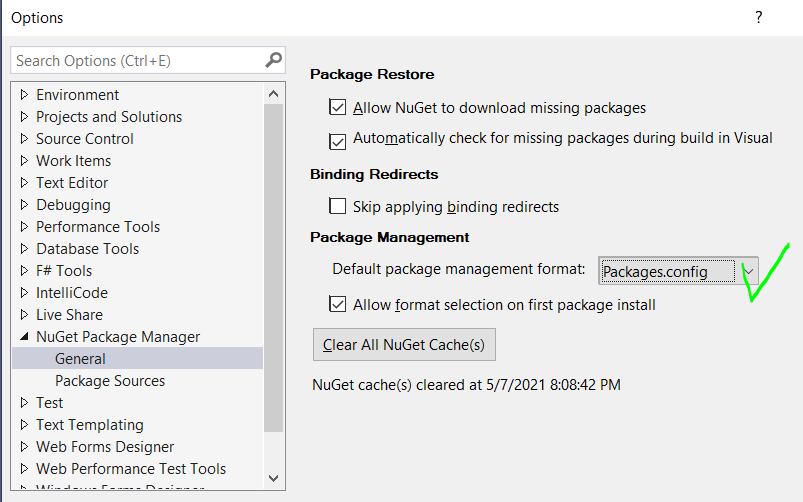
4) This is the original, automatically generated (.fsproject) project file:
<Project Sdk="Microsoft.NET.Sdk">
<PropertyGroup>
<TargetFramework>net48</TargetFramework>
<GenerateDocumentationFile>true</GenerateDocumentationFile>
</PropertyGroup>
<ItemGroup>
<Compile Include="Library1.fs" />
<None Include="Script.fsx" />
</ItemGroup>
</Project>
At this point I tried to follow Govert's instructions in [2] :
5) Update of the main.fs file :
namespace Library10
module MyFunctions
open ExcelDna.Integration // this is not recognized yet
[<ExcelFunction(Description="My first .NET function")>]
let HelloDna name =
"Hello " + name
(*)
6) I added new properties to the .fsproject file:
<Project Sdk="Microsoft.NET.Sdk">
<PropertyGroup>
<TargetFramework>net48</TargetFramework>
<GenerateDocumentationFile>true</GenerateDocumentationFile>
</PropertyGroup>
<PropertyGroup>
<ExcelDnaAllowPackageReferenceProjectStyle>true</ExcelDnaAllowPackageReferenceProjectStyle>
<RunExcelDnaSetDebuggerOptions>false</RunExcelDnaSetDebuggerOptions>
</PropertyGroup>
<ItemGroup>
<Compile Include="Library1.fs" />
<None Include="Script.fsx" />
</ItemGroup>
</Project>
(*)
7) I added a new Library10-Addin.dna file at the solution top-level folder
<?xml version="1.0" encoding="utf-8"?>
<DnaLibrary Name="Library10 Add-In" RuntimeVersion="v4.0" xmlns="http://schemas.excel-dna.net/addin/2018/05/dnalibrary">
<ExternalLibrary Path="Library10.dll" ExplicitExports="false" LoadFromBytes="true" Pack="true" IncludePdb="false" />
</DnaLibrary>

(*)
(*) Finally I tried to load the ExcelDna.AddIn 1.1.1 package via NuGet at several stages, but it never seems to load properly. On the one hand the Nuget Package Manager window indicates that ExcelDna is not loaded. However it does appear under the Solution Explorer.
but the F# does not compile as `open ExcelDna.Integration` isn't recognized.

If you can think of anything that would help me to get out of this painful hole, that'd be great. Thanks in advance.
Jan

Govert van Drimmelen
May 7, 2021, 4:57:01 PM5/7/21
to Excel-DNA
----------
Excel-DNA is now registered on GitHub Sponsors.
Please sign up as a sponsor to help fund future development.
Higher sponsor tiers can also access direct online support.
----------
Hi Jan,
1. For the Sdk-Style projects, I think the packages.config part does not apply - only PackageReference style is supported.
This means I expect the NuGet reference inside your fsproj file, whether you add it through the UI interface or just edit the project file.
<ItemGroup>
<PackageReference Include="ExcelDna.AddIn" Version="1.1.1" />
</ItemGroup>
2. Next I think you ended up with a real F# syntax error.
You should not have both the `namespace` and `module` lines.
Try this code without the namespace line:
//////////////////
module MyFunctions
open ExcelDna.Integration
[<ExcelFunction(Description="My first .NET function")>]
let HelloDna name =
"Hello " + name
///////////////
3. My debugger is set up like this for my 64-bit Excel:
Launch: Executable
Executable: C:\Program Files\Microsoft Office\root\Office16\EXCEL.EXE\
Application arguments: FsDna-AddIn64.xll
(Where my project is called FsDna).
Then it works fine for me.
Let me know if you still have trouble.
-Govert
jant...@gmail.com
May 7, 2021, 9:04:46 PM5/7/21
to Excel-DNA
Thanks Govert,
The 2) F# error was a typo on my part, which I fixed. But the rest did not seem to fix the issue. It always seems to come from .fsproject file (e.g. I realized the impact of the <IncludeAssets> tag, please see below).
So I recreated another similar project, Library11:
1) I changed .fs file back to our original program
namespace Library11
module MyFunctions =
open ExcelDna.Integration
[<ExcelFunction(Description="My first .NET function")>]
let HelloDna name =
"Hello " + name
2) the original, out-of-the-box, unaltered project .fsproject file is
<Project Sdk="Microsoft.NET.Sdk">
<PropertyGroup>
<TargetFramework>net48</TargetFramework>
<GenerateDocumentationFile>true</GenerateDocumentationFile>
</PropertyGroup>
<ItemGroup>
<Compile Include="Library1.fs" />
<None Include="Script.fsx" />
</ItemGroup>
</Project>
3) Loading ExcelDna from NuGet
I now have the error message:
Error DNA1546 Excel-DNA is not compatible with projects that use NuGet `PackageReference`. Make sure you create a .NET Framework (Class Library) project and configure Visual Studio to use `packages.config` Library11 C:\Users\W1\.nuget\packages\exceldna.addin\1.1.1\build\ExcelDna.AddIn.targets
while the .fsproject was automatically updated to
<Project Sdk="Microsoft.NET.Sdk">
<PropertyGroup>
<TargetFramework>net48</TargetFramework>
<GenerateDocumentationFile>true</GenerateDocumentationFile>
</PropertyGroup>
<ItemGroup>
<Compile Include="Library1.fs" />
<None Include="Script.fsx" />
</ItemGroup>
<ItemGroup>
<PackageReference Include="ExcelDna.AddIn" Version="1.1.1">
<PrivateAssets>all</PrivateAssets>
<IncludeAssets>runtime; build; native; contentfiles; analyzers; buildtransitive</IncludeAssets>
</PackageReference>
</ItemGroup>
</Project>
(added lines in bold-face)
4) I then manually edited the .fsproject file to allow Package references.
<Project Sdk="Microsoft.NET.Sdk">
<PropertyGroup>
<TargetFramework>net48</TargetFramework>
<GenerateDocumentationFile>true</GenerateDocumentationFile>
</PropertyGroup>
<PropertyGroup>
<ExcelDnaAllowPackageReferenceProjectStyle>true</ExcelDnaAllowPackageReferenceProjectStyle>
<RunExcelDnaSetDebuggerOptions>false</RunExcelDnaSetDebuggerOptions>
</PropertyGroup>
<ItemGroup>
<Compile Include="Library1.fs" />
<None Include="Script.fsx" />
</ItemGroup>
<ItemGroup>
<PackageReference Include="ExcelDna.AddIn" Version="1.1.1">
<PrivateAssets>all</PrivateAssets>
<IncludeAssets>runtime; build; native; contentfiles; analyzers; buildtransitive</IncludeAssets>
</PackageReference>
</ItemGroup>
</Project>
That removed the original error.
But two new other errors appeared:
Error FS0039 The namespace or module 'ExcelDna' is not defined. Library11 C:\Users\W1\source\repos\Library11\Library1.fs
Error FS0039 The type 'ExcelFunction' is not defined. Library11 C:\Users\W1\source\repos\Library11\Library1.fs
5) In order to get rid of these other errors, I manually removed the <IncludeAssets> tags from the .fsproject (I got that trick from you on [2])
<Project Sdk="Microsoft.NET.Sdk">
<PropertyGroup>
<TargetFramework>net48</TargetFramework>
<GenerateDocumentationFile>true</GenerateDocumentationFile>
</PropertyGroup>
<PropertyGroup>
<ExcelDnaAllowPackageReferenceProjectStyle>true</ExcelDnaAllowPackageReferenceProjectStyle>
<RunExcelDnaSetDebuggerOptions>false</RunExcelDnaSetDebuggerOptions>
</PropertyGroup>
<ItemGroup>
<Compile Include="Library1.fs" />
<None Include="Script.fsx" />
</ItemGroup>
<ItemGroup>
<PackageReference Include="ExcelDna.AddIn" Version="1.1.1">
<PrivateAssets>all</PrivateAssets>
<!--<IncludeAssets>runtime; build; native; contentfiles; analyzers; buildtransitive</IncludeAssets>-->
</PackageReference>
</ItemGroup>
</Project>
6) At this stage the project does compile :
Build started...
1>------ Build started: Project: Library11, Configuration: Debug Any CPU ------
1>Library11 -> C:\Users\W1\source\repos\Library11\bin\Debug\net48\Library11.dll
1>---
1>ExcelDnaBuild: ---
1>---
========== Build: 1 succeeded, 0 failed, 0 up-to-date, 0 skipped ==========
7) However it does not seem to generate any .xll file.
(I am not even trying to start the debugger and open an Excel sheet to test the addin at this stage, it's just that there is apparently no ExcelDna .xll to be found in the project).


What else could it be? Thanks for your help.
Jan
Govert van Drimmelen
May 8, 2021, 1:36:02 AM5/8/21
to exce...@googlegroups.com
Hi Jan,
The best instructions is at the GitHub issue you pointed to initially:
You are now missing the .dna file, which is the cue for the Excel-DNA build targets.
My project file for the project FsDna.fsproj looks like this (I don't think net472 vs net48 matters):
<Project Sdk="Microsoft.NET.Sdk">
<PropertyGroup>
<TargetFramework>net472</TargetFramework>
<GenerateDocumentationFile>true</GenerateDocumentationFile>
</PropertyGroup>
<PropertyGroup>
<ExcelDnaAllowPackageReferenceProjectStyle>true</ExcelDnaAllowPackageReferenceProjectStyle>
<RunExcelDnaSetDebuggerOptions>false</RunExcelDnaSetDebuggerOptions>
</PropertyGroup>
<ItemGroup>
<None Include="FsDna-AddIn.dna" />
<Compile Include="Library.fs" />
</ItemGroup>
<ItemGroup />
<ItemGroup>
<PackageReference Include="ExcelDna.AddIn" Version="1.1.1" />
</ItemGroup>
</Project>
Where my FsDna-AddIn.dna file contains:
<DnaLibrary Name="FsDna Add-In" RuntimeVersion="v4.0" xmlns="http://schemas.excel-dna.net/addin/2018/05/dnalibrary">
<ExternalLibrary Path="FsDna.dll" ExplicitExports="false" LoadFromBytes="true" Pack="true" IncludePdb="false" />
</DnaLibrary>
-Govert
--
You received this message because you are subscribed to the Google Groups "Excel-DNA" group.
To unsubscribe from this group and stop receiving emails from it, send an email to exceldna+u...@googlegroups.com.
To view this discussion on the web visit https://groups.google.com/d/msgid/exceldna/cd9ebc5b-bc33-4a64-a1db-6225baa940e6n%40googlegroups.com.
jant...@gmail.com
May 8, 2021, 2:49:11 AM5/8/21
to Excel-DNA
Thanks a lot Govert!
Adding the line <None Include="Library11-Addin.dna" /> to the .fsproject file did it. (I could not find a reference to this line in the GitHub issue, but now all is good).
Thanks for your help.
Jan
Reply all
Reply to author
Forward
0 new messages