
Device Module Info
123 views
Skip to first unread message

Bill McCormick
Mar 25, 2019, 5:17:00 PM3/25/19
to EIP Stack Group OpENer Developers
When I select the _Module Info_ tab of the device in Logix5000, information that I would expect to be displayed is not displayed and I see an Info Message dialog with a message _Requested message timed out_.

Martin Melik-Merkumians
Mar 26, 2019, 8:47:19 AM3/26/19
to EIP Stack Group OpENer Developers
I guess, you expect to see the answer of a List Identity command or a direct "get attribute all" answer of the identity object?
If this is the case, this works fine for me with the CT and Molex tools.
Best regards,
Martin
Bill McCormick
Mar 27, 2019, 11:42:18 AM3/27/19
to EIP Stack Group OpENer Developers
I don't have those tools, but I did expect to see *something*; and I didn't expect a timeout. Maybe it's something Rockwell is not doing correctly? But it's certainly something I'd expect to work.
-Bill
Martin Melik-Merkumians
Mar 27, 2019, 4:34:04 PM3/27/19
to EIP Stack Group OpENer Developers
Hi Bill,
you can get it for free at https://www.molex.com/mx_upload/superfamily/iccc/EtherNet_IPTool.html
I would also expect, that the ControlLogix is doing it correctly. This should work, based on my experience at the last PlugFest. This code hasn't changed since. I will try to fire up my own ControlLogix and give it a try, but I would expect, that the config you are using is somehow wrong.
Best,
Martin
Bill McCormick
Mar 27, 2019, 4:47:58 PM3/27/19
to Martin Melik-Merkumians, EIP Stack Group OpENer Developers
There isn't much to configure:
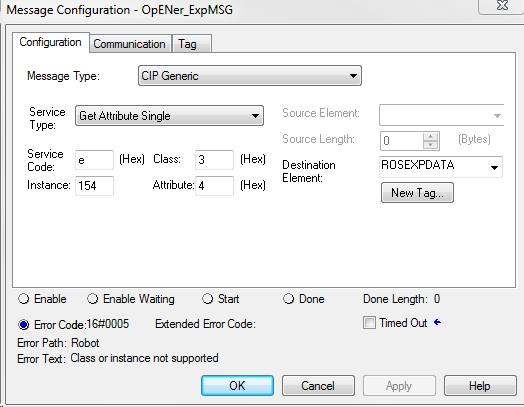

--
You received this message because you are subscribed to the Google Groups "EIP Stack Group OpENer Developers" group.
To unsubscribe from this group and stop receiving emails from it, send an email to eip-stack-group-opener...@googlegroups.com.
To post to this group, send email to eip-stack-group-...@googlegroups.com.
To view this discussion on the web visit https://groups.google.com/d/msgid/eip-stack-group-opener-developers/ac41c465-33d4-4778-a211-f8c5c8297e0e%40googlegroups.com.
For more options, visit https://groups.google.com/d/optout.
Martin Melik-Merkumians
Mar 27, 2019, 4:50:47 PM3/27/19
to EIP Stack Group OpENer Developers
Can it be, that you also have to provide the instance id in hex?
Am Mittwoch, 27. März 2019 21:47:58 UTC+1 schrieb Bill McCormick:
There isn't much to configure:


On Wed, Mar 27, 2019 at 3:34 PM Martin Melik-Merkumians <martin...@gmail.com> wrote:
Hi Bill,--you can get it for free at https://www.molex.com/mx_upload/superfamily/iccc/EtherNet_IPTool.htmlI would also expect, that the ControlLogix is doing it correctly. This should work, based on my experience at the last PlugFest. This code hasn't changed since. I will try to fire up my own ControlLogix and give it a try, but I would expect, that the config you are using is somehow wrong.Best,Martin
Am Mittwoch, 27. März 2019 16:42:18 UTC+1 schrieb Bill McCormick:I don't have those tools, but I did expect to see *something*; and I didn't expect a timeout. Maybe it's something Rockwell is not doing correctly? But it's certainly something I'd expect to work.-Bill
On Tuesday, March 26, 2019 at 7:47:19 AM UTC-5, Martin Melik-Merkumians wrote:I guess, you expect to see the answer of a List Identity command or a direct "get attribute all" answer of the identity object?If this is the case, this works fine for me with the CT and Molex tools.Best regards,Martin
Am Montag, 25. März 2019 22:17:00 UTC+1 schrieb Bill McCormick:When I select the _Module Info_ tab of the device in Logix5000, information that I would expect to be displayed is not displayed and I see an Info Message dialog with a message _Requested message timed out_.
You received this message because you are subscribed to the Google Groups "EIP Stack Group OpENer Developers" group.
To unsubscribe from this group and stop receiving emails from it, send an email to eip-stack-group-opener-developers+unsubscribe@googlegroups.com.
To post to this group, send email to eip-stack-group-opener-devel...@googlegroups.com.
Bill McCormick
Mar 27, 2019, 5:01:12 PM3/27/19
to Martin Melik-Merkumians, EIP Stack Group OpENer Developers
I tried that, of course, and it will not except anything other than a decimal value ... no letters ... so no hex.
The fact that it responds with Class or instance not supported makes me think that somehow the class is actually something other than 3, or the instance is not be exposed at all, or in a way that Rockwell understands.
-Bill
On Wed, Mar 27, 2019 at 3:50 PM Martin Melik-Merkumians <martin...@gmail.com> wrote:
Can it be, that you also have to provide the instance id in hex?
Am Mittwoch, 27. März 2019 21:47:58 UTC+1 schrieb Bill McCormick:
There isn't much to configure:
On Wed, Mar 27, 2019 at 3:34 PM Martin Melik-Merkumians <martin...@gmail.com> wrote:
Hi Bill,--you can get it for free at https://www.molex.com/mx_upload/superfamily/iccc/EtherNet_IPTool.htmlI would also expect, that the ControlLogix is doing it correctly. This should work, based on my experience at the last PlugFest. This code hasn't changed since. I will try to fire up my own ControlLogix and give it a try, but I would expect, that the config you are using is somehow wrong.Best,Martin
Am Mittwoch, 27. März 2019 16:42:18 UTC+1 schrieb Bill McCormick:I don't have those tools, but I did expect to see *something*; and I didn't expect a timeout. Maybe it's something Rockwell is not doing correctly? But it's certainly something I'd expect to work.-Bill
On Tuesday, March 26, 2019 at 7:47:19 AM UTC-5, Martin Melik-Merkumians wrote:I guess, you expect to see the answer of a List Identity command or a direct "get attribute all" answer of the identity object?If this is the case, this works fine for me with the CT and Molex tools.Best regards,Martin
Am Montag, 25. März 2019 22:17:00 UTC+1 schrieb Bill McCormick:When I select the _Module Info_ tab of the device in Logix5000, information that I would expect to be displayed is not displayed and I see an Info Message dialog with a message _Requested message timed out_.
You received this message because you are subscribed to the Google Groups "EIP Stack Group OpENer Developers" group.
To unsubscribe from this group and stop receiving emails from it, send an email to eip-stack-group-opener...@googlegroups.com.
To post to this group, send email to eip-stack-group-...@googlegroups.com.
To view this discussion on the web visit https://groups.google.com/d/msgid/eip-stack-group-opener-developers/ac41c465-33d4-4778-a211-f8c5c8297e0e%40googlegroups.com.
For more options, visit https://groups.google.com/d/optout.
--
You received this message because you are subscribed to the Google Groups "EIP Stack Group OpENer Developers" group.
To unsubscribe from this group and stop receiving emails from it, send an email to eip-stack-group-opener...@googlegroups.com.
To post to this group, send email to eip-stack-group-...@googlegroups.com.
To view this discussion on the web visit https://groups.google.com/d/msgid/eip-stack-group-opener-developers/47b63021-dc76-4f76-868e-5925af80ebb0%40googlegroups.com.
Bill McCormick
Mar 27, 2019, 5:29:52 PM3/27/19
to Martin Melik-Merkumians, EIP Stack Group OpENer Developers
Using the Molex tool, what should the path look like? Each octet of the IP address of my OpENer device? Or should the 1,0 path be correct?
I'm getting a Status of 5 Path Destination Unknown.
Bill McCormick
Mar 27, 2019, 6:01:36 PM3/27/19
to EIP Stack Group OpENer Developers
I think the issue is with the path I use in the MSG instruction, which allows me to use a Name from the I/O tree; in this, *Robot*.
I think the path should look something like 1,192.168.100.2, but that's not quite it because that doesn't work.
If this is the issue, it will be a problem as many like myself will fall into this problem.
To unsubscribe from this group and stop receiving emails from it, send an email to eip-stack-group-opener-developers+unsubscribe@googlegroups.com.
To post to this group, send email to eip-stack-group-opener-devel...@googlegroups.com.
To view this discussion on the web visit https://groups.google.com/d/msgid/eip-stack-group-opener-developers/ac41c465-33d4-4778-a211-f8c5c8297e0e%40googlegroups.com.
For more options, visit https://groups.google.com/d/optout.
--
You received this message because you are subscribed to the Google Groups "EIP Stack Group OpENer Developers" group.
To unsubscribe from this group and stop receiving emails from it, send an email to eip-stack-group-opener-developers+unsubscribe@googlegroups.com.
To post to this group, send email to eip-stack-group-opener-devel...@googlegroups.com.
Bill McCormick
Mar 27, 2019, 8:17:26 PM3/27/19
to EIP Stack Group OpENer Developers
I think I realized what the issue is on my way home this evening: I've got 2 switches between the PLC and the OpENer device, and one or both may be unmanaged. While it isn't an issue for unsolicited messaging that rides on UDP, I can see how it might be an issue for messaging that requires TCP.
Just an educated guess at this point (I'll move some things around in the morning), but if I'm right it like solves the subject of this thread and the subject of another thread that seems to now be discussed here as well.
Martin Melik-Merkumians
Mar 28, 2019, 6:07:13 AM3/28/19
to EIP Stack Group OpENer Developers
With the Molex Tool you provide the IP address, the rest is entered in the explicite message tab, where you can choose your command per drop down.
I don't see how unmanaged switches would interfere with TCP messages, switches, especially unmanaged ones, should simply repeat all messages to all ports.
If there is a timeout it is more likely that the hostname is not known to your PC or the port is blocked by a firewall along the way
Best regards,
Martin
Bill McCormick
Mar 28, 2019, 12:43:15 PM3/28/19
to EIP Stack Group OpENer Developers
As you predicted, moving the PLC to a new switch did not help. Some screen-shots of my setup:
RSLinx showing the OpENer device at 192.168.100.2
Molex EIP-Tool List Identity
Molex EIP-Tool Explicit Message:
The Path part is what I'm not sure about, but I've tried a number of variations 0,192,168.100.2 through 7,192,168.100.2, 1,1,192,168.100.2, and just 192,168.100.2 and none work.
Any help appreciated.
-Bill
Martin Melik-Merkumians
Apr 30, 2019, 5:07:30 AM4/30/19
to EIP Stack Group OpENer Developers
Hi,
sorry for the late reply. As I take a look on your screen shot you are trying to get attribute 4 from class 3 instance 154.
The problem is, if you did not implement the class 0x3 object (DeviceNet) yourself, it is not existing, resulting in the shown error of unknown path. Btw. the path is not the IP address, but the EPath as defined in the CIP specifaction
If you wanted to request the assembly object, this is class code 4, attribute 3 for the data array.
Best regards,
Martin
Reply all
Reply to author
Forward
0 new messages