
[Education cum Entertainment] How to Log off the user by using another user account......
0 views
Skip to first unread message

Owais Ahmed
Sep 8, 2011, 2:31:57 PM9/8/11
to edu-t...@googlegroups.com
How to Log off the user by using another user account......
 Step 1:- Press Ctrl+Alt and Delete or Ctrl +Shift and Esc
Step 2:- In Task Manager select "Users" tab.
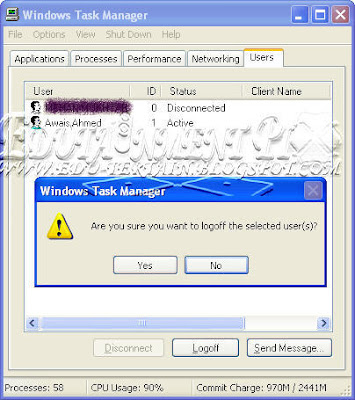 Step 3:- Click on the user which you want to log off.
Step 4:- Click logoff and then yes.

Step 2:- In Task Manager select "Users" tab.

Step 4:- Click logoff and then yes.
--
Posted By Owais Ahmed to Education cum Entertainment on 9/08/2011 11:31:00 AM
Reply all
Reply to author
Forward
0 new messages