
[Education cum Entertainment] How to control mouse using Keyboard (keypad)...
0 views
Skip to first unread message

Owais Ahmed
Sep 12, 2011, 3:46:47 PM9/12/11
to edu-t...@googlegroups.com
How to control mouse using Keyboard
(keypad)...

Step 1:- Go to Control Panel (in the start button)
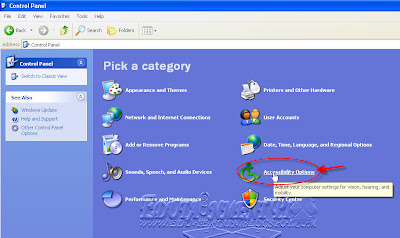
 Step 2:- Click on Accessibility Options
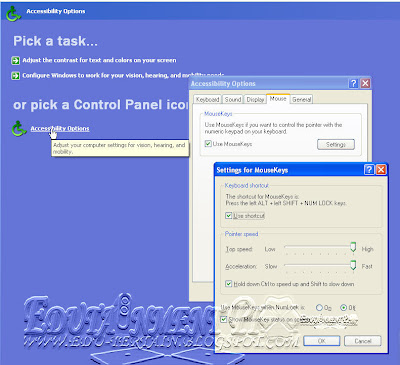
Step 3:- Click on Accessibility Options
Step 4:- Click on "Mouse" tab.
Step 5:- Check on "Use Mousekeys",then apply..
Now you can control your mouse using your keyboard keypad...
You can change also change setting by click on "Settings" option
On settings check on all boxes...example...Use shortcut,Hold down.....etc
also set "Off" in "Use Mouse keys when NumLock is:"
Short Cuts....
Left Alt+Left Ctrl+Left arrow key and Num Lock
You can increse mouse speed by hold Ctrl and decrease it by using Shift key....
Note: You can also do many more changes in Accessibility Options...But be careful...ccc
(keypad)...

Step 1:- Go to Control Panel (in the start button)

 Step 2:- Click on Accessibility Options
Step 3:- Click on Accessibility Options
Step 4:- Click on "Mouse" tab.
Step 5:- Check on "Use Mousekeys",then apply..
Now you can control your mouse using your keyboard keypad...
You can change also change setting by click on "Settings" option
On settings check on all boxes...example...Use shortcut,Hold down.....etc
also set "Off" in "Use Mouse keys when NumLock is:"
Short Cuts....
Left Alt+Left Ctrl+Left arrow key and Num Lock
You can increse mouse speed by hold Ctrl and decrease it by using Shift key....
Note: You can also do many more changes in Accessibility Options...But be careful...ccc
--
Posted By Owais Ahmed to Education cum Entertainment on 9/12/2011 12:46:00 PM
Reply all
Reply to author
Forward
0 new messages