
Theaming Method
203 views
Skip to first unread message

Craig Tucker
Aug 8, 2015, 11:16:52 AM8/8/15
to Easy!Appointments - Support Group
Theaming is problematic because not all colors are managed in the CSS files unfortunately.
How I changed the color (using free or open source tools): I used a ColorPic (http://www.iconico.com/colorpic/) to sample all the colors on the front end to determine the pallet for 1.1--pre-release. The same process would work for 1.0. I came up with the following hex codes for the pallet:
1A865F
38A07A
419641
5CB85C
3DD481
80E1AC
CAEDF3 (background color)
This is not all of them. I think there are some greys and some other images that I did not get but I was mainly wanting to change the shades of green.
I then made color swatches by going to http://www.color-hex.com/ and then using the windows snipping tool and came up with another pallet that matched my website. I focused on color intensity and tried to match that for blue.
I then used the search function in windows file explorer. I selected the advanced option that lets you search within files. I searched for each file in which each of these colors existed and then replaced those hex codes in the files them with my new color hex code.
Some colors are in image files in the /assets/ext/jquery-ui/images/ folder. I edited the colors of the image files in Gimp (www.gimp.org) and created new files to replace them and renamed the files with the new hex number. That changed my front end. It took about an hour and a half. I think it would have been quicker if I was better at using Gimp.
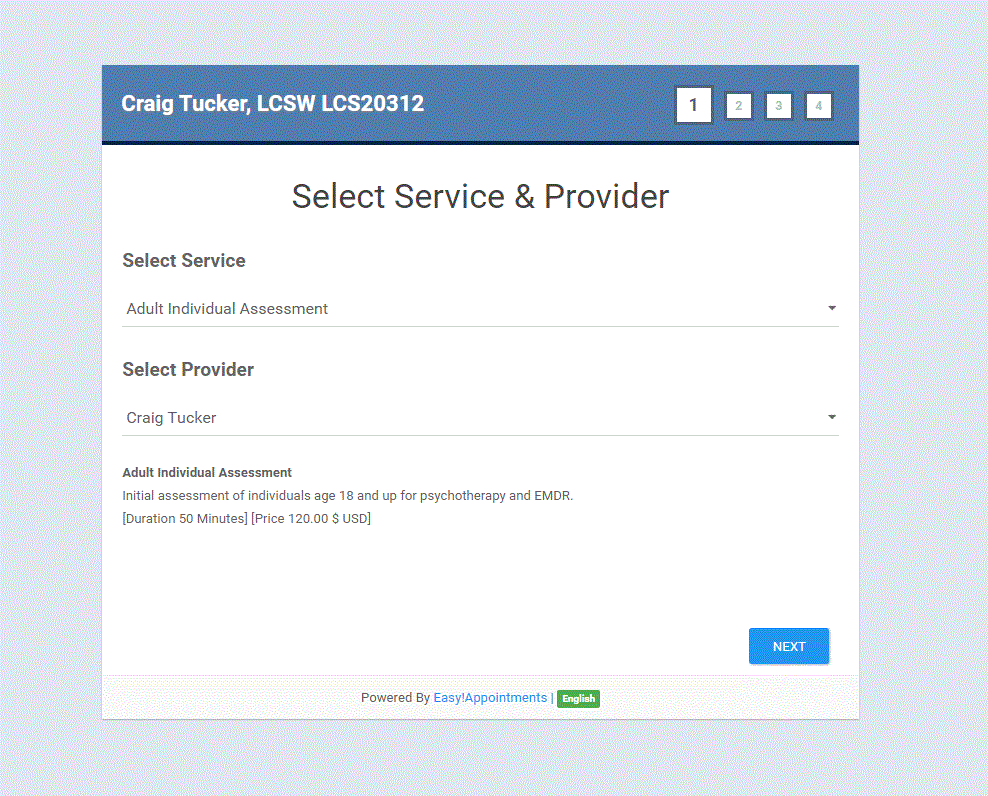
I have samples of how this has all worked out in my post here:
Here is a screen shot:
Reply all
Reply to author
Forward
0 new messages