
Waiting List Project
251 views
Skip to first unread message

Craig Tucker
Aug 8, 2015, 12:14:58 PM8/8/15
to Easy!Appointments - Support Group
I will be creating a waiting list option. I am not sure where to start with this. Any ideas?
What I am thinking is that on the front end at page 2 if a client is not seeing availability they can select a waiting list button that would put them on a notification list for the next 60 days. They would then be added to the customer list but with a waiting list flag. Perhaps a 1/0 column in the user table for waiting list. Or, perhaps I could trigger this in the appointments table with some early date like today minus 100 years. If that date exists older than 100 years +60 in the appointment table then they are on the waiting list. I think that would be easiest. They would then get a daily notification of openings over the next 60 days.
There needs to be an SQL statement to bring up available days.
There needs to be a link to take them off of the waiting list and I think that would be easily implemented if I went with the early date trigger.
I think it can be simple, like my email/text messaging method.
Any ideas. Any one else interested in this or want to help?
Craig Tucker
Sep 1, 2015, 12:10:10 PM9/1/15
to Easy!Appointments - Support Group
What I have done so far is make a button and page to register to be on the waiting list and then post the data to the database. I am assuming that all modifications to allow for text messaging have been made already. So this is what I have:
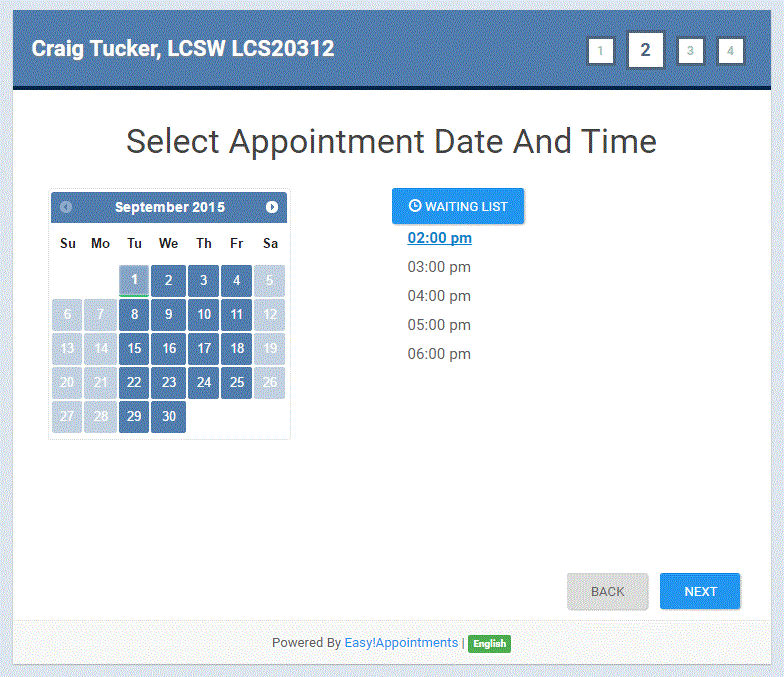


For this portion of the modification I have done the following:
I added the code in the attached file snippet1.js to frontend_book.js after code that looks like this:
             FrontendBook.updateServiceDescription($('#select-service').val(), $('#service-description'));
        });
and before code that looks like this:
        /**
         * Event: Next Step Button "Clicked"
In appointments.php I replaced this line of coode:
$this->load->view('appointments/book_success', $view);With this:
   if($this->input->post('submit2'))
   {
                $post_waiting = json_decode($_POST['post_waiting'], true);
                $waitinglist = $post_waiting['appointment'];

    $this->load->model('appointments_model');
    $this->appointments_model->waitinglist_to_db($waitinglist);
    $this->load->view('appointments/waiting_success', $view);//return to book view
   } else {
            $this->load->view('appointments/book_success', $view);
   }
in appointments_model.php after the last function I added this:
 public function waitinglist_to_db($waitinglist) {
        $waitinglist['book_datetime'] = date('Y-m-d H:i:s');
        $waitinglist['hash'] = $this->generate_hash();
  $waitinglist['is_unavailable'] = true;

        if (!$this->db->insert('ea_appointments', $waitinglist)) {
            throw new Exception('Could not insert waitinglist record.');
        }
        return intval($this->db->insert_id());
    }
The following lines were added to the translations_lang.php
$lang['cell_carrier'] = 'For text reminders, select cell carrier:';
$lang['waitinglist_registered'] = 'Waiting List';
$lang['waitinglist_details'] = 'You have been added to the waiting list for the next 30 days. To unsubscribe use the unsubscribe link included on your eamil notices. ';
$lang['return_to_book'] = 'Return to Booking';
In /application/views/appointments/
I made multiple changes to:
book.php
I added a new file:
waiting_success.php
waiting_success.php
So, this registers a person for notices regarding openings with a hash for their registration. There is no need to do the 100 year thing I was considering. Next steps:
- An SQL statement to bring up available days in the next 60 day period.
- A command line interface file with a cronjob to query the database daily and send out an email and text notice if there is availability. There will be a link with the hash to be removed from the waiting list.
- A function in appointments.php that will just delete the appointment associated with the hash where startdate is null
If you can see problems with my code or have suggestions to improve it let me know (that is if you can tell me how to code it better, not made to order requests). I am not a coder and am learning as I go so if I am making gross errors please tell me.
Message has been deleted
Craig Tucker
Sep 3, 2015, 12:56:31 PM9/3/15
to Easy!Appointments - Support Group
To construct the query I see that I need to access both the provider working plan and the appointment tables and join them. I have posted the following question on stackoverflow with questions about how to make this work:
Any tips there would be appreciated.
When this is completed I will then use the results for an email out to the registered waiting list requests.
Craig Tucker
Sep 7, 2015, 2:09:26 PM9/7/15
to Easy!Appointments - Support Group
It is clear that I cannot just do a simple SQL query to get this done. Instead I am trying to make a CLI controller using a modification of Alex's get_provider_available_time_periods function in the appointments.php controller. It looks like most of what is needed is in that function. I could loop this for x number of days out and produce some thing in an email that would look like:
The following 60 min appointments are available with Craig Tucker in the next 30 days:
Thursday, September 10, 2015 2 openings
Tuesday, September 15, 2015 3 openings
Wednesday, September 23, 2015 1 opening
Friday, October 2, 2015 1 opening
If you wish to schedule hit this link:
If you wish to be removed from the waiting list hit this link.
That is the concept I am going for. This could be launched with a cronjob. I have made several attempts to run my modified script but I have been unsuccessful so far in pulling out the array.
Craig Tucker
Sep 30, 2015, 12:02:53 PM9/30/15
to Easy!Appointments - Support Group
The waiting list is completed, it works well, and is integrated into this build:
Reply all
Reply to author
Forward
0 new messages