
URGENT: Port Device Address???
641 views
Skip to first unread message

FERNANDO LÚCIO
Apr 23, 2015, 3:43:49 PM4/23/15
to e-p...@googlegroups.com
Dear all,
I´m using a version (1.1) of E-Prime - the update will be made soon, but...- to build simple experiments and I´m trying to enable the parallel port to send triggers trhough it, for example, to an EEG. So far, I added a parallel port to my computer, cause it had none. The TI guy sad it is working properly, after check the port address in the device manager of control panel. Moreover, I have already added a Port Device (edit » experiment » devices » add » port) and put a few lines of codes whithin the script, using E-Prime InLine objects.I added three InLine objects:
one at the beginning and one at the end of the experiment, to turn all pins to zero and clear traces of other signals, as a friend taught me:
WritePort &H378, 0
The first weird thing I noticed was that the WritePort command became grey exactly when I was typing the word "Port" suggesting me that there is something wrong with the Port device...
Then, before the first segment of the stimulus presentation (this is, the first TextDisplay in TrialProcedure),which is called "SEG1" i added another InLine object to send a signal "1" trhough parallel port, with the following codes:
SEG1.OnsetSignalEnabled=True
SEG1.OnsetSignalPort=&H378
SEG1.OnsetSignalData=1
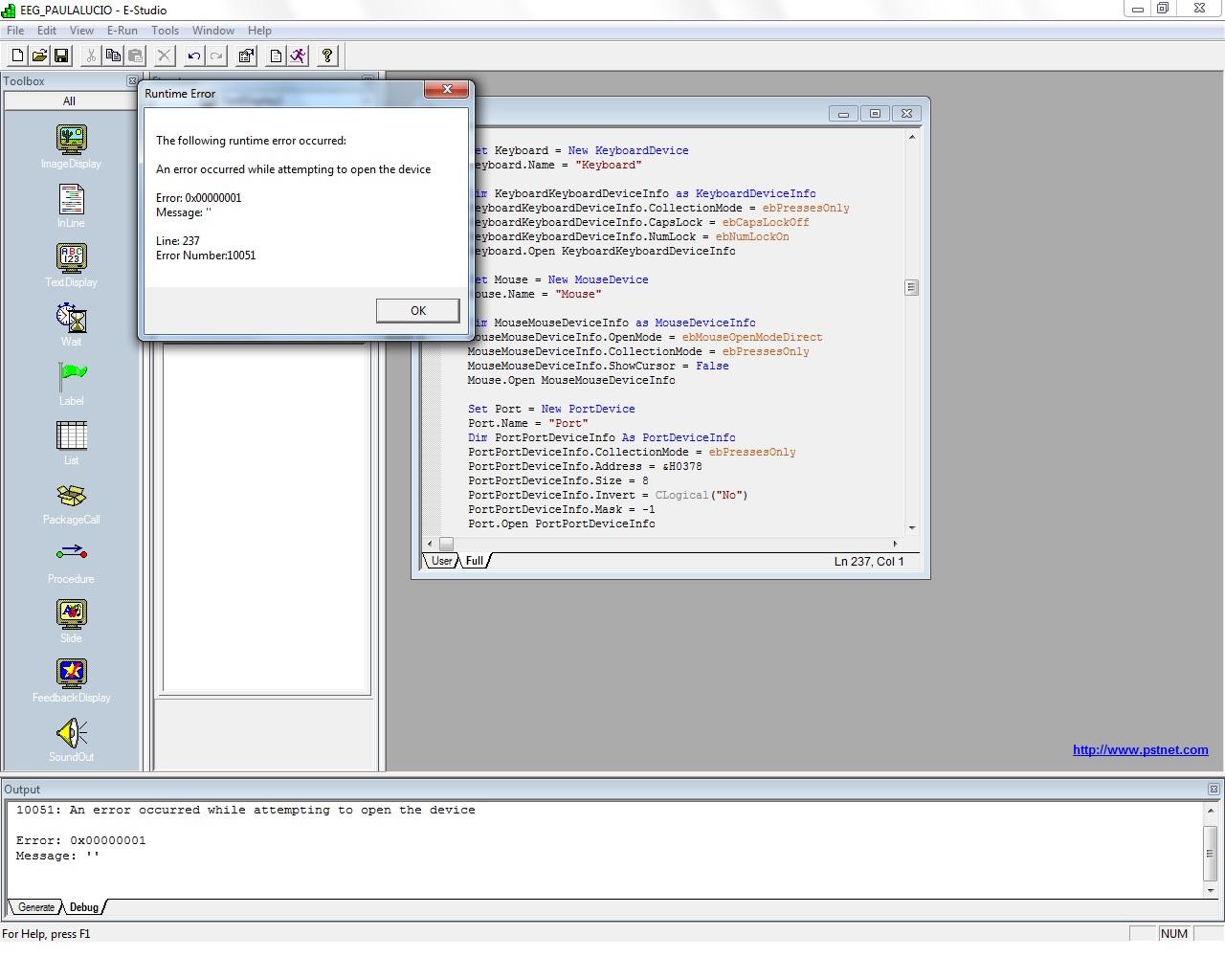
Nevertheless, wheneve I try to run the experiment a Run-time error message is shown: "10051: An error occurred while attempting to open the device". The script seems to stop exactly at the line which contains the command "Port.open" or something that was generated by E.Prime itself, cause I did not add this line anyway...
Me and my colleagues were concerning about several reasons to this error: Is it a problem about the code lines? Is there something wrong with the Port Device instead? Actually, we tried to set many different addresses to the Port Device in E-Prime (edit » experiment » devices » add » port » edit). The default configuration can be observed in the attached file. What is the correct addres I should use in E-Prime to send a signal through the parallel port from an E-Prime experiment to an EEG?
Thanks,
I´m using a version (1.1) of E-Prime - the update will be made soon, but...- to build simple experiments and I´m trying to enable the parallel port to send triggers trhough it, for example, to an EEG. So far, I added a parallel port to my computer, cause it had none. The TI guy sad it is working properly, after check the port address in the device manager of control panel. Moreover, I have already added a Port Device (edit » experiment » devices » add » port) and put a few lines of codes whithin the script, using E-Prime InLine objects.I added three InLine objects:
one at the beginning and one at the end of the experiment, to turn all pins to zero and clear traces of other signals, as a friend taught me:
WritePort &H378, 0
The first weird thing I noticed was that the WritePort command became grey exactly when I was typing the word "Port" suggesting me that there is something wrong with the Port device...
Then, before the first segment of the stimulus presentation (this is, the first TextDisplay in TrialProcedure),which is called "SEG1" i added another InLine object to send a signal "1" trhough parallel port, with the following codes:
SEG1.OnsetSignalEnabled=True
SEG1.OnsetSignalPort=&H378
SEG1.OnsetSignalData=1
Nevertheless, wheneve I try to run the experiment a Run-time error message is shown: "10051: An error occurred while attempting to open the device". The script seems to stop exactly at the line which contains the command "Port.open" or something that was generated by E.Prime itself, cause I did not add this line anyway...
Me and my colleagues were concerning about several reasons to this error: Is it a problem about the code lines? Is there something wrong with the Port Device instead? Actually, we tried to set many different addresses to the Port Device in E-Prime (edit » experiment » devices » add » port » edit). The default configuration can be observed in the attached file. What is the correct addres I should use in E-Prime to send a signal through the parallel port from an E-Prime experiment to an EEG?
Thanks,
David McFarlane
Apr 23, 2015, 5:17:05 PM4/23/15
to e-p...@googlegroups.com
Did you first use the Windows Device Manager to
get the port address of your LPT port?
-----
David McFarlane
At 4/23/2015 03:43 PM Thursday, FERNANDO LÚCIO wrote:
>Dear all,
>I´m using a version (1.1) of E-Prime - the
>Device in E-Prime (edit » experiment » devices
>» add » port » edit). The default
get the port address of your LPT port?
-----
David McFarlane
At 4/23/2015 03:43 PM Thursday, FERNANDO LÚCIO wrote:
>Dear all,
>I´m using a version (1.1) of E-Prime - the
>update will be made soon, but...- to build
>simple experiments and I´m trying to enable the
>parallel port to send triggers trhough it, for
>example, to an EEG. So far, I added a parallel
>port to my computer, cause it had none. The TI
>guy sad it is working properly, after check the
>port address in the device manager of control
>panel. Moreover, I have already added a Port
>Device (edit » experiment » devices » add »
>example, to an EEG. So far, I added a parallel
>port to my computer, cause it had none. The TI
>guy sad it is working properly, after check the
>port address in the device manager of control
>panel. Moreover, I have already added a Port
>» add » port » edit). The default
FERNANDO LÚCIO
Apr 24, 2015, 8:49:02 AM4/24/15
to e-p...@googlegroups.com
Yes, David. Thanks for answering. I noticed that the addres in LPT1 seems to be the most general 0378-037F. There are three images attached: one containing the LPT1 address in Windows Device Manager, another image containing the default properties of Port Device in E-Prime and the last one showing the Run-time error with openning the Port Device, which suggests that this device is not been recognized by E-Prime, or it is, but there´s something wrong about the addres. Could you help me to identify what is happening?
Best Regards,
Best Regards,


David McFarlane
Apr 24, 2015, 10:08:44 AM4/24/15
to e-p...@googlegroups.com
The pictures help. A few thoughts ...
- Your first picture confirms that you do have
the correct port address for your LPT1. Remember
that those values are in hexadecimal, so in
E-Basic you have to enter hex 0378 as either
&h0378 (i.e., hex), or 888 (decimal).
- Your second picture shows PortDevice Address
set to 0. Try setting that to &h378 or 888. And
make sure that you have wired up to the correct
pins on your parallel port connector, see
http://www.pstnet.com/support/kb.asp?TopicID=1320 .
- Your third picture shows a compile-time error,
instead of the run-time error in your initial
post. This time you got an error for trying to
assign a value to an "OnsetDataEnabled" property,
which of course does not exist. You mean
OnsetSignalEnabled, as you had it in your initial
post. See the
RteRunnableInputObject.OnsetSignalEnabled topic
and related topics in the E-Basic Help facility.
This will all get *much* simpler when you upgrade
to EP2, then you may use the Task Events feature.
BTW, your colleague who advised using "WritePort
&H378, 0" at the beginning and the end of the program gave very good advice!
And as to "WriteP" turning gray: Watch
carefully, you will see that "Wri" is gray, it
then turns color as you get to "Write", then back
to gray at "WriteP", and turns color again at
"WritePort". "Write" and "WritePort" are both
keywords, the intermediate forms are not, so
E-Studio is just doing a proper job of syntax-coloring keywords. All OK.
Hope that helps,
-- David McFarlane
At 4/24/2015 08:49 AM Friday, FERNANDO LÚCIO wrote:
>Yes, David. Thanks for answering. I noticed that
>the addres in LPT1 seems to be the most general
>0378-037F. There are three images attached: one
>containing the LPT1 address in Windows Device
>Manager, another image containing the default
>properties of Port Device in E-Prime and the
>last one showing the Run-time error with
>openning the Port Device, which suggests that
>this device is not been recognized by E-Prime,
>or it is, but there´s something wrong about the
> >Dear all,
> >I´m using a version (1.1) of E-Prime - the
> >Device in E-Prime (edit » experiment » devices
> >» add » port » edit). The default
- Your first picture confirms that you do have
the correct port address for your LPT1. Remember
that those values are in hexadecimal, so in
E-Basic you have to enter hex 0378 as either
&h0378 (i.e., hex), or 888 (decimal).
- Your second picture shows PortDevice Address
set to 0. Try setting that to &h378 or 888. And
make sure that you have wired up to the correct
pins on your parallel port connector, see
http://www.pstnet.com/support/kb.asp?TopicID=1320 .
- Your third picture shows a compile-time error,
instead of the run-time error in your initial
post. This time you got an error for trying to
assign a value to an "OnsetDataEnabled" property,
which of course does not exist. You mean
OnsetSignalEnabled, as you had it in your initial
post. See the
RteRunnableInputObject.OnsetSignalEnabled topic
and related topics in the E-Basic Help facility.
This will all get *much* simpler when you upgrade
to EP2, then you may use the Task Events feature.
BTW, your colleague who advised using "WritePort
&H378, 0" at the beginning and the end of the program gave very good advice!
And as to "WriteP" turning gray: Watch
carefully, you will see that "Wri" is gray, it
then turns color as you get to "Write", then back
to gray at "WriteP", and turns color again at
"WritePort". "Write" and "WritePort" are both
keywords, the intermediate forms are not, so
E-Studio is just doing a proper job of syntax-coloring keywords. All OK.
Hope that helps,
-- David McFarlane
At 4/24/2015 08:49 AM Friday, FERNANDO LÚCIO wrote:
>Yes, David. Thanks for answering. I noticed that
>the addres in LPT1 seems to be the most general
>0378-037F. There are three images attached: one
>containing the LPT1 address in Windows Device
>Manager, another image containing the default
>properties of Port Device in E-Prime and the
>last one showing the Run-time error with
>openning the Port Device, which suggests that
>this device is not been recognized by E-Prime,
>addres. Could you help me to identify what is happening?
>
>Best Regards,
>
>Em quinta-feira, 23 de abril de 2015 22:17:05
>UTC+1, McFarlane, David escreveu:
>Did you first use the Windows Device Manager to
>get the port address of your LPT port?
>
>-----
>David McFarlane
>
>
>At 4/23/2015 03:43 PM Thursday, FERNANDO LÚCIO wrote:
>
>Best Regards,
>
>Em quinta-feira, 23 de abril de 2015 22:17:05
>UTC+1, McFarlane, David escreveu:
>Did you first use the Windows Device Manager to
>get the port address of your LPT port?
>
>-----
>David McFarlane
>
>
> >Dear all,
> >I´m using a version (1.1) of E-Prime - the
> >update will be made soon, but...- to build
> >simple experiments and I´m trying to enable the
> >parallel port to send triggers trhough it, for
> >example, to an EEG. So far, I added a parallel
> >port to my computer, cause it had none. The TI
> >guy sad it is working properly, after check the
> >port address in the device manager of control
> >panel. Moreover, I have already added a Port
> >Device (edit » experiment » devices » add »
> >example, to an EEG. So far, I added a parallel
> >port to my computer, cause it had none. The TI
> >guy sad it is working properly, after check the
> >port address in the device manager of control
> >panel. Moreover, I have already added a Port
> >» add » port » edit). The default
FERNANDO LÚCIO
Apr 24, 2015, 10:40:10 AM4/24/15
to e-p...@googlegroups.com
Hi, David!
Now I´m using the WritePort command with the value &H0378, 0 to clear the pins - It is still gray, but I don´t know why; maybe there´s a space between the characters... (take a look at the picture attached, please).The Port Device in E-Prime was updated as you can see in the another picture attached (address &H0378). When I try to run the experiment, a run-time error is shown (as the third figure attached). Is it the case of installing the PorDevice I/O driver?
Now I´m using the WritePort command with the value &H0378, 0 to clear the pins - It is still gray, but I don´t know why; maybe there´s a space between the characters... (take a look at the picture attached, please).The Port Device in E-Prime was updated as you can see in the another picture attached (address &H0378). When I try to run the experiment, a run-time error is shown (as the third figure attached). Is it the case of installing the PorDevice I/O driver?


David McFarlane
Apr 24, 2015, 10:54:38 AM4/24/15
to e-p...@googlegroups.com
Your gray "WritePort" looks just as it
should. Looking closer with my own EP1, I see
that "Writ" is black, "Write" is blue, "WriteP"
is black again, and "WritePort" is
gray. E-Studio colors some keywords blue, and
others gray, I do not know the rule, but it is all OK.
Your port address looks OK now.
Hmm, not a very useful error message,
eh? Anyway, I had assumed that you had installed
the PortDevice I/O driver during
installation. If you did not do that, then you
definitely need to go back and do that! I would
just start with a fresh reinstallation of
E-Prime, and make sure to say "Yes" whenever it
asks to install a driver, ignore the scary warnings from Windows.
-- David McFarlane
At 4/24/2015 10:40 AM Friday, FERNANDO LÚCIO wrote:
>Hi, David!
>Now I´m using the WritePort command with the
> >or it is, but there´s something wrong about the
> > >Dear all,
> > >I´m using a version (1.1) of E-Primee - the
> > >Device in E-Prime (edit » experimentt » devices
> > >» add » po port » edit). The default
should. Looking closer with my own EP1, I see
that "Writ" is black, "Write" is blue, "WriteP"
is black again, and "WritePort" is
gray. E-Studio colors some keywords blue, and
others gray, I do not know the rule, but it is all OK.
Your port address looks OK now.
Hmm, not a very useful error message,
eh? Anyway, I had assumed that you had installed
the PortDevice I/O driver during
installation. If you did not do that, then you
definitely need to go back and do that! I would
just start with a fresh reinstallation of
E-Prime, and make sure to say "Yes" whenever it
asks to install a driver, ignore the scary warnings from Windows.
-- David McFarlane
At 4/24/2015 10:40 AM Friday, FERNANDO LÚCIO wrote:
>Hi, David!
>Now I´m using the WritePort command with the
>value &H0378, 0 to clear the pins - It is still
>gray, but I don´t know why; maybe there´s a
>space between the characters... (take a look at
>the picture attached, please).The Port Device in
>E-Prime was updated as you can see in the
>another picture attached (address &H0378). When
>I try to run the experiment, a run-time error is
>shown (as the third figure attached). Is it the
>case of installing the PorDevice I/O driver?
>
>
>Em sexta-feira, 24 de abril de 2015 15:08:44 UTC+1, McFarlane, David escreveu:
>The pictures help. A few thoughts ...
>
>- Your first picture confirms that you do have
>the correct port address for your LPT1. Remember
>that those values are in hexadecimal, so in
>E-Basic you have to enter hex 0378 as either
>&h0378 (i.e., hex), or 888 (decimal).
>
>- Your second picture shows PortDevice Address
>set to 0. Try setting that to &h378 or 888. And
>make sure that you have wired up to the correct
>pins on your parallel port connector, see
><http://www.pstnet.com/support/kb.asp?TopicID=1320>http://www.pstnet.com/support/kb.asp?TopicID=1320
>the picture attached, please).The Port Device in
>E-Prime was updated as you can see in the
>another picture attached (address &H0378). When
>I try to run the experiment, a run-time error is
>shown (as the third figure attached). Is it the
>case of installing the PorDevice I/O driver?
>
>
>Em sexta-feira, 24 de abril de 2015 15:08:44 UTC+1, McFarlane, David escreveu:
>The pictures help. A few thoughts ...
>
>- Your first picture confirms that you do have
>the correct port address for your LPT1. Remember
>that those values are in hexadecimal, so in
>E-Basic you have to enter hex 0378 as either
>&h0378 (i.e., hex), or 888 (decimal).
>
>- Your second picture shows PortDevice Address
>set to 0. Try setting that to &h378 or 888. And
>make sure that you have wired up to the correct
>pins on your parallel port connector, see
> >addres. Could you help me to identify what is happening?
> >
> >Best Regards,
> >
> >Em quinta-feira, 23 de abril de 2015 22:17:05
> >UTC+1, McFarlane, David escreveu:
> >Did you first use the Windows Device Manager to
> >get the port address of your LPT port?
> >
> >-----
> >David McFarlane
> >
> >
> >At 4/23/2015 03:43 PM Thursday, FERNANDO LÚCIO wrote:
> >
> >Best Regards,
> >
> >Em quinta-feira, 23 de abril de 2015 22:17:05
> >UTC+1, McFarlane, David escreveu:
> >Did you first use the Windows Device Manager to
> >get the port address of your LPT port?
> >
> >-----
> >David McFarlane
> >
> >
> > >Dear all,
> > >I´m using a version (1.1) of E-Primee - the
> > >update will be made soon, but...- to build
> > >simple experiments and I´m trying too enable the
> > >parallel port to send triggers trhough it, for
> > >example, to an EEG. So far, I added a parallel
> > >port to my computer, cause it had none. The TI
> > >guy sad it is working properly, after check the
> > >port address in the device manager of control
> > >panel. Moreover, I have already added a Port
> > >Device (edit » experiment Ãâ‚» devices » add ‚»
> > >example, to an EEG. So far, I added a parallel
> > >port to my computer, cause it had none. The TI
> > >guy sad it is working properly, after check the
> > >port address in the device manager of control
> > >panel. Moreover, I have already added a Port
> > >» add » po port » edit). The default
FERNANDO LÚCIO
Apr 24, 2015, 11:30:19 AM4/24/15
to e-p...@googlegroups.com
The TI guy installed the PorDevice I/O driver and the script is now running properly! I think no further adjusts will be needed...
Thanks a lot.
Thanks a lot.
Reply all
Reply to author
Forward
0 new messages