
Adding a letter on top of a (random) picture. Picture should stay on the screen the whole time
35 views
Skip to first unread message

laura vuillier
Oct 9, 2015, 10:54:31 AM10/9/15
to E-Prime
Hello,
I am very new to E-prime and I checked this group and other info on the internet and still cannot find how to solve my problem.
Please redirect me to a link if this question has been solved elsewhere. Otherwise, hope you'll be able to help me.
I would like to present a random selection of photos on E-prime for 500ms then present a letter (M or W) on top of this photo for 500ms and then have again the photo only for 500ms while the participants respond.
I haven't figured out how to present a random photo yet but I know this part will be easy (with List I think).
What I have no idea how to do is how to add a letter on top of the picture, with the picture staying on the screen throughout the whole time for 1500 ms (500 photo only, 500 with letter and 500 photo only).
I would also like to get codes for each of the three points (so I can link to EEG data) and have the photo continuously presented throughout.
Code 1: photo is presented (the code should tell me which photo is presented)
Code 2: letter is added (the code should tell me which letter is presented)
Code 3: participant's response
See photo below.
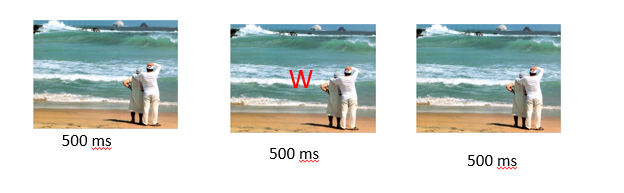
Thanks in advance for your help

Sophy Yu
Oct 10, 2015, 9:43:13 PM10/10/15
to E-Prime
Hi Laura:
You can have the codes by adding attributes in the list, giving each picture a code. e..g, attribute cell, number the pictures 1,2,3 etc.which will show up in E-data file. For participants' response, it can be edited in the duration/input tab.
To add a letter on top of the picture, you can try using Slide object. Hope it helps!
laura vuillier
Oct 12, 2015, 4:18:50 AM10/12/15
to E-Prime
Thanks, Sophy.
I'll try to have a go and will post again here if there's anything.

MarcL
Oct 15, 2015, 6:35:55 AM10/15/15
to E-Prime
Try the following to present the letter on top of your image:
Slide State 1: Image presented without letter (500 ms)
Slide State 2: Image presented, on top and in the foreground (!) a textfield which links to the list attribute containing the word (500 ms)
Slide State 3: Image presented without letter (500 ms)
you could aswell do it with 3 seperate slides the same way, and there is also a way to write the letter to the screen using only inline script, but the above should work fine for you!
Marc
Slide State 1: Image presented without letter (500 ms)
Slide State 2: Image presented, on top and in the foreground (!) a textfield which links to the list attribute containing the word (500 ms)
Slide State 3: Image presented without letter (500 ms)
you could aswell do it with 3 seperate slides the same way, and there is also a way to write the letter to the screen using only inline script, but the above should work fine for you!
Marc
laura vuillier
Oct 15, 2015, 5:23:57 PM10/15/15
to e-p...@googlegroups.com
Thank you very much for your help. Will have a go at it and hopefully it will do exactly what I want! :)
Best wishes,
Laura
-------
Laura Vuillier, PhD Cantab
Research Associate in the Cambridge Prosociality and Well being Lab
University of Cambridge
Department of Psychology
Downing Street
Cambridge, UK, CB2 3EB
To view this discussion on the web visit https://groups.google.com/d/msgid/e-prime/af1bba40-fef7-4f4a-8d76-c4d685c64dc0%40googlegroups.com.--
You received this message because you are subscribed to a topic in the Google Groups "E-Prime" group.
To unsubscribe from this topic, visit https://groups.google.com/d/topic/e-prime/NvydqJ4p5tY/unsubscribe.
To unsubscribe from this group and all its topics, send an email to e-prime+u...@googlegroups.com.
To post to this group, send email to e-p...@googlegroups.com.
Reply all
Reply to author
Forward
0 new messages