
PM2 uses a lot of memory and causes automatic Solr shutdown.

Javi Rojo Díaz



dataquest
Therefore we decreased caching significantly, I can look up specific numbers later, but it was
I also used this parameter in dspace-ui.json that is used to start pm2.
--
All messages to this mailing list should adhere to the Code of Conduct: https://www.lyrasis.org/about/Pages/Code-of-Conduct.aspx
---
You received this message because you are subscribed to the Google Groups "DSpace Technical Support" group.
To unsubscribe from this group and stop receiving emails from it, send an email to dspace-tech...@googlegroups.com.
To view this discussion on the web visit https://groups.google.com/d/msgid/dspace-tech/7829c1f2-86ff-46fb-a423-4b7a88cacab6n%40googlegroups.com.
Javi Rojo Díaz
Thank you very much for your response!


Sean Kalynuk
In our DSpace 7.5 environment (RHEL7, 16GB, 8 CPUs), I chose to only use 4 CPUs out of 8 ("instances": "4") for Node since we also run the other processes (Tomcat9 and Solr) on the same VM. The default Node 16 heap size is 2GB (verified with node -p 'v8.getHeapStatistics()'), and, originally, we were running into Node core dumps due to out-of-memory exceptions. At that time, I set "max_memory_restart": "1800M" so that the Node processes would be restarted before a core dump. However, after enabling server-side caching, the memory core dumps stopped and our Node process runtimes (before restart) changed from roughly 45 minutes to many days.
--
Sean
From:
dspac...@googlegroups.com <dspac...@googlegroups.com> on behalf of Javi Rojo Díaz <jrojo....@gmail.com>
Date: Monday, October 23, 2023 at 3:34 AM
To: DSpace Technical Support <dspac...@googlegroups.com>
Subject: Re: [dspace-tech] PM2 uses a lot of memory and causes automatic Solr shutdown.
|
Caution: This message was sent from outside the University of Manitoba. |
Thank you very much for your response!
For now, what I've done is to limit the memory usage for each core/node of PM2 cluster to 500MB. So, if I have 8 nodes in the cluster, the maximum memory used by PM2 should be 500MB x 8 nodes = 5GB RAM. This seems like a reasonable memory usage. Since I restarted PM2, the memory usage has significantly decreased, and so far, no node has reached 500MB to see if it automatically restarts.
I'll continue monitoring it, but it appears that this may be the solution.
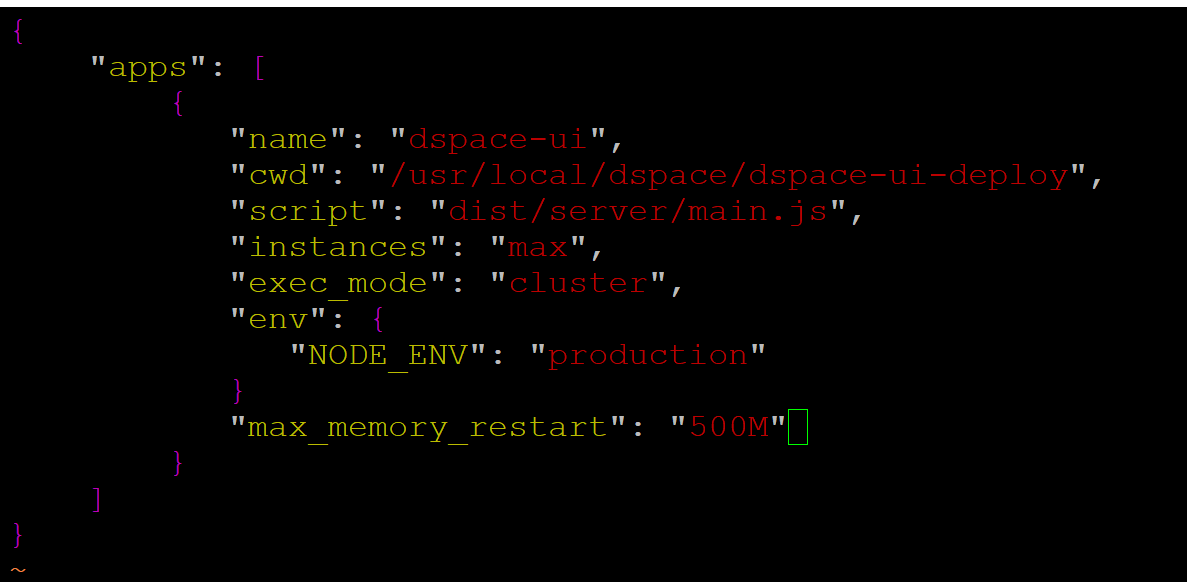
To limit memory usage, I added the following line to "dspace-ui.json":
"max_memory_restart": "500M"

And I restarted PM2 to apply it. I'll write here again if this adjustment has indeed resolved the issue.
Thanks for everything!
El lunes, 23 de octubre de 2023 a las 9:58:00 UTC+2, dataquest escribió:
Hello. I am not sure if I am the best one to answer this question, but we encountered similar problem.
We thought majority of the memory was spent for caching purposes.
Therefore we decreased caching significantly, I can look up specific numbers later, but it wasat most in hundreds. It is much less than official documentation recommends.
I also used this parameter in dspace-ui.json that is used to start pm2."node_args": "--max_old_space_size=4096"
I noticed that even if this memory is insufficient, one core crashes, pm2 restarts it
and after that all works well. It is certainly not a good behaviour and if you use that
parameter, beware of this possibility and monitor the cores for a while. If they keep
restarting, they don't have enough memory and something should be done.
Hope this helps, but perhaps someone else will have some better advice.
Majo
On Mon, Oct 23, 2023 at 9:50 AM Javi Rojo Díaz <jrojo....@gmail.com> wrote:
Good morning,
We have Dspace 7.5 installed and running in production on a machine with 16GB of RAM. For some time now, we have been noticing high RAM usage on the machine. It appears that PM2 is consuming the majority of the system's memory. It's currently using 11GB of RAM, as you can see in the screenshot:
This high memory usage is causing our Solr service to stop every night when it tries to perform the scheduled reindexing. Could you please advise us on how to resolve this issue so that PM2 doesn't use so much memory and leave other services inoperable?
Thank you very much for your assistance.
--
All messages to this mailing list should adhere to the Code of Conduct: https://www.lyrasis.org/about/Pages/Code-of-Conduct.aspx
---
You received this message because you are subscribed to the Google Groups "DSpace Technical Support" group.
To unsubscribe from this group and stop receiving emails from it, send an email to dspace-tech...@googlegroups.com.
To view this discussion on the web visit https://groups.google.com/d/msgid/dspace-tech/7829c1f2-86ff-46fb-a423-4b7a88cacab6n%40googlegroups.com.
--
All messages to this mailing list should adhere to the Code of Conduct:
https://www.lyrasis.org/about/Pages/Code-of-Conduct.aspx
---
You received this message because you are subscribed to the Google Groups "DSpace Technical Support" group.
To unsubscribe from this group and stop receiving emails from it, send an email to
dspace-tech...@googlegroups.com.
To view this discussion on the web visit https://groups.google.com/d/msgid/dspace-tech/3f64ad60-c5af-4198-8430-c67bff896974n%40googlegroups.com.
Javi Rojo Díaz


dung le
dung le
|
|
|||
|
|
January 24, 2024 11:12 AM |
||
|
|
 |
||
|
|

To view this discussion on the web visit https://groups.google.com/d/msgid/dspace-tech/a772dd6e-f711-440c-94ae-22ca21f41272n%40googlegroups.com.

DSpace Technical Support
I wanted to briefly thank you all for sharing your experiences/notes here. Since it sounds like "max_memory_restart" has been a helpful configuration, I've updated our "Performance Tuning DSpace" documentation to include details about using that setting along with clustering to better control memory usage.