
ArduCopter 3.0-rc6 available -- need an introductory video

Randy Mackay
1) bug fix to Circle mode's start position (was moving to last loiter target)
2) WP_ACCEL parameter added to allow user to adjust acceleration during missions
3) loiter acceleration set to half of LOIT_SPEED parameter value (was hard-coded)
2. Inertial navigation has been added meaning that X and Y axis vibration has become more critical. If you have working alt-hold in 2.9.1b then you're probably ok. You can check your XY vibration by looking at the dataflash log's IMU message (was called "RAW" in 2.9.1b). The X and Y axis should be between -3 and +3 after a stable hover.
3. No need to do factory reset of parameters but the Loiter parameters have changed. You will need to change these parameters manually if you have changed them from the defaults.
Loiter Speed P: 1.0 (was 0.2)
Rate Loiter P: 1.0 (was 5.0)
I: 0.5 (was 0.04)
D: 0.4 (was 0.0)
IMAX: 4.0 (was 30.0)
Altitude Hold P: 1.0 (was 2.0)
4. Nav parameters have been combined with loiter parameters.
5. pre-arm checks have been added and you may find that you cannot arm your copter unless you have performed all set-up correctly. If you find yourself unable to arm, try connecting your APM to your computer and check the HUD as you try to arm. If it's pre-arm checks it should display a warning with the reason.

micha...@ndsatcom.com
Craig Elder
--
You received this message because you are subscribed to the Google Groups "ArduCopter Testers Team" group.
To unsubscribe from this group and stop receiving emails from it, send an email to arducoptertest...@googlegroups.com.
For more options, visit https://groups.google.com/groups/opt_out.

Marco Robustini
I think you can use one of this videos, or both, both demonstrate the reliability of the code:
https://www.youtube.com/watch?v=GyPqHeg2v0Y
https://www.youtube.com/watch?v=vnJcxMxDfy4
Or if you want i can rec a new video tomorrow or Tuesday.
Bests, Marco
Olivier ADLER
Michael i did see the same thing and did not gave it much attention because of the quite low impact.
Could be interpreted as phase shift during the Loiter I term rotation.
We'll need to wait for nav specialists input.
Olivier

Jonathan Challinger
--
You received this message because you are subscribed to the Google Groups "drones-discuss" group.
To unsubscribe from this group and stop receiving emails from it, send an email to drones-discus...@googlegroups.com.
Olivier ADLER
Jonathan in my case the copter is well trimmed.
My compass-mot compensation is not perfect because i have no power module, so i did use the throttle method. It's very probable that i have a few degree error according to current load.
Talking about yaw, my yaw is very stable, except when i fly aggressively with large turns at 10 - 25 m/s sometimes it does shift alone to an angle between 0 to 45 degree sometimes a bit more. Do we release yaw lock if the yaw I term cannot catch the yaw rotation induced by flight conditions ?
I know there is an Imax safety so the yaw controller cannot indefinitely cath up. But it seems that Yaw heading is reseted to the new angle when the iterm cannot catch up.
Is this something that we could change ? Or simply rising Yaw Imax will solve the problem ?
For beginners, this behavior is certainly something undesirable.
Olivier

DanielB
T029a-es-QC01, 8 min. flight
2.125 Kg UAW 750mm quad, 2x3S t5 A Lipo for ESCs/motor, 3s 1.3 A Lipo for other elect. system, UBLOX LEA 6H GPS, GoPro on
Weather: windy with sporadic strong 26 km/hr gusts (.. hope not being overconfident here, LOL ;-)
Location: Backyard
- stabilize throttle altitude control stable and linear
- alt-hold mode is likewise is very linear, no altitude drift during relatively calm moments but slowly looses about qtr. m altitude as gusts picks up
- loiter locked in once engaged, stops firm and strong switched from alt-hold fast movement, no altitude loss noticeable except during strong gusts as above.
- loiter mode locks in consistently with strong full stops accurate within qtr of meter from full stick relocations, 360 deg. blender turn, 90 deg. snap yaw turns and up-down altitude change, resists strong gusts effectively (this make me feel like buying everyone a drink of beer! LOL!)
- yaw in all modes locks in firm, did not observe drift in the turns, even in the 360 deg. blender turn
- nagging twitches/quick tilts, 2 x, about after 5 and 6:50 min of flight (...still occurs, dang! (:)
Notion: try re-recalibrating compass offsets using "calibration dance" to see if this can fix the twitching
Fantastic job well appreciated!
Cheers.
Randy Mackay
Two possibilities are below...not sure which is is (or perhaps it's something else)...here's also some back ground:
inertial nav for horizontal position hold integrates the accelerometer values (which are in body-frame of course) and, using the current heading, updates the current estimated position offset from home in cm (this is in the earth frame). Then every time a new gps position arrives we calculate the error (i.e. gps position - estimate) and then we nudge the estimate towards the gps position. The strength of the nudge is controlled by the INAV_TC_XY parameter. This "nudge" both pushes the estimate towards the gps position but it also adjusts an earth-frame accelerometer offset.
So the position move could come from:
1. accelerometers not being perfectly calibrated. if they're not perfectly calibrated then when the copter rotates, the inertial nav lib may see an increase in the acceleration in one direction. This will be corrected quickly by the earth-frame accelerometer offset but you could still see it.
2. frame isn't balanced - try doing auto-trim.
-Randy
From: Olivier ADLER <cont...@nerim.net>
To: drones-...@googlegroups.com
Cc: ArduCopterTesters <arducopt...@googlegroups.com>; Randy Mackay <rmac...@yahoo.com>
Sent: Monday, June 17, 2013 2:55 AM
Subject: Re: ArduCopter 3.0-rc6 available -- need an introductory video

Gary McCray
Randy Mackay
- On the Configure Radio Control page:
- In the top image for the channels 1 ~ 8 the descriptions for 6 ~ 8 could be clearer for arducopter. I've included an image with the descriptions improved.
- we should have a description of what simple mode means
- we need more information and a link to the video of the compass dance
- The image for the Hardware Options is out-of-date and doesn't include the Auto Dec checkbox nor the Orientation drop-down
- it's not clear how to get to the next page once you reach the bottom. There's just this somewhat out of place message: Your APM and RC setup is not configured! If you're using an RTF copter, please proceed to Connect Battery. If you're using a DIY kit, please continue to Configure ESCs.
- In the top image for the channels 1 ~ 8 the descriptions for 6 ~ 8 could be clearer for arducopter. I've included an image with the descriptions improved.
- The FlightModes page :
- only talks about Stabilize and Loiter. We should probably extend it to talk about all 12 flight modes (Acro, Stabilize, AltHold, Auto, Guided, Loiter, RTL, Circle, Position, LAND, OF_Loiter, Toy).
- we should drop the section titled "User definable flight modes". This is very niche information and should probably go into the developers section
To: drones-...@googlegroups.com
Cc: ArduCopterTesters <arducopt...@googlegroups.com>; Randy Mackay <rmac...@yahoo.com>
Subject: [drones-discuss] Re: ArduCopter 3.0-rc6 available -- need an introductory video
Randy Mackay
ah, there seems to be two duplicate pages so I wasted time looking at the wrong page.
http://copter.ardupilot.com/quick-start-configure-rc-apm/ <--- garbage page that should be deleted? I reached this page by following the link at the bottom of this page.
http://copter.ardupilot.com/wiki/configuration/ <--- up to date page?
Other random notes:
Connecting GPS Module on the assembly-instructions page. 3dr GPS uBlox with onboard compass is intended for use with APM 2.6 isn't it? Comment should be changed from "It provides enhanced compass performance..." to something that clarifies that it allows you to place the compass up and away from sources of magnetic interference including the power-distribution-board, ESCs and motors.
We should include a diagram showing which trace to cut on the 2.5. We should also include a screen shot of where to set the compass orientation through the mission planner. I believe the Orientation drop-down should be set to ROTATION_ROLL_180.
-Randy
From: Randy Mackay <rmac...@yahoo.com>
To: "drones-...@googlegroups.com" <drones-...@googlegroups.com>
Sent: Monday, June 17, 2013 9:32 AM
Subject: Re: [drones-discuss] Re: ArduCopter 3.0-rc6 available -- need an introductory video

Roberto Navoni
Michael Utz

Robert Lefebvre
Gary McCray
DanielB
Just tested after having recalibrated the accelerometers (used carpenter's leveler) as well INS_MPU6K_FILTER increase to 42 (fr. 20), the results are must say, simply perfect:
rc6-T29a-es-QC02, 8 min. flight
2.125 Kg UAW 750mm quad, 2x3S t5 A Lipo for ESCs/motor, 3s 1.3 A Lipo for other elect. system, UBLOX LEA 6H GPS, GoPro on
Location: Backyard, modes: stabilized, alt-hold and loiter
- stabilize throttle-altitude very linear
- alt-hold mode also very linear with throttle alt control, no altitude drift during calm moments, slight
altitude drift as the wind picks up
- loiter locked in once engaged, stops firm and strong switched from alt-hold fast movement, slight
altitude drift during strong gusts as above.
- loiter mode locks 3D strong, full stops accurate hardly with any drift, from full stick relocation maneuvers,
blender turns, varying snap yaw turns and up-down altitude change, even in very gusty conditions
- loiter wind resistance excellent, hardly any dirft, even under quick yaw turns and after full blender turns
- yaw in all modes locks in firm, did not yaw drifts, even in after full blender turns
- NO twitching, or erratic behavior observed smooth even as it battles the winds.. (FINALY SOLVED! Yeheey!)
Much appreciated.
Cheers.
Daniel
Randy Mackay
From: DanielB <dber...@gmail.com>
To: drones-...@googlegroups.com
Cc: Olivier ADLER <cont...@nerim.net>; ArduCopterTesters <arducopt...@googlegroups.com>; Randy Mackay <rmac...@yahoo.com>
Sent: Tuesday, June 18, 2013 4:17 AM
Subject: Re: ArduCopter 3.0-rc6 available -- need an introductory video
Sent: Monday, June 17, 2013 2:55 AM
Subject: Re: ArduCopter 3.0-rc6 available -- need an introductory video
Robert Lefebvre
DanielB
Jonathan Challinger
I suspect it's actually better not to. Instead, run the calibration without caring about exactly leveling, then fly the autolevel mode (hold stick in arming position for a while)
Gary McCray
Randy Mackay
Nicely done on the flight modes page. Looks very good. thanks for that!
-Randy
Sent: Wednesday, June 19, 2013 10:26 AM
Subject: Re: [drones-discuss] Re: ArduCopter 3.0-rc6 available -- need an introductory video
On Sunday, June 16, 2013 5:32:29 PM UTC-7, Randy Mackay wrote:
Gary,Re the possibility to add a feature to disable inertial navigation. NO! :-). If people want to stick with gps-only navigation they can remain on 2.9.1b.Thanks for your help on the wiki. I've done a review and come up with some requests:
- On the Configure Radio Control page:
- In the top image for the channels 1 ~ 8 the descriptions for 6 ~ 8 could be clearer for arducopter. I've included an image with the descriptions improved.
- we should have a description of what simple mode means
- we need more information and a link to the video of the compass dance
- The image for the Hardware Options is out-of-date and doesn't include the Auto Dec checkbox nor the Orientation drop-down
- it's not clear how to get to the next page once you reach the bottom. There's just this somewhat out of place message: Your APM and RC setup is not configured! If you're using an RTF copter, please proceed to Connect Battery. If you're using a DIY kit, please continue to Configure ESCs.
- The FlightModes page :
- only talks about Stabilize and Loiter. We should probably extend it to talk about all 12 flight modes (Acro, Stabilize, AltHold, Auto, Guided, Loiter, RTL, Circle, Position, LAND, OF_Loiter, Toy).
- we should drop the section titled "User definable flight modes". This is very niche information and should probably go into the developers section
-Randy
From: Gary McCray <garyr...@gmail.com>
To: drones-...@googlegroups. com
Cc: ArduCopterTesters <arducopt...@ googlegroups.com>; Randy Mackay <rmac...@yahoo.com>
Michael Utz
// X frame set-up
add_motor(AP_MOTORS_MOT_1, 55, AP_MOTORS_MATRIX_YAW_FACTOR_CCW, 1);
add_motor(AP_MOTORS_MOT_2, -125, AP_MOTORS_MATRIX_YAW_FACTOR_CCW, 3);
add_motor(AP_MOTORS_MOT_3, -55, AP_MOTORS_MATRIX_YAW_FACTOR_CW, 4);
add_motor(AP_MOTORS_MOT_4, 125, AP_MOTORS_MATRIX_YAW_FACTOR_CW, 2);
because i realisen my new quadframe is not square distance between the Motors 31 cm long 42 cm width.
as attachment my vibration level on x.y.z , the configuration file and a picture of the Copter
thanks for your help
Randy Mackay
So you're most likely bumping into the board voltage check. It's a tricky one because plugging your APM into the computer via the USB cable will mean the APM will get 5V from the computer even though your battery normally can't provide that. So it's possible to pass the check when it's connected via USB cable but not when only the battery is connected.
A few possible solutions:
1. use telemetry to connect the APM to your computer. This will let you confirm on the mission planner HUD that it's the board voltage that is the problem. You'll also be able to see the board voltage in the mission planner's Flight Data screen's Status tab. Look for "hwvoltage". it need to be between 4.3V and 5.8V.
2. check the voltage across the middle and bottom rows of the input pins going into your APM from the radio receiver.
3. set the ARMING_CHECK parameter to zero to disable all checks and just hope for the best (not recommended).
I know it's annoying to not be able to fly but who knows, the checks may be highlighting a problem with the set-up that your weren't aware of and may in fact be saving you from a nasty and mysterious crash.
-Randy
From: sevet <sse...@gmail.com>
To: drones-...@googlegroups.com
Cc: ArduCopterTesters <arducopt...@googlegroups.com>; Randy Mackay <rmac...@yahoo.com>
Sent: Thursday, June 20, 2013 9:54 AM
Subject: Re: ArduCopter 3.0-rc6 available -- need an introductory video
I don't have a message on mission planner as what the fault is.

Andy Newman

sevet
I don't know where to start....
Randy Mackay
I've had a look at some of the logs that you posted. They're mostly very short logs with not much flying in them. I don't see anything obvious to cause wobbles.
One small thing unrelated to the wobbles is the range of channel 3 is very large (986 ~ 2020) and the min (986) is quite close to the throttle failsafe trigger (FS_THR_VALUE) of 975. A little bit of jitter could cause the failsafe to trigger. I think they should be at least 20 apart. By the way, there's no advantage to making the min/max range of the transmitter so large. It all gets scaled back to a 0 ~ 1000 value in arducopter anyway.
Sorry I can't be of more help. If you have a longer log - like your friend's who couldn't control the copter, I'm happy to give the analysis another try.
-Randy
To: drones-...@googlegroups.com
Cc: ArduCopterTesters <arducopt...@googlegroups.com>; Randy Mackay <rmac...@yahoo.com>
Subject: Re: ArduCopter 3.0-rc6 available -- need an introductory video
Olivier ADLER
Sevet, i can see that you have a GPS failsafe error (error 7/1, ERROR_SUBSYSTEM_FAILSAFE_GPS, ERROR_CODE_FAILED_TO_INITIALISE) from the log 1 and 2.
This is probably caused by your 1280 Mhz video transmitter, causing troubles in the GPS (GPS L1 is near this frequency at 1575.42 MHz Mhz).
Quite often the design of those 1.2 Ghz transmitters is very low cost, initially designed for baby spying without attention about output harmonics and filtering.
You could try to put a low pass filter on your video transmitter. But the safe solution would be to use a 5.8 Ghz one.
Olivier
sevet
Andy Newman
Randy Mackay
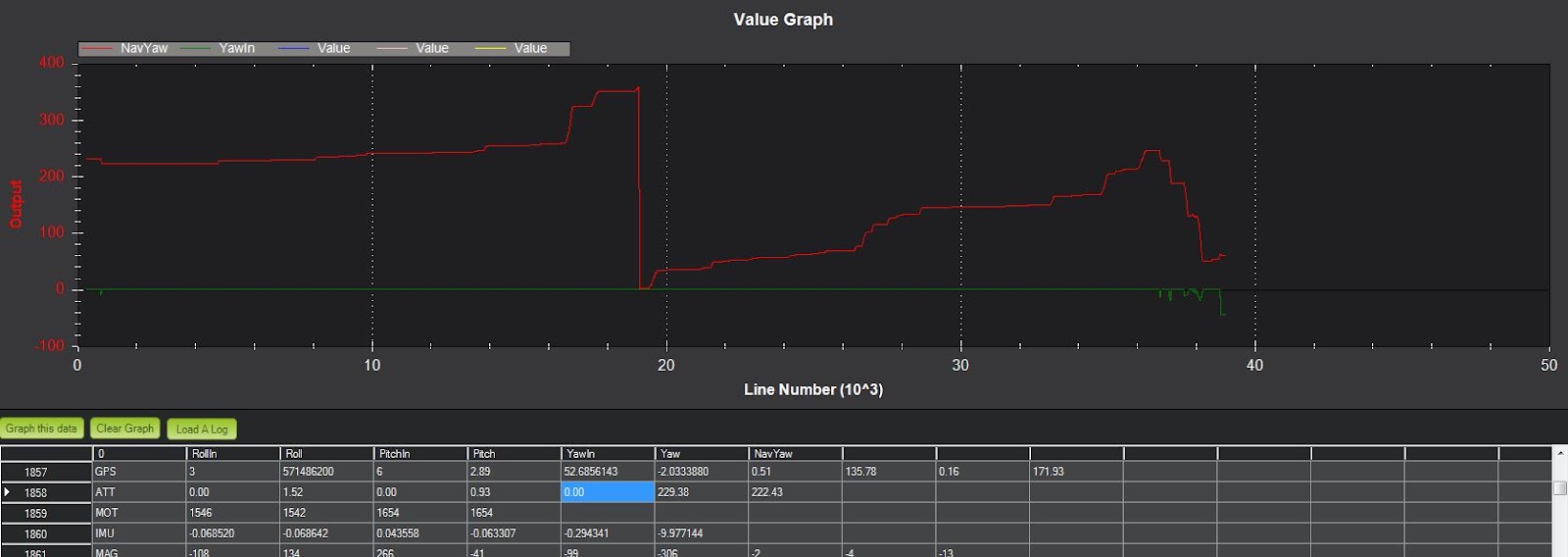
It looks like you have a motor imbalance. You can see from graphing the values from the MOT dataflash message that motors 3 and 4 are spinning about 20% faster than motors 1 & 2.
This is likely the cause of the uncommanded yaw.
The best solution is to resolve the imbalance. Perhaps it's ESCs that haven't been calibrated or a bad motor or ESC. Another option would be to increase the Rate Yaw I and IMAX values. I suspect you could double the IMAX without any problems. Increasing the Rate Yaw I to be the same as the Rate Yaw P should also be no problem.
-Randy
To: drones-...@googlegroups.com
Cc: ArduCopterTesters <arducopt...@googlegroups.com>; Randy Mackay <rmac...@yahoo.com>
Subject: Re: ArduCopter 3.0-rc6 available -- need an introductory video
DanielB
Hi.
Greetings.
Instinctively when asked to upgrade, I did so MP to latest version (1.2.55)... Liked the great new look and some other cosmetic changes. Great job.
So off I go to my backyard flights "workout" resulting to some weird close encounter of the 5th kind, you know the "kiss earth" type (LOL ;) but has it not been for my t'heli flying experience and quick recoveries, my quad would have ended up in pieces.
E.g. from the previous "perfectly" tuned, even keeled, highly predictable Dr. Jekyll quad, suddenly Mr. Hyde shows up with out warning with tendencies to violently lunge forward or back, attacking trees, my wife's lovely flower patch, and the patio ground... also, the twitches are also back.
Just wondering if I'm inadvertently turning on something like an accelerometer auto calibration during my pre-flight arming proceedure: wait for a solid GPS 3D lock, then do a 5 sec rudder-right (left) stick to arm.
Thanks.
All the best.
Daniel
Randy Mackay
You're not too specific about what you want me to look at so I just had a general look at your logs:
- You're using a modified version of the code? Not sure what's been added/changed but please remember that the code is very low on CPU time so any expensive additions could negatively affect basic functions.
- I see you have the fence enabled but not the throttle failsafe. I think the thr failsafe is quite a basic feature and if you're safety conscious that's one to turn-on
- Your Pitch and Roll I terms are quite high at 0.26. I hear some people say that our current default of 0.1 is too low so perhaps this is ok. I've never tried as high as 0.26
- The GPS Hdop values are spiking above 3.0 numerous times through the flight.
- I see a few ugly looking desired pitch spikes.
- The logging is more efficient than 2.9.1b but You might want to turn off the INAV dataflash message.
-Randy
To: drones-...@googlegroups.com
Cc: ArduCopterTesters <arducopt...@googlegroups.com>; Randy Mackay <rmac...@yahoo.com>
Subject: Re: ArduCopter 3.0-rc6 available -- need an introductory video
Andy Newman
Andy Newman
On Saturday, 22 June 2013 15:15:35 UTC+1, Randy Mackay wrote:
DanielB
What I was trying to get to is what might be causing the violent lunge forward or back (1st and 2nd occurrences, respectively) which I haven't seen for a while.
Could it be the Hdop spikes. ..notices, the Hdop tends to spike everytime there's a drop in Sat count... But I'm assuming that we have sampling algo that would filter out any error effect this may have on navigation (guessing here ;)
You're using a modified version of the code? There's a slight mod I did, line 141 of AC_WPNav.cpp : target_dist = constrain_float(target_dist, 0, _loiter_leash); // orig. _loiter_leash*2.0f. I've flown with this mod and found the stops more predictably precise and locked in, compared to the original, coming from full stick maneuvers in loiter as well as switching from other modes like alt-hold full stick speed motions.. The original has smoother stops but tends to drift significantly (could just be my copter)..
On a side note, some modes I'm keen on doing is a LOGO like command based, systems parms and interrupt conditional capable, relative waypoint navigation capability based on IMU and magnetometer.. I have a bit of custom LOGO functions and autopilot programs, such as function call enhancements, auto thermal hunt, that's I've enjoyed flying with my gliders (with UDB4/MP open systems) and would be nice of bringing this in in APM arduplane .. In addition, I'm also keen on looking at the possibility of inserting (using interrupts?) priority channel assignment for a kill (motor) switch. Wonder if these mods are at all possible.. any thoughts?
Cheers.
Daniel
DanielB
FYI Just stepped in from a backyard flight, and good news, problems solved.
No twitching, no abrupt lunging at any time, excellent hold, locked-in stops, with occasional minimal drifts (<.5m) all throughout of the 9 min. loiter flight!
This is after an accelerometer recalibration. Hope it stays permanently that way.
Thanks for the insights.
All the best.
Daniel
On Saturday, June 22, 2013 10:59:39 AM UTC-4, Randy Mackay wrote:
Randy Mackay
Sent: Sunday, June 23, 2013 2:34 AM
Subject: [drones-discuss] Re: ArduCopter 3.0-rc6 available -- need an introductory video
What I was trying to get to is what might be causing the violent lunge forward or back (1st and 2nd occurrences, respectively) which I haven't seen for a while.
Could it be the Hdop spikes. ..notices, the Hdop tends to spike everytime there's a drop in Sat count... But I'm assuming that we have sampling algo that would filter out any error effect this may have on navigation (guessing here ;)
You're using a modified version of the code? There's a slight mod I did, line 141 of AC_WPNav.cpp : target_dist = constrain_float(target_dist, 0, _loiter_leash); // orig. _loiter_leash*2.0f. I've flown with this mod and found the stops more predictably precise and locked in, compared to the original, coming from full stick maneuvers in loiter as well as switching from other modes like alt-hold full stick speed motions.. The original has smoother stops but tends to drift significantly (could just be my copter)..
On a side note, some modes I'm keen on doing is a LOGO like command based, systems parms and interrupt conditional capable, relative waypoint navigation capability based on IMU and magnetometer.. I have a bit of custom LOGO functions and autopilot programs, such as function call enhancements, auto thermal hunt, that's I've enjoyed flying with my gliders (with UDB4/MP open systems) and would be nice of bringing this in in APM arduplane .. In addition, I'm also keen on looking at the possibility of inserting (using interrupts?) priority channel assignment for a kill (motor) switch. Wonder if these mods are at all possible.. any thoughts?
Cheers.
Daniel
On Saturday, June 22, 2013 10:59:39 AM UTC-4, Randy Mackay wrote:
Daniel,
You're not too specific about what you want me to look at so I just had a general look at your logs:
- You're using a modified version of the code? Not sure what's been added/changed but please remember that the code is very low on CPU time so any expensive additions could negatively affect basic functions.
- I see you have the fence enabled but not the throttle failsafe. I think the thr failsafe is quite a basic feature and if you're safety conscious that's one to turn-on
- Your Pitch and Roll I terms are quite high at 0.26. I hear some people say that our current default of 0.1 is too low so perhaps this is ok. I've never tried as high as 0.26
- The GPS Hdop values are spiking above 3.0 numerous times through the flight.
- I see a few ugly looking desired pitch spikes.
- The logging is more efficient than 2.9.1b but You might want to turn off the INAV dataflash message.
-Randy
From: DanielB <dber...@gmail.com>
To: drones-...@googlegroups. com
Cc: ArduCopterTesters <arducopt...@ googlegroups.com>; Randy Mackay <rmac...@yahoo.com>
Randy Mackay
Thanks for testing this out. There's one other user out there who reported the same kind of thing. We think it's likely to do with the stability patch changes but I wouldn't go so far as to say it's a bug but rather that it's less forgiving of yaw imbalances.
Did you try increasing the Yaw Rate I and IMAX?
-Randy
Sent: Sunday, June 23, 2013 1:50 AM
Subject: Re: ArduCopter 3.0-rc6 available -- need an introductory video
On Saturday, 22 June 2013 15:15:35 UTC+1, Randy Mackay wrote:
Andy,
It looks like you have a motor imbalance. You can see from graphing the values from the MOT dataflash message that motors 3 and 4 are spinning about 20% faster than motors 1 & 2.
This is likely the cause of the uncommanded yaw.
The best solution is to resolve the imbalance. Perhaps it's ESCs that haven't been calibrated or a bad motor or ESC. Another option would be to increase the Rate Yaw I and IMAX values. I suspect you could double the IMAX without any problems. Increasing the Rate Yaw I to be the same as the Rate Yaw P should also be no problem.
-Randy
From: Andy Newman <andy.ne...@gmail.com>
To: drones-...@googlegroups. com
Cc: ArduCopterTesters <arducopt...@ googlegroups.com>; Randy Mackay <rmac...@yahoo.com>
Randy Mackay
- increase Stab Yaw P and Yaw Rate P by 50%
- add this line to your APM_Config.h:
- #define MAX_YAW_OVERSHOOT 2000
From: Randy Mackay <rmac...@yahoo.com>
To: Andy Newman <andy.ne...@gmail.com>; "drones-...@googlegroups.com" <drones-...@googlegroups.com>
Cc: ArduCopterTesters <arducopt...@googlegroups.com>
Sent: Sunday, June 23, 2013 11:20 AM
Andy Newman
Randy Mackay
You can find a zip with the code here:
http://ardupilot.com/downloads/?did=62
but if you've never uploaded the code before, probably best to start with just increasing the Stabilize and Rate P terms (and leave Rate I and IMAX higher too)
-Randy
Sent: Sunday, June 23, 2013 6:50 PM
Subject: [drones-discuss] Re: ArduCopter 3.0-rc6 available -- need an introductory video
On Sunday, 23 June 2013 03:54:19 UTC+1, Randy Mackay wrote:
Andy,Sorry, I see that you did try to increase the Yaw Rate I and IMAX. I'm a little surprised that didn't help.What you're seeing when you graph NavYaw vs actual Yaw is that the desired yaw (Nav Yaw) is getting dragged around behind the actual yaw. This is because in the code, we do not allow the Desired yaw to be further than 10 degrees from the actual yaw.Please try these two possible fixes:
- increase Stab Yaw P and Yaw Rate P by 50%
- add this line to your APM_Config.h:
- #define MAX_YAW_OVERSHOOT 2000
A 20% imbalance in your clockwise vs counter-clockwise motors is significant though and I think that should be the focus of trying to fix this.-Randy
From: Randy Mackay <rmac...@yahoo.com>
To: Andy Newman <andy.ne...@gmail.com>; "drones-...@googlegroups. com" <drones-...@googlegroups. com>
Cc: ArduCopterTesters <arducopt...@ googlegroups.com>
Sent: Sunday, June 23, 2013 11:20 AM
Subject: Re: ArduCopter 3.0-rc6 available -- need an introductory video
Andy,
Thanks for testing this out. There's one other user out there who reported the same kind of thing. We think it's likely to do with the stability patch changes but I wouldn't go so far as to say it's a bug but rather that it's less forgiving of yaw imbalances.
Did you try increasing the Yaw Rate I and IMAX?
-Randy
Cc: Andy Newman <andy.ne...@gmail.com>; ArduCopterTesters <arducopt...@ googlegroups.com>; Randy Mackay <rmac...@yahoo.com>
Andy Newman

Steve Ball
On Sunday, June 23, 2013 10:50:32 AM UTC+1, Andy Newman wrote:
Hi Randy.Thanks for the replys. I have looked through the forum and found that 4 others mention the same problem as me, strangely they all are using the same frame design as me, DJI Clone F450 Flamewheel. It seems there is a design flaw in this type frame that causes the imbalance between CW and CCW motors. I did try shimming one motor on one side to put a bit of tilt on it but this made no difference. This is a very popular frame type so I fear you might be getting a lot more messages when v3.0.0 goes public. I totally agree that searching for a fix for the imbalance is the best option but that might be beyond the general users skill level to fix.I will try your changes and see if that helps with the problem. Is the config.h accessible without compile or do i need to download the source and do it that way? if source then could you point me to the current source, I have never used github and get a bit lost in it.Andy.
Andy Newman
Randy Mackay
I did a short flight with my flamewheel and I also have an imbalance of about 100 ~ 150 between my lowest (#3 - front left, CW) and highest (#1 - front right, CCW) motors.
I haven't noticed loss of heading but I did notice terrible loiter performance. I suspect I have some vibration issues.
-Randy
Sent: Monday, June 24, 2013 6:16 AM
Subject: Re: ArduCopter 3.0-rc6 available -- need an introductory video
Randy Mackay
To: Andy Newman <andy.ne...@gmail.com>; "drones-...@googlegroups.com" <drones-...@googlegroups.com>
Subject: [drones-discuss] Re: ArduCopter 3.0-rc6 available -- need an introductory video
Robert Lefebvre
Jonathan Challinger
Andy Newman


Andy.
Robert Lefebvre
Randy Mackay
To: drones-...@googlegroups.com
Cc: Andy Newman <andy.ne...@gmail.com>; Randy Mackay <rmac...@yahoo.com>
Subject: Re: [drones-discuss] Re: ArduCopter 3.0-rc6 available -- need an introductory video
Randy Mackay
From: Robert Lefebvre <robert....@gmail.com>
To: drones-discuss <drones-...@googlegroups.com>
Sent: Monday, June 24, 2013 11:41 PM
Subject: Re: [drones-discuss] Re: ArduCopter 3.0-rc6 available -- need an introductory video
Robert Lefebvre
Robert Lefebvre
DanielB
I just tested (2 flights) a compile from current commit master, and encountered a couple of issues I thought
might help to report.
commit b21bc5a85a4780582afd10fc7f2aa0aa852543a1
Date: Sat Jun 22 18:06:58 2013 -0700
~~~
Copter: Fixed bug in battery current integration
APMVERSION: ArduCopter V3.0.1-rc1
Test log: T32a-es-QC01-2, 6-8 min. flights,
2.125 Kg UAW 750mm quad, 2x3S t5 A Lipo for ESCs/motor, 3s 1.3 A Lipo for other elect. system, GoPro on
1st flight PID increased per above, 2nd flight PID lowered down to previous tested to be excellent settings
Weather: mild winds with varying gusts prob. 5-12 km/hr
Location: Backyard, modes: stabilized, alt-hold and loiter
- stabilize throttle altitude control somewhat loose in establishing altitude hover foothold
- alt-hold mode also with altitude drifting, tends to drop during turns with increased PIDs
- alt-hold stabilized with default tested PIDs
- loiter on 2nd flight with twitched at least 1x
- loiter mode full stops very loose, with significant back and forth drifting, from mild relocation
- with both flights, GPS sat locked seem unable to go beyond 7 (remains at 6-7), whereas, reverting
to previous compile/commit, went back to 9 - 11 sat number (could be coincidental?)
- MP's (both r.53 and r.56) logs download doesn't work, and cli seems buggy
Notion: this release seems to have some issues to cause GPS and MP (log download/cli) dysfunctions
revert back to T031a-es (commit Sun Jun 23 15:52:46 2013 +0900)
To-do: time permits, selectively update T031a-es ONLY with critical BUG FIXES and patches
Sorry no logs as MP's log download has stopped working.
Hope this helps.
Daniel
Randy Mackay
thanks for the report on flying master.
I'm pretty sure the performance is mostly related to the flying conditions in particular the low GPS sat count is likely causing the loiter drift. You say "coincidence?" in your comments and I think you're totally right. I'm 99% certain that we haven't changed anything that could affect the GPS behaviour.
-Randy
Sent: Wednesday, June 26, 2013 7:53 AM
Subject: [drones-discuss] Re: ArduCopter 3.0-rc6 available -- need an introductory video
DanielB
You're right.. as suspected, it's the flying conditions, confirmed by a test flight just a few min. ago:
commit b00e5d95c9ba8929ba69a1eed815a7eb6c9ede5c
Date: Wed Jun 26 16:09:42 2013 -0400
Update AnalogIn.cpp
~~~
Version: ArduCopter V3.0.1-rc1-es (with minor mod...)
t33a-QC03, 9 min. flight
2.065Kg UAW 750mm quad, 1x3S t5 A Lipo for ESCs/motor, 3s 1.3 A Lipo for other elect. system, GoPro on
Weather: calm but very cloudy, warm and humid
Location: Backyard, modes: stabilized, alt-hold and loiter
- alt-hold mode also stable, without altitude drifting,
- loiter mode 3D hold, locks-in (occasional minimal drift of <.25m, wow!), incredibly firm
even after full blender/snap turns and short -full stick/speed maneuvers, all directions
- loiter twitch gone
- sat. count, 8, normal
- MP terminal works...
Notion: think this is perfect; next, test in the park for auto mode and variant features.
Cheers.
Daniel
Olivier ADLER
What we could do is adding a dynamic Lat / Lon offset when HDOP is rising or dropping suddenly (HDOP derivative), to compensate for the GPS jump, relying on inertial.
Most of the time those jumps are quite fast because they are induced by a change in visible satellite count. Inertial could help here to detect those jumps when HDOP derivative is high and GPS / inertial correlation is bad.
Not sure that will work reliably nevertheless but could be interesting to try it.
We still have many users starting to fly without reading Wiki recommendations and asking too much to their setup. The GPS system has not been designed to fly UAVs at a couple meters altitude between buildings or trees. Quite often we are seing users asking why they don't have a rock solid GPS position in those difficult GPS reception conditions.
GPS receivers are designed to receive satellites as low as 5° above the horizon. This mean that without a 170° vertical field of clear sky view around in all directions, GPS reception can be compromised or fully interrupted.
It's possible to rise this 5° horizon limit to a higher number, like 8° or 15°, but the drawback is that there will be periods where you will catch less satellites. You will get less precision, but jumps should be smaller because higher satellites have generally a more stable signal and have less probability for signal obstruction and multipathing.
The best solution i think is to spread GPS knowledge, that's why i did wrote those Wiki pages (published and enhanced by Gary) :
http://copter.ardupilot.com/wiki/common-gps-how-it-works/
http://copter.ardupilot.com/wiki/gps-failsafe/
From "Technical background and safety recommendations" :
The GPS system is not designed to be used as a primary navigation system. So you should be aware that GPS signal dropouts or integrity problems events can occur from time to time, even if predicted satellite elevations, dilution of precision, and visible satellite counts are favorable during all the duration of your fly.
It is particularly important to avoid auto mission flying inside canyons, between buildings, mountains or inside backyards because of heavy multipathing producing large GPS errors. Fix probability will drop dramatically in those conditions from about 99% to 38 % and position errors can rise to hundred meters or more.
Only a clear sky view will give good results.


john...@gmail.com
Alternatively if we project a sphere around the copter representing the possible movement of a simple copter/airplane model within the next ahrs frame, we can detect both gps and inertia faults and select the data that best fit the expected behavior.
- JAB
Olivier ADLER
John, i think that there is an even better solution than smoothing a jump. Because when you get a GPS jump because of one or more satellites becoming invisible, the position offset induced by the jump will be most of the time constant until a new jump occur.
In those (frequent) cases, the best would be to add a dynamic position offset, so that the copter does not try to go at the newer position, but stay at the same location. This is what a pilot will do manually in Loiter mode, to compensate for jumps.
I think that it is possible to detect that, watching for visible satellite count, HDOP, GPS position and inertial sensors, using some kind of fuzzy logic,nevertheless this does not seem like a simple thing to do to get a reliable behavior 99% of the time and will need a few hours of field testing to adjust the settings.
GPS smoothing (actually INAV_TC_XY) could be linked more or less with the HDOP value, and the dynamic position offset applied watching for HDOP derivative and a couple of other variables like GPS acceleration and speed and correlation with inertial sensors.
Olivier