
Attempting to align objects relative to each other
147 views
Skip to first unread message

Matthew Pitts
Sep 9, 2021, 12:24:32 PM9/9/21
to dra...@googlegroups.com
Hi,
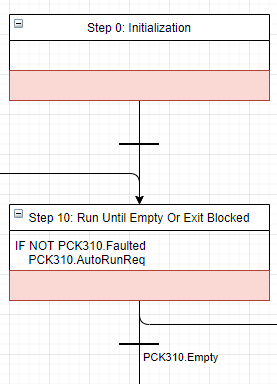
I am trying to align objects relative to each other. I would like to align the top of one object an inch or so below the bottom of the previous object. Then, on the connector I would like there to be a line with text that is aligned exactly midway between the two objects. I know there are some ways to manually do this, but I would like it to automatically happen.
Context:
I would like the top of step 10 to be exactly 1 inch below the bottom of step 0. These boxes automatically resize as text is placed in them. I would like the line between step 0 and step 10 to always be halfway between the bottom of step 0 and the top of step 10. I would like this to be the same for all of the other (unshown) steps, where they are all relative to the previous step.
Here is the xml for this section:
<object label="Step 0: Initialization" Function="Step" id="v8fGFA9TfXajVLonkftt-1">
<mxCell style="swimlane;fontStyle=0;childLayout=stackLayout;horizontal=1;startSize=26;horizontalStack=0;resizeParent=1;resizeParentMax=0;resizeLast=0;collapsible=1;marginBottom=0;perimeter=rectanglePerimeter;rounded=0;" parent="u10eXKDPt_KDiaN_YDLE-1" vertex="1">
<mxGeometry x="160" y="140" width="260" height="86" as="geometry">
<mxRectangle x="130" y="150" width="90" height="26" as="alternateBounds" />
</mxGeometry>
</mxCell>
</object>
<object label=" " Function="Outputs" id="v8fGFA9TfXajVLonkftt-2">
<mxCell style="text;strokeColor=none;fillColor=none;align=left;verticalAlign=top;spacingLeft=6;spacingRight=6;overflow=hidden;rotatable=0;points=[[0,0.5],[1,0.5]];portConstraint=eastwest;whiteSpace=wrap;autosize=1;resizeHeight=1;spacingBottom=4;spacingTop=4;spacing=0;rounded=0;" parent="v8fGFA9TfXajVLonkftt-1" vertex="1">
<mxGeometry y="26" width="260" height="30" as="geometry" />
</mxCell>
</object>
<object label=" " Function="Faults" id="v8fGFA9TfXajVLonkftt-3">
<mxCell style="text;align=left;verticalAlign=top;spacingLeft=6;spacingRight=6;overflow=hidden;rotatable=0;points=[[0,0.5],[1,0.5]];portConstraint=eastwest;spacingBottom=4;spacingTop=4;whiteSpace=wrap;autosize=1;spacing=0;rounded=0;strokeColor=#ae4132;fillColor=#fad9d5;" parent="v8fGFA9TfXajVLonkftt-1" vertex="1">
<mxGeometry y="56" width="260" height="30" as="geometry" />
</mxCell>
</object>
<mxCell id="3p-ulc9c1JbBlVB5MCGc-1" style="edgeStyle=orthogonalEdgeStyle;rounded=1;orthogonalLoop=1;jettySize=auto;html=1;exitX=0.5;exitY=1;exitDx=0;exitDy=0;entryX=0.5;entryY=0;entryDx=0;entryDy=0;" parent="u10eXKDPt_KDiaN_YDLE-1" source="v8fGFA9TfXajVLonkftt-5" target="3p-ulc9c1JbBlVB5MCGc-0" edge="1">
<mxGeometry relative="1" as="geometry">
<Array as="points">
<mxPoint x="290" y="450" />
<mxPoint x="623" y="450" />
</Array>
</mxGeometry>
</mxCell>
<mxCell id="3p-ulc9c1JbBlVB5MCGc-6" style="edgeStyle=orthogonalEdgeStyle;rounded=1;orthogonalLoop=1;jettySize=auto;html=1;exitX=0.5;exitY=1;exitDx=0;exitDy=0;entryX=0.5;entryY=0;entryDx=0;entryDy=0;" parent="u10eXKDPt_KDiaN_YDLE-1" source="v8fGFA9TfXajVLonkftt-5" target="3p-ulc9c1JbBlVB5MCGc-3" edge="1">
<mxGeometry relative="1" as="geometry" />
</mxCell>
<object label="Step 10: Run Until Empty Or Exit Blocked" Function="Step" id="v8fGFA9TfXajVLonkftt-5">
<mxCell style="swimlane;fontStyle=0;childLayout=stackLayout;horizontal=1;startSize=26;horizontalStack=0;resizeParent=1;resizeParentMax=0;resizeLast=0;collapsible=1;marginBottom=0;perimeter=rectanglePerimeter;rounded=0;" parent="u10eXKDPt_KDiaN_YDLE-1" vertex="1">
<mxGeometry x="160" y="330" width="260" height="96" as="geometry">
<mxRectangle x="130" y="150" width="90" height="26" as="alternateBounds" />
</mxGeometry>
</mxCell>
</object>
<object label="IF NOT PCK310.Faulted
 PCK310.AutoRunReq" Function="Outputs" id="v8fGFA9TfXajVLonkftt-6">
<mxCell style="text;strokeColor=none;fillColor=none;align=left;verticalAlign=top;spacingLeft=6;spacingRight=6;overflow=hidden;rotatable=0;points=[[0,0.5],[1,0.5]];portConstraint=eastwest;whiteSpace=wrap;autosize=1;resizeHeight=1;spacingBottom=4;spacingTop=4;spacing=0;rounded=0;" parent="v8fGFA9TfXajVLonkftt-5" vertex="1">
<mxGeometry y="26" width="260" height="40" as="geometry" />
</mxCell>
</object>
<object label=" " Function="Faults" id="v8fGFA9TfXajVLonkftt-7">
<mxCell style="text;align=left;verticalAlign=top;spacingLeft=6;spacingRight=6;overflow=hidden;rotatable=0;points=[[0,0.5],[1,0.5]];portConstraint=eastwest;spacingBottom=4;spacingTop=4;whiteSpace=wrap;autosize=1;spacing=0;rounded=0;strokeColor=#ae4132;fillColor=#fad9d5;" parent="v8fGFA9TfXajVLonkftt-5" vertex="1">
<mxGeometry y="66" width="260" height="30" as="geometry" />
</mxCell>
</object>
<mxCell style="swimlane;fontStyle=0;childLayout=stackLayout;horizontal=1;startSize=26;horizontalStack=0;resizeParent=1;resizeParentMax=0;resizeLast=0;collapsible=1;marginBottom=0;perimeter=rectanglePerimeter;rounded=0;" parent="u10eXKDPt_KDiaN_YDLE-1" vertex="1">
<mxGeometry x="160" y="140" width="260" height="86" as="geometry">
<mxRectangle x="130" y="150" width="90" height="26" as="alternateBounds" />
</mxGeometry>
</mxCell>
</object>
<object label=" " Function="Outputs" id="v8fGFA9TfXajVLonkftt-2">
<mxCell style="text;strokeColor=none;fillColor=none;align=left;verticalAlign=top;spacingLeft=6;spacingRight=6;overflow=hidden;rotatable=0;points=[[0,0.5],[1,0.5]];portConstraint=eastwest;whiteSpace=wrap;autosize=1;resizeHeight=1;spacingBottom=4;spacingTop=4;spacing=0;rounded=0;" parent="v8fGFA9TfXajVLonkftt-1" vertex="1">
<mxGeometry y="26" width="260" height="30" as="geometry" />
</mxCell>
</object>
<object label=" " Function="Faults" id="v8fGFA9TfXajVLonkftt-3">
<mxCell style="text;align=left;verticalAlign=top;spacingLeft=6;spacingRight=6;overflow=hidden;rotatable=0;points=[[0,0.5],[1,0.5]];portConstraint=eastwest;spacingBottom=4;spacingTop=4;whiteSpace=wrap;autosize=1;spacing=0;rounded=0;strokeColor=#ae4132;fillColor=#fad9d5;" parent="v8fGFA9TfXajVLonkftt-1" vertex="1">
<mxGeometry y="56" width="260" height="30" as="geometry" />
</mxCell>
</object>
<mxCell id="3p-ulc9c1JbBlVB5MCGc-1" style="edgeStyle=orthogonalEdgeStyle;rounded=1;orthogonalLoop=1;jettySize=auto;html=1;exitX=0.5;exitY=1;exitDx=0;exitDy=0;entryX=0.5;entryY=0;entryDx=0;entryDy=0;" parent="u10eXKDPt_KDiaN_YDLE-1" source="v8fGFA9TfXajVLonkftt-5" target="3p-ulc9c1JbBlVB5MCGc-0" edge="1">
<mxGeometry relative="1" as="geometry">
<Array as="points">
<mxPoint x="290" y="450" />
<mxPoint x="623" y="450" />
</Array>
</mxGeometry>
</mxCell>
<mxCell id="3p-ulc9c1JbBlVB5MCGc-6" style="edgeStyle=orthogonalEdgeStyle;rounded=1;orthogonalLoop=1;jettySize=auto;html=1;exitX=0.5;exitY=1;exitDx=0;exitDy=0;entryX=0.5;entryY=0;entryDx=0;entryDy=0;" parent="u10eXKDPt_KDiaN_YDLE-1" source="v8fGFA9TfXajVLonkftt-5" target="3p-ulc9c1JbBlVB5MCGc-3" edge="1">
<mxGeometry relative="1" as="geometry" />
</mxCell>
<object label="Step 10: Run Until Empty Or Exit Blocked" Function="Step" id="v8fGFA9TfXajVLonkftt-5">
<mxCell style="swimlane;fontStyle=0;childLayout=stackLayout;horizontal=1;startSize=26;horizontalStack=0;resizeParent=1;resizeParentMax=0;resizeLast=0;collapsible=1;marginBottom=0;perimeter=rectanglePerimeter;rounded=0;" parent="u10eXKDPt_KDiaN_YDLE-1" vertex="1">
<mxGeometry x="160" y="330" width="260" height="96" as="geometry">
<mxRectangle x="130" y="150" width="90" height="26" as="alternateBounds" />
</mxGeometry>
</mxCell>
</object>
<object label="IF NOT PCK310.Faulted
 PCK310.AutoRunReq" Function="Outputs" id="v8fGFA9TfXajVLonkftt-6">
<mxCell style="text;strokeColor=none;fillColor=none;align=left;verticalAlign=top;spacingLeft=6;spacingRight=6;overflow=hidden;rotatable=0;points=[[0,0.5],[1,0.5]];portConstraint=eastwest;whiteSpace=wrap;autosize=1;resizeHeight=1;spacingBottom=4;spacingTop=4;spacing=0;rounded=0;" parent="v8fGFA9TfXajVLonkftt-5" vertex="1">
<mxGeometry y="26" width="260" height="40" as="geometry" />
</mxCell>
</object>
<object label=" " Function="Faults" id="v8fGFA9TfXajVLonkftt-7">
<mxCell style="text;align=left;verticalAlign=top;spacingLeft=6;spacingRight=6;overflow=hidden;rotatable=0;points=[[0,0.5],[1,0.5]];portConstraint=eastwest;spacingBottom=4;spacingTop=4;whiteSpace=wrap;autosize=1;spacing=0;rounded=0;strokeColor=#ae4132;fillColor=#fad9d5;" parent="v8fGFA9TfXajVLonkftt-5" vertex="1">
<mxGeometry y="66" width="260" height="30" as="geometry" />
</mxCell>
</object>
I can change the objects as needed, as long as they maintain a similar look and function properly.
Thanks,
Matthew
Reply all
Reply to author
Forward
0 new messages