
Cannot link to webrtclib on Windows
1,168 views
Skip to first unread message

Evgeni Rusev
Feb 21, 2022, 12:55:30 PM2/21/22
to discuss-webrtc
Hello everyone,
I'm having issues linking to the webrtc library. I downloaded the source code, checked out the master branch and built it using:
gn gen --ide=vs2019 out\Release --args="is_debug=false use_lld=false is_clang=false rtc_include_tests=false rtc_build_tools=false rtc_build_examples=true treat_warnings_as_errors=false"
Then I created a console application, included the headers and libraries within the VS config and then tried running it - the project builds successfully but the linking fails with over 9000 LNK2001 errors. I've tried including specific libraries that are missing within the VS config as well as using # pragma, but the errors remain the same.
I'm attaching an image with examples:
I've been trying to find a way to use the library for over 60 hours and still feeling stuck, any help would be greatly appreciated.
Evgeni Rusev
Feb 21, 2022, 1:07:13 PM2/21/22
to discuss-webrtc
Small correction - I'm getting this issue using the branch recommended by microsoft (branch-heads/4147), which I found through this Getting Started page - https://docs.microsoft.com/en-us/winrtc/getting-started
I also tried with the master branch, but I'm getting similar results there.
Evgeni Rusev
Feb 21, 2022, 1:44:50 PM2/21/22
to discuss-webrtc
I'll be super grateful if anyone would be willing to hop on a quick call with me to help me resolve this, I'm even willing to pay you if you manage to help me resolve this issue.

Csaba Idei
Feb 26, 2022, 7:24:16 AM2/26/22
to discuss-webrtc
probably you followed
https://docs.microsoft.com/en-us/winrtc/getting-started
Some months ago I used this:
Some months ago I used this:
gn gen --ide=vs2019 out/Default --target_cpu=x86 --filters=//:webrtc "--args=is_debug=false use_lld=false is_clang=false rtc_include_tests=false rtc_build_tools=false enable_libaom=false rtc_enable_protobuf=false enable_iterator_debugging=false visual_studio_version=2019 host_cpu=""x86"" is_component_build=false target_os=""win"" rtc_build_examples=false toolkit_views=false rtc_ios_macos_use_opengl_rendering=false rtc_libvpx_build_vp9=false rtc_include_tests=false rtc_include_builtin_video_codecs=false rtc_enable_protobuf=false rtc_build_libvpx=false libyuv_include_tests=false archive_seed_corpus=false" --complete_static_lib
ninja -C out/Default
ninja -C out/Default
Webrtc.lib (out\Default\obj\webrtc.lib)
include directories and preprocessor definitions comes from src\out\Default\obj\webrtc.ninja
I used WEBRTC_WIN preprocessor
And one important remarks, only worked with ISO C++14 Standard (/std:c++14), (c++17 also compiled, but it causes strange memory corruption errors during runtime) -> Probably the reason behind this project files build with default "C++ Language standard " switch.
And one important remarks, only worked with ISO C++14 Standard (/std:c++14), (c++17 also compiled, but it causes strange memory corruption errors during runtime) -> Probably the reason behind this project files build with default "C++ Language standard " switch.
I hope this information help.
Evgeni Rusev
Feb 27, 2022, 8:11:58 AM2/27/22
to discuss-webrtc
Thanks for the reply, may I ask which branch/commit are you using to make the ninja build work? I tried with both master and branch-heads/4147, but neither worked:
Csaba Idei
Mar 3, 2022, 1:55:04 AM3/3/22
to discuss-webrtc
I just checked the checkout repo (what gclient did)
main
SHA-1: 68dc02b32fb33fa2718ef8c6180faa44ef021625BTW that warning really looks an error :-)
Evgeni Rusev
Mar 3, 2022, 3:50:10 AM3/3/22
to discuss-webrtc
I tried with your commit, but the ninja build failed with the same error, the issue must be elsewhere I guess..
Csaba Idei
Mar 3, 2022, 2:21:57 PM3/3/22
to discuss-webrtc
strange, I just compiled a minute ago and it works...
My VS2019 Version Version 16.10.3.
My VS2019 Version Version 16.10.3.
I just created an syntax error in that file and here are the compile params, maybe you can find something different:
ninja -t msvc -e environment.x86 -- "C:\Program Files (x86)\Microsoft Visual Studio\2019\Professional\VC\Tools\MSVC\14.29.30037\bin\Hostx64\x86/cl.exe" /c ../../api/video/video_frame_buffer.cc /Foobj/api/video/video_frame/video_frame_buffer.obj /nologo /showIncludes -DUSE_AURA=1 -D_HAS_EXCEPTIONS=0 -D__STD_C -D_CRT_RAND_S -D_CRT_SECURE_NO_DEPRECATE -D_SCL_SECURE_NO_DEPRECATE -D_ATL_NO_OPENGL -D_WINDOWS -DCERT_CHAIN_PARA_HAS_EXTRA_FIELDS -DPSAPI_VERSION=2 -DWIN32 -D_SECURE_ATL -DWINAPI_FAMILY=WINAPI_FAMILY_DESKTOP_APP -DWIN32_LEAN_AND_MEAN -DNOMINMAX -D_UNICODE -DUNICODE -DNTDDI_VERSION=NTDDI_WIN10_VB -D_WIN32_WINNT=0x0A00 -DWINVER=0x0A00 -DNDEBUG -DNVALGRIND -DDYNAMIC_ANNOTATIONS_ENABLED=0 -DWEBRTC_ENABLE_PROTOBUF=0 -DWEBRTC_INCLUDE_INTERNAL_AUDIO_DEVICE -DWEBRTC_HAVE_SCTP -DWEBRTC_LIBRARY_IMPL -DRTC_ENABLE_WIN_WGC -DWEBRTC_NON_STATIC_TRACE_EVENT_HANDLERS=0 -DWEBRTC_WIN -DABSL_ALLOCATOR_NOTHROW=1 -D_ENABLE_EXTENDED_ALIGNED_STORAGE -I../.. -Igen -I../../third_party/abseil-cpp -I../../third_party/libyuv/include /Gy /FS /bigobj /utf-8 /Zc:sizedDealloc- /wd4117 /D__DATE__= /D__TIME__= /D__TIMESTAMP__= /W4 /WX /wd4091 /wd4127 /wd4251 /wd4275 /wd4312 /wd4324 /wd4351 /wd4355 /wd4503 /wd4589 /wd4611 /wd4100 /wd4121 /wd4244 /wd4505 /wd4510 /wd4512 /wd4610 /wd4838 /wd4995 /wd4996 /wd4456 /wd4457 /wd4458 /wd4459 /wd4200 /wd4201 /wd4204 /wd4221 /wd4245 /wd4267 /wd4305 /wd4389 /wd4702 /wd4701 /wd4703 /wd4661 /wd4706 /wd4715 /wd4267 /O1 /Ob2 /Oy- /Zc:inline /Gw /Oi /Zi /MT /wd4702 /wd5041 /TP /wd4577 /GR- /Fd"obj/api/video/video_frame_cc.pdb"
Evgeni Rusev
Mar 3, 2022, 2:56:23 PM3/3/22
to discuss-webrtc
Each time I build it I seem to get a different build error, strange..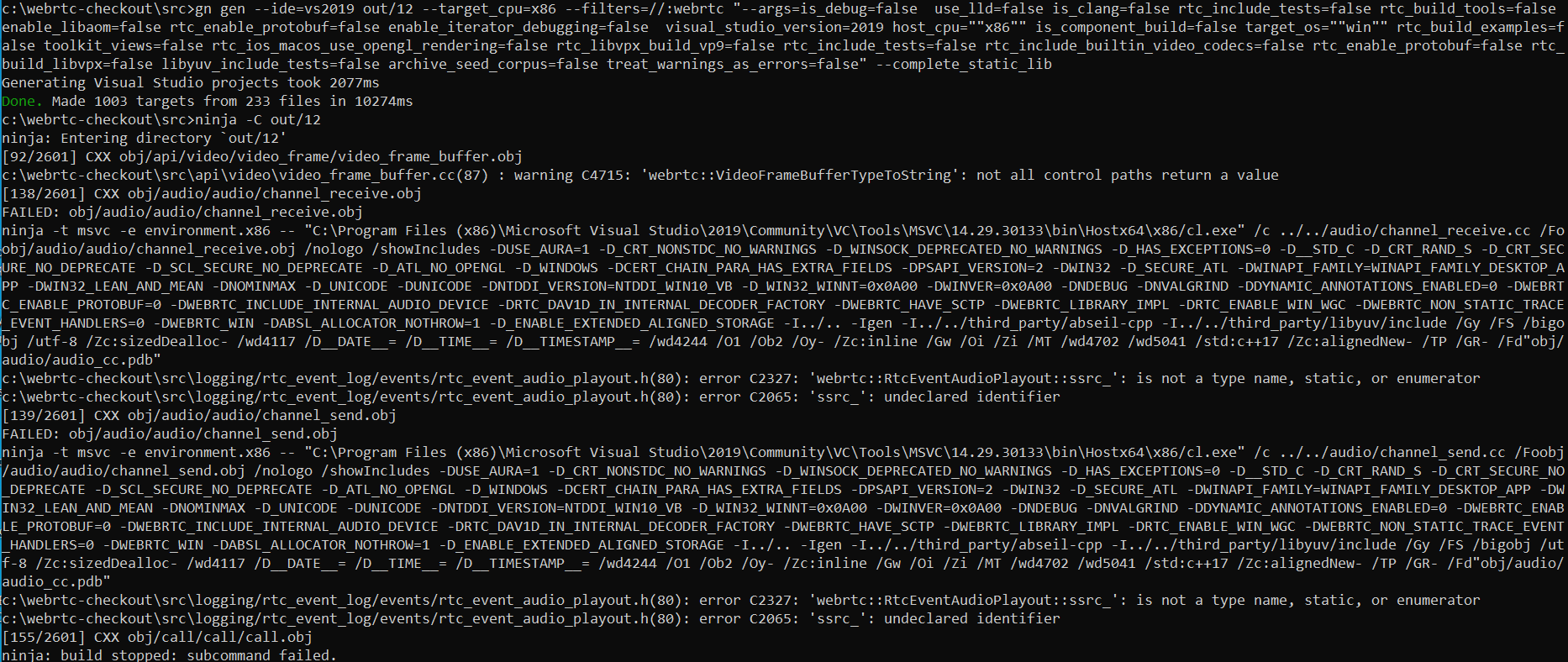
May I kindly ask you to send the build to me? It would help me out tremendously, I can directly use it instead of spending another week trying to figure this out..
I've tried multiple builds online, but many are outdated and don't seem to link successfully with my project.
Thanks in advance.

Vitaly Ivanov
Mar 8, 2022, 9:31:25 AM3/8/22
to discuss...@googlegroups.com
Hey,
Did you try use_custom_libcxx=false? There might be a mismatch between webrtc and VS in this department.
That's what I use with branch-heads/4664 (m96) and it builds and links fine:
gn gen out --args="is_debug=false is_clang=false use_custom_libcxx=false rtc_include_tests=false target_cpu=\"x64\""
--
---
You received this message because you are subscribed to the Google Groups "discuss-webrtc" group.
To unsubscribe from this group and stop receiving emails from it, send an email to discuss-webrt...@googlegroups.com.
To view this discussion on the web visit https://groups.google.com/d/msgid/discuss-webrtc/f5298f57-5c95-4e90-9c84-0947d0145178n%40googlegroups.com.
Evgeni Rusev
Mar 8, 2022, 2:50:58 PM3/8/22
to discuss-webrtc
Hey Witaly, thanks for the response.


I did indeed build the library successfully with use_custom_libcxx=false, but yet again I couldn't link to it successfully from my Visual Studio 2022 command line app:
This is my setup with Visual Studio 2022 (v143):
I include the the following directories for the header files:
For the linking - I wrote a script to copy all of the .lib files from the webrtc build into my release directory of my command line app and output the pragma directives which I then paste into my app as you can see from the first image. I also tried the approach with Visual Studio Linked>Include Directories and Additional Dependencies, but the result is the same - still LNK2001.
Witaly, may I ask how exactly are you doing the linking within visual studio and also which VS version are you using?
Thanks in advance! 🙂
Vitaly Ivanov
Mar 8, 2022, 8:35:39 PM3/8/22
to discuss...@googlegroups.com
Hi,
You shouldn't link intermediary libs like webrtc_multiopus.lib, the only one you need to use is webrtc.lib. Then you need to figure out which system libs are necessary, there should be a list of them in build.gn (winmm.lib, crypt32.lib, dxgi.lib, etc).
I'm using VS2019
To view this discussion on the web visit https://groups.google.com/d/msgid/discuss-webrtc/5f0f546a-fc68-447e-b9b7-f8c73bd4eae0n%40googlegroups.com.
Vitaly Ivanov
Mar 8, 2022, 8:45:04 PM3/8/22
to discuss...@googlegroups.com
It's just one of them, they're spilled all over the place:
https://source.chromium.org/chromium/chromium/src/+/main:third_party/webrtc/rtc_base/BUILD.gn;l=910I'm using CMake + VS2019 and build it all from the command line. Haven't messed with VS GUI include/link settings for about a decade
Evgeni Rusev
Mar 9, 2022, 6:41:57 AM3/9/22
to discuss-webrtc
IT WORKED, THANKS SO MUCH WITALY!!!
What I did was I included the following system DLL's:
webrtc.lib, WinMM.Lib, dmoguids.lib, AdvAPI32.Lib, Secur32.lib, amstrmid.lib, strmiids.lib, Crypt32.Lib, wmcodecdspuuid.lib, iphlpapi.lib, msdmo.lib
From the following directory:
C:\Program Files (x86)\Windows Kits\10\Lib\10.0.20348.0\um\x64
Evgeni Rusev
Mar 16, 2022, 10:24:07 AM3/16/22
to discuss-webrtc
Hi again,

I'm using branch-heads/4664 (m96) and linking is successful for most of my use cases, I'm still having some linking issues with some of the namespaces, in particular these two:
webrtc::VideoEncoderFactory
cricket::Candidate
When I remove the includes and code for these 2 classes, it links successfully.
(EDIT - FYI there was 1 more namespace that didn't link for me that I need - test::VcmCapturer)
I tried including some libs from the webrtclib build but it didn't link. Do you know where I can look for the libraries required for these?
Thanks,
Evgeni
Evgeni Rusev
Mar 20, 2022, 6:37:26 AM3/20/22
to discuss-webrtc
FYI - I managed to solve my issue by switching to C++ 14. It also solved another issue for me which was getting arbitrary memory corruption errors during runtime.
Reply all
Reply to author
Forward
0 new messages