
Create MySqlConnector is not working with latest debezium/connect docker
3,779 views
Skip to first unread message

Ramu N
Sep 6, 2018, 6:29:27 AM9/6/18
to debezium
Hi,
i am getting below error while creating MySQL connector.. but i could connect to mysql using mysql client command.
{
"name": "mysql_172.17.0.2_config",
"config": {
"connector.class": "io.debezium.connector.mysql.MySqlConnector",
"tasks.max": "1",
"database.hostname": "172.17.0.2",
"database.port": 3306,
"database.user": "root",
"database.password": "root",
"database.server.id": "1",
"database.server.name": "dsl-store_v1",
"database.whitelist": "config",
"table.whitelist": "config.tbl_pipeline",
"database.history.kafka.bootstrap.servers": "172.17.0.5:9092",
"database.history.kafka.topic": "dbhistory.config"
}
}
{
"error_code": 400,
"message": "Connector configuration is invalid and contains the following 1 error(s):\nUnable to connect: Could not create connection to database server.\nYou can also find the above list of errors at the endpoint `/{connectorType}/config/validate`"
}
#sudo docker ps | grep connect
3960b00f024e debezium/connect "/docker-entrypoin..." 39 minutes ago Up 39 minutes 8778/tcp, 9092/tcp, 0.0.0.0:8083->8083/tcp, 9779/tcp connect
#mysql -u root -h 172.17.0.2 -p
Enter password:
Welcome to the MySQL monitor. Commands end with ; or \g.
Your MySQL connection id is 964
Server version: 8.0.12 MySQL Community Server - GPL
Copyright (c) 2000, 2018, Oracle and/or its affiliates. All rights reserved.
Oracle is a registered trademark of Oracle Corporation and/or its
affiliates. Other names may be trademarks of their respective
owners.
Type 'help;' or '\h' for help. Type '\c' to clear the current input statement.
mysql>
Logs:
2018-09-06 09:48:58,109 DEBUG || REQUEST POST /connectors on HttpChannelOverHttp@f289725{r=1,c=false,a=DISPATCHED,uri=/connectors} [org.eclipse.jetty.server.Server]
2018-09-06 09:48:58,109 DEBUG || scope null||/connectors @ o.e.j.s.ServletContextHandler@632aa1a3{/,null,AVAILABLE} [org.eclipse.jetty.server.handler.ContextHandler]
2018-09-06 09:48:58,109 DEBUG || context=||/connectors @ o.e.j.s.ServletContextHandler@632aa1a3{/,null,AVAILABLE} [org.eclipse.jetty.server.handler.ContextHandler]
2018-09-06 09:48:58,109 DEBUG || sessionManager=org.eclipse.jetty.server.session.HashSessionManager@1af1347d [org.eclipse.jetty.server.session]
2018-09-06 09:48:58,109 DEBUG || session=null [org.eclipse.jetty.server.session]
2018-09-06 09:48:58,109 DEBUG || servlet ||/connectors -> org.glassfish.jersey.servlet.ServletContainer-159e366@f02ec575==org.glassfish.jersey.servlet.ServletContainer,-1,true [org.eclipse.jetty.servlet.ServletHandler]
2018-09-06 09:48:58,109 DEBUG || chain=null [org.eclipse.jetty.servlet.ServletHandler]
2018-09-06 09:48:58,111 DEBUG || parseNext s=CONTENT HeapByteBuffer@1042978d[p=286,l=841,c=16384,r=555]={POST /connectors ... keep-alive\r\n\r\n<<<{\n "name": "mysq...y.config"\n }\n}>>>\n}\x00\x00\x00\x00\x00\x00\x00\x00\x00\x00\x00\x00\x00\x00\x00...\x00\x00\x00\x00\x00\x00\x00\x00\x00\x00\x00\x00\x00\x00\x00} [org.eclipse.jetty.http.HttpParser]
2018-09-06 09:48:58,111 DEBUG || HttpChannelOverHttp@f289725{r=1,c=false,a=DISPATCHED,uri=/connectors} content java.nio.HeapByteBufferR[pos=286 lim=841 cap=16384] [org.eclipse.jetty.server.HttpChannel]
2018-09-06 09:48:58,111 DEBUG || [Worker clientId=connect-1, groupId=1] Received user wakeup [org.apache.kafka.clients.consumer.internals.ConsumerNetworkClient]
2018-09-06 09:48:58,111 DEBUG || [Worker clientId=connect-1, groupId=1] Raising WakeupException in response to user wakeup [org.apache.kafka.clients.consumer.internals.ConsumerNetworkClient]
2018-09-06 09:48:58,111 DEBUG || Getting plugin class loader for connector: 'io.debezium.connector.mysql.MySqlConnector' [org.apache.kafka.connect.runtime.isolation.DelegatingClassLoader]
2018-09-06 09:48:58,116 WARN || The connection password is empty [io.debezium.connector.mysql.MySqlConnector] ==> why this warning ? even though request contain password
2018-09-06 09:48:58,119 INFO || Failed testing connection for jdbc:mysql://172.17.0.2:3306/?useInformationSchema=true&nullCatalogMeansCurrent=false&useSSL=false&useUnicode=true&characterEncoding=UTF-8&characterSetResults=UTF-8&zeroDateTimeBehavior=convertToNull with user 'root' [io.debezium.connector.mysql.MySqlConnector]
2018-09-06 09:48:58,120 DEBUG || Uncaught exception in REST call to /connectors [org.apache.kafka.connect.runtime.rest.errors.ConnectExceptionMapper]
org.apache.kafka.connect.runtime.rest.errors.BadRequestException: Connector configuration is invalid and contains the following 1 error(s):
Unable to connect: Could not create connection to database server.
You can also find the above list of errors at the endpoint `/{connectorType}/config/validate`
at org.apache.kafka.connect.runtime.AbstractHerder.maybeAddConfigErrors(AbstractHerder.java:398)
at org.apache.kafka.connect.runtime.distributed.DistributedHerder.access$700(DistributedHerder.java:109)
at org.apache.kafka.connect.runtime.distributed.DistributedHerder$6.call(DistributedHerder.java:534)
at org.apache.kafka.connect.runtime.distributed.DistributedHerder$6.call(DistributedHerder.java:531)
at org.apache.kafka.connect.runtime.distributed.DistributedHerder.tick(DistributedHerder.java:267)
at org.apache.kafka.connect.runtime.distributed.DistributedHerder.run(DistributedHerder.java:216)
at java.util.concurrent.Executors$RunnableAdapter.call(Executors.java:511)
at java.util.concurrent.FutureTask.run(FutureTask.java:266)
at java.util.concurrent.ThreadPoolExecutor.runWorker(ThreadPoolExecutor.java:1149)
at java.util.concurrent.ThreadPoolExecutor$Worker.run(ThreadPoolExecutor.java:624)
at java.lang.Thread.run(Thread.java:748)
can any help to resolve this issue..
Thanks,
Ramu N

Jiri Pechanec
Sep 6, 2018, 11:37:14 PM9/6/18
to debezium
Hi,
could you connect using mysql clinet if you run it from inside of connect container?
The warning seems to be a bug.
J.
Ramu N
Sep 7, 2018, 10:00:15 AM9/7/18
to debezium
Hi,
but i tested with pymysql client, mysql connection from docker container is working fine.
# python
Python 2.7.5 (default, Aug 4 2017, 00:39:18)
[GCC 4.8.5 20150623 (Red Hat 4.8.5-16)] on linux2
Type "help", "copyright", "credits" or "license" for more information.
>>> import pymysql
>>> connection = pymysql.connect(host='172.17.0.2',
... user='root',
... password='root',
... db='config',
... charset='utf8')
>>> cursor = connection.cursor()
>>> cursor.execute('show tables')
2
>>> cursor.fetchall()
((u'tbl_dsl_file',), (u'tbl_pipeline',))
>>>
Ramu N
Jiri Pechanec
Sep 11, 2018, 2:55:56 AM9/11/18
to debezium
Does our tutorial work for you? - https://github.com/debezium/debezium-examples/tree/master/tutorial#using-mysql

Nicolas C
Sep 20, 2018, 9:58:32 PM9/20/18
to debezium
I just checked with the tutorial content (version 0.8), and i get the same error.
Jiri Pechanec
Oct 2, 2018, 4:28:51 AM10/2/18
to debezium
Hi,
have you managed to resolve the problem or does it still persist?
J.

Kinshuk Goel
Oct 15, 2018, 10:36:53 AM10/15/18
to debezium
Hi Jiri,
I am also getting the same error while connection to mysql databases using Debezium mysql connector.
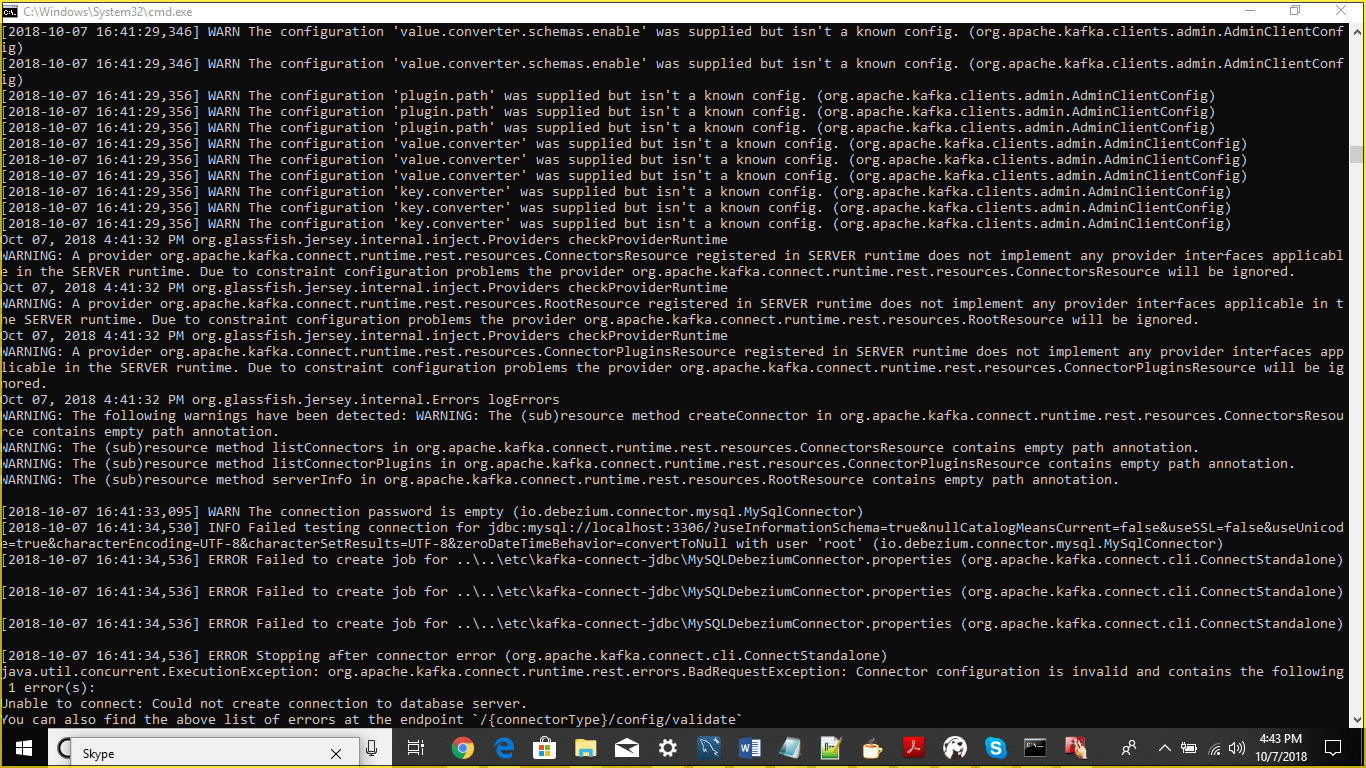
Properties File
name=MySQLDebeziumConnector
connector.class=io.debezium.connector.mysql.MySqlConnector
tasks.max=1
database.hostname=localhost
database.port=3306
database.user=root
database.password=*****
database.server.name=localhost
database.whitelist=<<schema >>
database.history.kafka.bootstrap.servers=localhost:9092
database.history.kafka.topic=schema-changes.<<schema_name>>
transforms=unwrap
transforms.unwrap.type=io.debezium.transforms.UnwrapFromEnvelope
transforms.unwrap.delete.handling.mode=rewrite
key.converter=org.apache.kafka.connect.json.JsonConverter
key.converter.schemas.enable=false
value.converter=org.apache.kafka.connect.json.JsonConverter
value. converter.schemas.enable=false
Can you Please help.
Jiri Pechanec
Oct 16, 2018, 2:20:25 AM10/16/18
to debezium
Which version of Debeizum do you use? Could you please look what version of JDBC driver is in?
J.
Kinshuk Goel
Oct 19, 2018, 9:18:52 AM10/19/18
to debezium
Debezium 0.8.1 and mysql connector is mysql-connector-java-5.1.40
Jiri Pechanec
Oct 19, 2018, 9:54:37 AM10/19/18
to debezium
Hi,
you are using MySQL 8. I believe the driver in this version is not compatible with new MySQL. Unfortunately the upgrade of the driver requires more work so it is available only in the latest version - see https://issues.jboss.org/browse/DBZ-763
J.
J.
Kinshuk Goel
Oct 19, 2018, 10:15:26 AM10/19/18
to debezium
Do I need to use debezium version 0.9.0.Alpha2??
Jiri Pechanec
Oct 22, 2018, 12:26:50 AM10/22/18
to debezium
Yes, please try it.
J.
Kinshuk Goel
Oct 22, 2018, 1:28:40 PM10/22/18
to debe...@googlegroups.com
Thanks!!! It worked.
--
You received this message because you are subscribed to the Google Groups "debezium" group.
To unsubscribe from this group and stop receiving emails from it, send an email to debezium+u...@googlegroups.com.
To post to this group, send email to debe...@googlegroups.com.
To view this discussion on the web visit https://groups.google.com/d/msgid/debezium/bf135a2a-9d9d-4ba4-896a-2434c32ebd84%40googlegroups.com.
For more options, visit https://groups.google.com/d/optout.

Ehasnul Khan
Feb 2, 2019, 2:05:21 AM2/2/19
to debezium
Hi, where did you get Debezium 0.9.0.Alpha2??
Jiri Pechanec
Feb 5, 2019, 3:56:17 AM2/5/19
to debezium
Hi,
0.9.0FInal has just been released - it is available on Maven Central. Docker images are currently being built.
J.

yaniv...@ziprecruiter.com
Feb 18, 2019, 10:14:11 AM2/18/19
to debezium
Hi everyone,
I came across the same problem exactly, I've tried using the latest debezium/connect docker image,
it managed to connect to my Kafka cluster, created the relevant topics and then when I POST the connector for mysql using -
curl -i -X PUT -H "Accept:application/json" -H "Content-Type:application/json" localhost:8083/connector-plugins/MySqlConnector/config/validate/ -d '{ "name": "try-connector", "config": { "connector.class": "io.debezium.connector.mysql.MySqlConnector", "tasks.max": "1", "database.hostname": "mysql", "database.port": "mysql-port", "database.user": "svc_debezium", "database.password": "mypassword", "database.server.id": "1", "database.server.name": "my-mysql-server", "database.whitelist": "some_table", "database.history.kafka.bootstrap.servers": "my-kafka-bootstrapserver-ip:9092", "database.history.kafka.topic": "my-table" } }'
I get an error of -
{"error_code":400,"message":"Connector configuration is invalid and contains the following 1 error(s):\nUnable to connect: Communications link failure\n\nThe last packet sent successfully to the server was 0 milliseconds ago. The driver has not received any packets from the server.\nYou can also find the above list of errors at the endpoint `/{connectorType}/config/validate`"}
When I check the What happened in the docker image I'm seeing the warning -
2019-02-18 15:03:37,187 WARN || The connection password is empty [io.debezium.connector.mysql.MySqlConnector]
2019-02-18 15:03:57,439 INFO || Failed testing connection for jdbc:mysql://mysql:32000/?useInformationSchema=true&nullCatalogMeansCurrent=false&useSSL=false&useUnicode=true&characterEncoding=UTF-8&characterSetResults=UTF-8&zeroDateTimeBehavior=CONVERT_TO_NULL with user 'svc_debezium' [io.debezium.connector.mysql.MySqlConnector]
I've tried several debezium images, and the connection to MySQL works from outside of the docker container.
What am I missing here?
Thanks!
Yaniv
Reply all
Reply to author
Forward
0 new messages