GUI for Cyclone PCB Factory

1,977 views
Skip to first unread message

Kobus du Toit

unread,
Aug 23, 2013, 7:02:02 AM8/23/13
to cyclone-p...@googlegroups.com
I created a very basic GUI to be used on top of the Python scripts.  I also created a basic installation and use document.  There are some things I need changed on the Python files so that I can show the images, but we can work on that next.  Please see the document for known issues.  I am also attaching the source, because I don't have time this weekend to setup a Github project
Cyclone PCB Factory Gui Tutorial.pdf
Cyclone-PCB-Factory-Gui.jar
src.zip

Samuel Kranz

unread,
Aug 23, 2013, 7:48:27 AM8/23/13
to cyclone-p...@googlegroups.com
Looks great, gonna test it in the evening ;)

Daniel "yOPERO" Garrido

unread,
Aug 23, 2013, 4:29:02 PM8/23/13
to cyclone-p...@googlegroups.com
Great stuff!!

<<import this

Kobus du Toit

unread,
Aug 25, 2013, 4:15:58 AM8/25/13
to cyclone-p...@googlegroups.com
Did you guys try it?

Stuart Mitchell

unread,
Aug 25, 2013, 9:44:39 AM8/25/13
to cyclone-p...@googlegroups.com
HI..

I had time over the week-end to set it up and see what it did.
I did some test using the files in the in dir and got some errors.

Parse Gerber data
Traceback (most recent call last):

  File "app_main.py", line 72, in run_toplevel

  File "./pygerber2gcode_cui_MOD.py", line 1528, in <module>

    main()

  File "./pygerber2gcode_cui_MOD.py", line 299, in main

    back_gerber = read_Gerber(GERBER_DIR,BACK_FILE)

  File "./pygerber2gcode_cui_MOD.py", line 544, in read_Gerber

    (data,f) = open_file(dirname, filename)

  File "./pygerber2gcode_cui_MOD.py", line 1515, in open_file

    with open(file_name,'r') as f:

IOError: [Errno 2] No such file or directory: 'C:\\Users\\AuzzeMit\\Downloads\\Cyclone-PCB-Factory-master\\printshield-1.0-B_Cu.gbl'


 Loading etch...
Gcode XY min: [4.526183, 5.292478]
Gcode XY max: [79.566179, 56.693602]
Joining etching paths!
Minimum XY travel distance: 0.0

 Loading etch (2nd pass)...
Gcode XY min: [4.382673, 5.155988]
Gcode XY max: [79.702668, 56.834067]
Joining etching paths!
Minimum XY travel distance: 0.0

 Loading etch (3rd pass)...
Gcode XY min: [4.218661, 5.0]
Gcode XY max: [79.858657, 56.994409]
Joining etching paths!
Minimum XY travel distance: 0.0

 Loading drill...
Gcode XY min: [6.218658, 6.738359]
Gcode XY max: [76.322658, 54.998359]
Minimum XY travel distance: 2.54

 Loading edge...
Gcode XY min: [3.297658, 3.626859]
Gcode XY max: [81.148658, 58.173359]
Joining etching paths!
Minimum XY travel distance: 0.0
PANELIZING: There will be 2x2 copies of this board
Connecting to Cyclone...
EMULATING MACHINE!
Serial port opened, checking connection...
Connected!
Homing all axis...
Done homing
Moving Z -5mm safely...
   Done moving Z!
[0, 0, 0, 0]
[0, 0, 0, 0]
[0, 0, 0, 0]
[0, 0, 0, 0]
Probing begins!
WARNING: Keep an eye on the machine, unplug if something goes wrong!
Probing Z
Result is Z = 0.0616602504848
Probing Z
Result is Z = 0.17194995221
Probing Z
Result is Z = .241364671502
Probing Z
Result is Z = .163383844845
Probing Z
Result is Z = .342011836769
Probing Z
Result is Z = 0.275131413841
Probing Z
Result is Z = .0620843168597
Probing Z
Result is Z = .199113321534
Probing Z
Result is Z = 0.39816494894
Probing Z
Result is Z = 0.412197263415
Probing Z
Result is Z = 0.11250125273
Probing Z
Result is Z = .079977560242
Probing Z
Result is Z = .323582487947
Probing Z
Result is Z = .188886156828
Probing Z
Result is Z = 0.421437067286
Probing Z
Result is Z = 0.348150259311
The origin Z height is 0.0616602504848
Probing duration:0:00:00.741000
#--------   Probing results   ---------
x_points = [3.297658, 58.531658, 113.765658, 168.999658]
y_points = [3.626859, 43.324525666666666, 83.02219233333332, 122.71985899999999]
probe_result = [[0.0, 0.1374530710492, 0.3365046984552, 0.2864900088262], [0.1102897017252, 0.00042406637490000065, 0.3505370129302, 0.3597768168012], [0.1797044210172, 0.21347116335619998, 0.0508410022452, 0.1272259063432], [0.10172359436019998, 0.2803515862842, 0.018317309757200008, 0.2619222374622]]
probe_duration = 0.741
#--------------------------------------

 Loading etch...

 Loading etch (2nd pass)...
Connecting to Cyclone...
EMULATING MACHINE!
Serial port opened, checking connection...
Connected!
Homing all axis...
Done homing
Moving Z -10mm safely...
   Done moving Z!
Probing Z
Result is Z = .0485720108575
Z offset: 0.0485720108575
Moving Z 5mm safely...
   Done moving Z!
Homing all axis...
Done homing

 Loading etch (3rd pass)...
Connecting to Cyclone...
EMULATING MACHINE!
Serial port opened, checking connection...
Connected!
Homing all axis...
Done homing
Moving Z -10mm safely...
   Done moving Z!
Probing Z
Result is Z = 0.356530673918
Z offset: 0.356530673918
Moving Z 5mm safely...
   Done moving Z!
Homing all axis...
Done homing
Traceback (most recent call last):
  File "3_Send.py", line 80, in <module>
    (etch_moves, travel_moves, gcode_minXY, gcode_maxXY) = gcv.view(filePath,fileName,0,showEtch,showEtch,showEtch2,showDrill,showEdge)
  File "C:\Users\AuzzeMit\Downloads\Cyclone-PCB-Factory-master (3)\Cyclone-PCB-Factory-master\Software\CycloneHost\GcodeViewer.py", line 130, in view
    return (etch_moves, travel_moves, gcode_minXY_global, gcode_maxXY_global)
UnboundLocalError: local variable 'etch_moves' referenced before assignment

 Loading drill...
Connecting to Cyclone...
EMULATING MACHINE!
Serial port opened, checking connection...
Connected!
Homing all axis...
Done homing
Moving Z -10mm safely...
   Done moving Z!
Probing Z
Result is Z = 0.264144998757
Z offset: 0.264144998757
Moving Z 5mm safely...
   Done moving Z!
Homing all axis...
Done homing

 Loading edge...
Connecting to Cyclone...
EMULATING MACHINE!
Serial port opened, checking connection...
Connected!
Homing all axis...
Done homing
Moving Z -10mm safely...
   Done moving Z!
Probing Z
Result is Z = 0.432210377178
Z offset: 0.432210377178
Moving Z 5mm safely...
   Done moving Z!
Homing all axis...
Done homing

Not sure what the errors mean.

Stuart

Kobus du Toit

unread,
Aug 25, 2013, 6:42:03 PM8/25/13
to cyclone-p...@googlegroups.com
Hi

There could be 2 reasons for it.

1. The file isn't in that location on the hard drive, but I assume it is so it is most likely the following problem

2. It is in my known issues on the last page of my document.  Currently the code can't handle to have the files in a different directory than the original installation directory.  I will work today on trying to come up with a fix

For me the original input directory is:
C:\Util\Cyclone-PCB-Factory-master\Software\GcodeGenerators\pyGerber2Gcode_CUI\in

and the output:
C:\Util\Cyclone-PCB-Factory-master\Software\GcodeGenerators\pyGerber2Gcode_CUI\out

The problem comes in when Java in Windows writes the path to the config file.  It adds slashes so that it will work correctly for Java to read the lines, but Python doesn't know Java tried to be smart so it doesn't know to try and convert the path.  So I will try to be smarter than Java today and write the path so that Python can understand it


--
Has recibido este mensaje porque estás suscrito a un tema del grupo "Cyclone PCB Factory" de Grupos de Google.
Para anular la suscripción a este tema, visita https://groups.google.com/d/topic/cyclone-pcb-factory/S3m1baPzwRk/unsubscribe. Para anular la suscripción a este grupo y todos sus temas, envía un correo electrónico a cyclone-pcb-fac...@googlegroups.com.
Para publicar una entrada en este grupo, envía un correo electrónico a cyclone-p...@googlegroups.com.
Para ver este debate en la Web, visita https://groups.google.com/d/msgid/cyclone-pcb-factory/aeff6eea-361b-4c2c-a353-9adf78f5f50b%40googlegroups.com.

Para obtener más opciones, visita https://groups.google.com/groups/opt_out.

Kobus du Toit

unread,
Aug 25, 2013, 9:53:15 PM8/25/13
to cyclone-p...@googlegroups.com
I created some code that will allow you to use any input and any output directory now

I also changed the way the run works.  I was looking at some videos and it seems the operator needs to interact with the machine at every step.  So there isn't just 1 run now, the operator will need to run each step, except for the 3 etch steps.  I see when I try to send etch 3 data the Python code throws an error.  I unzipped the downloaded file into another directory and tried again and it does it with the original code so it isn't something the Java code is breaking

This is the error you will most likely see when etch 3 tries to execute
Traceback (most recent call last):
  File "3_Send.py", line 80, in <module>
    (etch_moves, travel_moves, gcode_minXY, gcode_maxXY) = gcv.view(filePath,fileName,0,showEtch,showEtch,showEtch2,showDrill,showEdge)
  File "C:\temp\temp2\Cyclone-PCB-Factory-master\Software\CycloneHost\GcodeViewer.py", line 130, in view
    return (etch_moves, travel_moves, gcode_minXY_global, gcode_maxXY_global)
UnboundLocalError: local variable 'etch_moves' referenced before assignment
On Sun, Aug 25, 2013 at 11:44 PM, Stuart Mitchell <auzz...@gmail.com> wrote:

--
Has recibido este mensaje porque estás suscrito a un tema del grupo "Cyclone PCB Factory" de Grupos de Google.
Para anular la suscripción a este tema, visita https://groups.google.com/d/topic/cyclone-pcb-factory/S3m1baPzwRk/unsubscribe. Para anular la suscripción a este grupo y todos sus temas, envía un correo electrónico a cyclone-pcb-fac...@googlegroups.com.
Para publicar una entrada en este grupo, envía un correo electrónico a cyclone-p...@googlegroups.com.
src.zip
Cyclone-PCB-Factory-Gui.jar

Kobus du Toit

unread,
Aug 26, 2013, 4:47:40 PM8/26/13
to cyclone-p...@googlegroups.com
I think this line in the 3_Send python file needs to change
gcv.view(filePath,fileName,0,showEtch,showEtch,showEtch2,showDrill,showEdge)
to
gcv.view(filePath,fileName,0,showEtch,showEtch2,showEtch3,showDrill,showEdge)

I am just assuming here

On Friday, August 23, 2013 9:02:02 PM UTC+10, Kobus du Toit wrote:

Carlos García

unread,
Aug 26, 2013, 5:13:50 PM8/26/13
to cyclone-p...@googlegroups.com

That sounds right, still haven't got the chance to test the new code nor the GUI :-)

--
Has recibido este mensaje porque estás suscrito al grupo "Cyclone PCB Factory" de Grupos de Google.
Para anular la suscripción a este grupo y dejar de recibir sus correos electrónicos, envía un correo electrónico a cyclone-pcb-fac...@googlegroups.com.

Para publicar una entrada en este grupo, envía un correo electrónico a cyclone-p...@googlegroups.com.

Kobus du Toit

unread,
Aug 26, 2013, 5:18:36 PM8/26/13
to cyclone-p...@googlegroups.com

Carlos you created the code didn't you? Will you be able to do things for me like have a flag gui=true so that it doesn't block and write the images to bump files so I can display them?

Has recibido este mensaje porque estás suscrito a un tema del grupo "Cyclone PCB Factory" de Grupos de Google.
Para anular la suscripción a este tema, visita https://groups.google.com/d/topic/cyclone-pcb-factory/S3m1baPzwRk/unsubscribe. Para anular la suscripción a este grupo y todos sus temas, envía un correo electrónico a cyclone-pcb-fac...@googlegroups.com.

Para publicar una entrada en este grupo, envía un correo electrónico a cyclone-p...@googlegroups.com.

Carlos García

unread,
Aug 26, 2013, 5:29:38 PM8/26/13
to cyclone-p...@googlegroups.com

Sure! Good idea :-)
Maybe tomorrow I can get some time to implement that.

Kobus du Toit

unread,
Aug 26, 2013, 8:44:25 PM8/26/13
to cyclone-p...@googlegroups.com
I upgraded the code.

It will load an image from the 'out' directory after each step and display on a tab on the main screen.  It will also set runInGui=true in configuration.py when everything starts.  So if it is runInGui=false by default then it won't affect anybody not using the gui

Kobus du Toit

unread,
Aug 27, 2013, 3:08:11 AM8/27/13
to cyclone-p...@googlegroups.com
Java code
There are now 2 new property windows
You can change any property in configuration.py or the gerber2gcode conf file from inside the GUI.

The GUI will display the image in the out directory named boardName + _viewGcode.png, e.g. Encoder_Board_viewGcode.png after clicking the gcode button

The GUI will display the image in the out directory named boardName + _Z_probing_interpolated.png, e.g. Encoder_Board_Z_probing_interpolated.png after clicking on the zprobe button.  If images aren't available yet the code will not crash

It is possible to zoom into each image

The code will change the mouse cursor to a wait cursor when the user clicks a button for a job


Changes to python code needed
The following line needs to be added after each print statement or maybe after each loop so that the GUI log will update
sys.stdout.flush()


src.zip
Cyclone-PCB-Factory-Gui.jar

Kobus du Toit

unread,
Aug 30, 2013, 3:01:51 AM8/30/13
to cyclone-p...@googlegroups.com
I added alot of things to this one

Java
The comm ports available on the machine will show in a menu.  Only tested on Windows.  The comm ports jar is included in the main jar so the user still only needs to run 'java -jar Cyclone-PCB-Factory-Gui.jar'
The app properties can set the comm port to be used.  The comm port in app properties will also show all comm ports in a drop down so just select the correct one and save
Images of what is happening, e.g gcode, drilling and so on show on the gui
The images can be panned and zoomed
The images try to update as often as possible so you can also see in the gui where the spindle is
When starting a job the gui will ask if a tool change happened, if it did, the gui will guide the user through the process

Python
I split some code out of 3_send into 2_Zprobe_Toolchange
I am writing the toolchange value to cyclone.cfg and using that value in 3_send
Images are written in a thread
Fixed it so that when calling 3_send with showEtch3=1 that it will etch

I am attaching the new python source directory, backup your version of the code and unzip this version into the same place

Cyclone-PCB-Factory-Gui.jar
src.zip
Software.zip

Samuel Kranz

unread,
Aug 30, 2013, 6:10:19 AM8/30/13
to cyclone-p...@googlegroups.com
Looks good :D unfortunatly I am not able to test it (Cyclone not ready :'( ).

How about adding some manual machine controls like
XYZ + / -
Spindle On / Off
Home XYZ 
...
??

Kobus du Toit

unread,
Aug 30, 2013, 4:57:46 PM8/30/13
to cyclone-p...@googlegroups.com

I can build a favourites menu and then you can configure it with what you want.

--
Has recibido este mensaje porque estás suscrito a un tema del grupo "Cyclone PCB Factory" de Grupos de Google.
Para anular la suscripción a este tema, visita https://groups.google.com/d/topic/cyclone-pcb-factory/S3m1baPzwRk/unsubscribe. Para anular la suscripción a este grupo y todos sus temas, envía un correo electrónico a cyclone-pcb-fac...@googlegroups.com.
Para publicar una entrada en este grupo, envía un correo electrónico a cyclone-p...@googlegroups.com.

Robsbots

unread,
Sep 1, 2013, 11:53:57 AM9/1/13
to cyclone-p...@googlegroups.com
Hi all

Has anybody got the latest software running under linux. I have ubuntu but I seem to be unable to configure it correctly. The software has trouble finding 1_GenerateGcode.py

If you could share your 'Application Properties' settings that would be really handy. Thanks.

By the way. I had a play with the previous version and it looks GREAT. Thanks Kobus.


Kobus du Toit

unread,
Sep 1, 2013, 4:09:08 PM9/1/13
to cyclone-p...@googlegroups.com

Is it possible to install software on a USB version of Ubuntu? I can then setup something this week. I can maybe look a dual boot

Robsbots can you please post your properties that you have

--
Has recibido este mensaje porque estás suscrito a un tema del grupo "Cyclone PCB Factory" de Grupos de Google.
Para anular la suscripción a este tema, visita https://groups.google.com/d/topic/cyclone-pcb-factory/S3m1baPzwRk/unsubscribe. Para anular la suscripción a este grupo y todos sus temas, envía un correo electrónico a cyclone-pcb-fac...@googlegroups.com.
Para publicar una entrada en este grupo, envía un correo electrónico a cyclone-p...@googlegroups.com.

Alex

unread,
Sep 1, 2013, 5:00:40 PM9/1/13
to cyclone-p...@googlegroups.com
Hi Kobus,
You should be able to create a USB stick with persistent storage for Ubuntu with UNetbootin :
http://unetbootin.sourceforge.net/
If you use the default Ubuntu live CD, you will have to install it again each time you launch Ubuntu.

Alex


--
Has recibido este mensaje porque estás suscrito al grupo "Cyclone PCB Factory" de Grupos de Google.
Para anular la suscripción a este grupo y dejar de recibir sus correos electrónicos, envía un correo electrónico a cyclone-pcb-fac...@googlegroups.com.

Para publicar una entrada en este grupo, envía un correo electrónico a cyclone-p...@googlegroups.com.

Robert Last

unread,
Sep 1, 2013, 6:36:28 PM9/1/13
to cyclone-p...@googlegroups.com
Hi Kobus.

Think I have it cracked that prblem. I have now set my working directory to the one containing the scripts.

I am still having problems running the software though.

Currently when I choose a board and then hit Gerber2GCode I get the following error.

Traceback (most recent call last):
  File "1_GenerateGcode.py", line 30, in <module>
    call([sys.argv[1],"./pygerber2gcode_cui_MOD.py"]) # If you have "pypy" installed go ahead!
  File "/usr/lib/python2.7/subprocess.py", line 524, in call
    return Popen(*popenargs, **kwargs).wait()
  File "/usr/lib/python2.7/subprocess.py", line 711, in __init__
    errread, errwrite)
  File "/usr/lib/python2.7/subprocess.py", line 1308, in _execute_child
    raise child_exception
OSError: [Errno 13] Permission denied

I have tried running this as root and get the same error so I don't think it's a permission problem as such.

If you still need the settings I'm using let me know.

Thanks

Rob

Kobus du Toit

unread,
Sep 1, 2013, 7:01:10 PM9/1/13
to cyclone-p...@googlegroups.com
You can replace the sys.argv[1] with the location of your pypy and see what happens
Would probably be something like "/home/util/pypy" or revert back to the previous line
call(["python","./pygerber2gcode_cui_MOD.py"])

The code does a change directory to the Software directory, e.g. Cyclone-PCB-Factory-master\Software or what ever you selected as your script directory
and then it tries to call the python you set as your pypy.  You can select any python, doesn't have to be pypy

This is my .properties on Windows
DEVICE_PORT=COM3
WORKING_DIR=C\:\\Util\\Cyclone-PCB-Factory-master\\Software
ETCH_CONFIG_FILE=C\:\\Util\\Cyclone-PCB-Factory-master\\Software\\configuration.py
GERBER_INPUT_DIR=C\:\\temp\\in
GERBER_2_GCODE_CONFIG_FILE=C\:\\Util\\Cyclone-PCB-Factory-master\\Software\\GcodeGenerators\\pyGerber2Gcode_CUI\\pygerber2gcode_cui_MOD.conf
PYTHON_NUMPY=C\:\\Anaconda\\python.exe
PYPY=C\:\\pypy-2.0-beta1\\pypy.exe
GERBER_OUTPUT_DIR=C\:\\temp\\out
LAST_BOARD_NAME=Encoder_Board


How did you fix the other problem?


Kobus du Toit

unread,
Sep 1, 2013, 11:28:44 PM9/1/13
to cyclone-p...@googlegroups.com
I created some basic code that will allow you to create your own favourites

Unzip the favourites folder to where ever you want it
Copy the .py file to the same directory where the 1_GenerateGcode.py is
Open the gui and click on File | Edit configuration.py
Find favouritesPath and enter the path of where the favourites are, e.g. in my case "c:/Cyclone-PCB-Factory-master/favourites/".  Remember the quotes and the last forward slash

The favourites menu will refresh every 2 seconds or so and list all the files in the favourites directory.  Name all files .gcode or the file will not be executed.  You can use spaces in the name if you want.  You can even add some extra files in there to group commands, e.g. if you make a file called "Spindle -.txt" and another file called "Spindle.txt" those names will show up around "Spindle Off" and "Spindle On" in the menu.  Just don't click on the .txt versions :)

This doesn't use zprobe data, it just sends the commands directly so if you do write gcode that will try to mill you might have a bad day as the guy at EEVBlog would say :)
src.zip
4_ExecuteFavourite.py
favourites.zip
Cyclone-PCB-Factory-Gui.jar

Kobus du Toit

unread,
Sep 1, 2013, 11:42:16 PM9/1/13
to cyclone-p...@googlegroups.com
I will start putting releases in this directory, please see if it can be accessed

Iceflow

unread,
Sep 1, 2013, 11:43:10 PM9/1/13
to cyclone-p...@googlegroups.com
I can acces it without problem :D


El 2 de septiembre de 2013 05:42, Kobus du Toit <kobus...@gmail.com> escribió:
I will start putting releases in this directory, please see if it can be accessed

--
Has recibido este mensaje porque estás suscrito al grupo "Cyclone PCB Factory" de Grupos de Google.
Para anular la suscripción a este grupo y dejar de recibir sus correos electrónicos, envía un correo electrónico a cyclone-pcb-fac...@googlegroups.com.
Para publicar una entrada en este grupo, envía un correo electrónico a cyclone-p...@googlegroups.com.

Kobus du Toit

unread,
Sep 4, 2013, 1:41:04 AM9/4/13
to cyclone-p...@googlegroups.com
New version available in DropBox

Convert DipTrace files to be used by the python gerber2gcode program.  I see there is a bug with the edge code, it doesn't produce the correct graphic when importing DipTrace files.  I tested the files in other gerber importers and they showed up fine.  I remember seeing a comment in the code that the edge code is still buggy

Add profiles.  You can setup a profiles directory in the application properties.  When you click on the gerber2code button the application will take the properties in the profile and overwrite the properties in pygerber2gcode_cui_MOD.conf.  I created a default.properties that is really just a copy of the file and a profileA.properties that changes the Z_Speed to 55

Now the smart people can make profiles for the different RPM's, cutting tools and material and share it with the rest of us :)

I will probably need to make a nice gui for the profile file creation, but it will take some thinking of how to make it so that anybody can make profiles and actually understand the values.  I saw a Mach3 demo and they have screens ontop of screens ontop of screens where you enter the data.  That is probably not the best way of doing it, because if you know nothing then you won't be able to enter anything.  I think it needs to integrate maybe photos with the questions.  So that someone can see what the thing is in the real world

Example, what is ROT_ANG?
What is MCODE_FLAG?

I don't have a clue what most of the values are supposed to be

Laimonas Mockus

unread,
Sep 8, 2013, 5:19:50 AM9/8/13
to cyclone-p...@googlegroups.com
Unable to launch in Debian 7(Wheezy), java version "1.7.0_25", OpenJDK Runtime Environment (IcedTea 2.3.10) (7u25-2.3.10-1~deb7u1). I get the message:
"This application requires a newer version of the Java runtime. Please download and install the latest Java runtime from java.com. Then restart the application."

Is Java from Oracle the only option?

Kobus du Toit

unread,
Sep 8, 2013, 5:26:25 AM9/8/13
to cyclone-p...@googlegroups.com
Maybe see if you can install the pre-release of JDK 8.  I am using the newest version of JavaFx so that might be why you are having issues.  I was thinking of getting the pre-release of 8 next week and see if I can build the PCB in 3D


--
Has recibido este mensaje porque estás suscrito a un tema del grupo "Cyclone PCB Factory" de Grupos de Google.
Para anular la suscripción a este tema, visita https://groups.google.com/d/topic/cyclone-pcb-factory/S3m1baPzwRk/unsubscribe. Para anular la suscripción a este grupo y todos sus temas, envía un correo electrónico a cyclone-pcb-fac...@googlegroups.com.

Para publicar una entrada en este grupo, envía un correo electrónico a cyclone-p...@googlegroups.com.

Laimonas Mockus

unread,
Sep 8, 2013, 7:01:10 PM9/8/13
to cyclone-p...@googlegroups.com
I tried Java 7 from Oracle. The main windows shows up and the error messages fill the terminal:

~/cnc/Cyclone-PCB-Factory-master/Software$ java -jar Cyclone-PCB-Factory-Gui.jar
Exception in runnable
java.lang.NullPointerException
    at au.com.custom3dcnc.MainWindow$18$1.run(MainWindow.java:760)
    at com.sun.javafx.application.PlatformImpl$4$1.run(PlatformImpl.java:179)
    at com.sun.javafx.application.PlatformImpl$4$1.run(PlatformImpl.java:176)
    at java.security.AccessController.doPrivileged(Native Method)
    at com.sun.javafx.application.PlatformImpl$4.run(PlatformImpl.java:176)
    at com.sun.glass.ui.InvokeLaterDispatcher$Future.run(InvokeLaterDispatcher.java:76)
    at com.sun.glass.ui.gtk.GtkApplication._runLoop(Native Method)
    at com.sun.glass.ui.gtk.GtkApplication$3$1.run(GtkApplication.java:82)
    at java.lang.Thread.run(Unknown Source)

I will try Java 8 tomorrow.

Kobus du Toit

unread,
Sep 8, 2013, 11:19:05 PM9/8/13
to cyclone-p...@googlegroups.com
I found the problem
It is the comm port code

                        for (SerialComm serialCommItem : portList) {

Seems the commport code doesn't work on your OS.  I will build something in to allow you to disable it in the config file

Kobus du Toit

unread,
Sep 9, 2013, 12:04:45 AM9/9/13
to cyclone-p...@googlegroups.com
I have a new version waiting for you

If you can't get to the properties window just go to cycloneGui.properties and add this
DISABLE_COMM_CHECKING=true

I am using this code to check for comm ports


2013/9/9 Kobus du Toit <kobus...@gmail.com>

--
Has recibido este mensaje porque estás suscrito a un tema del grupo "Cyclone PCB Factory" de Grupos de Google.
Para anular la suscripción a este tema, visita https://groups.google.com/d/topic/cyclone-pcb-factory/S3m1baPzwRk/unsubscribe. Para anular la suscripción a este grupo y todos sus temas, envía un correo electrónico a cyclone-pcb-fac...@googlegroups.com.
Para publicar una entrada en este grupo, envía un correo electrónico a cyclone-p...@googlegroups.com.

Laimonas Mockus

unread,
Sep 9, 2013, 4:22:05 AM9/9/13
to cyclone-p...@googlegroups.com
>Seems the commport code doesn't work on your OS
There are no serial ports on board :) I'll try to plug a simple usb-serial adapter.
I'll try the new version in the evening.

I suggest to add 4_ExecuteFavourite.py and favourites.zip in Dropbox (if these files are the part of the GUI software).

Kobus du Toit

unread,
Sep 9, 2013, 5:02:20 AM9/9/13
to cyclone-p...@googlegroups.com
They are under Cyclone software release\2013 09 02


--
Has recibido este mensaje porque estás suscrito a un tema del grupo "Cyclone PCB Factory" de Grupos de Google.
Para anular la suscripción a este tema, visita https://groups.google.com/d/topic/cyclone-pcb-factory/S3m1baPzwRk/unsubscribe. Para anular la suscripción a este grupo y todos sus temas, envía un correo electrónico a cyclone-pcb-fac...@googlegroups.com.
Para publicar una entrada en este grupo, envía un correo electrónico a cyclone-p...@googlegroups.com.

Kobus du Toit

unread,
Sep 10, 2013, 1:07:30 AM9/10/13
to cyclone-p...@googlegroups.com
I started building Visolate in
You will need Java3d for your OS to get it working.  I have the windows dll in the release directory
There is a new property in the properties window where you need to select the directory of the Java3d dll or what ever your OS uses
Please get the downloads from here (http://java3d.java.net/binary-builds.htmland place the dll for your OS in a place that you will find it again

I built all the java3d files into the Visolate.jar so don't worry about those files.  Just place Visolate.jar in the same directory where the python files are, e.g. Cyclone-PCB-Factory-master\Software

You can select which parser to use in a drop down.  The python parser should still generate everything as it did in the past.

Currently it will only generate the gcode for the circuit and the edge, it doesn't seem to like any of the drill files
Don't try to do anything after generating the gcode, it won't work yet.  I think the problem is the offset.  When you generate the gcode you will see it is placed on a negative Y axis.  I will see what the developer says


Kobus du Toit

unread,
Sep 10, 2013, 2:49:36 AM9/10/13
to cyclone-p...@googlegroups.com
In case someone missed something along the way, this is my Cyclone directory

I just removed my config file, but this directory contains the latest GUI with Visolate and the Windows java3d dll, favourites and profiles

Iceflow

unread,
Sep 10, 2013, 3:48:25 AM9/10/13
to cyclone-p...@googlegroups.com
Maybe its a little "too much" to ask what im going to ask, but... i think it will be too much "usable", for the normal user, and it will help to spread the Cyclone if an easy way to use the software its ready to download and use, i mean, to have a "all in one" package :P its a little mess to download your files, searching one on that web and another one in the other web...

I understand that this is still in an early stage and with so much development to make a "release", too many changes everyday, but i hope that when the thing gets steady you will "offer" such an easy way to "get" the software... :D only my thoughts hehehehe

Anyway, so great work you done here man!! thanks!!


--
Has recibido este mensaje porque estás suscrito al grupo "Cyclone PCB Factory" de Grupos de Google.
Para anular la suscripción a este grupo y dejar de recibir sus correos electrónicos, envía un correo electrónico a cyclone-pcb-fac...@googlegroups.com.

Para publicar una entrada en este grupo, envía un correo electrónico a cyclone-p...@googlegroups.com.

Kobus du Toit

unread,
Sep 10, 2013, 4:21:56 AM9/10/13
to cyclone-p...@googlegroups.com

Good idea. I will look into creating an installation, but it will only make sense later. It wouldn't be great for everybody to have to download and install a huge file every day.  For now it is hopefully easy to get the files from Dropbox that changed the day

What other features would you guys like? Hopefully I can get the new stuff of today working perfectly this week

Iceflow

unread,
Sep 10, 2013, 5:14:51 AM9/10/13
to cyclone-p...@googlegroups.com
Thats the idea, totally agree, when the software becomes a little more "stable" it will be a good idea :D


2013/9/10 Kobus du Toit <kobus...@gmail.com>

Good idea. I will look into creating an installation, but it will only make sense later. It wouldn't be great for everybody to have to download and install a huge file every day.  For now it is hopefully easy to get the files from Dropbox that changed the day

What other features would you guys like? Hopefully I can get the new stuff of today working perfectly this week

--
Has recibido este mensaje porque estás suscrito al grupo "Cyclone PCB Factory" de Grupos de Google.
Para anular la suscripción a este grupo y dejar de recibir sus correos electrónicos, envía un correo electrónico a cyclone-pcb-fac...@googlegroups.com.
Para publicar una entrada en este grupo, envía un correo electrónico a cyclone-p...@googlegroups.com.

johnboy

unread,
Sep 10, 2013, 12:46:02 PM9/10/13
to cyclone-p...@googlegroups.com
Kobus du Toit:


I really appreciatde the time and effort you are sharing with
the rest of us.  I am getting ready to install your package
on the old laptop I use for machine control.

As for features I would like to see....

An easy, ready to download, installation package for windows

I currently use ponterface for my printer and it
has everything I need for printing, manual controls
for all axis and heaters, sends G codes plus
the ability to create custom buttons.  Something
similar would be great.


Thanks,

-John


Kobus du Toit

unread,
Sep 10, 2013, 8:40:32 PM9/10/13
to cyclone-p...@googlegroups.com
I will see if I can download it this week and have a look at it
The favourites menu will allow you to create unlimited favourite commands.  There just isn't a nice management gui for it.  Maybe if I create a nice gui for the favourites it will help?


--
Has recibido este mensaje porque estás suscrito a un tema del grupo "Cyclone PCB Factory" de Grupos de Google.
Para anular la suscripción a este tema, visita https://groups.google.com/d/topic/cyclone-pcb-factory/S3m1baPzwRk/unsubscribe. Para anular la suscripción a este grupo y todos sus temas, envía un correo electrónico a cyclone-pcb-fac...@googlegroups.com.

Para publicar una entrada en este grupo, envía un correo electrónico a cyclone-p...@googlegroups.com.

Kobus du Toit

unread,
Sep 10, 2013, 8:51:33 PM9/10/13
to cyclone-p...@googlegroups.com
When I search for Ponterface this is the closest I can get

Iceflow

unread,
Sep 11, 2013, 12:30:40 AM9/11/13
to cyclone-p...@googlegroups.com
Thats the place, you have ready for download files for Mac and Windows, for Linux you need to read the instructions and install everything to use it :D


2013/9/11 Kobus du Toit <kobus...@gmail.com>
Has recibido este mensaje porque estás suscrito al grupo "Cyclone PCB Factory" de Grupos de Google.
Para anular la suscripción a este grupo y dejar de recibir sus correos electrónicos, envía un correo electrónico a cyclone-pcb-fac...@googlegroups.com.

Para publicar una entrada en este grupo, envía un correo electrónico a cyclone-p...@googlegroups.com.

Kobus du Toit

unread,
Sep 11, 2013, 2:26:48 AM9/11/13
to cyclone-p...@googlegroups.com
How much of that screen do you guys actually ever use?
On my Replicator I only use jog Z axis when I change the thickness of the build plate and I need to level again.  The machine moves home automatically after a job or cancelled job.  It moves automatically into position.

I can think I need to move the comm port connect to the main screen, because it might change comm ports if you connect it into a different USB and you don't want to go to the properties file every time

I am not sure if we should allow the user to just change the feed speed.  We will have the profiles and I think when you have a profile for that material and that tool that you shouldn't mess with it or the tool will break off

With the correct electronics and gcode the user will also never need to switch the spindle on or off.  Would there every be a reason to remotely control the spindle on/off?  It is possible to write a favourite to do it, but is it needed on the main page?


Iceflow

unread,
Sep 11, 2013, 3:45:55 AM9/11/13
to cyclone-p...@googlegroups.com
A jog to manually move the axis is always handy with some buttons to home every axis ;) also a spindle on off could be used...


johnboy

unread,
Sep 11, 2013, 1:49:51 PM9/11/13
to cyclone-p...@googlegroups.com
I pretty much use everything on the ponterface screen.   Manual movement of all the axis
is a must for setup and trouble-shooting.  Also, being able to de-energize the motors helps.
 I also made buttons to zero the axis and to manually control the fan.

-John

Samuel Kranz

unread,
Sep 11, 2013, 2:12:02 PM9/11/13
to cyclone-p...@googlegroups.com
if my aid is appreciated I would design the UI of the Software. Images and stuff

Iceflow

unread,
Sep 11, 2013, 3:01:31 PM9/11/13
to cyclone-p...@googlegroups.com
I think that all the help would be apreciated i supose :D more on, two minds think better than one!! hehehehe


El 11 de septiembre de 2013 20:12, Samuel Kranz <secu...@gmail.com> escribió:
if my aid is appreciated I would design the UI of the Software. Images and stuff

--
Has recibido este mensaje porque estás suscrito al grupo "Cyclone PCB Factory" de Grupos de Google.
Para anular la suscripción a este grupo y dejar de recibir sus correos electrónicos, envía un correo electrónico a cyclone-pcb-fac...@googlegroups.com.
Para publicar una entrada en este grupo, envía un correo electrónico a cyclone-p...@googlegroups.com.

Kobus du Toit

unread,
Sep 11, 2013, 7:02:43 PM9/11/13
to cyclone-p...@googlegroups.com
That would be nice, because I suck at drawing stick men :)
I believe I can import an image in JavaFx and make it clickable, I will read up a bit.

I was thinking to have the manual control on its own tab and the reading of the file, probing and milling on another tab, but you can design it how you think it will look cool and I will try to make it happen


2013/9/12 Samuel Kranz <secu...@gmail.com>
if my aid is appreciated I would design the UI of the Software. Images and stuff

--
Has recibido este mensaje porque estás suscrito a un tema del grupo "Cyclone PCB Factory" de Grupos de Google.
Para anular la suscripción a este tema, visita https://groups.google.com/d/topic/cyclone-pcb-factory/S3m1baPzwRk/unsubscribe. Para anular la suscripción a este grupo y todos sus temas, envía un correo electrónico a cyclone-pcb-fac...@googlegroups.com.

Para publicar una entrada en este grupo, envía un correo electrónico a cyclone-p...@googlegroups.com.

Iceflow

unread,
Sep 11, 2013, 7:05:27 PM9/11/13
to cyclone-p...@googlegroups.com
This looks the begining of a good relationship i hope!! :D


2013/9/12 Kobus du Toit <kobus...@gmail.com>

--
Has recibido este mensaje porque estás suscrito al grupo "Cyclone PCB Factory" de Grupos de Google.
Para anular la suscripción a este grupo y dejar de recibir sus correos electrónicos, envía un correo electrónico a cyclone-pcb-fac...@googlegroups.com.

Para publicar una entrada en este grupo, envía un correo electrónico a cyclone-p...@googlegroups.com.

Kobus du Toit

unread,
Sep 11, 2013, 7:08:16 PM9/11/13
to cyclone-p...@googlegroups.com
Yep.  I want something that will get people to come to Cyclone rather than OtherMill where they have to spend almost $2k on something with less features.  Pretty graphics draw people.  Look at Makerware.  The software pulls people to the printer, might not be the best, but that is the thing people see and use.  They want something that is as simple as a paper printer.  I can't think how to make it that simple


Kobus du Toit

unread,
Sep 11, 2013, 7:11:45 PM9/11/13
to cyclone-p...@googlegroups.com
With the graphics it seems I will probably have the background image and then place layers on top of it.  I can then detect when the user clicks on a layer.  I will probably use a grid layout so if all the images are of the same size it might make things easier.  The grid layout resizes automatically so if you have large images on line 1 and then smaller images on line 2 the images will not touch on line 2 except if they are larger

Seems I can also do some basic 3D with the current JavaFX, but full 3D will only be available in the next release and is now available in the Windows pre release.  I wouldn't want to limit the app now to only Windows.  2D will be alot easier for me at this point since I am not a JavaFX developer

johnboy

unread,
Sep 11, 2013, 10:01:56 PM9/11/13
to cyclone-p...@googlegroups.com

I think you are right about software being the key.   Building a machine is the easy part (at least for me)but there  is a lot of difficulty in getting the software to work.  I have built a printer, an eggbot and now the Cyclone.

I got the printer working just fine but there was a lot of software available that was mature enough that is was easy  to  use.  My eggbot I still have not gotten to work right.  The cyclone I finally got the firmware to load but am still staring at the GUI tutorial and pondering my next step.

Is the tutorial up to date?
What do I do with src.zip
Etc.

You are doing this in Java but most of us don't know Java.  The only reason I am familiar with the
windows command feature is that I am so old that I can remember working in DOS.  I am a jack of all
trades and know a little about almost everything but working with software at this level is a reach for me and I suspect a lot of others.

I appreciate what you are doing and hope it gets to the level where I can get it to work for me.

Thanks,

-John


Kobus du Toit

unread,
Sep 11, 2013, 10:14:38 PM9/11/13
to cyclone-p...@googlegroups.com
Hi

The tutorial isn't up to date anymore, too many things already changed.  I place the src.zip in the directory so that people can feel safe that I didn't write a virus and that if they wanted to see the source they could

Copy this whole directory to your machine to start with, it contains the favourites, profiles, the start of visolate

I will try to update the tutorial today

Kobus


--
Has recibido este mensaje porque estás suscrito a un tema del grupo "Cyclone PCB Factory" de Grupos de Google.
Para anular la suscripción a este tema, visita https://groups.google.com/d/topic/cyclone-pcb-factory/S3m1baPzwRk/unsubscribe. Para anular la suscripción a este grupo y todos sus temas, envía un correo electrónico a cyclone-pcb-fac...@googlegroups.com.
Para publicar una entrada en este grupo, envía un correo electrónico a cyclone-p...@googlegroups.com.

Kobus du Toit

unread,
Sep 11, 2013, 10:22:08 PM9/11/13
to cyclone-p...@googlegroups.com
Give me a couple minutes.  I will also place the Java3D required files in there.  

Kobus du Toit

unread,
Sep 11, 2013, 11:13:58 PM9/11/13
to cyclone-p...@googlegroups.com
I updated the tutorial.  It is also in https://www.dropbox.com/sh/3jzb2tvfd0bh1if/VyBRnj5Vqx

Please see how that goes

I will look at changing the code to use relative paths so then one cycloneGui.properties will work largely for everybody if they download the full directory

Kobus du Toit

unread,
Sep 12, 2013, 1:34:08 AM9/12/13
to cyclone-p...@googlegroups.com
I changed the code so that it starts off with relative paths for everything.  I moved the favourites and profiles into software.  So now when you start the java app inside software it will just find all the files in the correct places

Only thing the non-Windows user will have to do is to select the correct java3D directory in the properties window

johnboy

unread,
Sep 12, 2013, 1:05:25 PM9/12/13
to cyclone-p...@googlegroups.com

Kobus du Toit

I used the new tutorial (thanks again) and ran the Gui.  Your screen flashed on for a second then went away, the command line screen showed an error.  I have attached the log file...
Can you see what I have done wrong?

-John
hs_err_pid3752.log

Samuel Kranz

unread,
Sep 12, 2013, 2:04:54 PM9/12/13
to cyclone-p...@googlegroups.com
Hi,
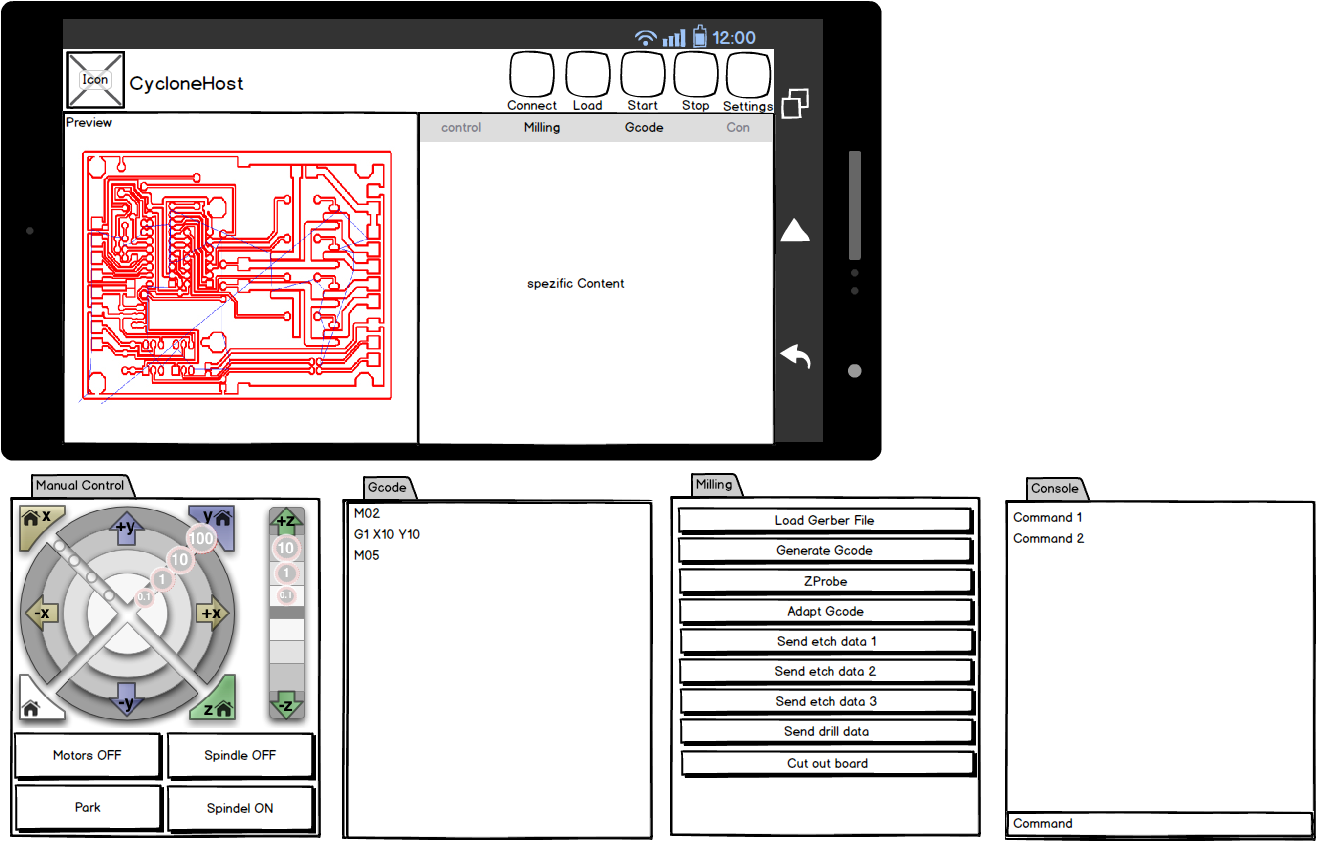
my imagination of the CycloneHost Software look like that.:
Pictures for the buttons and stuff will follow. 
What do you guys think about it?


Iceflow

unread,
Sep 12, 2013, 2:13:42 PM9/12/13
to cyclone-p...@googlegroups.com
In looks pretty good :D i love to have the windows separated and to move all where i want!! hehehehe with option to show hide what you want on any moment.


2013/9/12 Samuel Kranz <secu...@gmail.com>

--
Has recibido este mensaje porque estás suscrito al grupo "Cyclone PCB Factory" de Grupos de Google.
Para anular la suscripción a este grupo y dejar de recibir sus correos electrónicos, envía un correo electrónico a cyclone-pcb-fac...@googlegroups.com.

Para publicar una entrada en este grupo, envía un correo electrónico a cyclone-p...@googlegroups.com.

Kobus du Toit

unread,
Sep 12, 2013, 3:44:31 PM9/12/13
to cyclone-p...@googlegroups.com
John I think it might be comm ports.  Did you see any error messages on the command prompt with this in it
j.extensions.comm.SerialComm

Please try this
open cycloneGui.properties
change DISABLE_COMM_CHECKING=false to true

Lets see what that does

Which version of windows do you have?


2013/9/13 johnboy <stillstra...@gmail.com>

--
Has recibido este mensaje porque estás suscrito a un tema del grupo "Cyclone PCB Factory" de Grupos de Google.
Para anular la suscripción a este tema, visita https://groups.google.com/d/topic/cyclone-pcb-factory/S3m1baPzwRk/unsubscribe. Para anular la suscripción a este grupo y todos sus temas, envía un correo electrónico a cyclone-pcb-fac...@googlegroups.com.

Para publicar una entrada en este grupo, envía un correo electrónico a cyclone-p...@googlegroups.com.

Samuel Kranz

unread,
Sep 12, 2013, 4:44:36 PM9/12/13
to cyclone-p...@googlegroups.com
@Kobus 
what do you think about the layout of the GUI? 

btw.: I've got some experience in Android App development (also Java) so maybe I can help you.. 
You can drop me a mail about your thoughts (secures92(ät)gmail.com

johnboy

unread,
Sep 12, 2013, 7:10:48 PM9/12/13
to cyclone-p...@googlegroups.com
Kobus du Toit

Progress !!!! :)

I changed the comm test property from false to true and now the gui screen comes up and I can get a couple of steps
into the process.   There are some errors and it says that if you installed pypy to continue.  A couple of screens come
up but never with an image.  It acts as though there is a machine feeding back bed height etc. ?  I don't have a machine
hooked up yet. 


Kobus du Toit

unread,
Sep 13, 2013, 4:20:35 AM9/13/13
to cyclone-p...@googlegroups.com

Hi

I was running a laser skirmish game on a mountain today so was a bit busy since 5 this morning

I like the screens. I think we need some kind of progress indicator. I can't  remember my birthday, I won't remember what button I clicked 4 hours ago :)

Maybe a wizard. That way the user can't mess up and they know at what point they are at.

I was thinking the file selection also need to change. I tried to be too smart by asking for the drill file to get the name of the board and then work out the other names, but that forces the user to name files in a certain way.

We can work together on the code. I am also learning Javafx, normally do JSF/Spring and also some Android. Easiest for me to share the code is Dropbox. Where I sometimes work I have a proxy server and many sites are blocked so I need to connect through my cell to get online. Bit of a hassle to get things working

Kobus du Toit

unread,
Sep 13, 2013, 7:46:04 AM9/13/13
to cyclone-p...@googlegroups.com
John awesome.  Carlos wrote it to simulate a machine by default.  He knew most of us wouldn't have machines :)
Can you tell me the errors?  Did you install pypy and set it in the properties?

johnboy

unread,
Sep 13, 2013, 9:26:42 AM9/13/13
to cyclone-p...@googlegroups.com

Kobus du Toit

I will get you the details later today. 

Do you have a ".bat" file that would run the Gui from a shortcut on Windows Desktop ?

Kobus du Toit

unread,
Sep 13, 2013, 9:37:42 AM9/13/13
to cyclone-p...@googlegroups.com
I added a run.bat to the dropbox folder


2013/9/13 johnboy <stillstra...@gmail.com>

Kobus du Toit

I will get you the details later today. 

Do you have a ".bat" file that would run the Gui from a shortcut on Windows Desktop ?

--
Has recibido este mensaje porque estás suscrito a un tema del grupo "Cyclone PCB Factory" de Grupos de Google.
Para anular la suscripción a este tema, visita https://groups.google.com/d/topic/cyclone-pcb-factory/S3m1baPzwRk/unsubscribe. Para anular la suscripción a este grupo y todos sus temas, envía un correo electrónico a cyclone-pcb-fac...@googlegroups.com.
Para publicar una entrada en este grupo, envía un correo electrónico a cyclone-p...@googlegroups.com.

Samuel Kranz

unread,
Sep 13, 2013, 12:05:46 PM9/13/13
to cyclone-p...@googlegroups.com
What do you guys think about an android application for the cycloneHost? Kobus mentioned the raspberry pi a couple of days ago so why not an android tablet? Ive already found some applications to run a pythonscript.. So maybe its possible to use the software on Android..

Samuel Kranz

unread,
Sep 13, 2013, 12:40:17 PM9/13/13
to cyclone-p...@googlegroups.com
@Kobus if it is possible for you I would appiciate if we could use a Git responsitory.. BTW: which IDE do you use? Eclipse, NetBeans??

Iceflow

unread,
Sep 13, 2013, 12:40:54 PM9/13/13
to cyclone-p...@googlegroups.com
That would be superb!!! :D i suppose that it can use wifi or bluetooth for the comunications...


El 13 de septiembre de 2013 18:05, Samuel Kranz <secu...@gmail.com> escribió:
What do you guys think about an android application for the cycloneHost? Kobus mentioned the raspberry pi a couple of days ago so why not an android tablet? Ive already found some applications to run a pythonscript.. So maybe its possible to use the software on Android..

--

Has recibido este mensaje porque estás suscrito al grupo "Cyclone PCB Factory" de Grupos de Google.
Para anular la suscripción a este grupo y dejar de recibir sus correos electrónicos, envía un correo electrónico a cyclone-pcb-fac...@googlegroups.com.

Para publicar una entrada en este grupo, envía un correo electrónico a cyclone-p...@googlegroups.com.

Samuel Kranz

unread,
Sep 13, 2013, 12:45:19 PM9/13/13
to cyclone-p...@googlegroups.com
I dont know if a wifi connection is possible.. bluetooth yes.. and i saw an android ftdi driver a couple of days ago, so connecting via USB would be also possible. But i do not know if every phyton command is available on android..

Iceflow

unread,
Sep 13, 2013, 12:49:10 PM9/13/13
to cyclone-p...@googlegroups.com
Yeah, that would be needed to see, if not all the comands are available at least a minimal interface would be posible... i think :P

With the wifi conection i mean the tablet, the electronics can be conected trough a lan conection, and the 2 will be in te same lan, so comnication will be posible, or not? maybe also a direct wifi conection  with a wireless shield...


El 13 de septiembre de 2013 18:45, Samuel Kranz <secu...@gmail.com> escribió:
I dont know if a wifi connection is possible.. bluetooth yes.. and i saw an android ftdi driver a couple of days ago, so connecting via USB would be also possible. But i do not know if every phyton command is available on android..

--
Has recibido este mensaje porque estás suscrito al grupo "Cyclone PCB Factory" de Grupos de Google.
Para anular la suscripción a este grupo y dejar de recibir sus correos electrónicos, envía un correo electrónico a cyclone-pcb-fac...@googlegroups.com.
Para publicar una entrada en este grupo, envía un correo electrónico a cyclone-p...@googlegroups.com.

Samuel Kranz

unread,
Sep 13, 2013, 1:51:15 PM9/13/13
to cyclone-p...@googlegroups.com
I think with some work it is possible. but it will be a lot of work..

Iceflow

unread,
Sep 13, 2013, 1:58:45 PM9/13/13
to cyclone-p...@googlegroups.com
Then its better to go for something more simple :P


El 13 de septiembre de 2013 19:51, Samuel Kranz <secu...@gmail.com> escribió:
I think with some work it is possible. but it will be a lot of work..

--
Has recibido este mensaje porque estás suscrito al grupo "Cyclone PCB Factory" de Grupos de Google.
Para anular la suscripción a este grupo y dejar de recibir sus correos electrónicos, envía un correo electrónico a cyclone-pcb-fac...@googlegroups.com.
Para publicar una entrada en este grupo, envía un correo electrónico a cyclone-p...@googlegroups.com.

Samuel Kranz

unread,
Sep 13, 2013, 3:00:06 PM9/13/13
to cyclone-p...@googlegroups.com
Maybe i will give it a try, but bluetooth and usb has the higher priority.

Message has been deleted

johnboy

unread,
Sep 13, 2013, 4:35:47 PM9/13/13
to cyclone-p...@googlegroups.com

4:16 PM (8 minutes ago)

Kobus du Toit

Seems to be running per your tutorial but I haven't seen any images......

I have attached a file showing the results of 6 steps into the Gui and
after about an hour it is still cranking out etch data....

The dos screen shows a.....

"Exception in runnable
java.lang.OutOfMemoryError :  Java Heap Space"

for each step........

Could be why it is running so slow......

What needs to be done to try it with a machine ?

-John


gui_runing.txt

Kobus du Toit

unread,
Sep 13, 2013, 4:58:58 PM9/13/13
to cyclone-p...@googlegroups.com

I use a cheap $8 bluetooth module with my laser guns. I connect the bluetooth module to a teensy and I can send any message through the serial port to it. What is the cheapest android phone?

The python script will need to change so that it generates all the files without sending and the generate gcode script does some zprobing calcs. Then we need to get the files to the Android device and then send it. We don't want to use the mini android cpu to parse those files. We need to also build an easy way to get the files to the Android device so that it feels to the user almost like printing on a paper printer

Just brainstorming here
Load all files in a gui on the pc
Parse and generate gcode
Press send to send the files to android
Start zprobing on Android
Start the rest of the process on android

So we will need a gui for pc and for android

Kobus du Toit

unread,
Sep 13, 2013, 5:09:22 PM9/13/13
to cyclone-p...@googlegroups.com
John I changed the bat file to give Java 1GB of memory.  I will need to modify the code a bit next week to make it better.  Each time you click on a button I start code that checks for file changes from Python.  That code uses a bit of memory so if you start 20 tabs it will use alot of memory.  I don't switch off that checking when the tab closes, because I don't know how yet.  But will work on it during the week

Can you please attach your properties file?
Seems the python script can't find your pypy.  Where you select pypy in the properties you can changed it to the Anaconda python that you installed, it will be slower, but at least it will run

I started looking at writing an installer for the app.  It will then install the correct pypy and anaconda all in one go and it will contain a java so it will all be in one file, but the file will probably be 150MB, but that is anyway how much you need to download at the moment


--
Has recibido este mensaje porque estás suscrito a un tema del grupo "Cyclone PCB Factory" de Grupos de Google.
Para anular la suscripción a este tema, visita https://groups.google.com/d/topic/cyclone-pcb-factory/S3m1baPzwRk/unsubscribe. Para anular la suscripción a este grupo y todos sus temas, envía un correo electrónico a cyclone-pcb-fac...@googlegroups.com.

Para publicar una entrada en este grupo, envía un correo electrónico a cyclone-p...@googlegroups.com.

Samuel Kranz

unread,
Sep 13, 2013, 5:31:55 PM9/13/13
to cyclone-p...@googlegroups.com
I thought about generating the gerber file on pc -> send to android -> do the rest.. (yeah i wanted to use the mini android cpu to parese the files)

-> cheap china tablet I tought about this..

Kobus du Toit

unread,
Sep 13, 2013, 5:51:01 PM9/13/13
to cyclone-p...@googlegroups.com
wow that is cheap.  that whole table is half the price of the touch screens we can get


--
Has recibido este mensaje porque estás suscrito a un tema del grupo "Cyclone PCB Factory" de Grupos de Google.
Para anular la suscripción a este tema, visita https://groups.google.com/d/topic/cyclone-pcb-factory/S3m1baPzwRk/unsubscribe. Para anular la suscripción a este grupo y todos sus temas, envía un correo electrónico a cyclone-pcb-fac...@googlegroups.com.

Para publicar una entrada en este grupo, envía un correo electrónico a cyclone-p...@googlegroups.com.

Samuel Kranz

unread,
Sep 13, 2013, 5:55:25 PM9/13/13
to cyclone-p...@googlegroups.com
short question about the GUI.. is your JavaCode streaming the Gcode or is it a python script? maybe its better if java handels the serial port..

Kobus du Toit

unread,
Sep 13, 2013, 6:11:38 PM9/13/13
to cyclone-p...@googlegroups.com

Currently the Java code is just a dumb front end and calls the python code that Carlos wrote. The python code generates code and sends it at the same time

Samuel Kranz
unread,
Sep 13, 2013, 6:22:03 PM9/13/13
to cyclone-p...@googlegroups.com
Short preview for the AndroidHost

Kobus du Toit

unread,
Sep 13, 2013, 6:25:07 PM9/13/13
to cyclone-p...@googlegroups.com

Might not need to show the circuit board on android

Samuel Kranz

unread,
Sep 13, 2013, 7:11:44 PM9/13/13
to cyclone-p...@googlegroups.com
but with the preview the App looks more than a milling UI ;)

johnboy

unread,
Sep 13, 2013, 7:18:32 PM9/13/13
to cyclone-p...@googlegroups.com

what properties file are you asking about (path) ?

I am using a junker laptop for machine control, it only has 500 meg ram.

Samuel Kranz

unread,
Sep 13, 2013, 7:32:01 PM9/13/13
to cyclone-p...@googlegroups.com
If you have only 500 meg of ram.. I think you shouldnt change the usable memory in the batch to 1 gig..

Kobus du Toit

unread,
Sep 13, 2013, 8:05:44 PM9/13/13
to cyclone-p...@googlegroups.com

With only 500MB, how much is left over after Windows?

Maybe we are dreaming too big now. If we go this route we force everybody to need a tablet and bluetooth on their controllers. Let's make the Pc gui rock first

On 14/09/2013 9:32 AM, "Samuel Kranz" <secu...@gmail.com> wrote:
If you have only 500 meg of ram.. I think you shouldnt change the usable memory in the batch to 1 gig..

--
Has recibido este mensaje porque estás suscrito a un tema del grupo "Cyclone PCB Factory" de Grupos de Google.
Para anular la suscripción a este tema, visita https://groups.google.com/d/topic/cyclone-pcb-factory/S3m1baPzwRk/unsubscribe. Para anular la suscripción a este grupo y todos sus temas, envía un correo electrónico a cyclone-pcb-fac...@googlegroups.com.
Para publicar una entrada en este grupo, envía un correo electrónico a cyclone-p...@googlegroups.com.

Samuel Kranz

unread,
Sep 14, 2013, 11:42:21 AM9/14/13
to cyclone-p...@googlegroups.com
Ok i'll start the next days designing Images for the GUI ;)


Am Samstag, 14. September 2013 02:05:44 UTC+2 schrieb Kobus du Toit:

With only 500MB, how much is left over after Windows?

Maybe we are dreaming too big now. If we go this route we force everybody to need a tablet and bluetooth on their controllers. Let's make the Pc gui rock first

On 14/09/2013 9:32 AM, "Samuel Kranz" <secu...@gmail.com> wrote:
If you have only 500 meg of ram.. I think you shouldnt change the usable memory in the batch to 1 gig..

--
Has recibido este mensaje porque estás suscrito a un tema del grupo "Cyclone PCB Factory" de Grupos de Google.
Para anular la suscripción a este tema, visita https://groups.google.com/d/topic/cyclone-pcb-factory/S3m1baPzwRk/unsubscribe. Para anular la suscripción a este grupo y todos sus temas, envía un correo electrónico a cyclone-pcb-factory+unsub...@googlegroups.com.

Robsbots

unread,
Sep 20, 2013, 4:02:36 AM9/20/13
to cyclone-p...@googlegroups.com
I have the latest GUI running under ubuntu.
I have a machine hooked up on /dev/ttyUSB0

How do I get the software to recognize it. Currently it is emulating the machine.

I have set the port in the Applications Properties dialogue. Not sure what to do next.

Any pointers would be much appreciated.

Thanks.

Rob

Kobus du Toit

unread,
Sep 20, 2013, 4:27:39 AM9/20/13
to cyclone-p...@googlegroups.com
Edit the file configuration.py.  You should be able to edit it from the gui
Emulate=True should change to Emulate=False


--
Has recibido este mensaje porque estás suscrito a un tema del grupo "Cyclone PCB Factory" de Grupos de Google.
Para anular la suscripción a este tema, visita https://groups.google.com/d/topic/cyclone-pcb-factory/S3m1baPzwRk/unsubscribe. Para anular la suscripción a este grupo y todos sus temas, envía un correo electrónico a cyclone-pcb-fac...@googlegroups.com.

Para publicar una entrada en este grupo, envía un correo electrónico a cyclone-p...@googlegroups.com.

Kobus du Toit

unread,
Sep 20, 2013, 4:47:45 AM9/20/13
to cyclone-p...@googlegroups.com
Samuel and I are working on version 2 of the gui.  He is making a plan to integrate a 3D view of a circuit board

Please have a look at the prototypeGui2 directory at https://www.dropbox.com/sh/k7p896n0upv29u1/c5fmtmdpay
I am hoping it is alot simpler to use.  Currently it can only use Visolate to parse.  Visolate doesn't have all its settings exposed to command line so I still need to upgrade it.  I will be able to build in unlimited number of parsers and converters.  I am using gerbv as a converter from DipTrace to what Visolate can understand.  Ofcourse if you want to see how that works you will need to get gerbv yourself for now http://gerbv.sourceforge.net/, but it isn't needed to run the prototype

The prototype can run on 256MB memory.  The new gui will allow the user to upload a gerber or a gcode file.  Manual control concepts where stolen from Pronterface.  I haven't written the Z part of the screen yet.  All gcodes come from the favourites folder so the user can change the gcodes to do what ever they want
The port will try to populate and if it can't it just won't worry about it.  The user can enter the port details manually
A single command can be sent to the machine (when the code is written) or a whole file from the favourites

Still alot of work need to be done, but hopefully I can get some input from you guys

Kobus du Toit

unread,
Sep 20, 2013, 9:26:02 AM9/20/13
to cyclone-p...@googlegroups.com
I wrote the code to connect to the controller and send commands.  I tested it with my Sanguinololu, but since I have nothing connected to it I don't know if it actually does something.  Can someone please play around with the manual control and just send some commands using the drop down box

All the files in favourites\manual contain the same values.  I will need to write the gcode for each one or if someone already has it, it will help

Robsbots

unread,
Sep 27, 2013, 4:10:18 PM9/27/13
to cyclone-p...@googlegroups.com
Hi Guys.

I have put together the G-code files for the manual control using the GUI2 software.

You can get them here

Just extract all the files to the "path_to_your_gui2_software/favourites/manual/"

When you run the software and go to the "Manual Control" tab it should operate as expected, moving the axis's in the various steps.

btw. The Software look great.
Thanks guys.

Kobus du Toit

unread,
Sep 27, 2013, 4:32:56 PM9/27/13
to cyclone-p...@googlegroups.com

Thank you for that. I have been spending the whole week on fixing my casing. I will get the files and put them in the prototype directory

--
Has recibido este mensaje porque estás suscrito a un tema del grupo "Cyclone PCB Factory" de Grupos de Google.
Para anular la suscripción a este tema, visita https://groups.google.com/d/topic/cyclone-pcb-factory/S3m1baPzwRk/unsubscribe. Para anular la suscripción a este grupo y todos sus temas, envía un correo electrónico a cyclone-pcb-fac...@googlegroups.com.
Para publicar una entrada en este grupo, envía un correo electrónico a cyclone-p...@googlegroups.com.

Kobus du Toit

unread,
Sep 27, 2013, 7:07:34 PM9/27/13
to cyclone-p...@googlegroups.com
I copied it to the prototype directory
I should have time next week again to work on the software

Kobus du Toit

unread,
Sep 29, 2013, 9:48:25 PM9/29/13
to cyclone-p...@googlegroups.com
There is a new version of the prototype.  The developer of Visolate gave me the new code that he wrote to be able to send the cut height, feedrate and offsets to the program from the command line.

Please play around with it

Higher DPI seems to generate more gcode so might give a more precise circuit

Kobus du Toit

unread,
Sep 30, 2013, 10:27:59 PM9/30/13
to cyclone-p...@googlegroups.com
I wrote z probing, but not as awesome I think as Carlos.  I am trying something different.  I am using the principle of replacing variables.

The code runs through the circuit and when ever it finds a negative Z it will probe.  So it means there could be alot more probing happening compared to the way Carlos wrote it.  The program does increase the movement instructions to F3000 so it should go a bit faster than when a circuit is cut.  You can also select between slow/medium/fast.  

Slow will probe at every Z, medium every second Z and fast every fourth Z.  If it doesn't probe it will use the data from the previous probe.  Please tell me how it goes.  The probed gcode is stored on the file system and displayed.  You can also make the probing faster by lowering the DPI of the Visolate created file since the higher DPI will create more points

Kobus du Toit

unread,
Oct 1, 2013, 11:32:36 PM10/1/13
to cyclone-p...@googlegroups.com
New things in the prototype, probably not a prototype anymore :)

The command debug option found in the manual control tab is on by default

Z probing can be bypassed

When z probing is done it should display a nice long message.  The next button is enabled and the last checkbox is also enabled.  Sometimes text isn't appended to the text area.  For some reason the JavaFx text area gets errors when you add text to it too fast so you might not see the long message if something went wrong with the textarea

After seeing how files are sometimes saved I changed the way the GUI saves files
Gcode files will just get .gcode extension

So files like these will just get .gcode added to the back.  Previously the file extension was replaced with .gcode
freeduino_V1.16-1206-WestfW.cmp
freeduino_V1.16-1206-WestfW.drd
freeduino_V1.16-1206-WestfW.plc

will now look like this after Visolate parsed it
freeduino_V1.16-1206-WestfW.cmp.gcode
freeduino_V1.16-1206-WestfW.drd.gcode
freeduino_V1.16-1206-WestfW.plc.gcode


There is now an Ultra fast setting for z probing.  It will only probe every 8th negative Z.  Having a really small circuit I think it makes sense to use Ultra fast, because most of the Z positions will be very close together

Visolate seems to crash sometimes in auto mode especially when you try to parse files like the freeduino files mentioned.  The config setting of VISOLATE_AUTO has been removed.  The parser drop down on the first page will give the options to select visolate auto or visolate manual.  So if you have a basic circuit you can just select auto, but for complex circuits manual seems to be needed

New setting in the config called SLEEP_AFTER_COMMAND.  I used to sleep 10 milliseconds between commands, but running a large circuit seems to crash the controller at that speed.  I have set it to 100 now.  Change it as needed and tell us about it :)

There is now a tools menu.
If you have gerbv (http://gerbv.geda-project.org/) installed and configured it will open gerbv to display the gerber file listed as the circuit file.  Ofcourse when gerbv is open you can open any other file that it can understand
The Visolate option will open the same file in Visolate
Gcode viewer will open the 3D view for the same file to display the gcode if you have already created gcode for the file previously, maybe in another tool

I wrote a drill file parser so drill files can also now be converted to gcode.  I based the code on this website http://eng-serve.com/cnc/excellon_gcode.html

Kobus du Toit

unread,
Oct 2, 2013, 1:27:16 AM10/2/13
to cyclone-p...@googlegroups.com
Special addition just for John :)


I added x and y offset to z probing and to circuit cutting

If you offset in z probing the offsets will be written to the z probe file.  So when you cut you will have the offsets already in the file.  If you decide you don't want to use the z probing and just run the file you can enter the offsets in the circuit cutting screen.  So for those users that create a file in another tool and just want to run it, it is now possible

If you want to use your own gcode files just make sure the file is in the same directory as its gerber file, if you don't have a gerber file just make a text file with the correct filename

Example
Select your gerber or fake file on the first screen
johnboy-special-circuit.fake
Select in the drop down that it is a gcode file.  This will bypass any converters or parsers
On the next screen when you click on the view button the application will try to find the file called johnboy-special-circuit.fake.gcode.
The next screen is the z probe screen.  Just connect to the controller and then you can bypass z probing if you want to or enter the offsets.  Since your offsets are negative you can enter a positive value and it will fix the values for you

Kobus du Toit

unread,
Oct 3, 2013, 3:13:10 AM10/3/13
to cyclone-p...@googlegroups.com
I wrote interpolation z probing
I changed the screen a little bit, looks more like my competitor :)  Makes life easier in the back-end, because I only have one area to log to now and only one connect/disconnect bit of code

You can now choose between interpolation z probing and track following z probing.  I need to double check the numbers tomorrow to make sure there isn't a bug in there.
Both probing techniques write the new gcodes to a new file so that the user can see what is happening.  Both can offset the coordinates while probing

Track following will be the slowest, but I believe also the best if you want perfect tracks.  Both have speed settings

Setting the config to emulate = true works much better now.  I actually wrote the z probing using the emulator, because it was much faster than waiting for the controller to return values.  So if you don't have a controller yet you can use the emulator to see how everything will work
It is loading more messages.
0 new messages