
Cursive creates invalid Clojure namespaces?
94 views
Skip to first unread message

Peter Connolly
Sep 25, 2020, 12:11:28 PM9/25/20
to Cursive
I have a project that has a hyphen in its name (e.g., abc-def). When I create a new Clojure namespace (e.g., ghi) using IDEA/Cursive it creates the ghi.clj file but uses the hyphenated name in its 'ns' statement: "(ns abc-def.ghi)". This should be creating the 'ns' statement as (ns abc_def.ghi). I can't tell you the amount of time I've spent debugging code because of this one simple oversight.

glenn
Sep 25, 2020, 7:14:01 PM9/25/20
to cur...@googlegroups.com
Generally speaking, Clojure always has hyphens in code and underscores in filenames and maps between the two as such. So the hyphen in the namespace and underscore on disk follows that convention.
On Fri, Sep 25, 2020 at 4:11 PM Peter Connolly <pe...@theconnollys.net> wrote:
I have a project that has a hyphen in its name (e.g., abc-def). When I create a new Clojure namespace (e.g., ghi) using IDEA/Cursive it creates the ghi.clj file but uses the hyphenated name in its 'ns' statement: "(ns abc-def.ghi)". This should be creating the 'ns' statement as (ns abc_def.ghi). I can't tell you the amount of time I've spent debugging code because of this one simple oversight.
--
You received this message because you are subscribed to the Google Groups "Cursive" group.
To unsubscribe from this group and stop receiving emails from it, send an email to cursive+u...@googlegroups.com.
To view this discussion on the web visit https://groups.google.com/d/msgid/cursive/f440b66f-70b1-4add-b9b9-e92d0e02a0bcn%40googlegroups.com.

Colin Fleming
Sep 25, 2020, 10:32:02 PM9/25/20
to Cursive Group
Yes, this behaviour is correct - Clojure usually uses hyphens in names, but those are mapped to underscores in file and directory names in the file system.
Cheers,
Colin
To view this discussion on the web visit https://groups.google.com/d/msgid/cursive/CADSXXXXG-zYkcRsv-fSP08UdH-YVAcHt7qAVz3JNqNajJ4FvdQ%40mail.gmail.com.
Peter Connolly
Sep 25, 2020, 11:15:27 PM9/25/20
to Cursive
I'm not sure how I should be using IDEA/Cursive together with command-line Leiningen. The behavior between IDEA/Cursive Leiningen and command-line Leiningen seems to be different.
I started running into these differences almost immediately and I'm not sure what I'm doing wrong. I've taken it back a step to the simplest state that has this problem... setting up a skeleton Leiningen project on the command line (zyx-wvu) and under IDEA (abc-def) and I still run into problems.
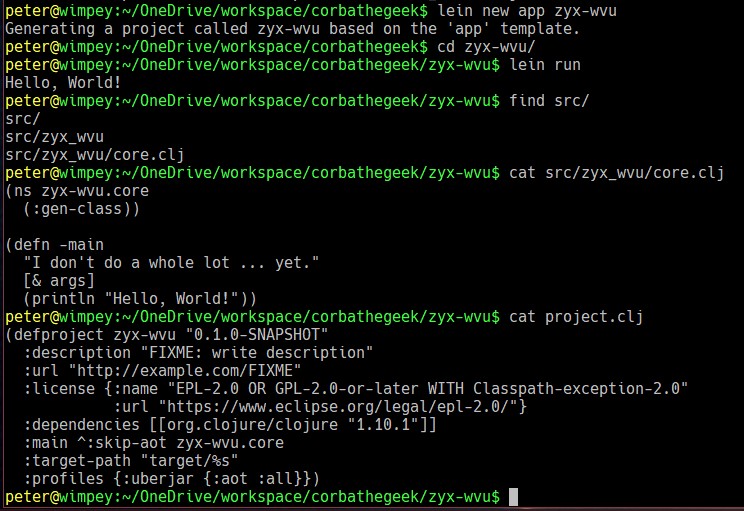
Setting up a simple Leiningen project on the command line works without any problems:


Setting up a Leiningen project in IDEA/Cursive behaves differently:
Running the Leiningen task fails:
I'm running Leiningen 2.9.3-1 on Java 1.8.0_261 Java HotSpot(TM) 64-Bit Server VM on the command line.
Any guidance you could give me as to what I'm doing wrong here would be appreciated!
/pc
Colin Fleming
Sep 26, 2020, 12:04:37 AM9/26/20
to Cursive Group
Hi Peter,
In the command line version, you have a :main entry in your project.clj, which is missing from the version in Cursive. That's required so that lein run knows what to run.
Cheers,
Colin
To view this discussion on the web visit https://groups.google.com/d/msgid/cursive/ed1792a4-592d-483a-a472-52a34c22381fn%40googlegroups.com.Attachments:
- Screenshot 2020-09-25 200433.jpg
- Screenshot 2020-09-25 200018.jpg
- Screenshot 2020-09-25 200151.jpg
- Screenshot 2020-09-25 200054.jpg
- Screenshot 2020-09-25 195852.jpg
- Screenshot 2020-09-25 195820.jpg


Peter Connolly
Sep 26, 2020, 12:12:55 AM9/26/20
to cur...@googlegroups.com
So... shouldn't Cursive have that same :main entry in its project.clj file?
Thanks,
/pc
To view this discussion on the web visit https://groups.google.com/d/msgid/cursive/c2266d25-d142-4e5b-89bd-17747631a24f%40www.fastmail.com.
Colin Fleming
Sep 26, 2020, 12:15:48 AM9/26/20
to Cursive Group
Ah, I see the difference - when you created the project on the command line, you used "lein new app zyx-wvu". The "app" part of that is the template name. To achieve the same in Cursive, put "app" in the Template field.
Cheers,
Colin
To view this discussion on the web visit https://groups.google.com/d/msgid/cursive/CAJPfHRC3oYrmMvpGyisBb7h_GUz5sL2CX%2BXgonTMN-ggbDZYPQ%40mail.gmail.com.
Peter Connolly
Sep 26, 2020, 12:25:11 AM9/26/20
to Cursive
A ha! Thank you!
/pc

Matthew Chadwick
Sep 26, 2020, 3:19:08 PM9/26/20
to cur...@googlegroups.com
what settings do I need to set to make it so whatever I do in IntelliJ it never formats my code in any other way than 2 spaces indented ? I never want it to align expressions over to the right in odd ways or any of that.

Wilker
Sep 26, 2020, 3:53:25 PM9/26/20
to Cursive

On Sat, Sep 26, 2020 at 4:19 PM Matthew Chadwick <po...@celeriac.net> wrote:
what settings do I need to set to make it so whatever I do in IntelliJ it never formats my code in any other way than 2 spaces indented ? I never want it to align expressions over to the right in odd ways or any of that.
--
You received this message because you are subscribed to the Google Groups "Cursive" group.
To unsubscribe from this group and stop receiving emails from it, send an email to cursive+u...@googlegroups.com.
To view this discussion on the web visit https://groups.google.com/d/msgid/cursive/FB456653-5F16-4F74-91A6-6A58B0DDB215%40celeriac.net.
Matthew Chadwick
Sep 27, 2020, 4:32:59 AM9/27/20
to cur...@googlegroups.com

had that checked for ages - it doesn't work - try using any structural editing and the indenting is all over the place
To view this discussion on the web visit https://groups.google.com/d/msgid/cursive/CALP1tjsf%3DE5L3FWFFPKvxfmUE2k6HB5L%3Dmd9L2gh283j4GRk8Q%40mail.gmail.com.
Colin Fleming
Sep 27, 2020, 4:35:02 AM9/27/20
to Cursive Group
I'll take a look at this. What that flag does it uses Only Indent for any form without other config, but thinking about it many of the built in forms have config out of the box. Either that flag should make everything use 2 spaces, or there should be another one which does.
To view this discussion on the web visit https://groups.google.com/d/msgid/cursive/FEEFA665-B198-4D94-8F8D-317EC546D789%40celeriac.net.Attachments:
- PastedGraphic-1.png
Matthew Chadwick
Sep 27, 2020, 6:29:14 AM9/27/20
to cur...@googlegroups.com
thank you Colin
On 27 Sep 2020, at 09:34, Colin Fleming <cur...@cursive-ide.com> wrote:
I'll take a look at this. What that flag does it uses Only Indent for any form without other config, but thinking about it many of the built in forms have config out of the box. Either that flag should make everything use 2 spaces, or there should be another one which does.On Sun, Sep 27, 2020, at 8:32 AM, Matthew Chadwick wrote:
<PastedGraphic-1.png>
had that checked for ages - it doesn't work - try using any structural editing and the indenting is all over the placeOn 26 Sep 2020, at 20:53, Wilker <wilke...@gmail.com> wrote:<Screen Shot 2020-09-26 at 16.51.52.png>On Sat, Sep 26, 2020 at 4:19 PM Matthew Chadwick <po...@celeriac.net> wrote:what settings do I need to set to make it so whatever I do in IntelliJ it never formats my code in any other way than 2 spaces indented ? I never want it to align expressions over to the right in odd ways or any of that.--You received this message because you are subscribed to the Google Groups "Cursive" group.To unsubscribe from this group and stop receiving emails from it, send an email to cursive+u...@googlegroups.com.To view this discussion on the web visit https://groups.google.com/d/msgid/cursive/FB456653-5F16-4F74-91A6-6A58B0DDB215%40celeriac.net.--You received this message because you are subscribed to the Google Groups "Cursive" group.To unsubscribe from this group and stop receiving emails from it, send an email to cursive+u...@googlegroups.com.To view this discussion on the web visit https://groups.google.com/d/msgid/cursive/CALP1tjsf%3DE5L3FWFFPKvxfmUE2k6HB5L%3Dmd9L2gh283j4GRk8Q%40mail.gmail.com.
--You received this message because you are subscribed to the Google Groups "Cursive" group.To unsubscribe from this group and stop receiving emails from it, send an email to cursive+u...@googlegroups.com.To view this discussion on the web visit https://groups.google.com/d/msgid/cursive/FEEFA665-B198-4D94-8F8D-317EC546D789%40celeriac.net.Attachments:
- PastedGraphic-1.png
--
You received this message because you are subscribed to the Google Groups "Cursive" group.
To unsubscribe from this group and stop receiving emails from it, send an email to cursive+u...@googlegroups.com.
To view this discussion on the web visit https://groups.google.com/d/msgid/cursive/3971b2bd-0cbb-479a-995d-0788140db782%40www.fastmail.com.
Colin Fleming
Sep 27, 2020, 5:30:17 PM9/27/20
to Cursive Group
To view this discussion on the web visit https://groups.google.com/d/msgid/cursive/BFA799F0-F872-48B9-ADB3-FE1F485F8C32%40celeriac.net.
Colin Fleming
Oct 7, 2020, 5:29:43 PM10/7/20
to Cursive Group
BTW I forgot to update this thread. There's a new flag allowing this in the latest EAP. Let me know how it works.
To view this discussion on the web visit https://groups.google.com/d/msgid/cursive/3838eaa4-f6d4-4cdb-9f40-5c23b9b8b4c6%40www.fastmail.com.
Reply all
Reply to author
Forward
0 new messages