
copyq clears clipboard if source (google-chrome) is closed
131 views
Skip to first unread message

jmland...@gmail.com
Apr 24, 2022, 8:20:25 AM4/24/22
to CopyQ
I use copyq on Manjaro Linux (Arch) XFCE and i really like it!
Is there an option of copyq to prevent clearing of clipboard if source application is closed?
Example: if i copied something from google-chrome-stable and close google-chrome what i just copied is gone :-(
Just reactivate last item in copyq history would be the solution?
Googled for that but couldn't find a simple solution besides reactivating just copied item in copyq history myself.
Sorry, i'm pretty shure that this question is really common ?!!

Lukáš Holeček
Apr 25, 2022, 7:19:26 AM4/25/22
to jmland...@gmail.com, CopyQ
CopyQ usually does not own the clipboard data itself. When the clipboard owner application (e.g. web browser) is closed the data cannot be provided anymore (the clipboard is cleared).
Workaround is to use "Reset Empty Clipboard/Selection" command: https://github.com/hluk/copyq-commands/tree/master/Scripts#reset-empty-clipboardselection
See details on how to add the command: https://github.com/hluk/copyq-commands/blob/master/README.md
--
You received this message because you are subscribed to the Google Groups "CopyQ" group.
To unsubscribe from this group and stop receiving emails from it, send an email to copyq+un...@googlegroups.com.
To view this discussion on the web visit https://groups.google.com/d/msgid/copyq/f3108d3c-3c32-4054-bf18-afbbc9b4276en%40googlegroups.com.
Message has been deleted
Message has been deleted
jmland...@gmail.com
Apr 25, 2022, 11:10:15 AM4/25/22
to CopyQ
I think i followed your instructions correct, but still clipboard will be cleared on exit browser.
See attached settings: "On clipboard change" ... thats what i need!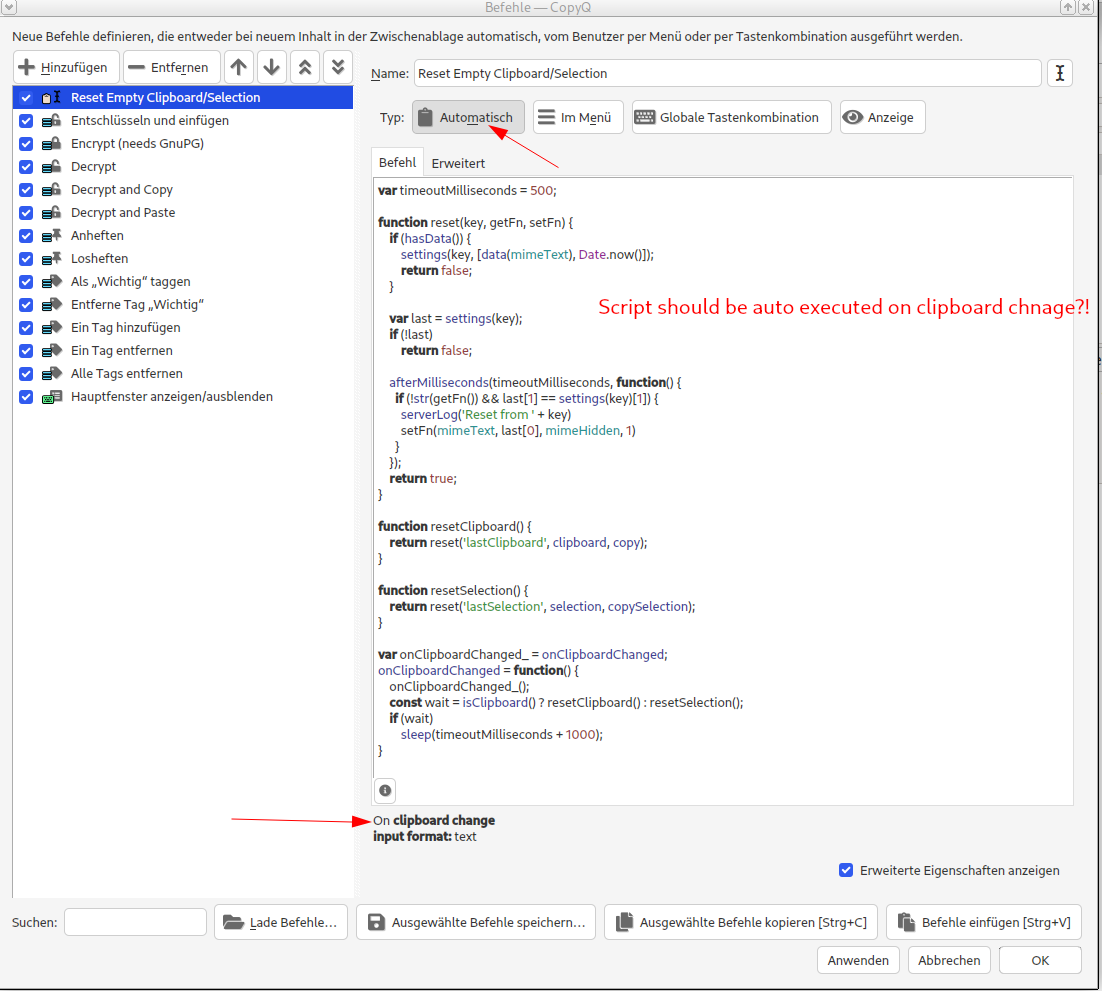
See attached settings: "On clipboard change" ... thats what i need!
Lukáš Holeček
Apr 26, 2022, 2:51:11 AM4/26/22
to jmland...@gmail.com, CopyQ
I think you have to update your version of CopyQ and add/install the command again. The command type should be "Script".
I think i followed your instructions correct ... do i have to assign this script to a keystroke because it is not auto-executed if i copy something from browser and close browser?See screenshot of my settings with two red arrows inserted!
Lukáš Holeček schrieb am Montag, 25. April 2022 um 13:19:26 UTC+2:
To view this discussion on the web visit https://groups.google.com/d/msgid/copyq/ef4e7989-258b-4ac3-ae9c-ad2fb1cc9454n%40googlegroups.com.
jmland...@gmail.com
Apr 26, 2022, 6:51:15 AM4/26/22
to CopyQ
Now it works with copyq 6.1, that was installed on my Manjaro Stable XFCE :-)
Conclusion:
Don't mess around if you think that could be the useful option. No "Automatic" or such.
Copy the script and just hit F6 plus Button (Ctrl+v).
Thank you for your effort.
Reply all
Reply to author
Forward
0 new messages