
Listen for 255.255.255.255 UDP broadcasts?
762 views
Skip to first unread message

Fiasco
Dec 11, 2009, 10:15:39 PM12/11/09
to CommandFusion
I want to try and get feedback from XBMC's UDP broadcasts over
255.255.255.255 any thoughts on how to accomplish this?
The Broadcast functionality is not, strictly speaking, part of the
HTTP API because it does not use the HTTP protocol. However, it is
controlled via HTTP API commands and would typically be used as an
adjunct to the HTTP API and so is presented here.
The HTTP API is a “pull” architecture -- that means HTTP API interacts
with XBMC by making calls to XBMC. For an HTTP API client to maintain
a dynamic up-to-date display (e.g. showing the currently playing
song), the client must continually poll XBMC for its status.
The Broadcast facility provides the opposite approach -– XBMC makes
calls out (i.e. broadcasts or "pushes") to indicate significant events
to any clients that happen to be listening.
The Broadcast facility uses the UDP broadcast protocol with a default
port setting of 8278. (We chose 8278 for no other reason than that it
was the first unregistered port we stumbled across.) For a client to
receive these broadcasts, the client must register to receive them.
(The method of doing so will depend on the language/technology of the
client). XBMC broadcasts on the IP address 255.255.255.255 which is
the limited broadcast address. Sending a UDP datagram to this address
delivers the message to any host on that broadcast network. Because
routers never forward messages sent to this address, only hosts on the
connected network see these broadcasts. In other words, the client
must be on the local network to receive XBMC broadcasts.
XBMC broadcasts are delimited by <b></b> and may consist of a
numerical or textual description of the event (depening on the event)
followed by ";" and the level of the event (e.g. 1 or 2).
An example Windows client (with source code), XBMC Listener, that
listens to these broadcasts can be found here
255.255.255.255 any thoughts on how to accomplish this?
The Broadcast functionality is not, strictly speaking, part of the
HTTP API because it does not use the HTTP protocol. However, it is
controlled via HTTP API commands and would typically be used as an
adjunct to the HTTP API and so is presented here.
The HTTP API is a “pull” architecture -- that means HTTP API interacts
with XBMC by making calls to XBMC. For an HTTP API client to maintain
a dynamic up-to-date display (e.g. showing the currently playing
song), the client must continually poll XBMC for its status.
The Broadcast facility provides the opposite approach -– XBMC makes
calls out (i.e. broadcasts or "pushes") to indicate significant events
to any clients that happen to be listening.
The Broadcast facility uses the UDP broadcast protocol with a default
port setting of 8278. (We chose 8278 for no other reason than that it
was the first unregistered port we stumbled across.) For a client to
receive these broadcasts, the client must register to receive them.
(The method of doing so will depend on the language/technology of the
client). XBMC broadcasts on the IP address 255.255.255.255 which is
the limited broadcast address. Sending a UDP datagram to this address
delivers the message to any host on that broadcast network. Because
routers never forward messages sent to this address, only hosts on the
connected network see these broadcasts. In other words, the client
must be on the local network to receive XBMC broadcasts.
XBMC broadcasts are delimited by <b></b> and may consist of a
numerical or textual description of the event (depening on the event)
followed by ";" and the level of the event (e.g. 1 or 2).
An example Windows client (with source code), XBMC Listener, that
listens to these broadcasts can be found here

Jarrod Bell
Dec 11, 2009, 10:22:26 PM12/11/09
to CommandFusion
Simply create a new system in System Manager, set its IP Address to
255.255.255.255 and UDP mode, with the port set to 8278 for both
origin and destination ports, maintain connection checked.
Then anything sent out on 255.255.255.255 on the local network will be
received by iViewer and you parse feedback using regex (examples on
our wiki).
Jarrod
255.255.255.255 and UDP mode, with the port set to 8278 for both
origin and destination ports, maintain connection checked.
Then anything sent out on 255.255.255.255 on the local network will be
received by iViewer and you parse feedback using regex (examples on
our wiki).
Jarrod
Fiasco
Dec 11, 2009, 10:34:30 PM12/11/09
to CommandFusion
Yea thats what I tried.
My regex for feedback is (*) to modify a text field.
> > listens to these broadcasts can be found here- Hide quoted text -
>
> - Show quoted text -
My regex for feedback is (*) to modify a text field.
>
> - Show quoted text -
Jarrod Bell
Dec 11, 2009, 10:38:07 PM12/11/09
to CommandFusion
Should be: (.*) to capture everything.
. represents 'any character' whilst asterix means 'zero or more times'
Jarrod
. represents 'any character' whilst asterix means 'zero or more times'
Jarrod
Fiasco
Dec 11, 2009, 10:42:44 PM12/11/09
to CommandFusion
Typo in my post there.
> > > - Show quoted text -- Hide quoted text -
Jarrod Bell
Dec 11, 2009, 11:17:13 PM12/11/09
to CommandFusion
I will do some tests on Monday
Jarrod
Jarrod
Jarrod Bell
Dec 12, 2009, 7:15:16 AM12/12/09
to CommandFusion
Just ran some tests and I also could not get feedback parsing for
devices on UDP broadcast addresses.
There are some issues with systems using UDP at the moment involving
sliders also, so we will get these fixed for next release.
Jarrod
devices on UDP broadcast addresses.
There are some issues with systems using UDP at the moment involving
sliders also, so we will get these fixed for next release.
Jarrod
Fiasco
Dec 13, 2009, 9:02:13 PM12/13/09
to CommandFusion
I tried it w/ the system set as the ip address of the system and not
255.255.255.255 and it works.
255.255.255.255 and it works.

Alec Smarthome
Oct 30, 2012, 12:05:11 AM10/30/12
to comman...@googlegroups.com
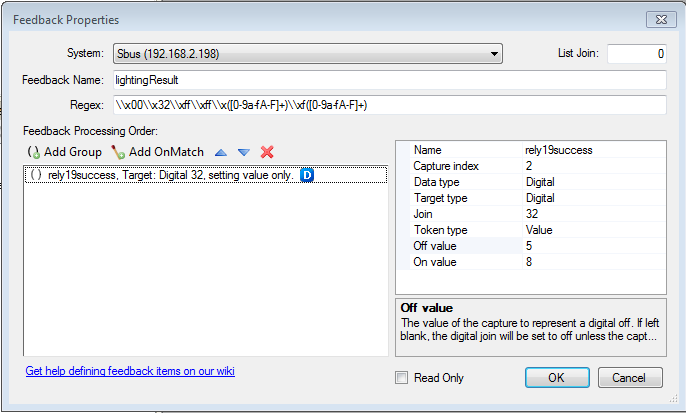
I have already check "accept broadcast message" and "accept incoming message" and tried with system 192.168.2.198 (device deliver broadcast) and 192.168.2.255.
Message : c0\xa8\x02\xc6\x53\x4d\x41\x52\x54\x43\x4c\x4f\x55\x44\xaa\xaa\x10\x01\x09\x01\xa8\x00\x32\xff\xff\x01\xf8\x64\x04\xb1\x60\x8c
Regex : \\x00\\x32\\xff\\xff\\x([0-9a-fA-F]+)\\xf([0-9a-fA-F]+)
If value of index 2 is 8 set joint 32 active. But It's not work.

Jarrod Bell
Oct 30, 2012, 12:50:22 AM10/30/12
to comman...@googlegroups.com
The regex you are using is not
capturing hex data, but capturing the string "\x00" for example.
Can you post an example of what the actual data being returned looks like? I suspect its actual hex data being returned, in which case your regex should be:
(?ms)\x00\x32\xff\xff(.)(.)
And then your capture group would be:
off value: \xf5
on value: \xf8
Note that you cannot use the regex tester to test hex bytes as you cannot actually enter hex bytes into the test data field.
Regards,
Can you post an example of what the actual data being returned looks like? I suspect its actual hex data being returned, in which case your regex should be:
(?ms)\x00\x32\xff\xff(.)(.)
And then your capture group would be:
off value: \xf5
on value: \xf8
Note that you cannot use the regex tester to test hex bytes as you cannot actually enter hex bytes into the test data field.
Regards,
Jarrod Bell
CommandFusion
www.commandfusion.com
--
You received this message because you are subscribed to the Google Groups "CommandFusion Software" group.
To view this discussion on the web visit https://groups.google.com/d/msg/commandfusion/-/SQmveJR5GE8J.
To post to this group, send email to comman...@googlegroups.com.
To unsubscribe from this group, send email to commandfusio...@googlegroups.com.
For more options, visit this group at http://groups.google.com/group/commandfusion?hl=en.
Alec Smarthome
Oct 30, 2012, 10:08:57 PM10/30/12
to comman...@googlegroups.com, jar...@commandfusion.com
My command to turn on the light : \xC0\xA8\x02\xA3\x53\x4d\x41\x52\x54\x43\x4c\x4f\x55\x44\xaa\xaa\x0F\x03\xFE\xFF\xFE\x00\x31\x01\x09\x01\x64\x00\x01\x82\x9B
and I captured response with wireshark : c0:a8:02:c6:53:4d:41:52:54:43:4c:4f:55:44:aa:aa:10:01:09:01:a8:00:32:ff:ff:01:f8:64:04:a1:72:bd
I want to get f8 to active joint 32 and f5 to inactive joint 32 (f8 : success, f5: fail).
and I captured response with wireshark : c0:a8:02:c6:53:4d:41:52:54:43:4c:4f:55:44:aa:aa:10:01:09:01:a8:00:32:ff:ff:01:f8:64:04:a1:72:bd
I want to get f8 to active joint 32 and f5 to inactive joint 32 (f8 : success, f5: fail).
Jarrod Bell
Oct 30, 2012, 10:12:55 PM10/30/12
to comman...@googlegroups.com
Is the response from wireshark shown
how the data is returned? Or is that signifying hex data only? You
need to understand how the data is being returned exactly.
Did you try the regex I suggested and the off/on values of \xf5 and \xf8?
Did you try the regex I suggested and the off/on values of \xf5 and \xf8?
Alec Smarthome
Oct 31, 2012, 2:52:40 AM10/31/12
to comman...@googlegroups.com, jar...@commandfusion.com
I tried with regex : (?ms).*\x00\x32\xff\xff(.)(.) and the off/on values of \xf5 and \xf8
and It works.
Thank you!

Deiby.cr
Sep 24, 2014, 12:12:54 PM9/24/14
to comman...@googlegroups.com, jar...@commandfusion.com
Hi Arina Smarthome
Smarthomebus is working for you with commandfusion?
THX
Reply all
Reply to author
Forward
0 new messages