
How to disable (i.e. grey out) a button?
36 views
Skip to first unread message

eos
Aug 27, 2013, 6:09:02 AM8/27/13
to codenameone...@googlegroups.com
you can uncheck "Enabled" and "Focusable" in the designer, but these dont have an effect on the buttons appearance. How does one disable (i.e. grey out) a button which cannot be pressed at this time?
Does it have to be done by hand by creating a new style?
thanks!

bles...@mfactory.mobi
Aug 27, 2013, 6:25:59 AM8/27/13
to codenameone...@googlegroups.com
1. Uncheck "Enabled" and "Focusable" on the designer.
2. Under the Designer Themes section where there is "Unselected", "Selected" and "Disabled".
Under the "Disabled" Add a new Button (style) that has a greyed out look n feel.
eos
Aug 27, 2013, 7:16:25 AM8/27/13
to codenameone...@googlegroups.com, bles...@mfactory.mobi
Kind of works, thanks. The only problem is the button uses one of those border image things. I went into the border image wizard, and only changed "Color B" to about half the lightness and hit ok. Now the button is half the hight it should be. Tried it a couple of times, seems to break the button height. Any ideas?
If this doesnt work, can you think of any other way to mark a button is disabled? The text is already white, so cant do much with that.
Everyone must have this problem no?
Blessing Mahlalela
Aug 27, 2013, 7:19:39 AM8/27/13
to eos, codenameone...@googlegroups.com
A number of techniques can be applied to get the right look n feel.
Please attach an image of how you would like the button to look.
Which platform is the button intended for?
--
Kind Regards,
Blessing Mahlalela
CEO
Website: www.mfactory.mobi
Tel: +27 76 359 8094
Please attach an image of how you would like the button to look.
Which platform is the button intended for?
Kind Regards,
Blessing Mahlalela
CEO
Website: www.mfactory.mobi
Tel: +27 76 359 8094
eos
Aug 27, 2013, 7:27:50 AM8/27/13
to codenameone...@googlegroups.com, bles...@mfactory.mobi
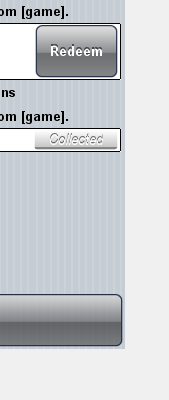
To illustrate the problem, here are 2 normal buttons and the disabeld button, you can see that when its disabled, it shrinks to less than half its height (the "collected" button). The only think I changed was the color B.
I tried making the height 60 and 80, but makes no difference to the displayed button height.
Here is the border wizard for button (disabled state):
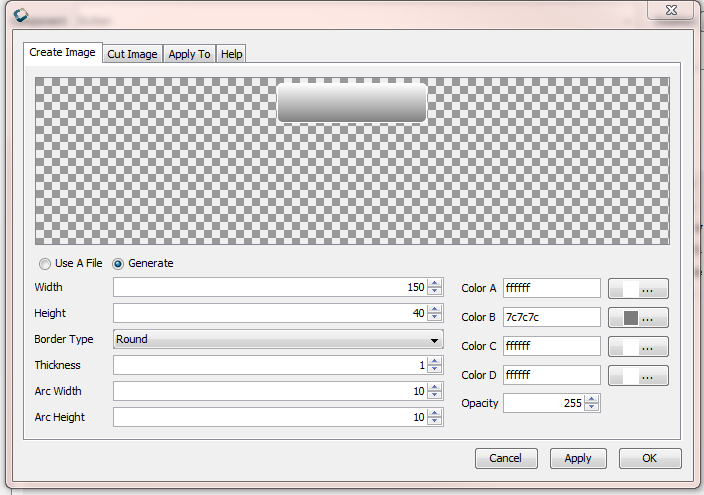
I tried making the height 60 and 80, but makes no difference to the displayed button height.
Blessing Mahlalela
Aug 27, 2013, 7:31:23 AM8/27/13
to eos, codenameone...@googlegroups.com
I see. To keep component styles consistent we usually copy the "selected" style and paste it on other styles. And do minor modifications.
To solve your problem you can apply the same process you used to created the selected style button.
eos
Aug 27, 2013, 7:58:54 AM8/27/13
to codenameone...@googlegroups.com, eos, bles...@mfactory.mobi
The problem is if I change the colour of the disabled button, it breaks the disabeld button. If I did the same for the selected button, it would break that too.
I tried adding 20 px padding, and now its the right height, but it starts tiling the button backgroud (which is what the border wizard is supposed to avoid (upper button is normal, lower is disabled).


Shai Almog
Aug 27, 2013, 1:43:44 PM8/27/13
to codenameone...@googlegroups.com, eos, bles...@mfactory.mobi
The component size in this case is determined by the height of the border so if you you replace the border with a different border type it will collapse.
I suggest just changing the text color to be gray and not changing the border.
I suggest just changing the text color to be gray and not changing the border.
Reply all
Reply to author
Forward
0 new messages