
Unable to execute .jmx script using bzt command
2,101 views
Skip to first unread message

Uttam
Feb 13, 2017, 8:33:43 AM2/13/17
to codename-taurus
Hi,
I am new to this Taurus tool. I am exploring new testing solutions. I am familiar with Jmeter. After reading about Taurus I had decided to give it a try. Therefore, I had installed Taurus in my system.
I already had jmeter available in my system. I tried running one simple .jmx script using the bzt command but got the error 'failed to create process'. I suppose I am doing something wrong. Can you tell me whether I can run a script present in a separate Jmeter/bin folder using the bzt command of Taurus. Or do I need to follow some other procedures to run the jmeter scripts. I have installed plus I am running the bzt command from this directory - C:\Users\u.kumar.barthakur in command promt.
Please find the directory locations below -
Taurus - C:\Program Files
Python - C:\Program Files\Common Files\Python\2.7
Jmeter script - C:\Users\u.kumar.barthakur\Desktop\TELUS\Soft\jmeter3.1\bin
Let me know if any more details is required. You can also email me spi...@gmail.com
Regards,
Uttam

pri...@blazemeter.com
Feb 13, 2017, 10:18:20 AM2/13/17
to codename-taurus, spi...@gmail.com
Hi, Uttam,
You can force Taurus to use your existing JMeter installation by setting `modules.jmeter.path` to a path to JMeter's base dir. You can either add it to each Taurus config you write, or add it to a '.bzt-rc' file inside your home directory.
Example of setting `modules.jmeter.path`:
---modules:
  jmeter:
    path: C:\Users\u.kumar.barthakur\Desktop\TELUS\Soft\jmeter3.1
Please note that when Taurus installs JMeter, it also installs a few useful JMeter plugins.
Dmitri
spi...@gmail.com
Feb 14, 2017, 12:26:45 AM2/14/17
to codename-taurus, spi...@gmail.com
Hi Dmitri,
Thanks a lot for the quick response :). I have some additional points to make in this regard. First- I tried installing Taurus using the windows installer and followed the same steps mentioned in the Installation manual. I don't see Jmeter being installed by Taurus. Please find the attached screenshot (1st screenshot below). Second - I suppose there might be something missing in my installation or may be its not installed properly as I could not find the '.bzt-rc' in my system. I am attaching the screenshot of all the folders of Taurus installation (from 2nd screenshot below). Please note I am trying to run the .jmx file directly using bzt command. Need your assistance in understanding as unfortunately I am stuck with the installation part and not able to try the interesting features of this tool that I had read on internet.
Regards,
Uttam


Andrey Pokhilko
Feb 14, 2017, 2:10:59 AM2/14/17
to codenam...@googlegroups.com
JMeter will be installed by Taurus in case it not exists. This is
done before executing the test, not at the installation stage.
Just start your test with Taurus and it should install JMeter.
--
Andrey
--
You received this message because you are subscribed to the Google Groups "codename-taurus" group.
To unsubscribe from this group and stop receiving emails from it, send an email to codename-taur...@googlegroups.com.
To view this discussion on the web visit https://groups.google.com/d/msgid/codename-taurus/c8a51aac-9431-413d-9407-9afeb04f578f%40googlegroups.com.
For more options, visit https://groups.google.com/d/optout.
spi...@gmail.com
Feb 14, 2017, 2:28:09 AM2/14/17
to codename-taurus, Andrey....@contractor.ca.com
Hi Andrey,
Point noted. But unfortunately I am not able to start the test as I am getting 'failed to create process' error. I attached some screenshots but those did not post I guess. Please find the screenshots that I mentioned in my last question.


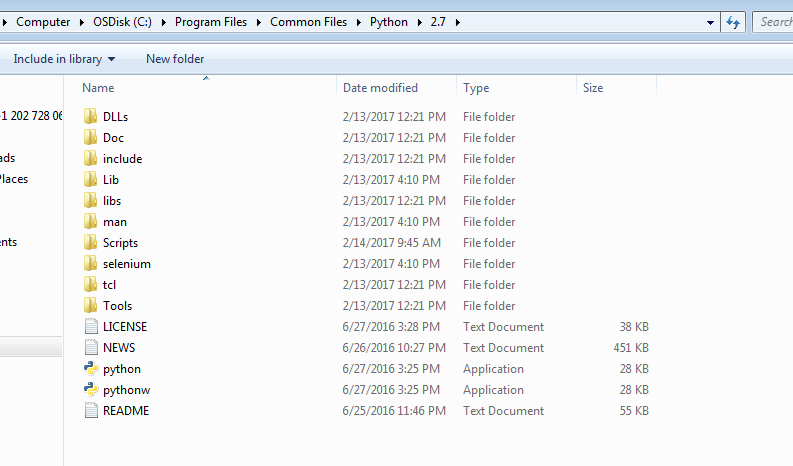


Regards,
Uttam
pri...@blazemeter.com
Feb 14, 2017, 2:41:54 AM2/14/17
to codename-taurus, Andrey....@contractor.ca.com, spi...@gmail.com
Hi,
Do you have a 32- or 64-bit system? We only supply Taurus installers for 64-bit ones.
What happens when you execute the following command in the terminal: `py -m bzt.cli` ?
Dmitri
spi...@gmail.com
Feb 14, 2017, 3:15:05 AM2/14/17
to codename-taurus, Andrey....@contractor.ca.com, spi...@gmail.com
Hi,
I am using 64 bit OS. Please find the screenshots below.


Regards,
Uttam
pri...@blazemeter.com
Feb 14, 2017, 3:48:20 AM2/14/17
to codename-taurus, Andrey....@contractor.ca.com, spi...@gmail.com
Uh huh.
So Taurus launches normally when you are running it with Python and fails if you're running it with a shortcut.
Try to completely reinstall the Taurus the following way:
1. Execute `py -m pip uninstall bzt` command from administrator's command line.
2. Uninstall Taurus from Control Panel.
3. Install Taurus with the installer.
spi...@gmail.com
Feb 14, 2017, 4:36:23 AM2/14/17
to codename-taurus, Andrey....@contractor.ca.com, spi...@gmail.com
After running the query I got the below error. Is this expected? Can I proceed with the 2nd and 3rd step

Regards,
Uttam
pri...@blazemeter.com
Feb 14, 2017, 4:48:35 AM2/14/17
to codename-taurus, Andrey....@contractor.ca.com, spi...@gmail.com
Not yet. Launch cmd.exe as an administrator and try executing the command again.
spi...@gmail.com
Feb 14, 2017, 5:53:22 AM2/14/17
to codename-taurus, Andrey....@contractor.ca.com, spi...@gmail.com
Thanks a lot guys. You guys are fantastic :). Finally I can start my journey now. I am not getting the error 'Failed to create process' anymore. I am able to run my first jmeter test. Hats of to you guys for providing so quick solutions. Really appreciate the effort that you have put in to troubleshoot the issue. One last question- Why I am not seeing the stats properly or should I say the stats are taking a long time to appear. Any reason behind this behavior?

pri...@blazemeter.com
Feb 14, 2017, 6:35:01 AM2/14/17
to codename-taurus, Andrey....@contractor.ca.com, spi...@gmail.com
It's not expected, first stats should appear after a few seconds. It definitely shouldn't take 3 minutes to get first results.
spi...@gmail.com
Feb 14, 2017, 7:52:39 AM2/14/17
to codename-taurus, Andrey....@contractor.ca.com, spi...@gmail.com
After 5 minutes of the test, I started seeing the stats. But I am not able to understand why the test if not completing. I only gave 20 threads with 5 iterations. It should complete by now. But instead the test is still running ~2hrs. I am attaching Jmeter and Error file

data from jmeter file --
2017/02/14 16:15:55 INFO - jmeter.util.JMeterUtils: Setting Locale to en_US
2017/02/14 16:15:55 INFO - jmeter.JMeter: Loading user properties from: C:\Users\u.kumar.barthakur\.bzt\jmeter-taurus\bin\user.properties
2017/02/14 16:15:55 INFO - jmeter.JMeter: Loading system properties from: C:\Users\u.kumar.barthakur\.bzt\jmeter-taurus\bin\system.properties
2017/02/14 16:15:55 INFO - jmeter.JMeter: Copyright (c) 1998-2016 The Apache Software Foundation
2017/02/14 16:15:55 INFO - jmeter.JMeter: Version 3.1 r1770033
2017/02/14 16:15:55 INFO - jmeter.JMeter: java.version=1.8.0_111
2017/02/14 16:15:55 INFO - jmeter.JMeter: java.vm.name=Java HotSpot(TM) 64-Bit Server VM
2017/02/14 16:15:55 INFO - jmeter.JMeter: os.name=Windows 7
2017/02/14 16:15:55 INFO - jmeter.JMeter: os.arch=amd64
2017/02/14 16:15:55 INFO - jmeter.JMeter: os.version=6.1
2017/02/14 16:15:55 INFO - jmeter.JMeter: file.encoding=Cp1252
2017/02/14 16:15:55 INFO - jmeter.JMeter: Max memory =523763712
2017/02/14 16:15:55 INFO - jmeter.JMeter: Available Processors =4
2017/02/14 16:15:55 INFO - jmeter.JMeter: Default Locale=English (United States)
2017/02/14 16:15:55 INFO - jmeter.JMeter: JMeter Locale=English (United States)
2017/02/14 16:15:55 INFO - jmeter.JMeter: JMeterHome=C:\Users\u.kumar.barthakur\.bzt\jmeter-taurus
2017/02/14 16:15:55 INFO - jmeter.JMeter: user.dir =C:\Users\u.kumar.barthakur\.bzt\Scripts
2017/02/14 16:15:55 INFO - jmeter.JMeter: PWD =C:\Users\u.kumar.barthakur\.bzt\Scripts
2017/02/14 16:15:55 INFO - jmeter.JMeter: IP: 142.63.7.220 Name: BDC4-L-61062D5 FullName: 142.63.7.220
2017/02/14 16:15:55 INFO - jmeter.JMeter: user.classpath=C:/Users/u.kumar.barthakur/.bzt/Scripts/2017-02-14_16-15-51.348000
2017/02/14 16:15:55 INFO - jmeter.JMeter: Adding to classpath and loader: C:/Users/u.kumar.barthakur/.bzt/Scripts/2017-02-14_16-15-51.348000
2017/02/14 16:15:55 INFO - jmeter.services.FileServer: Default base='C:\Users\u.kumar.barthakur\.bzt\Scripts'
2017/02/14 16:15:55 INFO - jmeter.services.FileServer: Set new base='C:\Users\u.kumar.barthakur\.bzt\Scripts'
2017/02/14 16:15:56 INFO - jmeter.save.SaveService: Testplan (JMX) version: 2.2. Testlog (JTL) version: 2.2
2017/02/14 16:15:56 INFO - jmeter.save.SaveService: Using SaveService properties file encoding UTF-8
2017/02/14 16:15:56 INFO - jmeter.save.SaveService: Using SaveService properties version 3.1
2017/02/14 16:15:56 INFO - jmeter.save.SaveService: All converter versions present and correct
2017/02/14 16:15:56 INFO - jmeter.save.SaveService: Loading file: C:\Users\u.kumar.barthakur\.bzt\Scripts\modified_modified_SOASTASTORE.jmx
2017/02/14 16:15:56 INFO - jmeter.protocol.http.control.CookieManager: Settings: Delete null: true Check: true Allow variable: true Save: false Prefix: COOKIE_
2017/02/14 16:15:56 INFO - jmeter.protocol.http.control.CacheManager: Will only cache the following methods: [GET]
2017/02/14 16:15:56 INFO - jmeter.protocol.http.sampler.HTTPSamplerBase: Parser for text/html is org.apache.jmeter.protocol.http.parser.LagartoBasedHtmlParser
2017/02/14 16:15:56 INFO - jmeter.protocol.http.sampler.HTTPSamplerBase: Parser for application/xhtml+xml is org.apache.jmeter.protocol.http.parser.LagartoBasedHtmlParser
2017/02/14 16:15:56 INFO - jmeter.protocol.http.sampler.HTTPSamplerBase: Parser for application/xml is org.apache.jmeter.protocol.http.parser.LagartoBasedHtmlParser
2017/02/14 16:15:56 INFO - jmeter.protocol.http.sampler.HTTPSamplerBase: Parser for text/xml is org.apache.jmeter.protocol.http.parser.LagartoBasedHtmlParser
2017/02/14 16:15:56 INFO - jmeter.protocol.http.sampler.HTTPSamplerBase: Parser for text/vnd.wap.wml is org.apache.jmeter.protocol.http.parser.RegexpHTMLParser
2017/02/14 16:15:56 INFO - jmeter.protocol.http.sampler.HTTPSamplerBase: Parser for text/css is org.apache.jmeter.protocol.http.parser.CssParser
2017/02/14 16:15:56 INFO - jmeter.engine.StandardJMeterEngine: Running the test!
2017/02/14 16:15:56 INFO - jmeter.samplers.SampleEvent: List of sample_variables: []
2017/02/14 16:15:56 INFO - jmeter.samplers.SampleEvent: List of sample_variables: []
2017/02/14 16:15:56 INFO - jmeter.engine.util.CompoundVariable: Note: Function class names must contain the string: '.functions.'
2017/02/14 16:15:56 INFO - jmeter.engine.util.CompoundVariable: Note: Function class names must not contain the string: '.gui.'
2017/02/14 16:15:56 INFO - jmeter.reporters.ResultCollector: Folder C:\Users\u.kumar.barthakur\.bzt\Scripts\run was created
2017/02/14 16:15:57 INFO - jmeter.JMeter: Running test (1487069157031)
2017/02/14 16:15:57 INFO - jmeter.engine.StandardJMeterEngine: Starting ThreadGroup: 1 : UserGroup1
2017/02/14 16:15:57 INFO - jmeter.engine.StandardJMeterEngine: Starting 20 threads for group UserGroup1.
2017/02/14 16:15:57 INFO - jmeter.engine.StandardJMeterEngine: Thread will start next loop on error
2017/02/14 16:15:57 INFO - jmeter.threads.ThreadGroup: Starting thread group number 1 threads 20 ramp-up 10 perThread 500.0 delayedStart=false
2017/02/14 16:15:57 INFO - jmeter.threads.JMeterThread: Thread started: UserGroup1 1-1
2017/02/14 16:15:57 INFO - jmeter.protocol.http.sampler.HTTPHCAbstractImpl: Local host = BDC4-L-61062D5
2017/02/14 16:15:57 INFO - jmeter.protocol.http.sampler.HTTPHC4Impl: HTTP request retry count = 0
2017/02/14 16:15:57 INFO - jmeter.threads.ThreadGroup: Started thread group number 1
2017/02/14 16:15:57 INFO - jmeter.engine.StandardJMeterEngine: All thread groups have been started
2017/02/14 16:15:57 INFO - jmeter.samplers.SampleResult: Note: Sample TimeStamps are START times
2017/02/14 16:15:57 INFO - jmeter.samplers.SampleResult: sampleresult.default.encoding is set to UTF-8
2017/02/14 16:15:57 INFO - jmeter.samplers.SampleResult: sampleresult.useNanoTime=true
2017/02/14 16:15:57 INFO - jmeter.samplers.SampleResult: sampleresult.nanoThreadSleep=5000
2017/02/14 16:15:57 INFO - jmeter.threads.JMeterThread: Thread started: UserGroup1 1-2
2017/02/14 16:15:58 INFO - jmeter.threads.JMeterThread: Thread started: UserGroup1 1-3
2017/02/14 16:15:58 INFO - jmeter.threads.JMeterThread: Thread started: UserGroup1 1-4
2017/02/14 16:15:59 INFO - jmeter.threads.JMeterThread: Thread started: UserGroup1 1-5
2017/02/14 16:15:59 INFO - jmeter.threads.JMeterThread: Thread started: UserGroup1 1-6
2017/02/14 16:15:59 INFO - jmeter.protocol.http.parser.BaseParser: Created org.apache.jmeter.protocol.http.parser.LagartoBasedHtmlParser
2017/02/14 16:16:00 INFO - jmeter.protocol.http.sampler.ResourcesDownloader: Creating ResourcesDownloader with keepalive_inseconds:60
2017/02/14 16:16:00 INFO - jmeter.threads.JMeterThread: Thread started: UserGroup1 1-7
2017/02/14 16:16:00 INFO - jmeter.threads.JMeterThread: Thread started: UserGroup1 1-8
2017/02/14 16:16:01 INFO - jmeter.protocol.http.parser.BaseParser: Created org.apache.jmeter.protocol.http.parser.CssParser
2017/02/14 16:16:01 INFO - jmeter.threads.JMeterThread: Thread started: UserGroup1 1-9
2017/02/14 16:16:01 INFO - jmeter.threads.JMeterThread: Thread started: UserGroup1 1-10
2017/02/14 16:16:02 INFO - jmeter.threads.JMeterThread: Thread started: UserGroup1 1-11
2017/02/14 16:16:02 INFO - jmeter.threads.JMeterThread: Thread started: UserGroup1 1-12
2017/02/14 16:16:03 INFO - jmeter.threads.JMeterThread: Thread started: UserGroup1 1-13
2017/02/14 16:16:03 INFO - jmeter.threads.JMeterThread: Thread started: UserGroup1 1-14
2017/02/14 16:16:04 INFO - jmeter.threads.JMeterThread: Thread started: UserGroup1 1-15
2017/02/14 16:16:04 INFO - jmeter.threads.JMeterThread: Thread started: UserGroup1 1-16
2017/02/14 16:16:05 INFO - jmeter.threads.JMeterThread: Thread started: UserGroup1 1-17
2017/02/14 16:16:05 INFO - jmeter.threads.JMeterThread: Thread started: UserGroup1 1-18
2017/02/14 16:16:06 INFO - jmeter.threads.JMeterThread: Thread started: UserGroup1 1-19
2017/02/14 16:16:06 INFO - jmeter.threads.JMeterThread: Thread started: UserGroup1 1-20
2017/02/14 16:20:35 INFO - jmeter.protocol.http.sampler.LazySchemeSocketFactory: Setting up HTTPS TrustAll Socket Factory
2017/02/14 16:20:36 INFO - jmeter.util.JsseSSLManager: Using default SSL protocol: TLS
2017/02/14 16:20:36 INFO - jmeter.util.JsseSSLManager: SSL session context: per-thread
2017/02/14 16:31:45 INFO - jmeter.threads.JMeterThread: Thread is done: UserGroup1 1-8
2017/02/14 16:31:45 INFO - jmeter.threads.JMeterThread: Thread finished: UserGroup1 1-8
2017/02/14 16:32:04 INFO - jmeter.threads.JMeterThread: Thread is done: UserGroup1 1-12
2017/02/14 16:32:04 INFO - jmeter.threads.JMeterThread: Thread finished: UserGroup1 1-12
2017/02/14 16:40:33 INFO - jmeter.threads.JMeterThread: Thread is done: UserGroup1 1-9
2017/02/14 16:40:33 INFO - jmeter.threads.JMeterThread: Thread finished: UserGroup1 1-9
2017/02/14 16:44:57 INFO - jmeter.threads.JMeterThread: Thread is done: UserGroup1 1-1
2017/02/14 16:44:57 INFO - jmeter.threads.JMeterThread: Thread finished: UserGroup1 1-1
2017/02/14 16:46:52 INFO - jmeter.threads.JMeterThread: Thread is done: UserGroup1 1-19
2017/02/14 16:46:52 INFO - jmeter.threads.JMeterThread: Thread finished: UserGroup1 1-19
2017/02/14 16:47:00 INFO - jmeter.threads.JMeterThread: Thread is done: UserGroup1 1-15
2017/02/14 16:47:00 INFO - jmeter.threads.JMeterThread: Thread finished: UserGroup1 1-15
2017/02/14 16:49:58 INFO - jmeter.threads.JMeterThread: Thread is done: UserGroup1 1-5
2017/02/14 16:49:58 INFO - jmeter.threads.JMeterThread: Thread finished: UserGroup1 1-5
2017/02/14 16:50:40 INFO - jmeter.threads.JMeterThread: Thread is done: UserGroup1 1-14
2017/02/14 16:50:40 INFO - jmeter.threads.JMeterThread: Thread finished: UserGroup1 1-14
2017/02/14 16:50:54 INFO - jmeter.threads.JMeterThread: Thread is done: UserGroup1 1-13
2017/02/14 16:50:54 INFO - jmeter.threads.JMeterThread: Thread finished: UserGroup1 1-13
2017/02/14 16:51:12 INFO - jmeter.threads.JMeterThread: Thread is done: UserGroup1 1-10
2017/02/14 16:51:12 INFO - jmeter.threads.JMeterThread: Thread finished: UserGroup1 1-10
2017/02/14 16:51:28 INFO - jmeter.threads.JMeterThread: Thread is done: UserGroup1 1-16
2017/02/14 16:51:28 INFO - jmeter.threads.JMeterThread: Thread finished: UserGroup1 1-16
2017/02/14 16:51:30 INFO - jmeter.threads.JMeterThread: Thread is done: UserGroup1 1-3
2017/02/14 16:51:30 INFO - jmeter.threads.JMeterThread: Thread finished: UserGroup1 1-3
2017/02/14 16:51:41 INFO - jmeter.threads.JMeterThread: Thread is done: UserGroup1 1-6
2017/02/14 16:51:41 INFO - jmeter.threads.JMeterThread: Thread finished: UserGroup1 1-6
2017/02/14 16:51:42 INFO - jmeter.threads.JMeterThread: Thread is done: UserGroup1 1-4
2017/02/14 16:51:42 INFO - jmeter.threads.JMeterThread: Thread finished: UserGroup1 1-4
2017/02/14 16:51:53 INFO - jmeter.threads.JMeterThread: Thread is done: UserGroup1 1-11
2017/02/14 16:51:53 INFO - jmeter.threads.JMeterThread: Thread finished: UserGroup1 1-11
2017/02/14 16:52:38 INFO - jmeter.threads.JMeterThread: Thread is done: UserGroup1 1-18
2017/02/14 16:52:38 INFO - jmeter.threads.JMeterThread: Thread finished: UserGroup1 1-18
2017/02/14 16:52:50 INFO - jmeter.threads.JMeterThread: Thread is done: UserGroup1 1-7
2017/02/14 16:52:50 INFO - jmeter.threads.JMeterThread: Thread finished: UserGroup1 1-7
2017/02/14 16:53:22 INFO - jmeter.threads.JMeterThread: Thread is done: UserGroup1 1-17
2017/02/14 16:53:22 INFO - jmeter.threads.JMeterThread: Thread finished: UserGroup1 1-17
2017/02/14 16:53:40 INFO - jmeter.threads.JMeterThread: Thread is done: UserGroup1 1-20
2017/02/14 16:53:40 INFO - jmeter.threads.JMeterThread: Thread finished: UserGroup1 1-20
2017/02/14 16:15:55 INFO - jmeter.JMeter: Loading user properties from: C:\Users\u.kumar.barthakur\.bzt\jmeter-taurus\bin\user.properties
2017/02/14 16:15:55 INFO - jmeter.JMeter: Loading system properties from: C:\Users\u.kumar.barthakur\.bzt\jmeter-taurus\bin\system.properties
2017/02/14 16:15:55 INFO - jmeter.JMeter: Copyright (c) 1998-2016 The Apache Software Foundation
2017/02/14 16:15:55 INFO - jmeter.JMeter: Version 3.1 r1770033
2017/02/14 16:15:55 INFO - jmeter.JMeter: java.version=1.8.0_111
2017/02/14 16:15:55 INFO - jmeter.JMeter: java.vm.name=Java HotSpot(TM) 64-Bit Server VM
2017/02/14 16:15:55 INFO - jmeter.JMeter: os.name=Windows 7
2017/02/14 16:15:55 INFO - jmeter.JMeter: os.arch=amd64
2017/02/14 16:15:55 INFO - jmeter.JMeter: os.version=6.1
2017/02/14 16:15:55 INFO - jmeter.JMeter: file.encoding=Cp1252
2017/02/14 16:15:55 INFO - jmeter.JMeter: Max memory =523763712
2017/02/14 16:15:55 INFO - jmeter.JMeter: Available Processors =4
2017/02/14 16:15:55 INFO - jmeter.JMeter: Default Locale=English (United States)
2017/02/14 16:15:55 INFO - jmeter.JMeter: JMeter Locale=English (United States)
2017/02/14 16:15:55 INFO - jmeter.JMeter: JMeterHome=C:\Users\u.kumar.barthakur\.bzt\jmeter-taurus
2017/02/14 16:15:55 INFO - jmeter.JMeter: user.dir =C:\Users\u.kumar.barthakur\.bzt\Scripts
2017/02/14 16:15:55 INFO - jmeter.JMeter: PWD =C:\Users\u.kumar.barthakur\.bzt\Scripts
2017/02/14 16:15:55 INFO - jmeter.JMeter: IP: 142.63.7.220 Name: BDC4-L-61062D5 FullName: 142.63.7.220
2017/02/14 16:15:55 INFO - jmeter.JMeter: user.classpath=C:/Users/u.kumar.barthakur/.bzt/Scripts/2017-02-14_16-15-51.348000
2017/02/14 16:15:55 INFO - jmeter.JMeter: Adding to classpath and loader: C:/Users/u.kumar.barthakur/.bzt/Scripts/2017-02-14_16-15-51.348000
2017/02/14 16:15:55 INFO - jmeter.services.FileServer: Default base='C:\Users\u.kumar.barthakur\.bzt\Scripts'
2017/02/14 16:15:55 INFO - jmeter.services.FileServer: Set new base='C:\Users\u.kumar.barthakur\.bzt\Scripts'
2017/02/14 16:15:56 INFO - jmeter.save.SaveService: Testplan (JMX) version: 2.2. Testlog (JTL) version: 2.2
2017/02/14 16:15:56 INFO - jmeter.save.SaveService: Using SaveService properties file encoding UTF-8
2017/02/14 16:15:56 INFO - jmeter.save.SaveService: Using SaveService properties version 3.1
2017/02/14 16:15:56 INFO - jmeter.save.SaveService: All converter versions present and correct
2017/02/14 16:15:56 INFO - jmeter.save.SaveService: Loading file: C:\Users\u.kumar.barthakur\.bzt\Scripts\modified_modified_SOASTASTORE.jmx
2017/02/14 16:15:56 INFO - jmeter.protocol.http.control.CookieManager: Settings: Delete null: true Check: true Allow variable: true Save: false Prefix: COOKIE_
2017/02/14 16:15:56 INFO - jmeter.protocol.http.control.CacheManager: Will only cache the following methods: [GET]
2017/02/14 16:15:56 INFO - jmeter.protocol.http.sampler.HTTPSamplerBase: Parser for text/html is org.apache.jmeter.protocol.http.parser.LagartoBasedHtmlParser
2017/02/14 16:15:56 INFO - jmeter.protocol.http.sampler.HTTPSamplerBase: Parser for application/xhtml+xml is org.apache.jmeter.protocol.http.parser.LagartoBasedHtmlParser
2017/02/14 16:15:56 INFO - jmeter.protocol.http.sampler.HTTPSamplerBase: Parser for application/xml is org.apache.jmeter.protocol.http.parser.LagartoBasedHtmlParser
2017/02/14 16:15:56 INFO - jmeter.protocol.http.sampler.HTTPSamplerBase: Parser for text/xml is org.apache.jmeter.protocol.http.parser.LagartoBasedHtmlParser
2017/02/14 16:15:56 INFO - jmeter.protocol.http.sampler.HTTPSamplerBase: Parser for text/vnd.wap.wml is org.apache.jmeter.protocol.http.parser.RegexpHTMLParser
2017/02/14 16:15:56 INFO - jmeter.protocol.http.sampler.HTTPSamplerBase: Parser for text/css is org.apache.jmeter.protocol.http.parser.CssParser
2017/02/14 16:15:56 INFO - jmeter.engine.StandardJMeterEngine: Running the test!
2017/02/14 16:15:56 INFO - jmeter.samplers.SampleEvent: List of sample_variables: []
2017/02/14 16:15:56 INFO - jmeter.samplers.SampleEvent: List of sample_variables: []
2017/02/14 16:15:56 INFO - jmeter.engine.util.CompoundVariable: Note: Function class names must contain the string: '.functions.'
2017/02/14 16:15:56 INFO - jmeter.engine.util.CompoundVariable: Note: Function class names must not contain the string: '.gui.'
2017/02/14 16:15:56 INFO - jmeter.reporters.ResultCollector: Folder C:\Users\u.kumar.barthakur\.bzt\Scripts\run was created
2017/02/14 16:15:57 INFO - jmeter.JMeter: Running test (1487069157031)
2017/02/14 16:15:57 INFO - jmeter.engine.StandardJMeterEngine: Starting ThreadGroup: 1 : UserGroup1
2017/02/14 16:15:57 INFO - jmeter.engine.StandardJMeterEngine: Starting 20 threads for group UserGroup1.
2017/02/14 16:15:57 INFO - jmeter.engine.StandardJMeterEngine: Thread will start next loop on error
2017/02/14 16:15:57 INFO - jmeter.threads.ThreadGroup: Starting thread group number 1 threads 20 ramp-up 10 perThread 500.0 delayedStart=false
2017/02/14 16:15:57 INFO - jmeter.threads.JMeterThread: Thread started: UserGroup1 1-1
2017/02/14 16:15:57 INFO - jmeter.protocol.http.sampler.HTTPHCAbstractImpl: Local host = BDC4-L-61062D5
2017/02/14 16:15:57 INFO - jmeter.protocol.http.sampler.HTTPHC4Impl: HTTP request retry count = 0
2017/02/14 16:15:57 INFO - jmeter.threads.ThreadGroup: Started thread group number 1
2017/02/14 16:15:57 INFO - jmeter.engine.StandardJMeterEngine: All thread groups have been started
2017/02/14 16:15:57 INFO - jmeter.samplers.SampleResult: Note: Sample TimeStamps are START times
2017/02/14 16:15:57 INFO - jmeter.samplers.SampleResult: sampleresult.default.encoding is set to UTF-8
2017/02/14 16:15:57 INFO - jmeter.samplers.SampleResult: sampleresult.useNanoTime=true
2017/02/14 16:15:57 INFO - jmeter.samplers.SampleResult: sampleresult.nanoThreadSleep=5000
2017/02/14 16:15:57 INFO - jmeter.threads.JMeterThread: Thread started: UserGroup1 1-2
2017/02/14 16:15:58 INFO - jmeter.threads.JMeterThread: Thread started: UserGroup1 1-3
2017/02/14 16:15:58 INFO - jmeter.threads.JMeterThread: Thread started: UserGroup1 1-4
2017/02/14 16:15:59 INFO - jmeter.threads.JMeterThread: Thread started: UserGroup1 1-5
2017/02/14 16:15:59 INFO - jmeter.threads.JMeterThread: Thread started: UserGroup1 1-6
2017/02/14 16:15:59 INFO - jmeter.protocol.http.parser.BaseParser: Created org.apache.jmeter.protocol.http.parser.LagartoBasedHtmlParser
2017/02/14 16:16:00 INFO - jmeter.protocol.http.sampler.ResourcesDownloader: Creating ResourcesDownloader with keepalive_inseconds:60
2017/02/14 16:16:00 INFO - jmeter.threads.JMeterThread: Thread started: UserGroup1 1-7
2017/02/14 16:16:00 INFO - jmeter.threads.JMeterThread: Thread started: UserGroup1 1-8
2017/02/14 16:16:01 INFO - jmeter.protocol.http.parser.BaseParser: Created org.apache.jmeter.protocol.http.parser.CssParser
2017/02/14 16:16:01 INFO - jmeter.threads.JMeterThread: Thread started: UserGroup1 1-9
2017/02/14 16:16:01 INFO - jmeter.threads.JMeterThread: Thread started: UserGroup1 1-10
2017/02/14 16:16:02 INFO - jmeter.threads.JMeterThread: Thread started: UserGroup1 1-11
2017/02/14 16:16:02 INFO - jmeter.threads.JMeterThread: Thread started: UserGroup1 1-12
2017/02/14 16:16:03 INFO - jmeter.threads.JMeterThread: Thread started: UserGroup1 1-13
2017/02/14 16:16:03 INFO - jmeter.threads.JMeterThread: Thread started: UserGroup1 1-14
2017/02/14 16:16:04 INFO - jmeter.threads.JMeterThread: Thread started: UserGroup1 1-15
2017/02/14 16:16:04 INFO - jmeter.threads.JMeterThread: Thread started: UserGroup1 1-16
2017/02/14 16:16:05 INFO - jmeter.threads.JMeterThread: Thread started: UserGroup1 1-17
2017/02/14 16:16:05 INFO - jmeter.threads.JMeterThread: Thread started: UserGroup1 1-18
2017/02/14 16:16:06 INFO - jmeter.threads.JMeterThread: Thread started: UserGroup1 1-19
2017/02/14 16:16:06 INFO - jmeter.threads.JMeterThread: Thread started: UserGroup1 1-20
2017/02/14 16:20:35 INFO - jmeter.protocol.http.sampler.LazySchemeSocketFactory: Setting up HTTPS TrustAll Socket Factory
2017/02/14 16:20:36 INFO - jmeter.util.JsseSSLManager: Using default SSL protocol: TLS
2017/02/14 16:20:36 INFO - jmeter.util.JsseSSLManager: SSL session context: per-thread
2017/02/14 16:31:45 INFO - jmeter.threads.JMeterThread: Thread is done: UserGroup1 1-8
2017/02/14 16:31:45 INFO - jmeter.threads.JMeterThread: Thread finished: UserGroup1 1-8
2017/02/14 16:32:04 INFO - jmeter.threads.JMeterThread: Thread is done: UserGroup1 1-12
2017/02/14 16:32:04 INFO - jmeter.threads.JMeterThread: Thread finished: UserGroup1 1-12
2017/02/14 16:40:33 INFO - jmeter.threads.JMeterThread: Thread is done: UserGroup1 1-9
2017/02/14 16:40:33 INFO - jmeter.threads.JMeterThread: Thread finished: UserGroup1 1-9
2017/02/14 16:44:57 INFO - jmeter.threads.JMeterThread: Thread is done: UserGroup1 1-1
2017/02/14 16:44:57 INFO - jmeter.threads.JMeterThread: Thread finished: UserGroup1 1-1
2017/02/14 16:46:52 INFO - jmeter.threads.JMeterThread: Thread is done: UserGroup1 1-19
2017/02/14 16:46:52 INFO - jmeter.threads.JMeterThread: Thread finished: UserGroup1 1-19
2017/02/14 16:47:00 INFO - jmeter.threads.JMeterThread: Thread is done: UserGroup1 1-15
2017/02/14 16:47:00 INFO - jmeter.threads.JMeterThread: Thread finished: UserGroup1 1-15
2017/02/14 16:49:58 INFO - jmeter.threads.JMeterThread: Thread is done: UserGroup1 1-5
2017/02/14 16:49:58 INFO - jmeter.threads.JMeterThread: Thread finished: UserGroup1 1-5
2017/02/14 16:50:40 INFO - jmeter.threads.JMeterThread: Thread is done: UserGroup1 1-14
2017/02/14 16:50:40 INFO - jmeter.threads.JMeterThread: Thread finished: UserGroup1 1-14
2017/02/14 16:50:54 INFO - jmeter.threads.JMeterThread: Thread is done: UserGroup1 1-13
2017/02/14 16:50:54 INFO - jmeter.threads.JMeterThread: Thread finished: UserGroup1 1-13
2017/02/14 16:51:12 INFO - jmeter.threads.JMeterThread: Thread is done: UserGroup1 1-10
2017/02/14 16:51:12 INFO - jmeter.threads.JMeterThread: Thread finished: UserGroup1 1-10
2017/02/14 16:51:28 INFO - jmeter.threads.JMeterThread: Thread is done: UserGroup1 1-16
2017/02/14 16:51:28 INFO - jmeter.threads.JMeterThread: Thread finished: UserGroup1 1-16
2017/02/14 16:51:30 INFO - jmeter.threads.JMeterThread: Thread is done: UserGroup1 1-3
2017/02/14 16:51:30 INFO - jmeter.threads.JMeterThread: Thread finished: UserGroup1 1-3
2017/02/14 16:51:41 INFO - jmeter.threads.JMeterThread: Thread is done: UserGroup1 1-6
2017/02/14 16:51:41 INFO - jmeter.threads.JMeterThread: Thread finished: UserGroup1 1-6
2017/02/14 16:51:42 INFO - jmeter.threads.JMeterThread: Thread is done: UserGroup1 1-4
2017/02/14 16:51:42 INFO - jmeter.threads.JMeterThread: Thread finished: UserGroup1 1-4
2017/02/14 16:51:53 INFO - jmeter.threads.JMeterThread: Thread is done: UserGroup1 1-11
2017/02/14 16:51:53 INFO - jmeter.threads.JMeterThread: Thread finished: UserGroup1 1-11
2017/02/14 16:52:38 INFO - jmeter.threads.JMeterThread: Thread is done: UserGroup1 1-18
2017/02/14 16:52:38 INFO - jmeter.threads.JMeterThread: Thread finished: UserGroup1 1-18
2017/02/14 16:52:50 INFO - jmeter.threads.JMeterThread: Thread is done: UserGroup1 1-7
2017/02/14 16:52:50 INFO - jmeter.threads.JMeterThread: Thread finished: UserGroup1 1-7
2017/02/14 16:53:22 INFO - jmeter.threads.JMeterThread: Thread is done: UserGroup1 1-17
2017/02/14 16:53:22 INFO - jmeter.threads.JMeterThread: Thread finished: UserGroup1 1-17
2017/02/14 16:53:40 INFO - jmeter.threads.JMeterThread: Thread is done: UserGroup1 1-20
2017/02/14 16:53:40 INFO - jmeter.threads.JMeterThread: Thread finished: UserGroup1 1-20
Regards,
Uttam
pri...@blazemeter.com
Feb 14, 2017, 9:13:46 AM2/14/17
to codename-taurus, Andrey....@contractor.ca.com, spi...@gmail.com
'jmeter.log' shows no signs of errors, so JMeter is functioning properly.
However, the response time stat looks rather big. Try setting sensible timeouts for your requests (10 or 30 seconds will do fine). You can also try to figure out why the response time is so huge for your requests.
spi...@gmail.com
Feb 14, 2017, 9:24:51 AM2/14/17
to codename-taurus, Andrey....@contractor.ca.com, spi...@gmail.com
Yes, I got that point. This is just a debug test to see whether my installation is ok. Can you please let me know why the Taurus window is not closing even after so much time. Do I need to do any setting change somewhere.
Its running for more than 3.5 hrs. Ideally the test should be over by now. It seems out of the 20 users 3 stopped but 17 are still running.

Regards,
Uttam
pri...@blazemeter.com
Feb 15, 2017, 2:41:24 AM2/15/17
to codename-taurus, Andrey....@contractor.ca.com, spi...@gmail.com
Taurus patiently waits for JMeter to finish. It looks like JMeter is stuck because it waits for the last thread group to finish. Looking at response times, it's kind of easy to suggest that the the thread group is still executing its last requests.
Setting timeouts for all HTTP Samplers (or solving network issues) should fix this.
By the way, if you close the window (or press Ctrl-C in the terminal) — Taurus will perform a normal shutdown, so don't be afraid to do it if it's stuck.
Dmitri

dieu...@gmail.com
Aug 2, 2017, 10:56:40 AM8/2/17
to codename-taurus, Andrey....@contractor.ca.com, spi...@gmail.com
Hi there,
My installation of Taurus failed due to "Cannot connect to proxy" as below.
Yes, I'm behind a proxy. How can I solve this issue?
Please assist.
Thanks.
Dieu-Ai
Andrey Pokhilko
Aug 2, 2017, 12:52:12 PM8/2/17
to dieu...@gmail.com, codename-taurus, spi...@gmail.com
Hi,
Since you are on Windows, you should use Widnows installer instead of command-line.
See here: http://gettaurus.org/docs/Installation/#Installing-Taurus-With-Prebuilt-Installer
--
Andrey
On 08/02/2017 05:56 PM,
dieu...@gmail.com wrote:
CAUTION: This email originated from outside of CA. Do not click links or open attachments unless you recognize the sender and know the content is safe.

Vinod Kumar
Mar 7, 2019, 11:30:07 AM3/7/19
to codename-taurus
Hi,
This is Vinod. I saw your post and your able to run the .jmx script. I am also facing same problem as I could not able to execute the .jmx script. Getting ""Child Process Error: Automatic installation of JavaVM isn't implemented" error. Is it possible for you to help me out.
Kindly share your email address or contact no so that i can coordinate with you.
Thanks,
Vinod
9618644012

snehalk...@gmail.com
Apr 2, 2020, 2:50:24 AM4/2/20
to codename-taurus
Hi team,
I have run two. Jmx file simultaneously through tsurus, and combined results in to csv by writing yml script. But i am unable to convert that file to JMEter html reports.
I have run two. Jmx file simultaneously through tsurus, and combined results in to csv by writing yml script. But i am unable to convert that file to JMEter html reports.
Alla
Apr 2, 2020, 3:25:15 AM4/2/20
to codename-taurus
Hello,
Could you please send your config files? And please use a separate topic for that.
BR,
Alla
Could you please send your config files? And please use a separate topic for that.
BR,
Alla

grey....@gmail.com
Apr 3, 2020, 1:11:05 AM4/3/20
to codename-taurus
sorry, we don't provide jmx -> html report conversion ability.
---
Taras
Reply all
Reply to author
Forward
0 new messages